Note
Access to this page requires authorization. You can try signing in or changing directories.
Access to this page requires authorization. You can try changing directories.
I’d like to propose an alternative to typical, preliminary design exploration techniques such as wire-framing and interactive prototyping – when designing new Microsoft Surface experiences. In 5 years of brainstorming, visualizing, and creating Microsoft Surface experiences as a designer; I have definitely learned the limitations and advantages of various techniques due to the fact that showing interaction design on Microsoft Surface requires a lot more human interaction (touch, multi-touch, complex gestures, etc.) as well as other factors like physical objects, multi-directional experiences, etc.
What is Video Sketching?
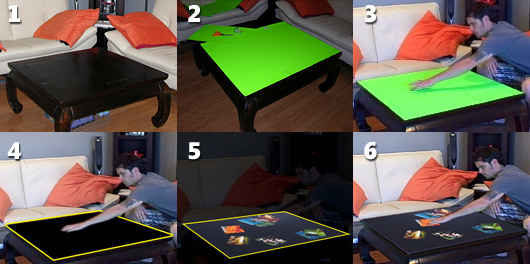
Video Sketching is a technique that involves using a any simple video camera (i.e. Flip), any surface, everyday objects, some green construction paper, and some simple AfterEffects (or equivelant) compositing techniques any designer can easily pickup. Video Sketching is a technique optimized for:
- Quickly and efficiently exploring and visualizing key feature ideas, design solutions, scenarios
- Easily communicating a design concept to a wide audience (i.e. researchers, developers, management, etc) BEFORE a line of code is written
- Visualize solutions that involve interaction beyond the device itself
- Visualize your solution with real people!
Why Video Sketches?
- They are lightweight, low cost, efficient, and most importantly… disposable!
- FAR more cost-effective than building premature, functional software prototypes
- Provides more breadth to design possibilities and communicates the right information at the appropriate time
- Helps you think about how users realistically approach Surface (just by physically acting out your own scenarios)
- Forces designers and researchers to think ‘outside of the screen’ to ultimately design solutions that are seamless with their environment (as opposed to UI wireframes)
- Allows you to ‘mock-up’ scenarios that are outside of your current technical capabilities (i.e. integration with other devices, new technologies, even audio, etc.) - helping set a bar to work toward and even drive technical requirements.
- Allows you to consider other form factors for the product in a variety of settings
Comments
Anonymous
March 17, 2009
The comment has been removedAnonymous
March 23, 2009
Thanks Adam! Likewise on the great suggestions. Yes, the main takeaway is that you've found a short path of resistance to get an idea across that helps others envision that idea in a more suitable context. P.S. It looks like you're link was removed before I could get to it, but I definitely get your technique. Great stuff. DaneAnonymous
March 29, 2009
Hi Dane, I've moved the video here: http://www.vimeo.com/3801734 As you've said - it really helps others envision the idea of multi-touch and using gestures.