Note
Access to this page requires authorization. You can try signing in or changing directories.
Access to this page requires authorization. You can try changing directories.
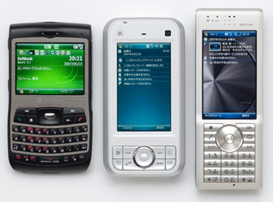 Windows mobile のバージョンは面倒です。
OSとバージョンで区分した場合
Windows Mobile 5.0
- Smartphone Edition
- for pocket PC Edition
- Phone Edition
Windows Mobile 6.0/6.1
- Standard
- Classic
- Professional
アプリケーションのタイプで区分した場合
アプリの区分としては、5.0 と 6.0/6.1 はほぼ同じアプリが使えるのでまとめて扱うことがほとんどです。
Smartphone タイプ
- Windows Mobile 5.0 Smartphone
- Windows Mobile 6.0/6.1 Standard
Pocket PC タイプ
- Windows Mobile 5.0 for Pocket PC
- Windows Mobile 5.0 Phone Edition
- Windows Mobile 6.0/6.1 Classic
- Windows Mobile 6.0/6.1 Professional
大事なのはどのアプリを入れるべきなのか間違えないこと
なので、アプリの区分が大事ですが、そのつど上記の表記を書くのは面倒。(わかっている人はわかっているのですが)でも、間違えるとアプリが動かなかったりインストールできないことも多いです。
しかし、実際は、使っている人全員が自分の使っているデバイスのOSを知っているわけではないですからね。
だからこうしましょう
- Windows Mobile 5/6 タッチパネルあり の方は こちら

- Windows Mobile 5/6 タッチパネル無し の方はこちら


ね、これなら簡単でしょ?バージョンとかエディションを知らなくてもすぐ判別してわかります。
「...あ、じぶんのはタッチパネルありだ」
ってね。実際にMicrosoftの社内でもこういった表記が使われていたりします。