Note
Access to this page requires authorization. You can try signing in or changing directories.
Access to this page requires authorization. You can try changing directories.
We are pleased to announce that SQL Server Data Tools - June 2013 is now available for download. This release introduces several new features that we have consistently received requests for via MSDN forums and Connect. From the SSDT team, thank you for your valuable feedback and suggestions!
Get it here
https://msdn.microsoft.com/en-us/data/hh297027
What's new
Data Compare
We received significant feedback that Data Compare is a critical feature for SSDT customers, so this release of SSDT enables the visual data comparison between a customizable list of tables/views in two databases. From this comparison, a script to update the table data in the target database can be generated. This is a new addition to SQL Server Data Tools and brings with it support for all SQL Server platforms supported by SSDT including SQL Server 2012 and Windows Azure SQL Database.
Entry point for Data Comparison from SQL Server Object Explorer
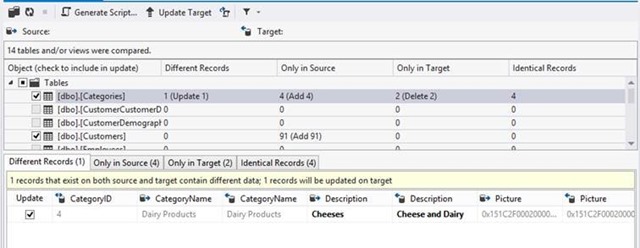
Data Comparison showing two different records in Source and Target
Extensibility
This release brings with it a significant payload of updates and additions to the extensibility scenarios supported in SSDT and DACFx.
Build & Deployment contributors
This extensibility point allows hooking custom code up to the existing DACFx build or deployment pipeline. Similar to previous database project extensibility, this enables advanced build and deployment scenarios like auto-generating documentation, custom difference reports, or injecting custom data motion logic into the deployment plan. The three supported contributor types are:
· Build Contributors - Extension that runs when the database project is being built and allows read-only access to the schema model and all properties and arguments of the build task
· Deployment Plan Modifier – Extension that runs after the deployment plan has been generated allowing read/write access to the deployment plan, and read-only access to the model comparison results, and source/target schema models
· Deployment Plan Executor - Extension that runs during deployment allowing read-only access to the deployment plan
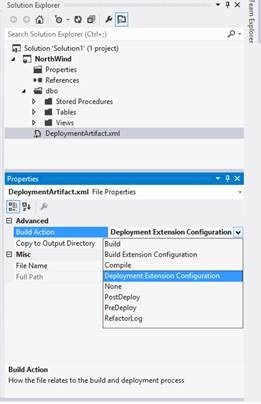
New Build Action in SSDT projects for deployment contributors
Schema Model Navigation and Extensibility API
Another addition to this release is the exposure of an API allowing navigation of the schema model contained in a DACPAC or BACPAC. This API allows you to reason over the objects and relationships contained in the schema model generated by DACFx. In addition, this allows you to implement custom solutions on top of DAC package navigation like synchronization with a data access model, writing custom schema navigation and browsing tools, and perform additional schema validation.
Documentation of the key DACFx API namespaces involved in extensibility scenarios can be found on MSDN here. Additionally, walkthrough samples for the creation of build and deployment contributors can be found in the SSDT documentation here.
Updated Data-Tier Application Framework
This release includes the June 2013 release of SQL Server Data-Tier Application Framework (DACFx), which contains several feature enhancements and bug fixes.
Related information:
Visual Studio data tooling
Database Unit Testing was included in SSDT December 2012. With SSDT June 2013, Data Comparison was added along with several key extensibility scenarios. However, Data Generation is not included and is not planned to be released in the future. Third party tooling will have to be relied upon for that functionality.
SQL Server 2014 CTP1
Only SQL Server Management Studio that ships with SQL Server 2014 CTP1 should be used with SQL Server 2014 CTP1. No version of Visual Studio, SQL Server Data Tools, or Data-Tier Application Framework provides support for SQL Server 2014 CTP1. We will continue to invest in SQL Server Data Tools (SSDT) and Data-Tier Application Framework (DACFx) and the tooling will be updated to support future SQL Server and Windows Azure SQL Database releases.
Supporting links
SQL Server 2014 CTP1 - https://www.microsoft.com/en-us/sqlserver/sql-server-2014.aspx
Contact Us
Please provide your feedback and ask us questions on our forum or via Microsoft Connect. We look forward to hearing from you.
Comments
Anonymous
June 24, 2013
Hi Janet, There's some interesting sounding stuff here. Is there any additional documentation available regarding the Deployment Plan Modifier? I'd like to know how and where to implement these things as I'm hoping they are a solution to many of the limitations of DAC deployments. thanks JamieAnonymous
June 24, 2013
Fantastic! We've been anxiously awaiting the Data Compare tool. This should be super helpful in keeping all the workflow within Visual Studio.Anonymous
June 24, 2013
Very Cool! The team is really pushing out updates quick! SSDT really helps me out a lot and is a great product. Thanks so much. I just downloaded the new June 2013 update and noticed a couple new Build Actions on .sql files: "Build Extension Configuration" and "Deployment Extension Configuration"- what do these do? Previously, I was having problems with SQL71502 errors on a stored procedure that referenced a linked server via a merge statement. The SQL71502 error prevented the projected from building, and removing the .sql file from the build prevented the schema compare tool from seeing that the file was already in the project. This was a problem that I could get around but was pretty annoying. NOW, with the new update, it changed the SQL71502 error to a warning so my project builds and the schema compare works too. Thanks a million!Anonymous
June 24, 2013
Any Data Generation announcements here or plans for that in the near future or releases? Thanks. HassanAnonymous
June 24, 2013
Visual studio, SSDt check for updates does not present the June 2013 release as an available update. The DACFx direct download links go.microsoft.com/fwlink and go.microsoft.com/fwlink seems to still point to the Mar 2013 update.Anonymous
June 25, 2013
@dirq - thanks for the positive feedback and we're happy about the value you're getting from SQL Server! @Hassan - we've updated the blog post to be more clear about Data Generation, which is not included in the current or any future release. Bummer! @Srinivasn Raju - we'll update our "check for updates" pipeline in the next few days to prompt existing users. thanks - ErickAnonymous
June 25, 2013
I'm happy this is finally here. I'll use the connect feature to request that the data compare add the "Use [database]" in the script it generates because I had a "DOH" moment when first trying to use the script and forgetting to change to the database after making the connection. Thanks again as this was holding up the Visual Studio 2012 deployment.Anonymous
June 25, 2013
Hi, Does anyone have an example of how to set up and use Deployment contributors along with the new Deployment Extension Configuration Build Action that has been mentioned above. I tried going through this walk through msdn.microsoft.com/.../ee461507(v=vs.100).aspx but it does not work, when I run MSBuild on the VS2012 database .sqlproj file - it looks like the contributor is not running. Any help on how to use new ' Deployment Extension Configuration' Build Action would be appreciated. Thanks, AnjamAnonymous
June 26, 2013
The comment has been removedAnonymous
June 26, 2013
I think I figured out the solution to my comment above -- when the installer prompts you to select "shared installation" vs "database instance-specific installation" make sure you select the shared installation option. Then it is able to continue the installation.Anonymous
June 27, 2013
What third party tooling is recommended for data generation plans? Data Generation is not included and is not planned to be released in the future. Third party tooling will have to be relied upon for that functionality.Anonymous
June 27, 2013
(bump) Does anyone have an example of how to set up and use Deployment contributors along with the new Deployment Extension Configuration Build Action that has been mentioned above. I tried going through this walk through msdn.microsoft.com/.../ee461507(v=vs.100).aspx but it does not work, when I run MSBuild on the VS2012 database .sqlproj file - it looks like the contributor is not running. Any help on how to use new ' Deployment Extension Configuration' Build Action would be appreciated.Anonymous
June 27, 2013
Hi Janet, Very well done. SSDT is a fantastic tool bringing me huge value, and I am loving it since the first release! And now I cannot even think about my development experience without it... Please keep up with this outstanding work an continue updating it: this update and hearing you will continue with this project makes me very happy. I am also very interested in SSDT extensibility: could you point me to some docs about it? Thank you very much AlbertoAnonymous
June 27, 2013
I can't install this update. Does anyone have any ideas? There's an error on installation: "Element not found". Looking at the log file shows these lines: [169C:1688][2013-06-28T11:08:29]: Error 0x80070490: Failed to verify expected payload certificate with any certificate in the actual certificate chain. [169C:1688][2013-06-28T11:08:29]: Error 0x80070490: Failed to verify signature of payload: DACFX11X86 [169C:1688][2013-06-28T11:08:29]: Failed to verify payload: DACFX11X86 at path: C:ProgramDataPackage Cache.unverifiedDACFX11X86, error: 0x80070490. Deleting file. [169C:1688][2013-06-28T11:08:29]: Error 0x80070490: Failed to cache payload: DACFX11X86Anonymous
June 28, 2013
The comment has been removedAnonymous
June 28, 2013
@Jamie @Anjam @Piggy Documentation and walkthroughs for Extensibility, Build and Deployment Contributors and all other new features will be available soon. Sorry for the delay! @Brigadir ISO downloads coming early next weekAnonymous
June 28, 2013
Hi Janet, Thanks for letting us know. I can not wait for the docs. Regards, AnjamAnonymous
June 28, 2013
Hi Janet, Thank you very much. Will check the SSDT pages to get the docs! Have a great weekend AlbertoAnonymous
June 28, 2013
If you install the VS 2012 update, it breaks 2010. So, if you install one, install both. Assuming you're running a side-by-side installation.Anonymous
July 01, 2013
@Brigadir totally agree with you, the concept how MSFT is releasing software is like a kid that discovers each week a new toy. The problem however with .ISO is that their OS didn't support it and one was forced to install a spam software like Daemon Tools (even promoted by MSDN). Never the less, I have installed this update and I can't find the data compare. In VS2012 it says after SQL Data Tools 11.1.21208.0 on the download page for SSDT June I see this version: 11.0.3369.0. Now that SSDT June must be the latest version I wonder how my version number can be newer than the one available for download.Anonymous
July 01, 2013
@nojetlag I use Virtual CloneDrive to mount ISOs, it's not spammy at all. Try that.Anonymous
July 02, 2013
@Jamie @Anjam @Piggy - Documentation of the new/updated DACFx APIs is available on MSDN here - msdn.microsoft.com/.../bb522480.aspx. The core extensibility functionality is contained in the Dac, Model, and Deployment namespaces. Walkthroughs for the creation of build and deployment contributors are also available on the SSDT documentation here - msdn.microsoft.com/.../dn268597(v=vs.103).aspx. Sorry for the delay in getting the documentation posted, thanks for your patience. Thanks, AdamAnonymous
July 02, 2013
No test data generator yet? :-(Anonymous
July 03, 2013
@nojetlag >The problem however with .ISO is that their OS didn't support it. It ain't a problem. MSFT doesn't want to use ISO? Well, release your updates as ZIP archive! Instead of force me to use MSFT proprietary "download software" give me a DIRECT link to a ZIP archive that contains everything "SSDTSetup.exe /layout <destination>" downloads. So I will not do that by myself to download the update from PC with "unsupported OS". nojetlag, I've downloaded the update with "SSDTSetup.exe /layout <destination>" on Windows 7 PC. After I've installed the update on target (another) PC (also Windows 7 SP 1 ENU) Visual Studio 11 shows version 11.1.30618.1 for SSDT. As the OS control panel does. But "on the download page for SSDT June" I see no version number :( Data comparison is here (inside VS 11): open "SQL Server Object Explorer" window, expand "SQL Server" node, expand "Your-SQL-server-name" node, then -- "Databases" node. Right click on a database name child node under "Databases" node -- the third menu item from the top is "Data Comparison..." Is that what you were looked for? @Janet Yeilding >ISO downloads coming early next week The second half of the "next week" is coming. Where's ISO you promised? Or "next week" is the week starting on 7/8/2013 (monday)?Anonymous
July 03, 2013
Finally Installed the June SSDT update. Tried data compare - it looks like the comparison was spot on. Then I told it to update the target... Once it finally got to 'writing updates' Visual Studio puppoed up with the Visual Studio 2012 Stopped Working alert. I guess I'll wait a few revisions. :(Anonymous
July 07, 2013
My build server doesn't have internet access either. ISO please...Anonymous
July 07, 2013
"@Brigadir ISO downloads coming early next week" So "early next week" comes and goes and still no sign of an ISO download.Anonymous
July 08, 2013
ISOs are available for download at these locations: msdn.microsoft.com/.../jj650015 msdn.microsoft.com/.../jj650014Anonymous
July 09, 2013
Janet, Great work on the update and thanks for the ISO file. It makes enterprise deployments much easier. In the post you state "This release includes the June 2013 release of SQL Server Data-Tier Application Framework (DACFx), which contains several feature enhancements and bug fixes." Does this mean the updates for DACFx are included in the install or are there separate MSI's for these updates? It's my understanding that I needed to install SSDT and then all 6 of the MSI's from this download page. www.microsoft.com/.../details.aspx However, it appears these were last updated in March. Thanks! - BradAnonymous
July 09, 2013
@Brad SSDT will automatically chain in the June 2013 version of DACFx during installation, so you don't need to install any MSIs separately. The link you provided to the March release is not the most recent DACFx version - that's available here: www.microsoft.com/.../details.aspx. You can read more about the features and fixes in June DACFx release here: blogs.msdn.com/.../sql-server-data-tier-application-framework-june-2013-available.aspxAnonymous
July 10, 2013
@Janet Yeilding "ISOs are available for download" Finally. Thanks a lot!Anonymous
July 17, 2013
Looks really cool, and the tool is almost perfect. One thing I miss is the option to "IgnoreColumnOrder" when doing a schema compare! Could you please give us back that option? Thanks KennethAnonymous
July 24, 2013
Would like to see a strategy for managing sample data sets along side schema in a future release. Should we log this on the Visual Studio user voice site?Anonymous
July 24, 2013
HI All, Please note the following while installing SSDT BI: . You can still use the existing version of SSDT BI to create and deploy projects for SQL Server 2014 CTP1. · SSDT BI cannot be installed on the same machine as SQL Server 2014 CTP1. · To deploy to a SQL Server 2014 CTP1 Server, install SSDT-BI on different machine. Reference: blogs.msdn.com/.../how-do-i-get-sql-server-data-tools-business-intelligence-ssdt-bi-for-sql-server-2014-ctp1-bits.aspxAnonymous
August 21, 2013
Hi,Nice demonstration about Announcing SQL Server Data Tools.Thanks. <a href="theosoftindia.com/.../a>Anonymous
August 29, 2013
Question, I just installed this update and my Visual Studio projects that were building with warning now just fail. It's mostly due to other developers not fully qualifying ambiguous names. Is there any way to set those types of errors to warnings again?Anonymous
September 12, 2013
Yanet, we are highly interested in the Visual Studio data tooling features you mentioned, especially for data deployment requirements. Any news on this?Anonymous
September 16, 2013
The comment has been removedAnonymous
September 20, 2013
The comment has been removedAnonymous
October 08, 2013
I have just used data compare and synchronize for my team. It's actual fast and cool.Anonymous
January 21, 2014
How do you set the command timeout for the sql data compare ? it constantly times out after 30 mins when updating to a windows azure database. Our internet connection is 40 mbs uload speed so quite fast.Anonymous
February 04, 2014
Is there a way or are you planning on adding a way to apply rules to the data comparison? i.e. when comparing decimal values in two db's we only really care to the Nth decimal place (due to inconsitency in calculations) so would want to compare rounded values rather than the actual values in the db table.Anonymous
April 17, 2014
You can try Devart's dbForge Data Compare for SQL Server - www.devart.com/.../datacompare