Note
Access to this page requires authorization. You can try signing in or changing directories.
Access to this page requires authorization. You can try changing directories.
Question
Saturday, December 16, 2017 7:40 PM | 1 vote
A VB6 application which I developed a decade ago worked well on Windows XP thru 7, however when running it on Windows 10, I receive the following error message:
"Component 'MSCOMCTL.OCX' or one of its dependencies not correctly registered: a file is missing or invalid339"
I have validated that the OCX file is located in the C:\WIndows\SysWOW64 folder and I tried to register it using the solution provided by user k.c.s. at:
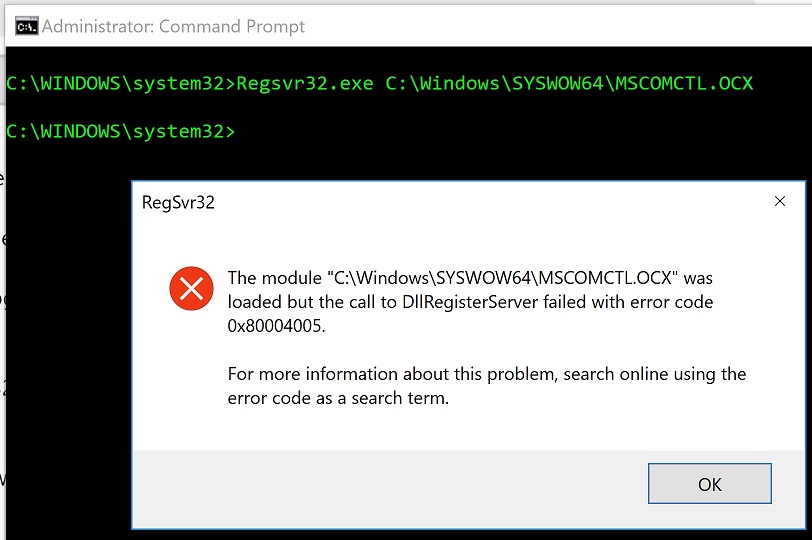
However, when I try the solution, which is to execute a command using regsvr32 in the command prompt (using admin privileges) I get the following error message (see pic below):
The module 'mscomctl.ocx' was loaded but the call to DllRegisterServer failed with error code 0x80004005
I am desperate for help to solve this problem. As a side note, I first reported this issue in the Microsoft Community and the full thread can be found here.
Thank you.
Hrair Kerametlian
All replies (2)
Saturday, December 16, 2017 10:48 PM | 1 vote
from your screenshot: you are calling regsvr32 from the system32 folder, and not from the SysWow64 folder.
The article you linked to states:
cd<push spacebar>C:\Windows\SysWOW64 <push Enter key>
The prompt should change to: C:\Windows\SysWOW64
Then type:
regsvr32<push spacebar>mscomctl.ocx <push Enter key>
Monday, December 18, 2017 8:48 AM
Hi Hrair K,
Firstly, right click CMD and run as admin to check.
Also you could follow the steps below to check it.
module c:\windows\syswow64\mscomctl.ocx was loaded but the call to DLLRegisterServer
Please Note: Since the website is not hosted by Microsoft, the link may change without notice. Microsoft does not guarantee the accuracy of this information.
Hope it will be helpful to you
Please remember to mark the replies as answers if they help.
If you have feedback for TechNet Subscriber Support, contact tnmff@microsoft.com.