Note
Access to this page requires authorization. You can try signing in or changing directories.
Access to this page requires authorization. You can try changing directories.
Sample reports and a Windows Azure web role with a ReportViewer control that points to the sample reports, is available for download for Windows Azure SQL Reporting.
In this article:
- Download samples
- Prerequisites
- Sample Data for Reports
- Report Samples
- SQL Reporting application samples for Windows Azure
Download Samples
Download samples from Code Gallery on MSDN:
- Sample reports for Windows Azure SQL Database data sources: Windows Azure SQL Database Reports
- Sample code for Windows Azure SQL Reporting ReportViewer-SOAP API usage sample: Windows Azure SQL Reporting ReportViewer-SOAP API usage sample
- Sample code for SQLReportingAdmin sample: Windows Azure SQL Reporting Admin Sample.
Prerequisites
The samples have the following prerequisites:
- Before You Begin in Getting Started with Windows Azure SQL Reporting
- Tool Compatibility in Guidelines and Limitations
Sample Data for Reports
Reports that use the SQLAzure_AdventureWorksLT data source require access to the following database, which must be installed on a Windows Azure subscription that you have access to:
| Name | Link |
| Download AdventureWorksLTAZ2008R2 database |
AdventureWorks Community Samples Databases for Windows Azure SQL Database (December CTP) |
| Comparison between Windows Azure SQL Database version and SQL Server version | http://sqlblog.com/blogs/john_paul_cook/archive/2010/09/12/sql-azure-differences.aspx |
| Video |
Also, see Getting Started Guide for Database Administrators (Windows Azure SQL Reporting).
Report Samples
| Sample | Data source | Description |
| SQLAzureReportingPreviewReportSamples | README.txt | Requirements and notes |
| AnySQLAzureDatabase.rds |
Column_Chart_Sales.rdl Product_Sales_KPI.rdl Store_Sales_in_New_York.rdl |
|
| SQLAzure_AdventureWorksLT.rds |
Product_Catalog_AWLTAz_2008R2.rdl Product_Line_Sales_AWLTAz_2008R2.rdl |
Also, see Getting Started Guide for Report Authors (Windows Azure SQL Reporting).
SQL Reporting application samples for Windows Azure
| Sample | Name | Description |
| Windows Azure SQL Reporting ReportViewer-SOAP API usage sample | README.txt | Requirements and notes |
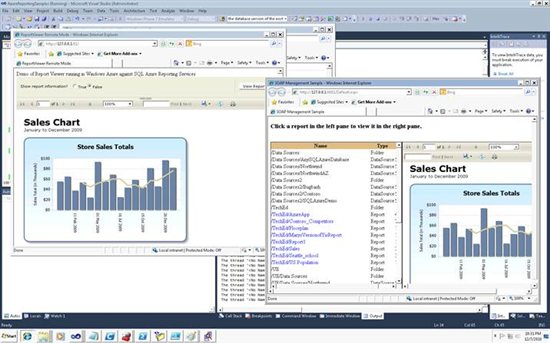
| ReportViewerRemoteMode |
Displays reports published to a SQL Reporting report server URL that you provide. |
|
| SOAPManagement | Calls the report server Web service proxy ListChildren in the ReportingService2010 endpoint, to display a list of reports published on the SQL Reporting report server. | |
| Windows Azure SQL Reporting Admin sample | SQLReportingAdmin Sample | The SQLReportingAdmin sample for Windows Azure SQL Reporting demonstrates the usage of SQL Reporting APIs, and manages (add/update/delete) permissions of SQL Reporting users. |
Also, see Getting Started Guide for Application Developers (Windows Azure SQL Reporting) and How to: Use ReportViewer in a Web Site Hosted in Windows Azure.
See Also
[[SQL Reporting Overview]]
[[Windows Azure SQL Database Overview]]
[[Windows Azure Survival Guide]]