Note
Access to this page requires authorization. You can try signing in or changing directories.
Access to this page requires authorization. You can try changing directories.
This article explains how to update an ASP.NET Core in .NET 10 to ASP.NET Core in .NET 11.
Prerequisites
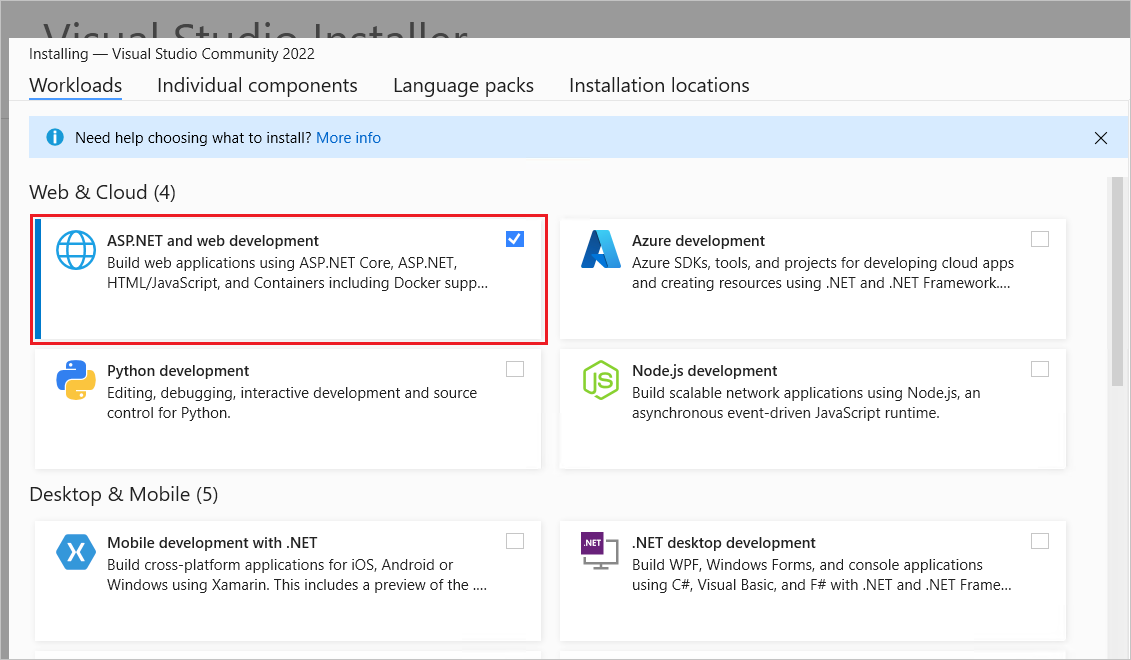
Visual Studio with the ASP.NET and web development workload.
Update the .NET SDK version in global.json
If you rely on a global.json file to target a specific .NET SDK version, update the version property to the .NET 11 SDK version that's installed. For example:
{
  "sdk": {
-    "version": "10.0.102"
+    "version": "11.0.100"
  }
}
Update the target framework
Update the project file's Target Framework Moniker (TFM) to net11.0:
<Project Sdk="Microsoft.NET.Sdk.Web">

  <PropertyGroup>
-    <TargetFramework>net10.0</TargetFramework>
+    <TargetFramework>net11.0</TargetFramework>
  </PropertyGroup>

</Project>
Update package references
In the project file, update each Microsoft.AspNetCore.*, Microsoft.EntityFrameworkCore.*, Microsoft.Extensions.*, and System.Net.Http.Json package reference's Version attribute to 11.0.0 or later. For example:
<ItemGroup>
-   <PackageReference Include="Microsoft.AspNetCore.JsonPatch" Version="10.0.0" />
-   <PackageReference Include="Microsoft.EntityFrameworkCore.Tools" Version="10.0.0" />
-   <PackageReference Include="Microsoft.Extensions.Caching.Abstractions" Version="10.0.0" />
-   <PackageReference Include="System.Net.Http.Json" Version="10.0.0" />
+   <PackageReference Include="Microsoft.AspNetCore.JsonPatch" Version="11.0.0" />
+   <PackageReference Include="Microsoft.EntityFrameworkCore.Tools" Version="11.0.0" />
+   <PackageReference Include="Microsoft.Extensions.Caching.Abstractions" Version="11.0.0" />
+   <PackageReference Include="System.Net.Http.Json" Version="11.0.0" />
</ItemGroup>
Blazor
Blazor release notes
For new feature coverage, see What's new in ASP.NET Core in .NET 11.
Adopt Inline JS event handler removed from the NavMenu component
This section only applies to Blazor Web Apps.
The inline JS event handler for the navigation bar toggler isn't present in the NavMenu component of the Blazor Web App project template in .NET 11 or later. Apps generated from the project template use a collocated JS module approach to show or hide the navigation links on the rendered page. The approach improves Content Security Policy (CSP) compliance because it doesn't require the CSP to include an unsafe hash for the inline JS.
Use the following instructions to adopt the new JS module approach for the navigation links toggler in an existing app.
Add a collocated JS module next to the app's NavMenu component.
NavMenu.razor.js:
// Handle navigation menu toggle
const navScrollable = document.getElementById("nav-scrollable");
const navToggler = document.querySelector(".navbar-toggler");

if (navScrollable && navToggler) {
    navScrollable.addEventListener("click", function() {
        navToggler.click();
    });
}
At the top of the app's NavMenu component (NavMenu.razor), add a <script> tag for the collocated JS module:
- If the app adopts client-side rendering (has a
.Clientproject) with global interactivity (the render mode is set globally for the app by the app'sAppcomponent), use the following tag, which indicates the path to the module in theLayoutfolder:
<script type="module" src="@Assets["Layout/NavMenu.razor.js"]"></script>
- Otherwise, use the following tag, which indicates the path to the module in the
Components/Layoutfolder:
<script type="module" src="@Assets["Components/Layout/NavMenu.razor.js"]"></script>
Also in the app's NavMenu component, change the line that has the inline JS to toggle the navigation links:
- <div class="nav-scrollable" onclick="document.querySelector('.navbar-toggler').click()">
+ <div id="nav-scrollable" class="nav-scrollable">
If the app has a Content Security Policy (CSP) with an unsafe hash for the inline JS removed by the preceding step, remove the unsafe hash:
- 'unsafe-hashes' 'sha256-qnHnQs7NjQNHHNYv/I9cW+I62HzDJjbnyS/OFzqlix0='
QuickGrid adopts URL-based pagination and sorting
The QuickGrid component persists pagination and sort state in the URL query string (for example, ?page=2&sort=Name&direction=asc), which enables link sharing, browser back/forward navigation, and operation under static server-side rendering (static SSR). This behavior is enabled by default.
To work without a JavaScript runtime, sortable column headers and paginator controls now render as <a> (link) elements instead of <button> elements. Update any custom CSS that targets the previous markup:
- button.col-title { ... }
+ button.col-title, a.col-title { ... }
- nav button:disabled { ... }
+ nav button:disabled, nav a[aria-disabled="true"] { ... }
Disabled paginator links use aria-disabled="true" instead of the HTML disabled attribute, which isn't valid on <a> elements. The built-in QuickGrid CSS already covers both markup styles.
When more than one QuickGrid is rendered on the same page, set unique query parameter names with QueryParameterNameOptions on all but one grid (and give each its own PaginationState) to prevent the grids from sharing the page, sort, and direction query parameters:
- <QuickGrid Items="@cities" Pagination="@pagination2">...</QuickGrid>
+ <QuickGrid Items="@cities" Pagination="@pagination2" QueryParameterNameOptions="@(new QueryParameterNameOptions("cities_"))">...</QuickGrid>
To revert to the previous <button>-based markup, which requires an interactive render mode, set the following AppContext switch to false:
AppContext.SetSwitch(
    "Microsoft.AspNetCore.Components.QuickGrid.EnableUrlBasedQuickGridNavigationAndSorting",
    false);
The switch only controls the rendered HTML element; sort and page state is read from and written to the URL query string regardless of the setting.
For more information, see QuickGrid sorting and pagination controls render as links.
Upgrade from the experimental ValidatableTypeAttribute and SkipValidationAttribute in .NET 10
ValidatableTypeAttribute and SkipValidationAttribute were published as experimental in .NET 10. In .NET 11 or later, they aren't experimental. Referencing them from any project, including a plain class library that uses the Microsoft.NET.Sdk SDK, no longer produces the ASP0029 code analysis warning.
Apps upgrading from .NET 10 can remove the workarounds that warning required:
- Delete
#pragma warning disable ASP0029and#pragma warning restore ASP0029directives around uses of the attributes. - Remove
ASP0029from any<NoWarn>property in the project file. - Replace any locally declared
Microsoft.Extensions.Validation.Embedded.ValidatableTypeorMicrosoft.Extensions.Validation.Embedded.SkipValidationattribute with the real ValidatableTypeAttribute and SkipValidationAttribute, and remove theglobal using Microsoft.Extensions.Validation.Embedded;statement or the<Using Include="Microsoft.Extensions.Validation.Embedded" />item that made it visible.
Leaving the suppressions in place is harmless, so an upgraded app doesn't fail because of them. Removing them keeps the project free of suppressions that no longer correspond to a diagnostic.
Security
Automatic CSRF protection
.NET 11 adds automatic Cross-Site Request Forgery (CSRF) protection. When an app is built with WebApplication.CreateBuilder and has endpoints, a middleware is wired up by default that inspects the Sec-Fetch-Site and Origin headers and records a validation verdict on the request.
The middleware validates endpoints that opt in to antiforgery validation—that is, endpoints with metadata implementing IAntiforgeryMetadata where RequiresValidation is true. The framework sets this automatically for:
- All Blazor server-side rendering (SSR) endpoints. Each is protected by default; a page can opt out with
@attribute [RequireAntiforgeryToken(false)]. - Minimal API endpoints that bind form data.
- MVC actions that use antiforgery validation, such as those annotated with
[ValidateAntiForgeryToken]or[AutoValidateAntiforgeryToken].
Endpoints that bind JSON, such as a plain MapPost or a Web API [HttpPost] action, have no behavioral change.
Going forward, the automatic CSRF protection is the recommended defense, and most apps no longer need the token-based antiforgery system. Keep the token-based system when the app must support browsers that don't send Sec-Fetch-Site, uses IAntiforgeryAdditionalDataProvider, or must keep the token defense as an independent layer for a compliance requirement. Both protections can coexist.
To simplify an app that configures antiforgery explicitly, drop the AddAntiforgery and UseAntiforgery calls and rely on the automatic protection. For most apps, this is a one-line change with no other code updates. For Blazor static SSR, removing app.UseAntiforgery() also stops antiforgery token generation for rendered forms; see Blazor server-side rendering defers antiforgery validation to middleware.
A 400 - Bad Request on a cross-origin form post is the CSRF protection working as intended. When the request comes from a legitimate origin, allow that origin rather than suppressing the check:
- Configure CORS so the endpoint's resolved policy includes the caller's origin. The CSRF middleware honors that policy and allows the request.
- Only opt an endpoint out with
.DisableAntiforgery()(Minimal APIs) or[IgnoreAntiforgeryToken](MVC) when it isn't vulnerable to CSRF, such as an endpoint that isn't reachable from a browser or that authenticates with a non-cookie mechanism (for example, bearer authentication).
For a full description of the middleware, the validation rules, and how it interacts with the token-based antiforgery system, see Automatic CSRF protection in ASP.NET Core.
ASP.NET Core MVC
Upgrading F# MVC applications from .NET 10 to .NET 11
Newly generated .NET 11 F# MVC projects already include build- and publish-time Razor compilation and view assembly registration. The following steps apply when migrating an existing F# MVC application from .NET 10 or earlier.
F# MVC projects generated by earlier templates use the Microsoft.AspNetCore.Mvc.Razor.RuntimeCompilation NuGet package and call AddRazorRuntimeCompilation. Razor runtime compilation is obsolete in .NET 10 or later (breaking change announcement). Unlike C# MVC projects, F# projects can't use the Razor source generator directly. Removing runtime compilation without configuring compilation causes the app to build successfully but fail at runtime when a view is requested with an InvalidOperationException.
To upgrade an existing F# MVC project:
Remove the
Microsoft.AspNetCore.Mvc.Razor.RuntimeCompilationpackage reference from the project file (.fsproj).In
Program.fs, remove the call toAddRazorRuntimeCompilation.Configure Razor compilation in the project file:
<PropertyGroup>
  <UseRazorSourceGenerator>false</UseRazorSourceGenerator>
  <RazorCompileOnBuild>true</RazorCompileOnBuild>
  <RazorCompileOnPublish>true</RazorCompileOnPublish>
</PropertyGroup>
Add
MvcBuilderExtensions.fsto the project file beforeProgram.fs, as F# compilation order is significant:<ItemGroup> <!-- Other F# source files --> <Compile Include="MvcBuilderExtensions.fs" /> <Compile Include="Program.fs" /> </ItemGroup>Add
MvcBuilderExtensions.fs. The namespace must match the application's root namespace (for example,Company.WebApplication1):namespace Company.WebApplication1 open System open System.IO open System.Reflection open System.Runtime.CompilerServices open System.Runtime.Loader open Microsoft.AspNetCore.Mvc.ApplicationParts open Microsoft.Extensions.DependencyInjection [<Extension>] type MvcBuilderExtensions = [<Extension>] static member AddCompiledRazorViews(builder: IMvcBuilder) = let applicationAssembly = Assembly.GetExecutingAssembly() let viewsAssemblyName = $"{applicationAssembly.GetName().Name}.Views" let viewsAssemblyPath = Path.Combine(AppContext.BaseDirectory, $"{viewsAssemblyName}.dll") let loadContext = AssemblyLoadContext.GetLoadContext(applicationAssembly) let viewsAssembly = if File.Exists(viewsAssemblyPath) then loadContext.LoadFromAssemblyPath(viewsAssemblyPath) else loadContext.LoadFromAssemblyName(AssemblyName(viewsAssemblyName)) builder.PartManager.ApplicationParts.Add( CompiledRazorAssemblyPart(viewsAssembly)) builderRegister the compiled views in
Program.fs:.AddControllersWithViews() .AddCompiledRazorViews()
This configuration compiles Razor views during build and publish and registers the resulting views assembly with MVC. It avoids the obsolete runtime compilation dependency and allows view discovery at runtime.
OpenAPI
Microsoft.OpenApi upgraded to 3.x
In .NET 11, Microsoft.AspNetCore.OpenApi upgrades its dependency on Microsoft.OpenApi from 2.x to 3.x. The transformer interfaces are unchanged, but the object model for OpenApiDocument, OpenApiOperation, and OpenApiSchema has changed shape. Custom document, operation, and schema transformers that inspect or mutate OpenAPI objects must be updated to compile against the 3.x API.
For detailed migration guidance and breaking change details, see Microsoft.OpenApi upgraded to 3.x (ASP.NET Core 11.0 breaking change announcement) and the Microsoft.OpenApi 3.x upgrade guide.
Breaking changes
Use the articles in Breaking changes in .NET to find breaking changes that might apply when upgrading an app to a newer version of .NET.
Collaborate with us on GitHub
The source for this content can be found on GitHub, where you can also create and review issues and pull requests. For more information, see our contributor guide.

ASP.NET Core