Note
Access to this page requires authorization. You can try signing in or changing directories.
Access to this page requires authorization. You can try changing directories.
Windows Autopilot is a collection of technologies used to set up and pre-configure new devices, getting them ready for productive use. You can use Windows Autopilot to deploy Windows PCs or HoloLens 2 devices. For more information, see Windows Autopilot for HoloLens 2.
You can also use Windows Autopilot to reset, repurpose, and recover devices. This solution enables an IT department to achieve these goals with little to no infrastructure to manage, with a process that's easy and simple.
Windows Autopilot simplifies the Windows device lifecycle, for both IT and end users, from initial deployment to end of life. By using cloud-based services, Windows Autopilot:
- Reduces the time IT spends on deploying, managing, and retiring devices.
- Reduces the infrastructure required to maintain the devices.
- Maximizes ease of use for all types of end users.
See the following video:
Note
This article is for Windows Autopilot. For Windows Autopilot device preparation, see Overview of Windows Autopilot device preparation.
Process overview
When new Windows devices are initially deployed, Windows Autopilot uses the OEM-optimized version of Windows client. This version is preinstalled on the device, so custom images and drivers for every device model don't have to be maintained. Instead of re-imaging the device, the existing Windows installation can be transformed into a business-ready state that can:
- Apply settings and policies.
- Install apps.
- Change the edition of Windows to support advanced features, such as upgrading from Windows Pro to Windows Enterprise.
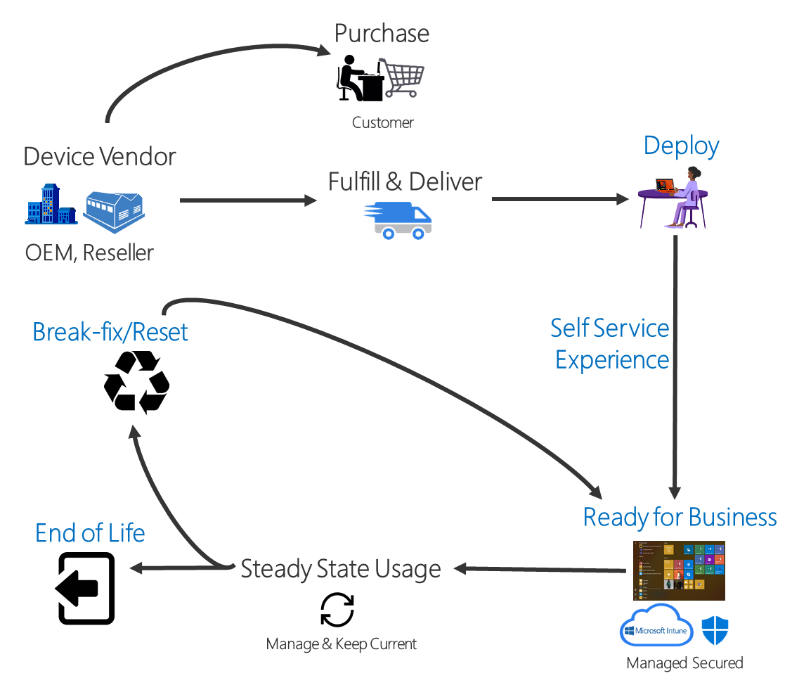
After deployment, you can manage Windows devices by using:
- Microsoft Intune.
- Windows Update client policies.
- Microsoft Configuration Manager.
- Other similar tools from non-Microsoft parties.
Requirements
To use Windows Autopilot, you need a supported version of Windows semi-annual channel. For more information, see Windows Autopilot software, networking, configuration, and licensing requirements.
Summary
Traditionally, IT pros spend significant time building and customizing images that they later deploy to devices. Windows Autopilot introduces a new approach.
- From the user's perspective, it takes only a few simple operations to make their device ready to use.
- From the IT pro's perspective, the only interaction required from the end user is to connect to a network and verify their credentials. Everything beyond that is automated.
Windows Autopilot enables the following functionality:
- Automatic joining of devices to Microsoft Entra ID or Active Directory by using Microsoft Entra hybrid join. For more information about these two join options, see Introduction to device management in Microsoft Entra ID.
- Auto-enrollment of devices into mobile device management (MDM) services, such as Microsoft Intune. (Requires a Microsoft Entra ID P1 or P2 subscription for configuration).
- Creation and auto-assignment of devices to configuration groups based on a device's profile.
- Customization of the out-of-box experience (OOBE) content specific to the organization.
You can also quickly prepare an existing device for a new user with Windows Autopilot Reset. The Reset capability is also useful in break/fix scenarios to quickly bring a device back to a business-ready state.
Tutorial
For a tutorial with detailed instructions on configuring Windows Autopilot, see Windows Autopilot scenarios.