Note
Access to this page requires authorization. You can try signing in or changing directories.
Access to this page requires authorization. You can try changing directories.
Important
Items marked preview in this article are currently in preview. This preview is provided without a service-level agreement, and Microsoft doesn't recommend it for production workloads. Certain features might not be supported or might have constrained capabilities. For more information, see Supplemental Terms of Use for Microsoft Azure Previews.
Important
Interactive training requires explicit access approval. Request access through the preview sign-up form and wait for approval before creating a training session.
Interactive training (preview) is an API for building your own post-training loop over open-weight models in Microsoft Foundry. You control the experiment in Python. Foundry runs model sampling and low-rank adaptation (LoRA) updates on serverless GPUs.
For reinforcement learning (RL), your code controls rollout collection, rewards, advantages, and update scheduling. The same primitives support supervised learning, preference learning, distillation, and custom-loss workflows.
When to use it
Use interactive training when the training loop itself is part of your research:
- You need a custom learning signal. Supply demonstrations, compute rewards and advantages, or compose a local loss for preference learning or other objectives.
- Your model interacts with an environment. Coordinate model responses, tool calls, observations, and rewards in your driver.
- You need control over individual updates. Select batches, token masks, loss settings, and optimizer parameters. Decide when to accumulate gradients and apply an update.
- You want to inspect and adapt an experiment. Sample from the current adapter, evaluate on held-out prompts, and choose the next prompts based on observed results.
- You need to preserve and continue progress. Save adapter and optimizer state, then resume in a compatible session. Keep dataset position and other experiment state in your driver.
Managed fine-tuning also supports graders for reinforcement fine-tuning. Choose interactive training when you need control over the loop, not just the grader or job settings. See Choose your training approach.
Who does what
Your Python program is the training driver. It prepares inputs and coordinates the experiment. Foundry maintains the model and adapter state and executes the requested operations.
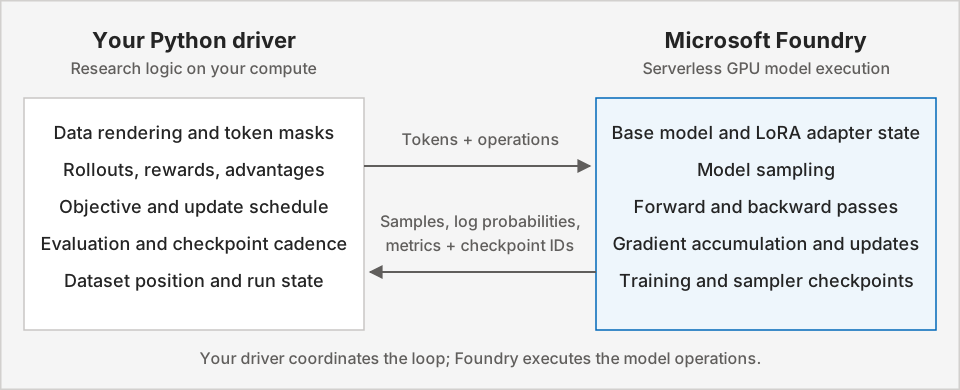
Your driver can run on a CPU, including your own machine or a compute environment. A reward model or environment you add can have its own compute requirements. Keep the driver running while it manages the loop.
Core concepts and primitives
A session is stateful: gradient computation, optimizer updates, and sampling are separate operations on a selected model and adapter. This separation lets you choose when to collect data, accumulate gradients, update, and evaluate.
| Building block | What it does |
|---|---|
| Training session and LoRA adapter | FineTuningSession.create initializes a supported base model with your adapter configuration. The session holds the state used by subsequent operations. |
| Tokenized batch and masks | Datum carries model inputs and loss inputs. Masks select which tokens contribute to learning, such as assistant tokens rather than prompts or tool observations. |
| Sampling | sample generates responses from a selected sampler checkpoint. RL inputs pair sampled tokens with their rollout log probabilities and reward-derived advantages. |
| Forward and backward passes | forward returns per-example loss-function outputs without accumulating gradients. forward_backward computes the selected objective and accumulates gradients. It doesn't apply an optimizer update. |
| Optimizer update | optim_step applies accumulated gradients with your Adam parameters. You choose when to update and which learning rate to use. |
| Sampler checkpoint | save_weights_for_sampler prepares adapter weights for generation. Refresh these weights after an update before sampling from the updated adapter. |
| Training checkpoint | save_weights persists adapter weights and optimizer state. FineTuningSession.create_from_checkpoint resumes training in a compatible session. |
The SDK includes cross_entropy for supervised updates and RL losses such as importance_sampling and ppo. These losses are loss primitives, not predefined end-to-end algorithms. For input contracts and custom-loss composition, see Key concepts.
How an RL loop works
Consider a math-reasoning experiment: your model generates several answers to each problem, and your program grades their correctness. For a worked example, follow Get started.
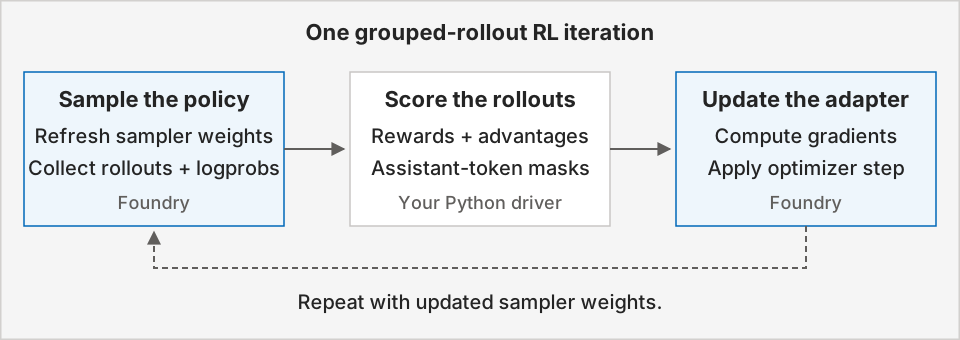
Establish a held-out baseline and test your reward function before the first update. Then repeat:
- Prepare the current policy for sampling. Save sampler weights from the training adapter, then collect several responses, or rollouts, for each prompt.
- Score and compare responses. Your reward function assigns a score to each rollout. Subtract the prompt group's mean reward to produce each rollout's advantage.
- Prepare the learning signal. Align sampled assistant tokens with their rollout log probabilities and advantages. Exclude prompts and environment observations from the learning signal.
- Compute gradients. Submit the batch to
forward_backwardwithimportance_sampling. Complete the gradient computation before the update that consumes it. - Update the adapter. Call
optim_step, then refresh sampler weights before collecting responses from the updated policy. - Evaluate and preserve progress. Compare held-out correctness with the baseline and save training checkpoints at your chosen cadence.
Get started
Choose the starting point that fits your task:
- Quickstart: Follow the quickstart sample to clone the repository and run a short reinforcement-learning recipe.
- Try other recipes: Explore the fine-tuning samples repository for more training examples.
- Look up an operation: Use the SDK cheatsheet (preview) for functions and key parameters.
- Understand the training loop: Read Key concepts for rewards, advantages, token masks, and checkpoints.
Supported models and regions
See the fine-tuning overview for supported models and supported regions.