Note
Access to this page requires authorization. You can try signing in or changing directories.
Access to this page requires authorization. You can try changing directories.
Through integration with Fireworks AI, Microsoft Foundry customers can:
- Experiment with the latest open-source models often before they're available directly from Azure.
- Import and deploy custom model weights (bring your own model, or BYOM) onto Fireworks' on-demand GPU-backed infrastructure. For more information, see Import custom models on Microsoft Foundry with Fireworks.
- Scale up using Provisioned throughput.
All of these capabilities are available directly within your Foundry project, with Azure governance, access controls, and project management built in.
Prerequisites
An Azure subscription. If you don't have one, create a free account.
A Foundry resource with a Foundry project.
An Azure identity with the Subscription Owner or Subscription Contributor role to enable the feature.
To deploy models, you need the Foundry Owner role on the Foundry project. For more information, see Azure built-in roles.
Important
The Foundry RBAC roles were recently renamed. Foundry User, Foundry Owner, Foundry Account Owner, and Foundry Project Manager were previously named Azure AI User, Azure AI Owner, Azure AI Account Owner, and Azure AI Project Manager. You might still see the previous names in some places while the rename rolls out. The role IDs and core permissions are unchanged by the rename.
Region availability
Data Zone Standard and Data Zone Provisioned deployments of models via Fireworks on Foundry are available in the following Azure regions:
- East US (eastus)
- East US 2 (eastus2)
- Central US (centralus)
- North Central US (northcentralus)
- West US (westus)
- West US 3 (westus3)
Global Provisioned throughput deployments of base and custom models are available in all global Azure regions except for Azure Government cloud environments. All catalog models that support Global Provisioned throughput also support Data Zone Provisioned throughput.
Enable Fireworks on Foundry
Important
Fireworks on Foundry is currently excluded from EU Data Boundary commitments.
FedRAMP isn't achieved for Fireworks on Foundry. If your organization requires FedRAMP, before use, consult with your Authorization Official to determine if use of Fireworks on Foundry is allowed.
Payment Card Industry (PCI) Data Security Standard (DSS) isn't applicable to Fireworks on Foundry. You shouldn't use Fireworks on Foundry to store, process, or transmit payment and cardholder data.
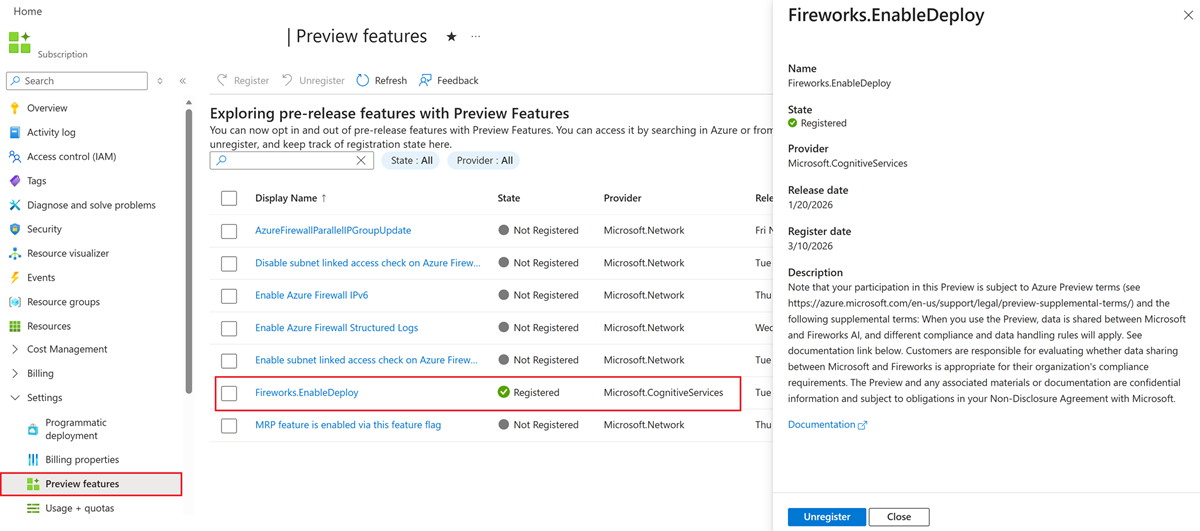
While Fireworks on Foundry is generally available, an administrator must enable the service within your Azure subscription. The Azure Preview features portal enables customers to turn on the service by using the following steps.
Sign in to the Azure portal.
In the search box, enter subscriptions and select Subscriptions.
Select the link for your subscription's name.
From the left menu, under Settings, select Preview features.
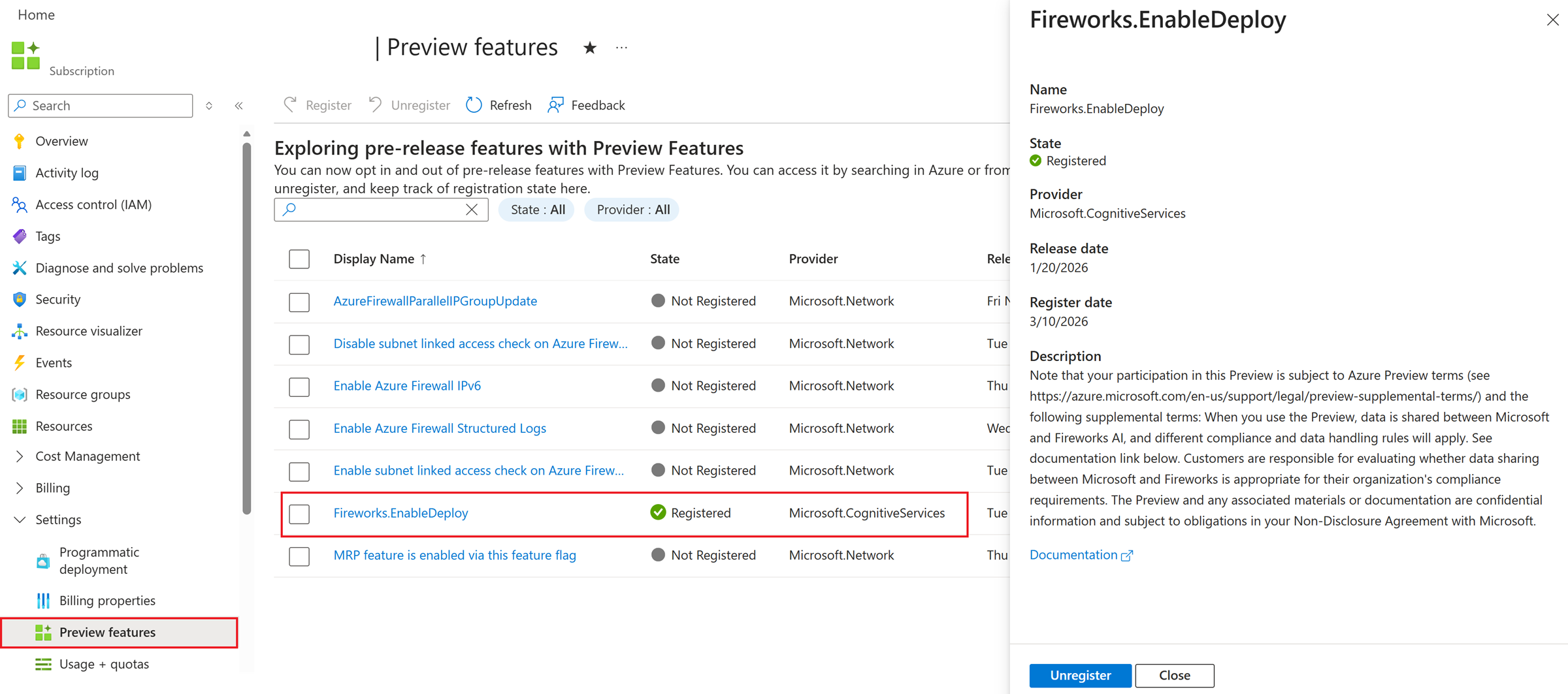
Search for and select the Fireworks.EnableDeploy preview feature.
Review the terms provided in the Description and the data privacy section in this documentation.
If you don't agree to the terms, select Close and don't continue. Otherwise, select Register.
Select OK. The Preview features screen refreshes and the preview feature's State is displayed. It might take up to 30 minutes for the feature to enable for your subscription.
Tip
To verify registration, refresh the Preview features page and confirm the State column shows Registered for the Fireworks on Foundry feature.
Deploy Fireworks models from the Foundry portal
After the feature is enabled, you can deploy Fireworks models from the Foundry model catalog. Complete these steps to get a live endpoint for chat completions. Browse available models in the Available catalog models section, or import your own custom model.
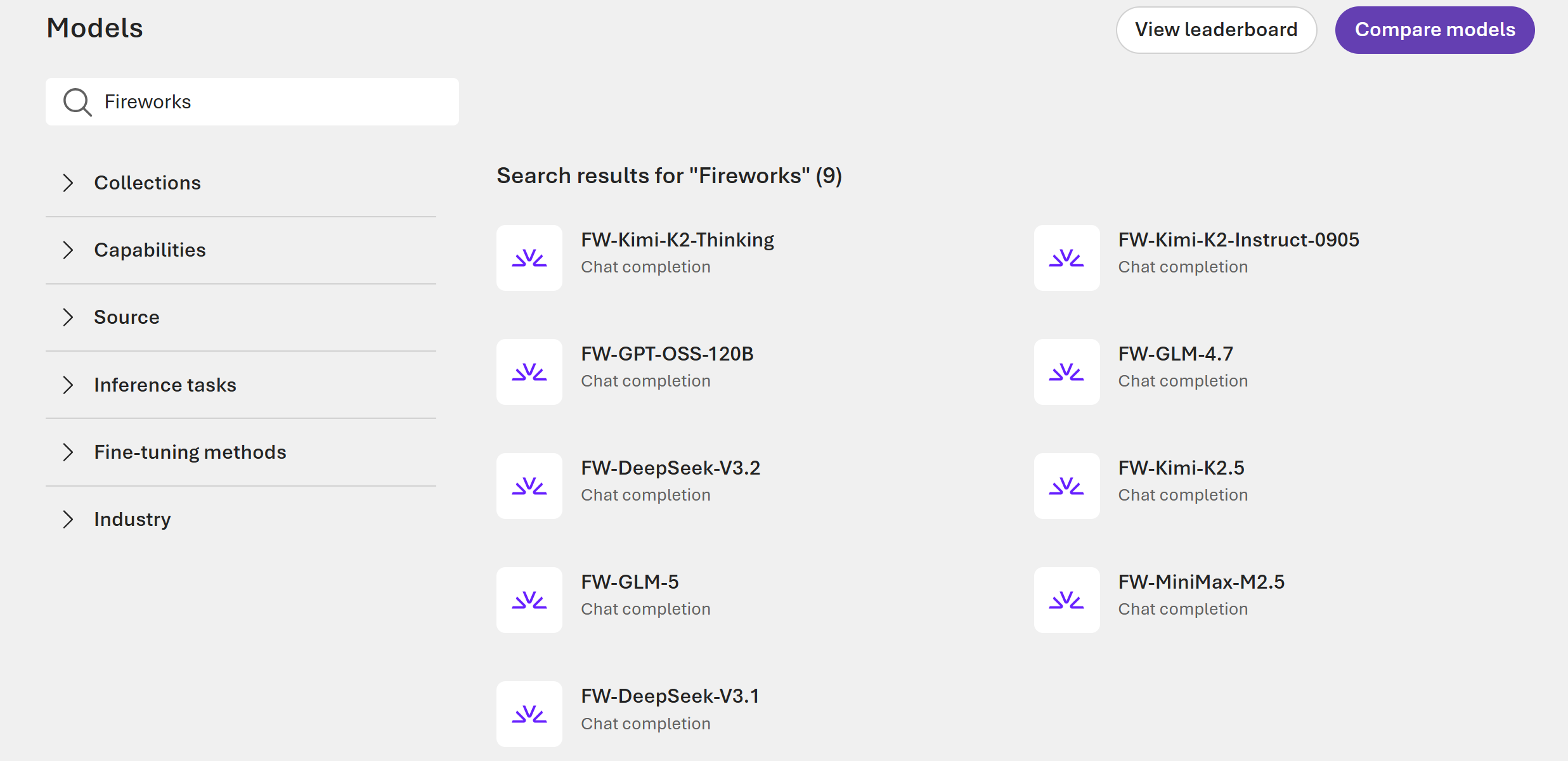
From the portal homepage, select Discover in the upper-right navigation.
In the left pane, select Models to open the Model catalog.
Select your desired Fireworks model to view its details on the model page:
On the model page, select Deploy. For more information on deployment options, see Deploy Foundry Models in the portal.
In the deployment window, configure the following settings:
- Deployment name: Keep the default name or enter a custom name to identify the deployment.
- Token Plan: Select Pay-per-token -> Datazone Standard or Global Standard, depending on the model, or Provisioned Throughput -> Datazone or Global. For more information, see Deployment types.
- Model version settings: Select the model version for the deployment.
- Tokens per Minute Rate Limit: Set a custom tokens-per-minute limit to manage costs and control usage. For pay-per-token deployments, see Quotas and rate limits.
- Guardrails: Select DefaultV2 or Default guardrail configuration. Models use the Microsoft.DefaultV2 guardrail unless a different one is specified. For more information, see Use guardrails to set boundaries on model outputs.
Select Deploy. The deployment process can take up to 30 minutes.
After deployment completes, use the provided endpoint and key to send inference requests to the model. To quickly test the deployment, use the Playground in your Foundry project.
Tip
To verify the deployment, navigate to your project's Deployments page and confirm the deployment Status shows Succeeded.
Quotas and rate limits
For pay-per-token deployments, Global Standard and Data Zone Standard have separate quota pools. Enterprise customers have a default quota of 10 million tokens per minute (TPM) per region, per subscription, in each pool. Each pool is shared across all Fireworks models, and you can allocate quota to individual model deployments.
Fireworks directly enforces adaptive rate limits within your quota. Your effective limits can be lower than the full quota and adjust automatically as your usage grows.
Ramp up traffic gradually, and use exponential backoff when retrying HTTP 429 (Too Many Requests) responses. For more information, see Fireworks adaptive rate limits.
All customers can submit a quota increase request for more quota.
Improve prompt cache hit rate
Prompt caching reuses processing for requests that share the same prompt prefix. To improve the prompt cache hit rate, set a stable identifier for each user or session, and reuse the same value for related requests. Use one of these options:
- Set the
x-session-affinityHTTP header. - Set the
userrequest parameter. - Set the
prompt_cache_keyrequest parameter. This parameter takes priority overuserwhen both are present.
For more information, see Prompt caching in the Fireworks AI documentation.
Available catalog models
The following Fireworks models are available in the Foundry model catalog. In the Supported offers column, PTU includes both Global Provisioned throughput and Data Zone Provisioned throughput.
| Model provider | Model name | Model ID | Type | Supported offers | Description |
|---|---|---|---|---|---|
| DeepSeek | DeepSeek V3.1 | FW-DeepSeek-V3.1 |
Chat completions | PTU | MoE language model with 163K context and function calling for chat and tool-use workloads. |
| DeepSeek | DeepSeek V3.2 | FW-DeepSeek-V3.2 |
Chat completions | PTU | MoE model focused on efficient reasoning and agent performance. |
| DeepSeek | DeepSeek V4 Flash | FW-DeepSeek-V4-Flash |
Chat completions | PTU | Streamlined MoE model optimized for fast, cost-efficient reasoning and coding at 1M-token context scale. |
| DeepSeek | DeepSeek V4 Flash 0731 | FW-DeepSeek-V4-Flash-0731 |
Chat completions | Pay-per-token and PTU | Updated DeepSeek V4 Flash model with enhanced agentic capabilities, speculative decoding, and 1M context. |
| DeepSeek | DeepSeek V4 Pro | FW-DeepSeek-V4-Pro |
Chat completions | Pay-per-token and PTU | Flagship 1.6T-parameter MoE model for frontier reasoning, coding, and long-context agentic workloads. |
| DeepSeek | DeepSeek V4.1 Flash | FW-DeepSeek-V4.1-Flash |
Chat completions | Pay-per-token (Global Standard) | Multimodal MoE model with 552B parameters, image input, and 1M context. |
| Gemma 4 26B A4B IT | FW-Gemma-4-26B-A4B-IT |
Chat completions | PTU | Multimodal MoE instruction-tuned model with image input, function calling, and 256K context. | |
| Gemma 4 31B IT | FW-Gemma-4-31B-IT |
Chat completions | PTU | Multimodal dense instruction-tuned model with image input, function calling, and 256K context. | |
| Meta | Llama 3.1 8B Instruct | FW-Llama-v3.1-8B-Instruct |
Chat completions | PTU | Multilingual instruction-tuned model optimized for dialogue workloads. |
| MiniMax | MiniMax-M2.5 | FW-MiniMax-M2.5 |
Chat completions | PTU | MoE model for coding, agentic tool use, search, and office-work workflows. |
| MiniMax | MiniMax-M3 | FW-MiniMax-M3 |
Chat completions | Pay-per-token and PTU | Multimodal MoE model with 512K context for coding and long-horizon agentic tasks. |
| Mistral AI | Ministral 3 3B Instruct 2512 | FW-Ministral-3-3B-Instruct-2512 |
Chat completions | PTU | Compact 3B dense instruction-tuned model with vision input and 256K context. |
| Moonshot AI | Kimi K2 Instruct 0905 | FW-Kimi-K2-Instruct-0905 |
Chat completions | PTU | 1T-parameter MoE instruction model with 262K context, improved coding, and tool use. |
| Moonshot AI | Kimi K2 Thinking | FW-Kimi-K2-Thinking |
Chat completions | PTU | MoE reasoning model for step-by-step tool-using agents with 262K context. |
| Moonshot AI | Kimi K2.5 | FW-Kimi-K2.5 |
Chat completions | PTU | Multimodal MoE agentic model with reasoning controls, tool use, and 262K context. |
| Moonshot AI | Kimi K2.6 | FW-Kimi-K2.6 |
Chat completions | Pay-per-token (retires September 25, 2026) and PTU | Open-source multimodal agentic model for long-horizon coding and task orchestration. |
| Moonshot AI | Kimi K2.7 Code | FW-Kimi-K2.7-Code |
Chat completions | Pay-per-token (retires September 25, 2026) and PTU | Coding-focused multimodal agentic model for long-horizon software engineering workflows. |
| Moonshot AI | Kimi K3 | FW-Kimi-K3 |
Chat completions | Pay-per-token (Global Standard) | Multimodal 2.8T-parameter MoE model with native visual understanding and 1M context. |
| NVIDIA | NVIDIA Nemotron 3 Super 120B A12B BF16 | FW-Nemotron-3-Super-120B-A12B-BF16 |
Chat completions | PTU | Hybrid LatentMoE model with 120B total parameters for agentic workflows, long-context reasoning, and tool use. |
| NVIDIA | NVIDIA Nemotron 3 Ultra NVFP4 | FW-Nemotron-3-Ultra-NVFP4 |
Chat completions | Pay-per-token and PTU | Nemotron reasoning model with 262K context for agentic and long-context workloads. |
| NVIDIA | NVIDIA Nemotron Lightning 3.5 30B A3B | FW-Nemotron-Lightning-3.5-30B-A3B |
Chat completions | Pay-per-token and PTU | Hybrid Mamba-Transformer MoE model with configurable reasoning and 262K context. |
| OpenAI | OpenAI gpt-oss-120b | FW-GPT-OSS-120B |
Chat completions | PTU | Open-weight MoE model for reasoning, agentic tasks, and developer use cases. |
| OpenAI | OpenAI gpt-oss-20b | FW-GPT-OSS-20B |
Chat completions | PTU | Open-weight model for reasoning and developer workloads with 131K context. |
| PaddlePaddle | PaddleOCR VL 1.6 | FW-PaddleOCR-VL-1.6 |
Chat completions | PTU | Compact vision-language model for document parsing, including OCR, tables, formulas, and charts. |
| Qwen | Qwen3 14B | FW-Qwen3-14B |
Chat completions | PTU | Dense Qwen model with function calling and 40.9K context. |
| Qwen | Qwen3 32B | FW-Qwen3-32B |
Chat completions | PTU | Dense 32B Qwen model for reasoning, coding, and dialogue tasks. |
| Qwen | Qwen3.5 4B | FW-Qwen3.5-4B |
Chat completions | PTU | Compact Qwen model with 262K context. |
| Qwen | Qwen3.5 9B | FW-Qwen3.5-9B |
Chat completions | PTU | Compact dense Qwen model with 262K context. |
| Qwen | Qwen3.5 27B | FW-Qwen3.5-27B |
Chat completions | PTU | Dense 27B Qwen model with 262K context. |
| Qwen | Qwen3.5 35B A3B | FW-Qwen3.5-35B-A3B |
Chat completions | PTU | 35B-parameter MoE Qwen model with 262K context. |
| Qwen | Qwen3.5 122B A10B | FW-Qwen3.5-122B-A10B |
Chat completions | PTU | 122B-parameter MoE Qwen model with image input and 262K context. |
| Qwen | Qwen3.5 397B A17B | FW-Qwen3.5-397B-A17B |
Chat completions | PTU | 396B-parameter MoE Qwen model with image input and 262K context. |
| Qwen | Qwen3.6 27B | FW-Qwen3.6-27B |
Chat completions | PTU | 27B-parameter dense Qwen model with image input, function calling, and 262K context. |
| Qwen | Qwen3.6 35B A3B | FW-Qwen3.6-35B-A3B |
Chat completions | PTU | 35B-parameter MoE Qwen model with 262K context. |
| Thinking Machines Lab | Inkling | FW-Inkling |
Chat completions | Pay-per-token (retires September 25, 2026) and PTU | Multimodal 975B-parameter MoE model with text, image, and audio input and 1M context. |
| Z.ai | GLM-4.7 | FW-GLM-4.7 |
Chat completions | PTU | 352B-parameter MoE model for coding, reasoning, and agentic workflows. |
| Z.ai | GLM-5 | FW-GLM-5 |
Chat completions | PTU | MoE model for complex systems engineering and long-horizon agentic tasks. |
| Z.ai | GLM-5.1 | FW-GLM-5.1 |
Chat completions | PTU | MoE model for agentic engineering, coding, and long-horizon tasks. |
| Z.ai | GLM-5.2 | FW-GLM-5.2 |
Chat completions | Pay-per-token and PTU | MoE model with 1M-token context and multi-effort coding capabilities for long-horizon tasks. |
| Z.ai | GLM-5.2 Fast | FW-GLM-5.2-Fast |
Chat completions | Pay-per-token and PTU | High-throughput GLM-5.2 variant optimized for latency-sensitive coding and agentic workloads. |
| Z.ai | GLM-5.3 | FW-GLM-5.3 |
Chat completions | Pay-per-token | GLM-5.2 successor with improved complex coding and long-horizon task performance. |
| Z.ai | GLM-5.3 Flash | FW-GLM-5.3-Flash |
Chat completions | Pay-per-token (Global Standard) | Multimodal MoE model with 320B total parameters, 18B active parameters, and 1M context. |
All catalog models support the OpenAI/v1 API for Chat Completions API and the Foundry SDK and endpoint for accessing the Responses API.
Important
Fireworks models on Standard (Per-Token) inference offerings are subject to a 15-day notice period prior to model retirement. Plan your deployments accordingly and monitor notifications for upcoming retirement dates.
The pay-per-token offering is deprecated for FW-GPT-OSS-120B, FW-DeepSeek-V3.2, FW-Kimi-K2.5, FW-GLM-5, FW-GLM-5.1, and FW-MiniMax-M2.5. Provisioned throughput (PTU) remains available for all six models.
The pay-per-token (pay-as-you-go) offerings for FW-Kimi-K2.6, FW-Kimi-K2.7-Code, and FW-Inkling retire on September 25, 2026. Provisioned throughput (PTU) remains available for these three models.
Custom models (bring your own model)
In addition to the catalog models, Fireworks on Foundry supports importing and deploying your own custom model weights. This BYOM capability lets you run proprietary or fine-tuned open-weight models within the Foundry ecosystem, with inference provided by the optimized Fireworks cloud.
Supported model architectures
Custom models must be based on one of the following supported architectures:
- Kimi (K2, K2.5, K2.6)
- GLM (4.7, 4.8)
- OpenAI (gpt-oss-120b)
- Qwen (qwen3.5-9B, qwen3.5-35B-A3B, qwen3.5-112B-A10B, qwen3.5-397B)
Limitations
- CLI-first workflow. The import process uses the Azure Developer CLI (
azd). The Foundry portal supports registering, viewing, and deploying models after upload. - Fireworks Agents and Agent Builder workflows aren't currently supported.
For step-by-step instructions, see Import custom models into Foundry.
Data privacy
When you use Fireworks on Foundry, data is shared between Microsoft and Fireworks AI, and different compliance and data handling rules will apply. See below for details. Customers are responsible for evaluating whether data sharing between Microsoft and Fireworks is appropriate for their organizations compliance requirements.
Fireworks on Foundry is currently excluded from EU Data Boundary commitments.
FedRAMP isn't achieved for Fireworks on Foundry. If your organization requires FedRAMP, before use, consult with your Authorization Official to determine if use of Fireworks on Foundry is allowed.
Payment Card Industry (PCI) Data Security Standard (DSS) isn't applicable to Fireworks on Foundry. You shouldn't use Fireworks on Foundry to store, process, or transmit payment and cardholder data.
Transparency note
Fireworks on Foundry allows customers to deploy and operate third-party and open-weight AI models using Microsoft Foundry platform services.
- Microsoft doesn't develop, train, fine-tune, or evaluate the safety, security, or Responsible AI characteristics of models deployed through Fireworks on Foundry.
- Microsoft makes no representations regarding the behavior, performance, or risk profile of these models.
- Customers are solely responsible for assessing the suitability of any model for their intended use, including performing any required safety, compliance, and Responsible AI evaluations, before deploying models in production or customer-facing applications.
Foundry provides the tools and best practices for performing your own risk and safety evaluations of models.
Frequently asked questions
Is Fireworks on Foundry available in Azure for US Government?
No, currently the Fireworks on Foundry service isn't available for Azure Government cloud users.
How can I get quota for Fireworks model deployments?
Use the quota request form to request added quota for Fireworks on Foundry.
I have a Fireworks AI account. Can I use my existing Fireworks deployments?
No, you need to create new deployments in Foundry. If you'd like to shift consumption to Azure, contact your Fireworks account team to assist.
Can I deploy LoRA or adapter-based models?
LoRA support is in public preview. See import custom Fireworks models for details. For compatible adapters trained in Foundry, see Deploy fine-tuned models with Fireworks on Foundry (preview); use the import guide for adapters trained elsewhere.
How do I import and deploy a custom model?
Custom model import uses a CLI-first workflow with the Azure Developer CLI. For step-by-step instructions, see Import custom models into Foundry.
How is Fireworks on Foundry billed?
Fireworks models deployed through Foundry support both pay-per-token and provisioned throughput offers.
How do I disable Fireworks in my Foundry project?
Fireworks can be disabled at the Azure subscription level. Follow the steps to unregister preview features in your Azure subscription.
How do I use the Responses API?
The Responses API is supported via the Foundry Projects API and SDK. Make sure to point your client to your project's API endpoint or use the Foundry SDK.
Troubleshoot Fireworks on Foundry
Use the following guidance to resolve common issues with Fireworks on Foundry.
| Issue | Resolution |
|---|---|
| Preview registration stays in "Registering" state | Registration can take up to 30 minutes. Refresh the Preview features page to check the current status. If the state doesn't change after 30 minutes, try unregistering and re-registering the feature. |
| Fireworks models don't appear in the model catalog | Confirm that the preview feature state shows Registered for your subscription. Verify you're working in a supported region. |
| Deployment fails with a quota error | Use the quota request form to request added capacity for Fireworks on Foundry. |
| "Forbidden" or access denied during deployment | Verify that your identity has the Azure AI Developer role or higher on the Foundry project. Subscription-level roles alone aren't sufficient for deployment. |
| Model endpoint returns errors after deployment | Confirm the deployment status shows Succeeded on the project's Deployments page. Verify you're using the correct Target URI and Key from the deployment details. |
For other queries, see the frequently asked questions section.
Related content
- Fine-tuning overview
- Deploy fine-tuned models with Fireworks on Foundry (preview)
- Import custom models into Foundry
- Deploy Foundry Models in the portal
- Foundry Models from partners and community
- Foundry model catalog overview
- Deployment types
- Provisioned throughput concepts
- Azure built-in roles
- Azure preview features
- Fireworks AI Trust Center