Note
Access to this page requires authorization. You can try signing in or changing directories.
Access to this page requires authorization. You can try changing directories.
The Genie One MCP server is a Azure Databricks-provided MCP that exposes Genie as a conversational tool over the Model Context Protocol (MCP), leveraging Chat in Genie One. An MCP client or agent sends a natural-language question, and Genie searches your enterprise data, writes SQL, and returns an answer grounded in Genie Ontology with deep links back to your cited Azure Databricks sources.
Connect any MCP client or agent to ground its data questions in Genie's trusted insights. Clients that support MCP Apps can render an interactive View that shows Genie's progress, visualizations, and results inline.
Unity Catalog permissions are always enforced, so users and agents can only query data they're allowed to access.
Use this server for analytics across your workspace: business questions asked in natural language, where accuracy depends on understanding what your data means. Genie resolves business terms, metric definitions, and table relationships through Genie Ontology, your governed semantic layer, which produces more accurate answers than an agent writing SQL directly against raw tables.
Tip
To query one curated Genie Agent from Python, use AI Bridge tool examples. For an existing MCP integration with a specific agent, see the legacy Genie Agent MCP server.
Access through Unity Gateway
The Genie One MCP server is a Azure Databricks-provided MCP, system.ai.genie_one_mcp, governed through Unity Gateway.
Invoke the MCP at its Unity Gateway URL, with its fully qualified Unity Catalog name in the path:
https://<workspace-hostname>/ai-gateway/mcp-services/system.ai.genie_one_mcp
When connecting with on-behalf-of user authentication, include the ai-gateway OAuth scope. To control access and apply policies, see Govern an MCP. To add the MCP to an agent, see Use MCP tools in a Python agent. To connect external clients such as Cursor or Claude Desktop, see Supported coding agents.
Note
The new Genie One MCP, system.ai.genie_one_mcp, is generally available. The previous Beta endpoint, https://<workspace-hostname>/api/2.0/mcp/genie, is deprecated and will be sunset on October 31, 2026. Move all workloads to the MCP before then. The deprecated endpoint uses the genie OAuth scope. To govern access with MCP policies, use the system.ai.genie_one_mcp MCP in Unity Gateway.
Connect a client such as Claude or ChatGPT
Point your client at the MCP URL above and authenticate with OAuth. Follow the setup for coding agents or other MCP clients, including Claude and ChatGPT.
To view your MCPs and their URLs, go to your workspace and select Unity Gateway > MCPs.
Available tools
The Genie One MCP server exposes the following tools. In practice, an agent invokes genie_ask (or view_ask on MCP Apps clients) to ask a question; the agent manages the remaining tools on your behalf as it works through the response.
| Tool | Description |
|---|---|
genie_ask |
Ask Genie a natural-language data question and start a response. Returns conversation_id, response_id, and status. Pass a conversation_id to continue a previous conversation. |
genie_poll_response |
Fetch the latest state of an in-flight or completed response, including progress steps, the final answer, and deep links to your Azure Databricks sources. |
genie_get_query_result |
Fetch the full SQL result, including column schema and rows, for a query Genie ran. |
genie_cancel_response |
Request cancellation of an in-flight Genie turn. |
view_ask |
Ask Genie a question and open the interactive View. Offered instead of genie_ask to MCP Apps clients, and preferred when available. |
Ask a question
Because Genie runs an agent that searches data and executes SQL, answers are asynchronous. You (or your agent) invoke genie_ask with a question; the agent then manages the rest of the exchange automatically. A typical flow looks like this:
genie_askstarts the response and returns aconversation_idandresponse_idwithstatus: in_progress. Genie continues working in the background.- The agent polls
genie_poll_responseuntil the response completes, surfacingprogress_stepsand anarration_instructionalong the way to keep you informed. - When
statusiscompleted(orincomplete/failed), the agent returns the rendered answer, including an Explore in Azure Databricks deep link to the full conversation and any visualizations Genie produced.
To continue the same conversation, the follow-up question reuses the previous conversation_id.
MCP App
The Genie One MCP server provides an MCP App, an extension that lets a server return an interactive view instead of plain text. On clients that support MCP Apps, the server returns an interactive View: a panel embedded in the client that shows Genie's progress, visualizations, and final answer as the conversation unfolds, rather than a text-only reply.
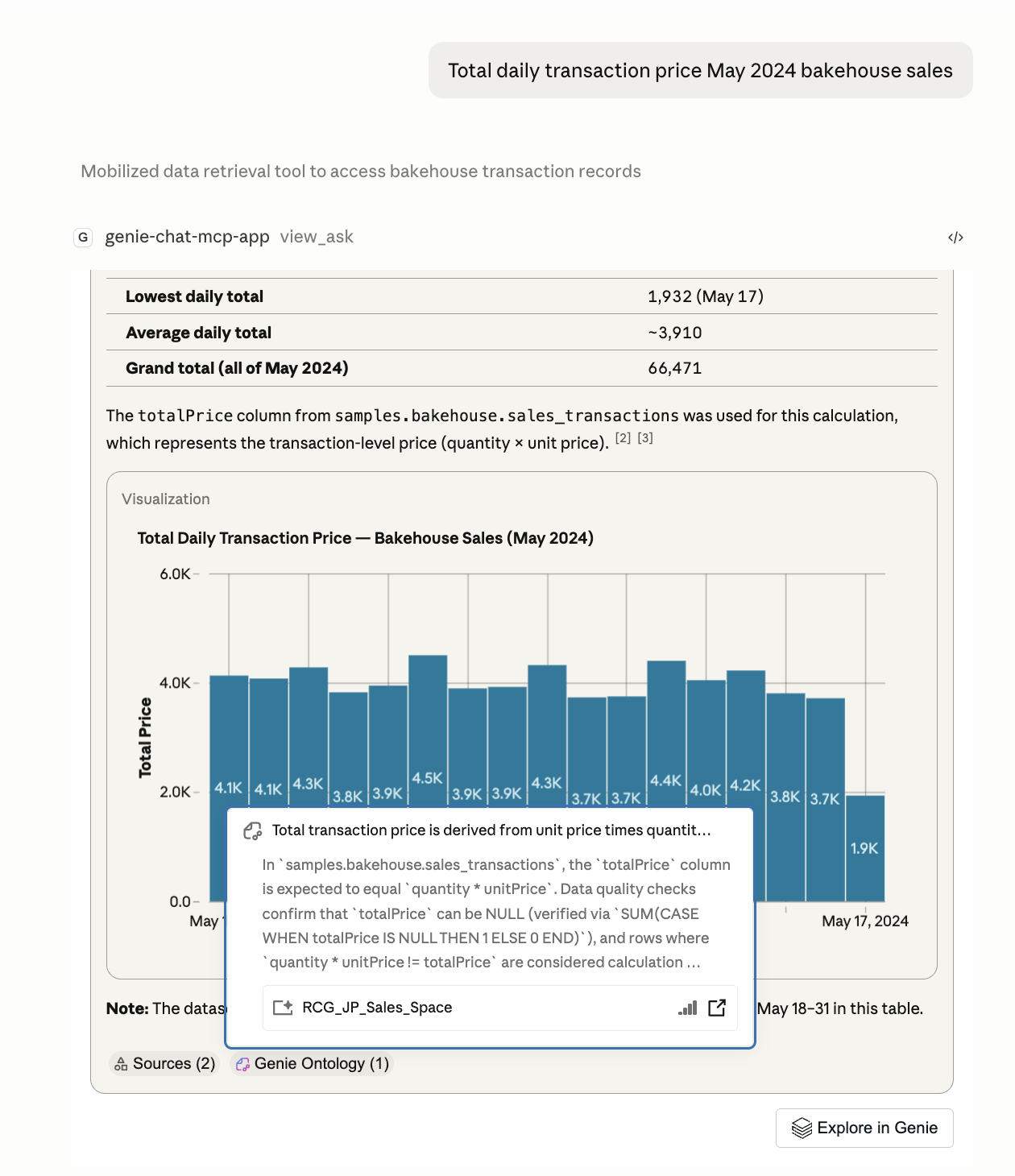
The Genie One MCP App rendering a bar chart, summary metrics, and Genie Ontology citations inside Claude Desktop.
No additional setup is required. Clients that support MCP Apps automatically get the interactive View. Clients that don't continue to receive text results.
Considerations
- Permissions: Unity Catalog permissions are enforced on every request, so results are scoped to what the user can access.
- User authentication: On-behalf-of user OAuth authentication is recommended, following data governance best practices and allowing for smooth clickthrough to Genie sources. Service principal authentication is also supported for programmatic and automated workloads.
- Configuration: The server honors your Genie One configuration in Azure Databricks. Tune and configure Genie's behavior there. See Chat in Genie One.
- Polling cadence: Wait for the prior
genie_poll_responsecall to complete before polling again. - Result size: To protect the model's context window,
genie_askandgenie_poll_responsereturn truncated query results. When an agent needs the complete result, it can callgenie_get_query_resultto retrieve the full schema and rows. Very large results are still subject to a size limit; if it's exceeded, the response is truncated. - SQL warehouse: To run queries on a specific SQL warehouse, pass
warehouse_idin the_metaparameters ongenie_askorview_ask. - Pricing: The Genie One MCP server uses Chat in Genie One. See Genie pricing.
Additional resources
- Supported coding agents to connect a coding agent.
- Other MCP clients to connect Claude, ChatGPT, or another client.
- Use MCP tools in a Python agent to add the Genie One MCP to an agent you build in code, then deploy it.
- Govern an MCP to grant access and apply policies.
- MCPs for an overview of MCPs on Azure Databricks.