Note
Access to this page requires authorization. You can try signing in or changing directories.
Access to this page requires authorization. You can try changing directories.
In data engineering, backfilling refers to the process of retroactively processing historical data through a data pipeline that was designed for processing current or streaming data.
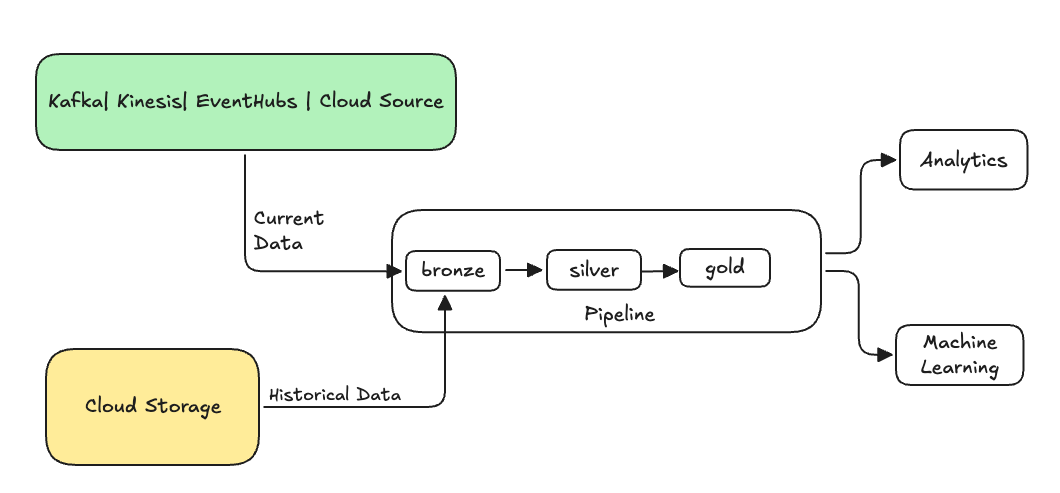
Typically, this is a separate flow sending data into your existing tables. The following illustration shows a backfill flow sending historical data to the bronze tables in your pipeline.
Some scenarios that might require a backfill:
- Process historical data from a legacy system to train a machine learning (ML) model or build a historical trend analysis dashboard.
- Reprocess a subset of data due to a data quality issue with upstream data sources.
- Your business requirements changed and you need to backfill data for a different time period that was not covered by the initial pipeline.
- Your business logic changed and you need to reprocess both historical and current data.
The backfill flow you use depends on the target table and source data. For an AUTO CDC slowly changing dimension (SCD) Type 1 target with an authoritative snapshot, use a one-time AUTO CDC FROM SNAPSHOT flow. For an SCD migration that replays historical changes, use a one-time AUTO CDC flow.
For append-only backfills: Use a specialized append flow with the ONCE option to backfill an append-only streaming table. See append_flow or CREATE FLOW (pipelines) for more information about the ONCE option.
Considerations when backfilling historical data into a streaming table
- Typically, append the data to the bronze streaming table. Downstream silver and gold layers pick up the new data from the bronze layer.
- Ensure your pipeline can handle duplicate data gracefully in case the same data is appended multiple times.
- Ensure the historical data schema is compatible with the current data schema.
- Consider the data volume size and the required processing service-level agreement (SLA), and accordingly configure the cluster and batch sizes.
Example: Add a backfill to an existing pipeline
In this example, say you have a pipeline that ingests raw event registration data from a cloud storage source, starting Jan 01, 2025. You later realize that you want to backfill the previous three years of historical data for downstream reporting and analysis use cases. All data is in one location, partitioned by year, month, and day, in JSON format.
Initial pipeline
Here's the starting pipeline code that incrementally ingests the raw event registration data from the cloud storage.
Python
from pyspark import pipelines as dp

source_root_path = spark.conf.get("registration_events_source_root_path")
begin_year = spark.conf.get("begin_year")
incremental_load_path = f"{source_root_path}/*/*/*"

# create a streaming table and the default flow to ingest streaming events
@dp.table(name="registration_events_raw", comment="Raw registration events")
def ingest():
    return (
        spark
        .readStream
        .format("cloudFiles")
        .option("cloudFiles.format", "json")
        .option("cloudFiles.inferColumnTypes", "true")
        .option("cloudFiles.maxFilesPerTrigger", 100)
        .option("cloudFiles.schemaEvolutionMode", "addNewColumns")
        .option("modifiedAfter", "2025-01-01T00:00:00.000+00:00")
        .load(incremental_load_path)
        .where(f"year(timestamp) >= {begin_year}") # safeguard to not process data before begin_year
    )
SQL
-- create a streaming table and the default flow to ingest streaming events
CREATE OR REFRESH STREAMING LIVE TABLE registration_events_raw AS
SELECT * FROM read_files(
  "/Volumes/gc/demo/apps_raw/event_registration/*/*/*",
  format => "json",
  inferColumnTypes => true,
  maxFilesPerTrigger => 100,
  schemaEvolutionMode => "addNewColumns",
  modifiedAfter => "2024-12-31T23:59:59.999+00:00"
)
WHERE year(timestamp) >= '2025'; -- safeguard to not process data before begin_year
Here we use the modifiedAfter Auto Loader option to ensure we are not processing all data from the cloud storage path. The incremental processing is cutoff at that boundary.
Tip
Other data sources, such as Kafka, Kinesis, and Azure Event Hubs have equivalent reader options to achieve the same behavior.
Backfill data from previous 3 years
Now you want to add one or more flows to backfill previous data. In this example, take the following steps:
- Use the
append onceflow. This performs a one-time backfill without continuing to run after that first backfill. The code remains in your pipeline, and if the pipeline is ever fully refreshed, the backfill is re-run. - Create three backfill flows, one for each year (in this case, the data is split by year in the path). For Python, we parameterize the creation of the flows, but in SQL we repeat the code three times, once for each flow.
If you are working on your own project and not using serverless compute, you may want to update the max workers for the pipeline. Increasing the max workers ensures you have the resources to process the historical data while continuing to process the current streaming data within the expected SLA.
Tip
If you use serverless compute with enhanced autoscaling (the default), then your cluster automatically increases in size when your load increases.
Python
from pyspark import pipelines as dp

source_root_path = spark.conf.get("registration_events_source_root_path")
begin_year = spark.conf.get("begin_year")
backfill_years = spark.conf.get("backfill_years") # e.g. "2024,2023,2022"
incremental_load_path = f"{source_root_path}/*/*/*"

# meta programming to create append once flow for a given year (called later)
def setup_backfill_flow(year):
    backfill_path = f"{source_root_path}/year={year}/*/*"
    @dp.append_flow(
        target="registration_events_raw",
        once=True,
        name=f"flow_registration_events_raw_backfill_{year}",
        comment=f"Backfill {year} Raw registration events")
    def backfill():
        return (
            spark
            .read
            .format("json")
            .option("inferSchema", "true")
            .load(backfill_path)
        )

# create the streaming table
dp.create_streaming_table(name="registration_events_raw", comment="Raw registration events")

# append the original incremental, streaming flow
@dp.append_flow(
        target="registration_events_raw",
        name="flow_registration_events_raw_incremental",
        comment="Raw registration events")
def ingest():
    return (
        spark
        .readStream
        .format("cloudFiles")
        .option("cloudFiles.format", "json")
        .option("cloudFiles.inferColumnTypes", "true")
        .option("cloudFiles.maxFilesPerTrigger", 100)
        .option("cloudFiles.schemaEvolutionMode", "addNewColumns")
        .option("modifiedAfter", "2024-12-31T23:59:59.999+00:00")
        .load(incremental_load_path)
        .where(f"year(timestamp) >= {begin_year}")
    )

# parallelize one time multi years backfill for faster processing
# split backfill_years into array
for year in backfill_years.split(","):
    setup_backfill_flow(year) # call the previously defined append_flow for each year
SQL
-- create the streaming table
CREATE OR REFRESH STREAMING TABLE registration_events_raw;

-- append the original incremental, streaming flow
CREATE FLOW
  registration_events_raw_incremental
AS INSERT INTO
  registration_events_raw BY NAME
SELECT * FROM STREAM read_files(
  "/Volumes/gc/demo/apps_raw/event_registration/*/*/*",
  format => "json",
  inferColumnTypes => true,
  maxFilesPerTrigger => 100,
  schemaEvolutionMode => "addNewColumns",
  modifiedAfter => "2024-12-31T23:59:59.999+00:00"
)
WHERE year(timestamp) >= '2025';


-- one time backfill 2024
CREATE FLOW
  registration_events_raw_backfill_2024
AS INSERT INTO ONCE
  registration_events_raw BY NAME
SELECT * FROM read_files(
  "/Volumes/gc/demo/apps_raw/event_registration/year=2024/*/*",
  format => "json",
  inferColumnTypes => true
);

-- one time backfill 2023
CREATE FLOW
  registration_events_raw_backfill_2023
AS INSERT INTO ONCE
  registration_events_raw BY NAME
SELECT * FROM read_files(
  "/Volumes/gc/demo/apps_raw/event_registration/year=2023/*/*",
  format => "json",
  inferColumnTypes => true
);

-- one time backfill 2022
CREATE FLOW
  registration_events_raw_backfill_2022
AS INSERT INTO ONCE
  registration_events_raw BY NAME
SELECT * FROM read_files(
  "/Volumes/gc/demo/apps_raw/event_registration/year=2022/*/*",
  format => "json",
  inferColumnTypes => true
);
This implementation highlights several important patterns.
Separation of concerns
- Incremental processing is independent of backfill operations.
- Each flow has its own configuration and optimization settings.
- There is a clear distinction between incremental and backfill operations.
Controlled execution
- Using the
ONCEoption ensures that each backfill runs exactly once. - The backfill flow remains in the pipeline graph, but becomes idle after it's complete. It is ready for use on full refresh, automatically.
- There is a clear audit trail of backfill operations in the pipeline definition.
Processing optimization
- You can split the large backfill into multiple smaller backfills for faster processing, or for control of the processing.
- Using enhanced autoscaling dynamically scales the cluster size based on the current cluster load.
Schema evolution
- Using
schemaEvolutionMode="addNewColumns"handles schema changes gracefully. - You have consistent schema inference across historical and current data.
- There is safe handling of new columns in newer data.
Add a backfill to an AUTO CDC SCD Type 1 table
Use a one-time AUTO CDC FROM SNAPSHOT flow to add an authoritative snapshot to an SCD Type 1 target that also receives an ongoing change data capture (CDC) feed. The snapshot version and the CDC sequencing column form one ordering domain. A newer CDC event takes precedence over an older snapshot, while a newer snapshot takes precedence over an older CDC event.
Requirements
Before you add the backfill, make sure the flows meet the following requirements:
- The target uses SCD Type 1.
- The target has exactly one
AUTO CDC FROM SNAPSHOTflow and one or more uniquely namedAUTO CDCflows. - All flows use the same number of keys in the same order. Snapshot-flow key names are compared case-insensitively with
AUTO CDCkey names. MultipleAUTO CDCflows must use identical key names and casing. - The snapshot version and each CDC sequencing column have exactly the same data type.
- The
AUTO CDC FROM SNAPSHOTflow does not define expectations. - The
AUTO CDCflows do not useIGNORE NULL UPDATES. In Python, do not setignore_null_updates,ignore_null_updates_column_list, orignore_null_updates_except_column_list. - The pipeline uses triggered mode. This pattern does not support continuous pipelines.
Both flow types can use the SQL or Python pipeline interface. You can mix SQL and Python flows in the same target.
The snapshot must represent the complete state of the source at its version. If a target key is absent from the snapshot, AUTO CDC FROM SNAPSHOT treats the absence as a delete at the snapshot version. A CDC event with a newer version preserves or restores the key.
Add the backfill
To add a one-time snapshot backfill and continue processing CDC events, use the following steps:
- Keep the existing target table and its ongoing
AUTO CDCflows in the pipeline definition. - Define the authoritative snapshot and its version. For a Python callback, the first invocation must return a snapshot and version. Return
Noneonly after at least one snapshot has been processed. - Add one
AUTO CDC FROM SNAPSHOTflow withonce=Truein Python orONCEin SQL. For a SQL backfill into an existing target, include aWITH VERSIONquery. A SQL snapshot flow withoutWITH VERSIONsupports only an initial load into an empty target. - Run a triggered pipeline update to process the backfill and ongoing CDC events.
The following example starts with an existing Python pipeline that incrementally processes changes from customers_cdc. Assume that you have already run this pipeline and populated the customers target:
from pyspark import pipelines as dp
from pyspark.sql.functions import col, expr

@dp.view
def customers_cdc():
    return (
        spark.readStream.table("main.bronze.customers_cdc")
        .withColumn("change_timestamp", col("change_timestamp").cast("timestamp"))
    )


dp.create_streaming_table("customers")

dp.create_auto_cdc_flow(
    name="customers_incremental_cdc",
    target="customers",
    source="customers_cdc",
    keys=["customer_id"],
    sequence_by=col("change_timestamp"),
    apply_as_deletes=expr("operation = 'DELETE'"),
    except_column_list=["operation", "change_timestamp"],
    stored_as_scd_type=1,
)
To backfill that existing target with the state of customers_snapshot as of January 1, 2025, add the following code to the same pipeline definition. Keep the existing target table and AUTO CDC flow:
from datetime import datetime, timezone
from typing import Optional, Tuple

from pyspark.sql import DataFrame

backfill_version = datetime(2025, 1, 1, tzinfo=timezone.utc)


def backfill_snapshot_and_version(
    latest_snapshot_version: Optional[datetime],
) -> Optional[Tuple[DataFrame, datetime]]:
    if latest_snapshot_version is None:
        return (spark.read.table("main.legacy.customers_snapshot"), backfill_version)
    return None


dp.create_auto_cdc_from_snapshot_flow(
    target="customers",
    source=backfill_snapshot_and_version,
    keys=["customer_id"],
    stored_as_scd_type=1,
    once=True,
)
The callback must return a snapshot and version on its first invocation. If it returns None before any snapshot is processed, the pipeline update fails. After the snapshot is processed, returning None signals that no additional snapshots are available.
The snapshot version is a Python datetime, which corresponds to the Spark SQL TIMESTAMP type. The existing AUTO CDC flow casts change_timestamp to TIMESTAMP so that the two sequencing types match exactly. The example uses Python for both flows, but you can define either flow in SQL and mix SQL and Python flows in the same target. For SQL syntax, including the required WITH VERSION query for a non-empty target, see CREATE FLOW (pipelines).
After the snapshot flow commits successfully, subsequent incremental updates skip it while the AUTO CDC flow continues to process new events.
Important
A full refresh of the target re-runs the one-time snapshot flow. Keep the snapshot available and ensure it still represents the intended state before you perform a full refresh.
This unified backfill pattern does not support SCD Type 2 or bitemporal targets.
Example: Backfill an SCD target during a migration
A common migration scenario is a slowly changing dimension (SCD) table that already exists in a legacy system with years of accumulated history, but whose original change feed is no longer available. Because the original change events are gone, you instead replay the legacy table's own history into the new AUTO CDC target one time, then attach a fresh CDC feed going forward. For more about AUTO CDC and SCD types, see The AUTO CDC APIs: Simplify change data capture with pipelines.
The pattern is a one-time AUTO CDC flow into the same streaming table that the ongoing AUTO CDC flow targets. An AUTO CDC target accepts only AUTO CDC flows, so the seed must also be an AUTO CDC flow. A plain INSERT INTO ONCE append flow into the same table fails validation:
- Create the target streaming table that your
AUTO CDCflow writes to. - Seed the legacy history one time with an
AUTO CDC ONCEflow that reads the legacy SCD table as a stream, sequenced by the legacy validity start column. Replay the legacy rows as change events rather than shaping them yourself.AUTO CDCbuilds the__START_ATand__END_AThistory columns for an SCD Type 2 target, so don't write those columns directly. - Attach the ongoing
AUTO CDCflow reading the fresh change feed.AUTO CDCresolves ordering per key, so the cutover must hold for each business key individually: every key's first live change must sequence after the last seeded change for that same key. A sequence value that is merely later than the global legacy maximum can still be stale for an individual key, and that key's first live change is then ignored or ordered incorrectly.
The following code creates a streaming table that uses the steps above:
CREATE OR REFRESH STREAMING TABLE customers_history;

-- One-time seed: replay the legacy history as change events
CREATE FLOW customers_history_seed
AS AUTO CDC ONCE INTO customers_history
FROM stream(legacy.customers_scd2)
KEYS (customer_id)
SEQUENCE BY valid_from
STORED AS SCD TYPE 2;

-- Ongoing live CDC into the same target
CREATE FLOW customers_history_cdc
AS AUTO CDC INTO customers_history
FROM stream(customers_cdc_bronze)
KEYS (customer_id)
SEQUENCE BY change_timestamp
STORED AS SCD TYPE 2;
Both flows must agree on their keys, their SCD type, and the data type of their sequencing column. In the preceding example, both flows sequence by a timestamp, which uses a single cutover time to separate the seeded history from the live feed. If the legacy table sequences by a value of a different type than the live feed, cast one of them so the types match.
The same shape works for an SCD Type 1 target: change STORED AS SCD TYPE 2 to STORED AS SCD TYPE 1 on both flows, and the target keeps only the current row per key. Before relying on either shape, validate on a sample of keys that the first live change for a seeded key produces exactly one new version and correctly closes the prior one. A per-key sequencing gap usually shows up at that step.