Note
Access to this page requires authorization. You can try signing in or changing directories.
Access to this page requires authorization. You can try changing directories.
Important
Currently this experience is only available to customers on enhanced support plans with account managers.
What are Critical Risks?
Azure Advisor supports the concept of Critical Risks. Critical Risks are associated with a prioritized set of recommendations designed to protect your most essential workloads from outages. Instead of navigating long lists of suggestions, you see a small set of key risks and corresponding recommendations that matter most for availability and business continuity.
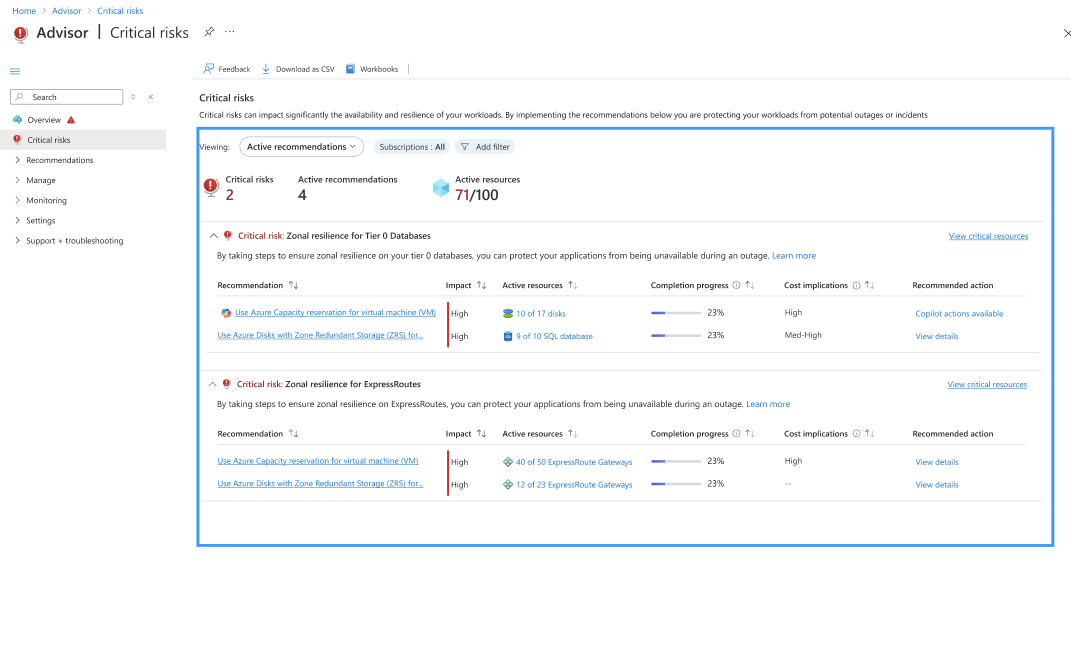
Currently, you see two risks that are foundational to application availability:
Zone Resiliency for Networking Services
Zone Resiliency for Operational Data Storage
The services underpin mission-critical workloads. If the services fail, the impact can cascade across your entire application stack.
Focus on your critical resources
Critical Risks are not generic recommendations. Critical Risks are surfaced only for resources that you identify as critical to your business. The focus on critical resources ensures that the guidance you see is tailored to what matters most for your workloads and operations.
To start using the Critical Risks feature, complete the following actions.
By default, Critical Risks are shown for workloads included in previous Resiliency Reviews. To further refine the list, work with your account manager to designate the resources that are critical. Designating critical resources informs Advisor which resources are the highest priority.
Note
Contact your account manager to change the resources that are designated as critical. Self-serve support is not currently available.
After the resources are designated as critical, Azure Advisor highlights the potential risks that affect the availability of the critical resources. The designation helps you avoid noise and concentrate on protecting the assets that drive your business.
To view Critical Risks, navigate to Azure Advisor and select Critical Risks from the menu.
Note
You only see Critical Risks if active recommendations exist for critical resources that you have access to. Contact your account manager with any questions.
All other Azure Advisor recommendations remain available, but Critical Risks are flagged separately, so you can first address the most critical recommendations.
Why zone resiliency is essential
Azure regions are divided into availability zones. Availability zones are physically separate datacenters with independent power, cooling, and networking. Deploying resources across zones ensures that if one zone experiences an outage, your workloads continue to run in another zone.
Without zone resiliency, you potentially experience the following situations.
A single-zone failure can take down your entire workload.
Recovery potentially requires manual intervention that increases downtime and risk.
By enabling zone redundancy or deploying zonal resources across multiple zones, you safeguard against localized failures caused by hardware issues, network disruptions, or natural disasters.
Why these two risks are prioritized
Zone Resiliency for Networking Services
Networking components are the backbone of connectivity and security for your workloads. Workloads tend to share networking services, so improving resiliency simultaneously strengthens multiple workloads.
The following resource types are in-scope for Zone Resiliency for Networking Services.
Azure ExpressRoute Gateway
Azure Application Gateway
Azure Firewall
Why the risk is important.
ExpressRoute Gateways ensure private, reliable connectivity between on-premises and Azure. A failure disrupts hybrid workloads and compliance-sensitive operations.
Application Gateways provide secure traffic routing and load balancing. Outages can lead to service unavailability or degraded performance.
Azure Firewalls protect against threats. A failure can expose workloads to security risks.
Deploying the resources across multiple zones ensures uninterrupted connectivity and security, even during a zone outage.
Zone Resiliency for Operational Data Storage
Operational data storage systems are the foundation of your applications. The data stores often contain valuable information used by multiple workloads, so improving resiliency simultaneously benefits many workloads.
The following resource types are in-scope for Zone Resiliency for Operational Data Storage.
Azure SQL Database
Azure MySQL Flexible Server
Azure PostgreSQL Flexible Server
Azure Cosmos DB
Azure SQL Managed Instance
Azure Storage
Why the risk is important.
The resources store critical operational data. A zone outage without redundancy can lead to catastrophic data loss and extended downtime.
Azure offers zone-redundant configurations to replicate data across zones automatically, ensuring continuous availability.
Next steps
Work with your account manager to designate critical resources.
Review your Azure Advisor dashboard for Critical Risks. To review, see Azure Advisor.
Implement the recommended actions for Zone Resiliency for Networking Services and Zone Resiliency for Operational Data Storage.
For more information on best practices, see Enable zone resiliency for Azure workloads.
Frequently asked questions (F.A.Q.s)
Where can I see Critical Risks?
To view Critical Risks, navigate to Azure Advisor and select Critical Risks from the menu.
Note
You only see Critical Risks if active recommendations exist for critical resources that you have access to. Contact your account manager with any questions.
How do I designate resources as critical?
Contact your account manager to designate resources that are critical to your business. The designation of critical resources ensures Critical Risks recommendations are tailored to your priorities.
What happens if I don’t implement the recommendations?
If a zone outage occurs and your resources aren't zone-resilient, your applications potentially experience prolonged downtime. Prolonged downtime affects business continuity.
How do I enable Zone Resiliency for Networking Services?
Deploy ExpressRoute Gateways, Application Gateways, and Azure Firewalls across multiple zones. For details, see Enable zone resiliency for Azure workloads.
How do I enable Zone Resiliency for Operational Data Storage?
Use zone-redundant configurations for databases and storage accounts or deploy across multiple zones using supported services. For details, see Enable zone resiliency for Azure workloads.
Does enabling zone resiliency increase cost?
Yes, extra costs potentially appear for redundant resources. However, the costs are minimal compared to the potential financial and operational impact of an outage.
How do I provide feedback about this experience?
Contact your account manager to share feedback about your experience.