Note
Access to this page requires authorization. You can try signing in or changing directories.
Access to this page requires authorization. You can try changing directories.
Note
This document refers to the Microsoft Foundry (classic) portal.
🔄 Switch to the Microsoft Foundry (new) documentation if you're using the new portal.
Note
This document refers to the Microsoft Foundry (new) portal.
Microsoft Foundry is a unified Azure platform-as-a-service offering for enterprise AI operations, model builders, and application development. This foundation combines production-grade infrastructure with friendly interfaces, enabling developers to focus on building applications rather than managing infrastructure.
Microsoft Foundry unifies agents, models, and tools under a single management grouping with built-in enterprise-readiness capabilities including tracing, monitoring, evaluations, and customizable enterprise setup configurations. The platform provides streamlined management through unified Role-based access control (RBAC), networking, and policies under one Azure resource provider namespace.
Tip
Azure AI Foundry is now Microsoft Foundry. Screenshots appearing throughout this documentation are in the process of being updated.
Tip
Azure AI Foundry is now Microsoft Foundry. Screenshots appearing throughout this documentation are in the process of being updated.
Microsoft Foundry portals
There are two different portals for you to use to interact with Microsoft Foundry. A toggle in the portal banner allows you to switch between the two versions.
| Portal | Banner display | When to use |
|---|---|---|
| Microsoft Foundry (classic) | 
|
Choose this portal when working with multiple resource types: Azure OpenAI, Foundry resources, hub-based projects, or Foundry projects. |
| Microsoft Foundry (new) | 
|
Choose this portal for a seamless experience that combines simplicity with powerful and secure tools to build, manage and grow multi-agent applications. Only Foundry projects are visible here - use (classic) for all other resource types. |
Tip
All links to Microsoft Foundry open whichever version you last used.
Microsoft Foundry (classic)
Microsoft Foundry (classic) is designed for developers to:
- Build generative AI applications and AI agents on an enterprise-grade platform.
- Explore, build, test, and deploy using cutting-edge AI tools and ML models, grounded in responsible AI practices.
- Collaborate with a team for the full life-cycle of application development.
- Work across model providers with a consistent API contract.
With Microsoft Foundry, you can explore a wide variety of models, services and capabilities, and get to building AI applications that best serve your goals. Microsoft Foundry facilitates scalability for transforming proof of concepts into full-fledged production applications with ease. Continuous monitoring and refinement support long-term success.
Microsoft Foundry (new)
Microsoft Foundry (new) delivers a modernized experience with powerful enhancements designed for flexibility and scale:
- Multi-Agent Orchestration and Workflows – Build advanced automation using SDKs for C# and Python that enable collaborative agent behavior and complex workflow execution.
- Expanded Integration Options – Publish agents to Microsoft 365, Teams, and BizChat, plus leverage containerized deployments for greater portability.
- Expanded Tool Access – Access the Foundry tool catalog (preview) with a public tool catalog and your own private catalogs, connecting over 1,400 tools in Microsoft Foundry.
- Enhanced Memory Capabilities – Use memory to help your agent retain and recall contextual information across interactions. Memory maintains continuity, adapts to user needs, and delivers tailored experiences without requiring repeated input.
- Knowledge Integration – Connect your agent to a Foundry IQ (powered by Azure AI Search) knowledge base to ground responses in enterprise or web content. This integration provides reliable, citation-backed answers for multi-turn conversations.
- Real-Time Observability – Monitor performance and governance using built-in metrics and model tracking tools.
- Enhanced Enterprise Support – Use open protocols in Foundry Agent Service with full authentication support in MCP and A2A tool, AI gateway integration, and Azure Policy integration.
- Centralized AI asset management - Observe, optimize, and manage 100% of your AI assets (agents, models, tools) in one place, the Operate section. Register agents from other clouds, get alerts when an agent or model requires your attention, and effectively manage your AI fleet health as that fleet scales.
- Optimized Developer Experience – Experience faster load times and dynamic prefetching for smooth development and deployment.
- Streamlined Navigation – Navigate efficiently with a redesigned interface that places key controls where you need them, improving workflow efficiency.
Choosing a project
In the Foundry (new) portal, the project you're working with appears in the upper-left corner of most pages.
- If you see a long list of projects instead, select a project to begin. This brings you to the Home page with the project name in the upper-left corner.
- To switch to another recently used project, select the project name in the upper-left corner, then select the other project.
- To see all of your Foundry projects, select the project name in the upper-left corner, the select View all projects. Select the next project you want to work on.
Find other resources
The Foundry (new) portal displays only Foundry projects, not other resources or hub-based projects you might have created in Foundry (classic).
To find these other resources, select the project name in the upper-left corner, then select View all resources. A new browser tab opens the Foundry (classic) portal. Switch to Microsoft Foundry (classic) documentation to work with these other resources in the Foundry (classic) portal.
Work in a Foundry project
A Foundry project is where you do most of your development work. You can work with your project in the Foundry portal, or use the SDK in your preferred development environment.
Foundry projects provide developers with self-serve capabilities to independently create new environments for exploring ideas and building prototypes, while managing data in isolation. Projects act as secure units of isolation and collaboration where agents share file storage, thread storage (conversation history), and search indexes. You can also bring your own Azure resources for compliance and control over sensitive data.
Microsoft Foundry API and SDKs
The Microsoft Foundry API is designed specifically for building agentic applications and provides a consistent contract for working across different model providers. The API is complemented by SDKs to make it easy to integrate AI capabilities into your applications. SDK Client libraries are available for:
- Python
- C#
- JavaScript/TypeScript (preview)
- Java (preview)
The Microsoft Foundry for VS Code Extension helps you explore models and develop agents directly in your development environment.
Types of projects
Microsoft Foundry (classic) supports two types of projects: a hub-based project and a Foundry project. In most cases, you want to use a Foundry project.
-
An Foundry project is managed under a Microsoft Foundry resource. It's a container for access management, data upload and integration, and monitoring. This lets you keep your work separated between use cases without needing to create extra Azure resources.
-
A hub-based project is hosted by a Microsoft Foundry hub. If your company has an administrative team that created a hub for you, you can create a project from that hub. If you're working on your own, you can create a project and a default hub is automatically be created for you.
To understand how the newer Foundry project differs from the hub-based project, see New Foundry projects overview.
Which type of project do I need?
- In general, you should use a Foundry project if you're looking to build agents or work with models.
- Use a hub-based project when you need features that aren't available in a Foundry project. See the following table for more on feature availability.
Note
New agents and model-centric capabilities are only available on Foundry projects, including access to the Foundry API and Foundry Agent Service in general availability. To migrate your hub-based project to a Foundry project, see Migrate from hub-based to Foundry projects.
This table summarizes features available in the two project types:
| Capability | Foundry project | hub-based project |
|---|---|---|
| Agents | ✅ (GA) | ✅ (Preview only) |
| Models sold directly by Azure - Azure OpenAI, DeepSeek, xAI, etc. | ✅ | Available via connections |
| Partner & Community Models sold through Marketplace - Stability, Cohere, etc. | ✅ | Available via connections |
| Models deployed on managed compute (e.g. HuggingFace) | ✅ | |
| Foundry SDK and API | ✅ | Limited* |
| OpenAI SDK and API | ✅ | Available via connections |
| Evaluations | ✅ (preview) | ✅ |
| Playgrounds | ✅ | ✅ |
| Content understanding | ✅ | ✅ |
| Model router | ✅ | ✅ |
| Datasets | ✅ | ✅ |
| Indexes | ✅ | ✅ |
| Project files API (Foundry-managed storage) | ✅ | Limited |
| Project-level isolation of files and outputs | ✅ | Limited |
| Bring-your-own Key Vault to store connection secrets | ✅ | ✅ |
| Bring-your-own Storage for Agent service | ✅ | ✅ |
| Prompt flow | ✅ |
*New feature enhancements primarily land on the Microsoft Foundry resource type.
How do I know which type of project I have?
Here are some of the ways to identify your project type:
From the breadcrumb navigation section
- A Foundry project displays (Foundry) on the second line
- A hub-based project displays (Hub) on the second line
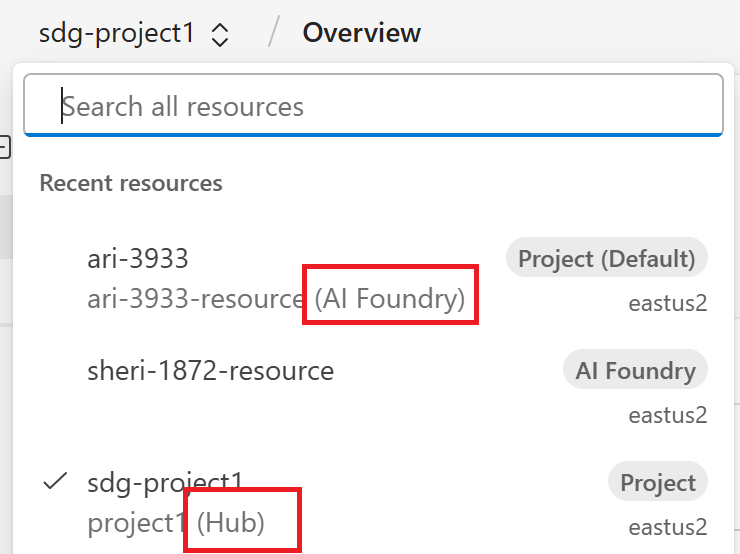
From the All resources page
- A Foundry project displays (Foundry) as the parent resource
- A hub-based project displays (Hub) as the parent resource
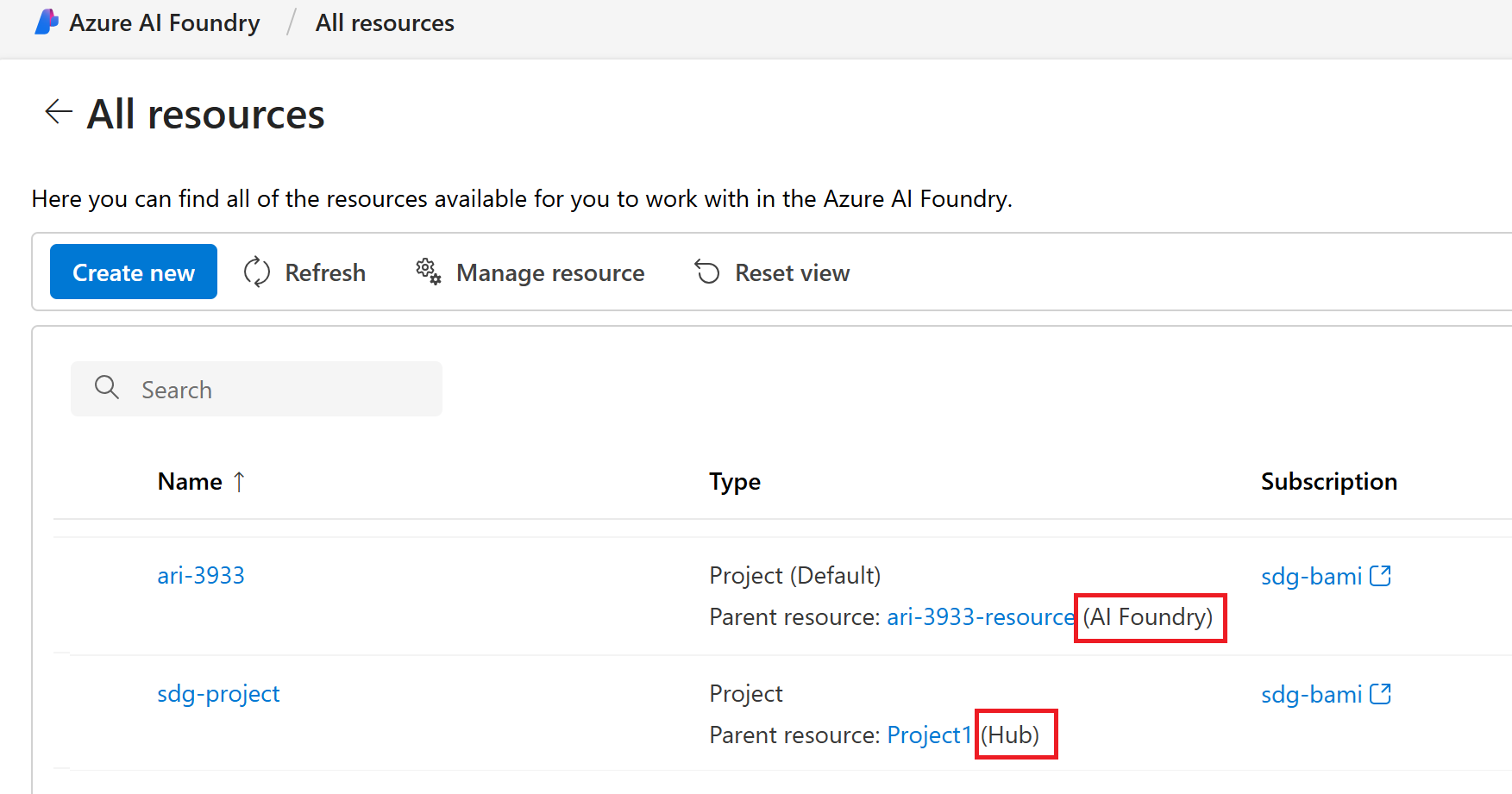
Navigate in the Foundry (classic) portal
In the Foundry (classic) portal, you can navigate among all your resources using the breadcrumbs at the top of the page. The breadcrumbs show recent resources, along with a link to all resources.
The left pane is organized around your goals. Generally, as you develop with Azure AI, you'll likely go through a few distinct stages of project development:
- Define and explore. In this stage you define your project goals, and then explore and test models and services against your use case to find the ones that enable you to achieve your goals.
- Build and customize. In this stage, you're actively building solutions and applications with the models, tools, and capabilities you selected. You can also customize models to perform better for your use case by fine-tuning, grounding in your data, and more. Building and customizing might be something you choose to do in the Foundry portal, or through code and the Foundry SDKs. Either way, a project provides you with everything you need.
- Once you're actively developing in your project, the Overview page shows the things you want easy access to, like your endpoints and keys.
- Observe and improve. In this stage, you're looking for where you can improve your application's performance. You might choose to use tools like tracing to debug your application or compare evaluations to hone in on how you want your application to behave. You can also integrate with safety & security systems so you can be confident when you take your application to production.
If you're an admin, or leading a development team, and need to manage the team's resources, project access, quota, and more, you can do that in the Management Center.
Customize the left pane
The left pane of the Foundry (classic) portal is your main navigation tool. Customize this area to show the parts of the portal you want to use.
Pin or unpin items into the left pane. When you unpin an item, it's hidden from the left pane but can be found again in the ...More menu.
- Select ... More at the bottom of the pane to see items to pin and unpin.
- Customize each project separately. The left pane isn't shared across projects.
- The left pane isn't shared across users. Each user customizes their own left pane for each project.
Management center
The management center is a part of the Foundry (classic) portal that streamlines governance and management activities. In the management center, you can view and manage:
- Projects and resources
- Quotas and usage metrics
- Govern access and permissions
For more information, see Management center overview.
Pricing and billing
Microsoft Foundry is monetized through individual products customer access and consume in the platform, including API and models, complete AI toolchain, and responsible AI and enterprise grade production at scale products. Each product has its own billing model and price.
The platform is free to use and explore. Pricing occurs at deployment level.
Using Foundry also incurs cost associated with the underlying services. To learn more, read Plan and manage costs for Foundry Tools.
Region availability
Foundry is available in most regions where Foundry Tools are available. For more information, see region support for Microsoft Foundry.
How to get access
You can explore Foundry portal (classic) (including the model catalog) without signing in.
But for full functionality, you need an Azure account.
You need an Azure account. Then sign in to Microsoft Foundry and toggle the Try the new Foundry on.