Note
Access to this page requires authorization. You can try signing in or changing directories.
Access to this page requires authorization. You can try changing directories.
Applies to: AKS on Windows Server
This article describes the architecture for deploying a Kubernetes cluster on a two-node Azure Local cluster. The article describes various failure scenarios that can occur, their impact on the cluster, and recoverability from these failure scenarios.
Architecture
Traditional Kubernetes deployments require three physical machines to mitigate a single failure. This requirement usually means a higher Total Cost of Ownership (TCO). For cost-sensitive deployments, AKS on Windows Server can be deployed on a two-node Azure Local system, as shown below, with a few trade-offs in availability. These trade-offs are described in Availability scenarios and their impact on two-node AKS cluster.
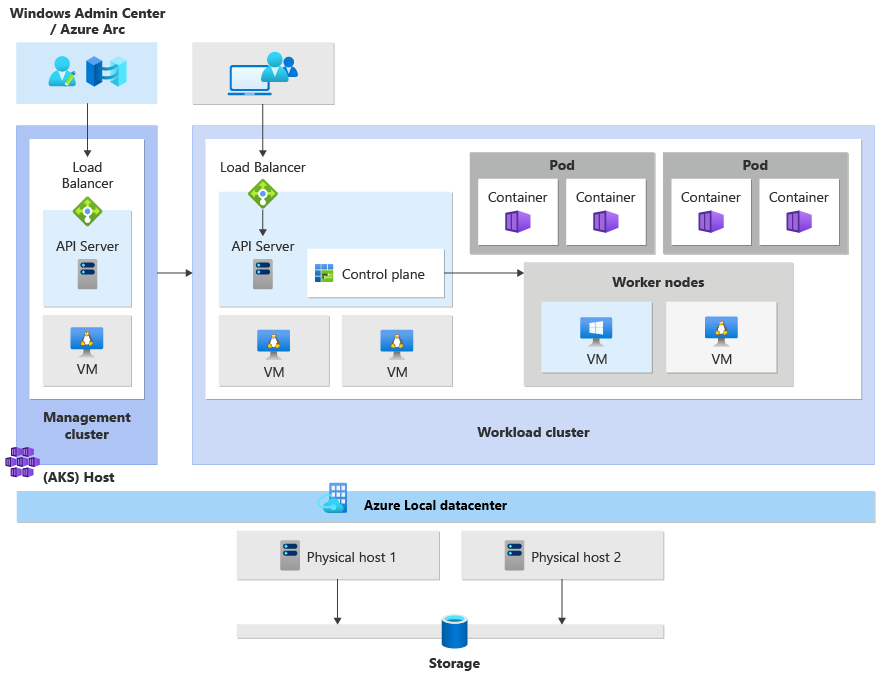
For more information about architecture, cluster deployment strategies, reliability considerations, and cost optimization for AKS, see Azure Kubernetes Service (AKS) baseline architecture.
Terminology
This article uses the following terminology:
| Term | Definition |
|---|---|
| Physical Azure Local Host | The physical Azure Local cluster node that hosts the VMs needed to run AKS on Windows Server. |
| Guest OS | Operating system running inside the control plane virtual machine (VM), load balancer VM, or node pool VMs. |
| Failover Clustering | Failover Clustering for Azure Local and Windows Server provides infrastructure features that support high availability of VMs and applications. If a cluster node or service fails, the VMs or applications that are hosted on that node can be automatically or manually transferred to another available node in a process known as failover. |
| Workload cluster | A Kubernetes cluster that is deployed by Azure Kubernetes Service (AKS) to host the containerized end-user application or workload, also known as a target cluster. |
| Management cluster (AKS host) | Provides the core orchestration mechanism and interface for deploying and managing one or more workload clusters. The management cluster contains a single control plane VM. |
| Load balancer | A single dedicated Linux VM with a load-balancing rule for the API server. |
| API server | Enables interaction with the Kubernetes cluster, providing interaction for management tools such as Windows Admin Center, PowerShell modules, and kubectl. |
| CRUD | Create, Read, Update, and Delete operations. |
Availability scenarios and their impact on two-node AKS cluster
The scaled-down architecture in an Azure Local deployment with two physical nodes involves some availability trade-offs. This section describes node behavior during the following failure modes and during updates:
- Updates
- Host hardware failure
- Host OS failure
- Management plane VM failure
- Control plane VM failure
- Node pool (worker node) failure
- Load balancer VM failure
Updates
Use the following table to determine the potential impact of Azure Local and AKS updates on workloads:
| Existing workloads | CRUD on workload clusters | New workload cluster lifecycle | API server availability |
|---|---|---|---|
| No disruption | No disruption | No disruption | No disruption |
| Cluster-Aware Updating on Azure Local live-migrates the worker nodes to the other node before rebooting. Applications aren't disrupted during this migration. | Cluster-Aware Updating on Azure Local live-migrates the control plane VM of the workload cluster to the other node before rebooting. Existing workloads can be scaled without disruption during an update. | Cluster-Aware Updating on Azure Local live-migrates the control plane VM of the management cluster to the other node before rebooting. New workloads can be created without disruption during an update. | Cluster-Aware Updating on Azure Local live-migrates the control plane VM of the workload cluster to the other node before rebooting. The API server cluster remains available during an update. |
Hardware failure on host
The physical host that runs the VMs hosting the Kubernetes nodes might stop functioning because of hardware issues or might become network-partitioned.
Use the following table to determine the potential impact of host hardware failures on workloads.
| Existing workloads | CRUD on workload clusters | New workload cluster lifecycle | API server availability |
|---|---|---|---|
| Potential disruption + Automatic recovery |
Potential disruption + Automatic recovery |
Potential disruption + Automatic recovery |
Potential disruption + Automatic recovery |
| Existing workloads continue to run without disruption as long as: - The worker nodes are on separate hosts. - The application defined at least two replicas with podAntiAffinity specified.If an application has a dependency on an external virtual IP address (VIP) of the API server, disruption occurs. |
If the control plane VM of the workload cluster resides on the host that went down, workloads won't scale. Adding new worker nodes and scaling pods will not work. | If the control plane VM of the management cluster resides on the host that went down, new clusters can't be created. Scaling of existing clusters will not work. | If the control plane VM of the workload cluster or the load balancer VM resides on the host that went down, the API server isn't available. |
| If the worker nodes are on the same physical host, Failover Clustering fails over the worker nodes on the surviving host. If the application wasn't created with anti-affinity, Kubernetes moves the pod to the existing worker node. If the application depends on the API server, and the control plane VM or load balancer VM of the workload cluster goes down, Failover Clustering moves those VMs to the surviving host, and the application resumes working. Depending on how the application handles the loss of the API server, pods might be restarted on the new host. |
Failover Clustering fails over the control plane VM of the workload cluster to the healthy host. After failover, workloads can be scaled. | Failover Clustering fails over the control plane VM of the management cluster on the healthy host. After failover, CRUD operations on new target clusters work. | Failover Clustering fails over the control plane VM of the workload cluster on the healthy host. After failover, the API server is available. |
Host OS failure
The physical host that runs the VMs hosting the Kubernetes nodes might have a software issue in the operating system and cause a failure.
Use the following table to determine the potential impact of host OS failures on workloads.
| Existing workloads | CRUD on workload clusters | New workload cluster lifecycle | API server availability |
|---|---|---|---|
| Potential disruption + Automatic recovery |
Potential disruption + Automatic recovery |
Potential disruption + Automatic recovery |
Potential disruption + Automatic recovery |
| Existing workloads continue to run without disruption as long as: - The worker nodes are on separate hosts. - The application defined at least two replicas with podAntiAffinity specified.If the application has a dependency on an external VIP of the API server, disruption occurs. |
If the control plane VM in the target cluster resides on the host with OS failures, adding new worker nodes and scaling pods will not work. | If the control plane VM of the management cluster resides on the host with OS failures, new clusters won't be created and existing clusters can't be scaled. | If the control plane VM resides on the host with OS failures, the API server won't be available. |
| If the worker nodes are on the same physical host, Failover Clustering fails over the worker nodes on the surviving host. If the application wasn't created with anti-affinity, Kubernetes will move the pod over to the existing worker node. If the application has dependency on the API server, and the control plane VM or load balancer VM of the workload cluster shuts down, Failover Clustering moves those VMs to the surviving host, and the application resumes. Depending on how the application handles the loss of the API server, pods might be restarted on the new host. |
Failover Clustering fails over the control plane VM of the workload cluster on the healthy host. After failover, workloads can be scaled. | Failover Clustering fails over the control plane VM of the management cluster on the healthy host. After failover, CRUD operations on new target clusters will work. | Failover Clustering restarts the control plane VM of the workload cluster on the healthy host. After that, the API server is available. |
Management plane VM failure
The control plane VM of the management cluster might get deleted unexpectedly, the boot disk might get corrupted, or the control plane VM of the management cluster might not boot because of OS issues.
Use the following table to determine the potential impact of failure of the management cluster's control plane VM on workloads.
| Existing workloads | CRUD on workload clusters | New workload cluster lifecycle | API server availability |
|---|---|---|---|
| No disruption | Disruption + Manual recovery |
Disruption + Manual recovery |
No disruption |
| Existing workloads continue to run if the management cluster VM fails. | Worker nodes can't be added to scale the application. | New workload creation isn't successful while the management cluster is down. | The API server should remain available in case the management cluster VM fails. |
| Not applicable | If Failover Clustering can recover from the error, it tries to restart the management plane VM on a different host. If Failover Clustering can't recover the VM, the management cluster must be rebuilt manually. For more information, see Back up and restore workload clusters. | If Failover Clustering can recover from the error, it tries to restart the management plane VM on a different host. If Failover Clustering can't recover the VM, the management cluster must be rebuilt manually. For instructions, see Back up and restore workload clusters. | Not applicable |
Control plane VM failure
The control plane VM of the workload cluster might get deleted unexpectedly, the boot disk might get corrupted, or the VM might not start because of OS issues.
Use the following table to determine the potential impact of failure of a workload cluster's control plane VM on workloads.
| Existing workloads | CRUD on workload clusters | New workload cluster lifecycle | API server availability |
|---|---|---|---|
| No disruption | Disruption + Manual recovery |
No disruption | Disruption + Manual recovery |
| Existing workloads continue to run without disruption as long as: - The worker nodes are on separate hosts. - The application defined at least two replicas with podAntiAffinity specified.If the application has a dependency on an external VIP of the API server, disruption occurs. |
Workloads can't be scaled while the control plane VM is in a failed state. Adding new worker nodes and scaling pods will not work. | New workload creation succeeds. | The API server isn't available when the control plane VM is in a failed state. |
| Not applicable | If Failover Clustering can recover from the error, it tries to restart the control plane VM on a different host. If Failover Clustering can't recover the VM, the control plane VM must be rebuilt manually. For instructions, see Back up and restore workload clusters. | Not applicable | If Failover Clustering can recover from the error, it tries to restart the control plane VM on a different host. If Failover Clustering can't recover the VM, the control plane VM must be rebuilt manually. For instructions, see Back up and restore workload clusters. |
Node pool (worker nodes) VM failure
The VMs hosting the Kubernetes nodes might get deleted unexpectedly, the boot disk might get corrupted, or the VMs might not boot because of OS issues.
Use the following table to determine the potential impact of failure of a VM within a Kubernetes node pool on workloads.
| Existing workloads | CRUD on workload clusters | New workload cluster lifecycle | API server availability |
|---|---|---|---|
| Potential disruption + Manual recovery |
No disruption | No disruption | No disruption |
| Existing workloads continue to run without disruption as long as: - The worker nodes are on separate hosts. - The application defined at least two replicas with podAntiAffinity specified. |
Worker nodes can be added. Pod scheduling succeeds if the remaining nodes have enough capacity. |
New workload creation succeeds. | The API server remains available in case there's a single worker VM failure. |
| If Failover Clustering can recover from the error, it tries to restart the control plane VM on a different host. If Failover Clustering can't recover the VM, you must recreate the worker nodes manually. | Not applicable | Not applicable | Not applicable |
Load balancer VM failure
The load balancer VM might get deleted unexpectedly, the boot disk might get corrupted, or the VM might not boot because of OS issues.
Use the following table to determine the potential impact of a failure of the load balancer VM on workloads.
| Existing workloads | CRUD on workload clusters | New workload cluster lifecycle | API server availability |
|---|---|---|---|
| Potential disruption + Automatic recovery |
Disruption + Manual recovery |
No disruption | Disruption + Manual recovery |
| Existing workloads continue to run without disruption as long as: - The worker nodes are on separate hosts. - The application defined at least two replicas with podAntiAffinity specified.If an application has a dependency on an external VIP of the API server, disruption occurs. |
Workloads can't be scaled while the load balancer VM is in a failed state. Adding new worker nodes and scaling pods will not work. | Workload creation succeeds. | The API server remains unavailable while the load balancer VM is down. |
| If Failover Clustering can recover from the error, it tries to restart the load balancer VM on a different host. If Failover Clustering can't recover the VM, you must rebuild the control plane VM manually. For instructions, see Back up and restore workload clusters. | If Failover Clustering can recover from the error, it tries to restart the load balancer VM on a different host. If Failover Clustering can't recover the VM, you must rebuild the control plane VM manually. For instructions, see Back up and restore workload clusters. | Not applicable | If Failover Clustering can recover from the error, it tries to restart the load balancer VM on a different host. If Failover Clustering can't recover the VM, you must rebuild the control plane VM manually. For instructions, see Back up and restore workload clusters. |