Note
Access to this page requires authorization. You can try signing in or changing directories.
Access to this page requires authorization. You can try changing directories.
Applies to: AKS on Windows Server
Deploying AKS on Windows Server target clusters on different software defined networking (SDN) virtual networks (VNets) can offer a range of benefits, primarily focused on security, scalability, and organization of networks:
- Security and isolation: Each isolated VNet acts as a separate entity, which can help to contain potential security threats. If one network is compromised, the threat is less likely to spread to other VNets.
- Scalability: Deploying AKS target clusters on multiple networks can improve the scalability of your applications. As your requirements and/or compliance grows, you can add more AKS target clusters to new SDN VNets.
- Service segmentation: Isolated networks enable you to logically segregate services or applications based on their function or the business they serve, especially O/T networks with high compliance and regulatory requirements. This segmentation simplifies management, monitoring, and troubleshooting.
- Regulatory compliance: For organizations that operate under strict guidelines such as manufacturing, healthcare, and finance, isolated networks can help achieve compliance with little increase in physical IP address space such as VLANs, subnets, and so on.
The following image shows the deployment of AKS target clusters. The image shows that the AKS management cluster and target clusters are on different SDN VNets:
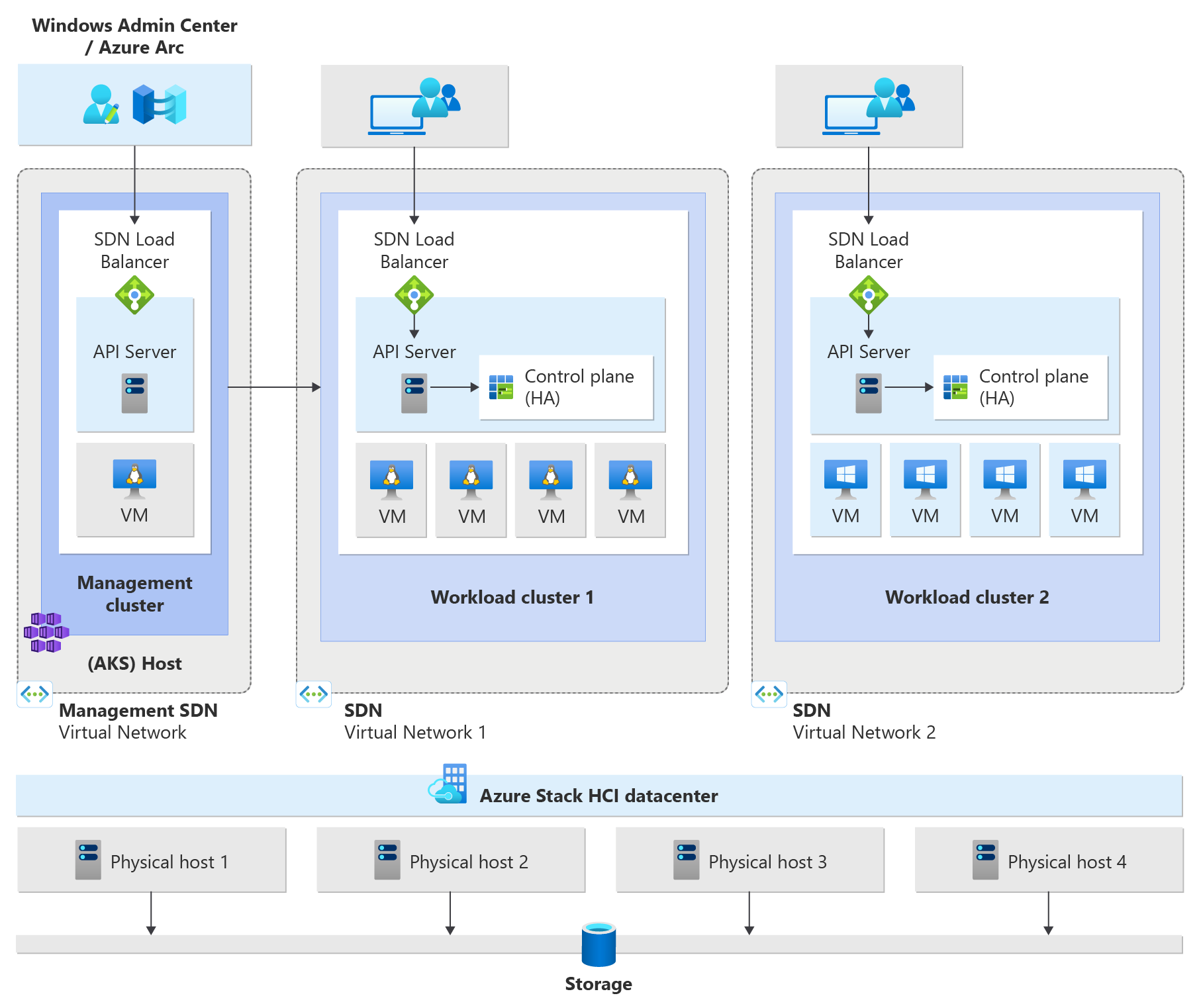
Configure a new SDN virtual network
Prior to deploying a new AKS target cluster, you must create a new virtual network. If the name of the SDN VNet was already created using Windows Admin Center or PowerShell, you can reuse the existing VNet (SDN-managed VNet). If it hasn't been created, we create the VNet for you in the AKS and SDN Network Controller (MOC Managed Virtual Network):
New-AksHciClusterNetwork -name "SDNVNet1" -vswitchName "ConvergedSwitch(hci)" `
-ipAddressPrefix "13.20.0.0/8" -gateway "13.20.0.1" -dnsServers "10.195.95.223"  `
-k8sNodeIpPoolStart "13.20.0.2" -k8sNodeIpPoolEnd "13.20.100.255"
| Parameter | Description |
|---|---|
name |
Name of the default virtual network. Reuses existing SDN managed network if it exists, or creates a new MOC managed network. |
vswitchName |
Name of the vSwitch configured for SDN. This vSwitch has the VFP extension enabled; only one vSwitch with VFP can be enabled on the system. |
ipAddressPrefix |
Subnet prefix for creating the virtual network in the network controller. This prefix is a subnet prefix, not a virtual network prefix. Currently, MOC only supports a single subnet. |
gateway |
Default gateway for the subnet. Must be the first IP of the subnet. SDN doesn't support custom default gateways for virtual networks. |
dnsServers |
DNS servers reachable from SDN VMs public IP or other (for example, an L3 connection), used for name resolutions. |
K8sNodeIpPoolStart, K8sNodeIpPoolEnd |
A subset or full IP range from the ipAddressPrefix. Used by MOC IPAM to allocate IP addresses for nodes. Useful if deploying non-AKS on Windows Server VMs on the same subnet, but not recommended due to possible misconfiguration. |
Create a Kubernetes cluster on your SDN virtual network
After you create an SDN VNet that is isolated, you can create a new Kubernetes cluster. First, retrieve the SDN VNet that you created, and save this value into a variable:
$vnet = New-AksHciClusterNetwork -name "SDNVNet1" -vSwitchName $vSwitchName -ipAddressPrefix $ipAddressPrefix -gateway $gateway -dnsServers "192.168.60.10" -k8sNodeIpPoolStart $k8sNodeIpPoolStart -k8sNodeIpPoolEnd $k8sNodeIpPoolEnd
You can use that variable to pass to the New-AksHciCluster cmdlet. You must specify at least the name and the VNet:
New-AksHciCluster -name "OTCluster1" -vnet "$SDNVNet1"