Note
Access to this page requires authorization. You can try signing in or changing directories.
Access to this page requires authorization. You can try changing directories.
NVIDIA Grace-Blackwell systems combine ARM64-based Grace CPUs with Blackwell GPUs. In a single compute rack, GPUs on different nodes can communicate through physical NVLink, which are NVIDIA's high-speed connections for exchanging data between GPUs. Using these systems offered in Azure ND GB200-v6 series and ND GB300-v6 series VM sizes on Azure Kubernetes Service (AKS) involves more than assigning a GPU to a container: applications that use cross-node NVLink also need a coordinated group of participating nodes.
This article explains important GPU and networking concepts related how these capabilities fit together. For instructions on feature usage and sample workload manifests, see Use NVIDIA Grace Blackwell GPUs on AKS.
Important
AKS preview features are available on a self-service, opt-in basis. Previews are provided "as is" and "as available," and they're excluded from the service-level agreements and limited warranty. AKS previews are partially covered by customer support on a best-effort basis. As such, these features aren't meant for production use. For more information, see the following support articles:
Overview
Kubernetes applications can request devices like compute accelerators through Dynamic Resource Allocation (DRA). DRA lets an application describe the specific devices it needs so that the Kubernetes scheduler can consider available devices together with the nodes where the workload pod is allowed to run.
Grace-Blackwell GPU nodes in Kubernetes extend this individual-device model to applications that use GPUs across nodes. AKS manages the coordination for cross-node NVLink through compute domains, which group participating nodes for an application's use. Applications can also use DRA to request InfiniBand network devices available on these nodes where the DRA networking (DRANET) driver is installed. GPU access, compute-domain membership, and network-device access each solve a different part of running a distributed GPU application.
Why Grace-Blackwell involves more than one node
A large model or training job can need more GPU memory or computing power than a single machine provides. Distributing the work across machines helps meet that need, but the GPUs must exchange data as the application runs. The connections between machines therefore matter as well as the GPUs themselves.
In an NVIDIA Grace-Blackwell GPU rack, physical NVLink connections allow GPUs on different nodes to communicate at high speed. The interconnected hardware is often called an NVLink fabric. Software can prepare an application to use that fabric, but it can't create a physical connection between machines that aren't connected.
Cross-node NVLink lets GPUs on different machines communicate through high-speed physical connections within a rack. Before creating a Grace Blackwell GPU node pool on AKS, confirm that your allocated capacity supports these connections. Choosing the same virtual machine (VM) size for two nodes doesn't guarantee that their GPUs are connected through NVLink.
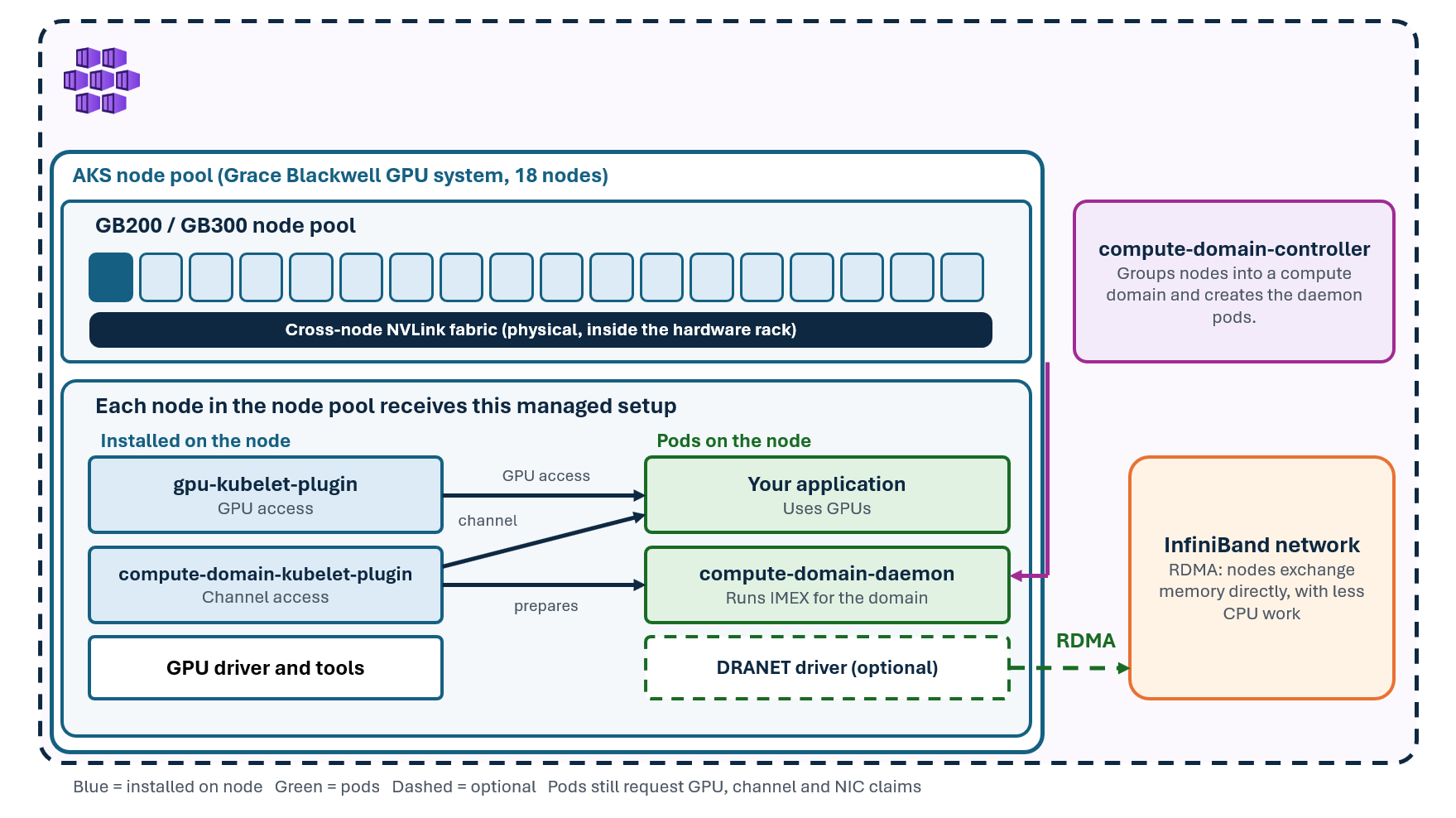
The rack provides the connected hardware, and the node pool determines how many machines AKS creates from your available capacity. Your application then requests GPUs on those machines. If it needs cross-node NVLink, it also joins a compute domain, which coordinates the participating nodes and prepares them to use their existing connections.
How an application gets a GPU
Kubernetes needs to know which devices exist and which application should receive them. A resource claim provides an explicit request that Kubernetes can allocate and the node can prepare for the application.
For example, consider an inference pod that needs one GPU to run a model. You define a ResourceClaim that requests one GPU, reference that claim from the pod, and specify which container uses it. Kubernetes coordinates device allocation with scheduling so that the chosen node can satisfy both the GPU request and the pod's placement requirements. The managed software on that node then prepares the assigned GPU for the container.
Two other DRA objects connect that request to the hardware. A ResourceSlice is a driver's description of the devices it makes available to Kubernetes. A DeviceClass defines which devices a claim can select. For Grace Blackwell GPUs, the class named gpu.nvidia.com selects devices advertised by the NVIDIA GPU DRA driver.
When an application has several pods, each pod might need its own GPU allocation. Instead of writing a separate claim for every pod, you can define a ResourceClaimTemplate. Kubernetes uses that template to create an individual claim for each pod that references it. This makes the device request reusable without making all replicas share a single allocation.
Important
You might already have GPU workloads that specify nvidia.com/gpu in their container resource limits. Those workloads use the device-plugin allocation model. Managed DRA uses claims instead, so moving a workload to this configuration requires changing how it requests GPUs. Don't run a device plugin and a DRA driver against the same GPUs: they are different mechanisms for assigning the same hardware.
What a compute domain accomplishes
Allocating a GPU node doesn't yet answer the question, "Which other nodes will participate with this application in cross-node NVLink communication?" A compute domain provides that grouping and the coordination needed to prepare its members.
AKS manages a Kubernetes controller that watches compute domains and arranges their supporting resources. Here, you declare the domain and its channel template name, and the controller creates the channel claim template and the resources needed to run the domain's coordination processes.
As the channel claims are prepared, supporting pods run on the participating nodes. They start NVIDIA Internode Memory Exchange (IMEX) processes for that domain. IMEX coordinates domain membership so that the participating nodes can be prepared together.
The domain definition is therefore a request for coordinated participation. Application pods must request the domain's IMEX channel and be able to run on suitable nodes. For a two-node example, placing both pods on one node wouldn't fulfill the intended two-node arrangement. Similarly, a domain channel doesn't grant a pod a GPU: an application that needs both must request both.
How InfiniBand fits in
InfiniBand is another high-performance interconnect that an application can use to exchange data between machines. It supports Remote Direct Memory Access (RDMA), which lets compatible devices transfer data between machines' memory with less CPU involvement than conventional networking. Distributed computing software can use this capability for communication between nodes.
Cross-node NVLink uses the compute rack's GPU interconnect, while InfiniBand uses network devices. A compute-domain channel prepares participation in the former; a network-device claim supplies access to devices for the latter. The appropriate communication path depends on your application's libraries and configuration.
Managed support for DRANET makes supported InfiniBand and RDMA devices available through DRA. When you enable it on a GB-series GPU node pool, AKS runs the networking support software on the selected nodes. Your application requests network interface card (NIC) devices through a resource claim, just as it explicitly requests GPUs. Kubernetes coordinates those requests with pod placement so the selected node can satisfy the resources the pod needs.
For a workload that needs a GPU and InfiniBand, the pod references a GPU claim and a network claim. If it also needs compute-domain participation for cross-node NVLink, it requests a channel as well. Enabling these AKS-managed capabilities on the node pool makes them available to applications.
AKS managed component scope
AKS manages the NVIDIA drivers, container-runtime integration, DRA and DRANET services to reduce the operational toil of manually installing, configuring, and maintaining the software between your application and the Grace Blackwell GPU hardware. For supported configurations, it also manages the compute-domain controller and the lifecycle of the per-domain supporting pods.
Your team still supplies the application and its resource requirements. You choose compatible Grace-Blackwell GPU capacity, create the node pool, use ARM64-compatible container images, and write the GPU, channel, and network claims that the workload requires.
Next steps
Configure a managed GPU node pool with NVIDIA Grace-Blackwell GPUs on your AKS cluster.
Related content
- Use managed support for DRANET to enable RDMA over InfiniBand on AKS nodes.
- Use dynamic resource allocation for NVIDIA GPUs in AKS.