Note
Access to this page requires authorization. You can try signing in or changing directories.
Access to this page requires authorization. You can try changing directories.
When you run large-scale, AI, GPU, Windows, or other performance-sensitive workloads in Azure Kubernetes Service (AKS), newly provisioned nodes must download container images, install dependencies, and complete initialization tasks before workloads can run. This per-node setup work repeats on every scale event, contributing to longer node startup times.
Prepared Image Specification (PIS) is an AKS feature that lets you create preconfigured node images with your required container images and node customizations already applied. AKS builds or rebuilds the prepared image when required, such as when a node pool is created or updated to reference a PIS version. Kubernetes version changes can also trigger a rebuild.
This article explains how PIS works, describes common use cases, and compares it with related AKS features. To create and use a PIS, see Use Prepared Image Specification (PIS) in AKS.
Important
AKS preview features are available on a self-service, opt-in basis. Previews are provided "as is" and "as available," and they're excluded from the service-level agreements and limited warranty. AKS previews are partially covered by customer support on a best-effort basis. As such, these features aren't meant for production use. For more information, see the following support articles:
What is a Prepared Image Specification (PIS)?
A PIS is an Azure resource that defines the content and configuration that AKS should bake into a prepared node image. You can include any combination of:
- Container images to pre-cache
- Custom initialization scripts
- Operating system customizations
- Runtime dependencies and security policies
When AKS provisions a node pool that references a PIS, it creates and manages the prepared image on your behalf, preserving the standard managed AKS experience. Unlike unsupported Bring Your Own Image (BYOI) approaches, you define the desired state, and AKS handles creating and maintaining the underlying image.
How PIS works
PIS moves image preparation work earlier in the node pool create/update flow so that future scale-out operations can use the prepared image.
- Create a PIS resource.
- Define container images and customization scripts.
- AKS creates a temporary build node.
- AKS applies all specified customizations and caches the images.
- AKS snapshots the configured node and creates a prepared image.
- Future node provisioning and scale-out operations boot from the prepared image.
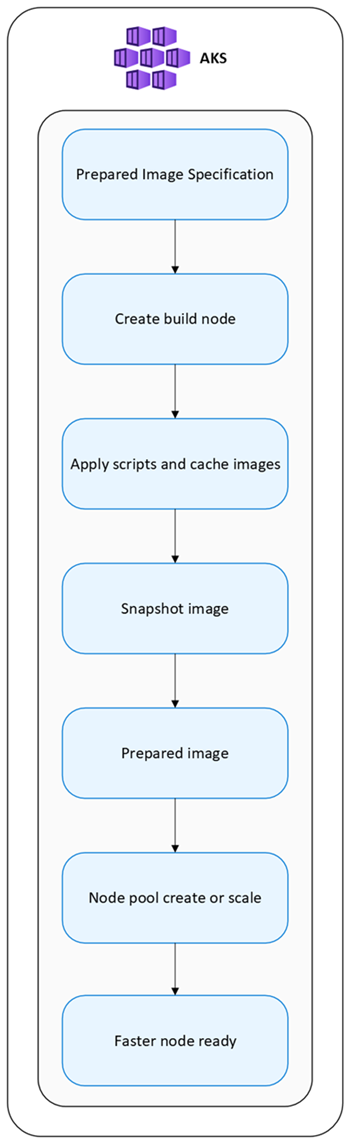
Because container images and customizations already exist in the prepared image, subsequent node creation skips that work entirely.
When a PIS includes both custom scripts and cached container images, AKS runs the custom scripts first. After the scripts complete successfully, AKS caches the specified container images into the prepared node image.
This ordering means script changes can affect the environment used for image caching, including container runtime configuration. Design and test scripts with this sequence in mind, especially if the script modifies containerd, registry configuration, credentials, certificates, networking, or other settings that could affect image pulls or caching behavior.
Provisioning model comparison
| Operation | Standard AKS | Prepared Image Specification |
|---|---|---|
| Node pool create/update | Fast | Slower (image preparation required) |
| Subsequent scale-out | Standard provisioning | Faster provisioning |
| Container image downloads | At runtime | Pre-cached |
| Custom scripts | Runtime execution | Pre-baked into image |
| Startup consistency | Variable | Predictable |
| Large image workloads | Slower startup | Faster startup |
Important
Prepared Image Specification (PIS) delivers the most value when a node pool scales multiple times after the image is prepared. If nodes rarely scale, the one-time image preparation cost might outweigh the benefit.
Common use cases
PIS is most useful for repeated scale-out scenarios, large/stable container images or dependencies, GPU/AI/Windows workloads, and workloads where node readiness time matters. Some common use cases include:
- AI and machine learning: Large AI/ML model images often take significant time to pull. Prepared Image Specification pre-caches those images so GPU nodes reach a ready state faster, reducing workload startup time and improving scaling responsiveness.
- GPU workloads: Pre-installing GPU drivers, CUDA libraries, and other dependencies into the prepared image reduces provisioning overhead and speeds up node readiness during scale events.
- Windows workloads: Windows container images tend to be large. Prepared Image Specification reduces image download times and improves deployment consistency for Windows node pools.
- Burst scaling: When Cluster Autoscaler triggers scale-out events, nodes that boot from a prepared image reach the ready state faster, reducing workload queue time and making scale behavior more predictable.
- Simplify the standardization of environments: Baking a consistent configuration into the prepared image reduces configuration drift across node pools and simplifies operations.
- Large data/artifact caching: This includes LLM weights, model files, training datasets, and database seed blobs that can be downloaded by customization scripts during image preparation. Large artifacts increase prepared image size and rebuild time, so ensure you version and test your prepared image carefully.
Note
The initial node pool create/update can take longer because the image is built first.
How PIS relates to other AKS features
You can use PIS alongside other AKS features to optimize node provisioning and scaling.
Prepared Image Specification and Artifact Streaming
Use PIS and Artifact Streaming together to reduce node startup latency. PIS pre-caches container images and dependencies, while Artifact Streaming streams large artifacts to nodes during provisioning. This combination is particularly useful for workloads that require large datasets or model files.
| Feature | Prepared Image Specification | Artifact Streaming |
|---|---|---|
| Faster container startup | Yes | Yes |
| Script execution | Yes | No |
| Container image pull | During AgentPool update/node image build | During VM provisioning |
For more information about Artifact Streaming, see Reduce image pull time with Artifact Streaming on Azure Kubernetes Service (AKS).
Prepared Image Specification and Custom Node Configuration
Use PIS and Custom Node Configuration together to address runtime/node configuration scenarios. PIS pre-caches container images and applies OS customizations, while Custom Node Configuration allows you to apply runtime configurations to nodes after they are provisioned.
| Feature | Prepared Image Specification | Custom Node Configuration |
|---|---|---|
| Node image customization | Yes | No |
| Container image caching | Yes | No |
| Runtime configuration | Limited | Yes |
| Persistent prepared state | Yes | No |
For more information about Custom Node Configuration, see Customize the node configuration for Azure Kubernetes Service (AKS) node pools.
Prepared Image Specification and Node Pool Snapshot
Use PIS and Node Pool Snapshot together to preserve node pool configuration and state. PIS pre-caches container images and applies OS customizations, while Node Pool Snapshot captures the current state of a node pool for backup or replication purposes.
| Feature | Prepared Image Specification | Node Pool Snapshot |
|---|---|---|
| Image preparation | Yes | No |
| Container image caching | Yes | No |
| Restore node pool configuration | No | Yes |
| Performance optimization | Yes | No |
For more information about Node Pool Snapshot, see Azure Kubernetes Service (AKS) node pool snapshot.
Supported customizations
Container images
Prepared Image Specification pre-caches container images into the node image so nodes skip image pulls during provisioning.
Custom scripts
You can include initialization scripts to run during image preparation. Supported script types:
- Bash
- PowerShell
Common uses include installing software packages, configuring OS settings, applying security policies, and downloading runtime dependencies.
Use custom scripts carefully because they become part of the prepared node image build process. Treat each script as versioned configuration: store the script source in source control, pin the script content or URI used by each PIS version, and avoid changing a script in place after a PIS version has been created. If script behavior changes, create a new PIS version so node image contents remain traceable and repeatable.
Scripts should be stable and safe to run more than once. Avoid commands that depend on transient external state unless the dependency is pinned to a specific version. Test scripts in a nonproduction environment before using them for production node pools, and validate both successful image creation and node pool rollout behavior.
When validating behavior against a specific AKS node image version, use AKS node pool snapshots so testing is tied to a known node image version. This helps ensure that script results are consistent when the underlying AKS image changes.
Organizations that want to restrict or prevent custom scripts should consider using Azure Policy to enforce allowed PIS configurations, such as blocking script use or limiting script sources to approved locations.
Operating system configuration
Examples of OS customizations that can be baked into the prepared image include:
- Sysctl settings
- Package installation
- Runtime configuration
- Security hardening
Supported operating systems
PIS supports Ubuntu, Azure Linux, and Windows node pools.
Recommended metrics
To evaluate the effect of PIS in your environment, monitor these areas:
| Area | Metrics |
|---|---|
| Provisioning | Node provisioning duration, time to ready, workload scheduling latency |
| Scaling | Scale-out completion time, autoscaler events, node startup duration |
| Workload | Pod startup time, container image pull duration, GPU workload startup time |
We also recommend that you manage node pool images from a cost/versioning perspective. Track the number of PIS versions, image size, and rebuild frequency to ensure that your prepared images remain efficient and effective.
Best practices
- Cache large, stable images: Use PIS for images that are large, change infrequently, and are shared across many workloads. Frequently updated images reduce the value of a prepared image because you need to rebuild it often.
- Version consistently: Create a new PIS version for application releases, security patches, and AKS node image changes to keep the prepared image current.
- Validate before production: Before promoting a prepared image to production, test node startup, workload deployment, registry access, and application functionality in a nonproduction environment. We recommend using Node Pool Snapshot to test before promoting a prepared image to production.
- Automate image refreshes: Rebuild prepared images on a regular schedule to incorporate updated dependencies, security patches, and the latest AKS node image.
Limitations
The following limitations apply during preview:
- Available in public Azure regions, excluding sovereign clouds and air-gapped environments.
- Supported operating systems include Ubuntu, Azure Linux, and Windows.
- Custom scripts can cause image build or scale-up failures.
- You might need to recreate existing specifications when you modify them.
- Prepared images are referenced, not customer-managed. Customers configure a node pool to use a supported PIS version ID. The underlying prepared image artifact remains service-managed by AKS and isn’t exposed as a customer-owned BYOI, managed image, or gallery image.
- You can't directly share or reuse prepared image artifacts between node pools. To use the same prepared image content for another node pool, you must configure that node pool with the appropriate PIS version ID. You can’t copy, export, mutate, grant access to, or attach the prepared image artifact as a customer-managed image.
Frequently asked questions (FAQs)
Does PIS replace AKS node images?
No. AKS continues to use supported AKS node images. PIS builds on top of those images.
Does PIS support Cluster Autoscaler?
Yes. Node pools configured with PIS can be used with Cluster Autoscaler.
Can I create multiple versions?
Yes. PIS supports versioning.
Does PIS reduce GPU startup latency?
PIS can reduce initialization overhead by pre-caching dependencies and container images.
Can multiple node pools use the same PIS?
Multiple node pools can reference the same PIS version resource ID, but AKS doesn't expose or support sharing a single prepared image artifact across node pools as a customer managed image. Each node pool uses the referenced PIS version in its own AgentPool context.
Is there extra cost?
Standard AKS compute and storage charges apply.
Related content
To create a PIS, see Create and manage a Prepared Image Specification (PIS) in AKS.