Note
Access to this page requires authorization. You can try signing in or changing directories.
Access to this page requires authorization. You can try changing directories.
The node pool version rollback feature in Azure Kubernetes Service (AKS) enables you to recover from unexpected behaviors after Kubernetes upgrades. If issues occur, you can roll back node pools to the previous Kubernetes version and node image combination, ensuring business continuity and minimizing downtime. This article explains when and how to use the rollback feature, its capabilities and limitations, and best practices for post-rollback actions.
Prerequisites
- Azure CLI version 2.88.0 or later. Find your version by using the
az --versioncommand. If you need to install or upgrade, see Install Azure CLI. Theaks-previewextension isn't required. - API version
2026-04-01or later.
Supported features for node pool version rollback
The node pool version rollback feature supports the following capabilities:
| Feature | Description |
|---|---|
| Revert version | Restores both Kubernetes and node image versions to their previous state. |
| Manual trigger, automatic execution | Rollback requires manual initiation, but once triggered, the system automatically handles the entire rollback process without further intervention. |
| Node pool compatibility | Works on all types of node pools including both virtual machine (VM) pools and Virtual Machine Scale Sets (VMSS)-based node pools. |
| Operating system support | Compatible with all operating system (OS) stock keeping units (SKUs) including Ubuntu, Azure Linux, and Windows pools. |
| Simplified process | No snapshot management required. |
Node pool rollback limitations and considerations
Keep the following limitations in mind when using the node pool rollback feature:
- Limited to version changes only. Other node pool changes aren't reverted.
- No concurrent operations allowed during rollback.
- You must disable the Kubernetes automatic upgrade channel before rollback. If the node OS upgrade channel is enabled, the Kubernetes version rollback can proceed, but the previous node image might not be restored. Disable the node OS upgrade channel when you need to roll back both the Kubernetes version and node image.
- Available only for seven days after upgrade completion.
- Can't perform consecutive rollbacks to go back multiple versions.
- Rollback doesn't support reverting OS SKU changes. If you changed the OS SKU of your node pool (for example, from Ubuntu to Azure Linux), the rollback attempts to restore the previous node image version, which belongs to a different OS SKU and is rejected. To revert an OS SKU change, use the
az aks nodepool update --os-skucommand instead.
Keep the following considerations in mind when using node pool rollback:
| Security implications | Operational considerations |
|---|---|
| * Vulnerability exposure: Rolling back removes security patches and updates from the newer version. Therefore, we recommend using rollback only temporarily while resolving issues, then re-upgrading as soon as possible. | * Service disruption: Rollback process might cause temporary workload interruptions. * Resource availability: Ensure sufficient capacity for the rollback operation. * Testing requirements: Plan to fix underlying issues before attempting upgrades again. |
Why use rollback
Rollback provides a critical recovery mechanism for production environments:
- Business continuity: Minimize downtime when upgrades cause unexpected issues
- Risk mitigation: Quickly restore known-good configurations without complex recovery procedures
- Simplified recovery: Avoid manual intervention or rebuilding clusters from backups
When to use node pool rollback
Consider rollback as your recovery option in the following scenarios:
- Upgrade failures occur: Infrastructure issues, resource constraints, or compatibility problems prevent successful upgrades.
- Applications break: Workloads experience critical failures or data corruption with newer Kubernetes versions.
- Performance degrades: New versions cause unacceptable latency, throughput issues, or resource consumption.
- Testing gaps emerge: Issues surface in production that weren't caught during pre-production testing.
Node pool rollback workflow
The following diagram illustrates the node pool rollback workflow:
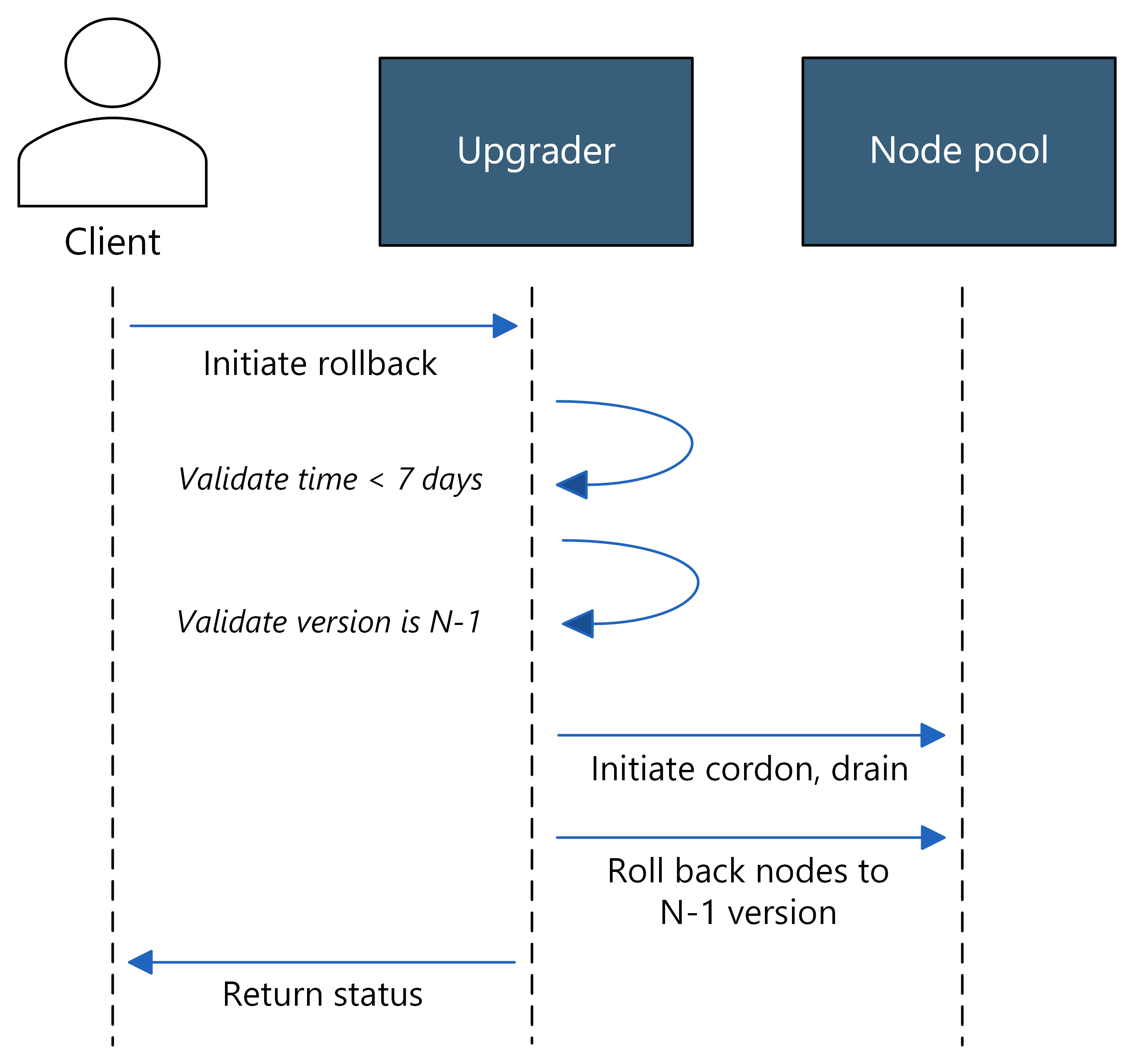
The rollback process restores all nodes in a node pool to their previous version state. Key aspects of the workflow include:
- All-or-nothing approach: All nodes must successfully revert to the previous version for the rollback to complete successfully. If any node fails to roll back, the entire operation fails in order to clearly communicate the state of the cluster, similar to the upgrade operation.
- Progress tracking: Monitor rollback status using Azure Activity Log for operation history and the Operation Status API for real-time updates.
Roll back a node pool version
Important
Keep the following information in mind when rolling back a node pool version:
- Staying on older versions long-term increases security risks and might eventually prevent upgrades due to version skew limitations. Treat rollback as a temporary recovery mechanism, not a permanent solution.
- Rollback replaces the nodes in the node pool and can temporarily disrupt workloads. Before you start, verify that your workloads have sufficient capacity and that your Pod Disruption Budgets allow the required node disruptions.
- When using the REST API, you can call the Agent Pools - Get Upgrade Profile API first to retrieve the recently used versions. Use this information to specify the target version in your rollback request.
The Azure CLI rollback command automatically selects the most recently recorded version, also known as N-1. You can't use the command to select an arbitrary Kubernetes or node image version, and you can't perform consecutive rollbacks to move through multiple previous versions.
Review the cluster's automatic upgrade configuration.
az aks show \
    --name myAKSCluster \
    --resource-group myResourceGroup \
    --query autoUpgradeProfile
Disable the Kubernetes automatic upgrade channel before rollback. If you need to restore the previous node image, also disable the node OS upgrade channel.
Review the available rollback target by using the
az aks nodepool get-rollback-versionscommand.az aks nodepool get-rollback-versions \ --name myNodePool \ --resource-group myResourceGroup \ --cluster-name myAKSClusterIf the command returns no versions, the node pool doesn't have an eligible rollback target. The node pool must have been upgraded within the previous seven days, and the recorded Kubernetes version must still be supported by AKS.
Roll back the node pool by using the
az aks nodepool rollbackcommand.az aks nodepool rollback \ --name myNodePool \ --resource-group myResourceGroup \ --cluster-name myAKSClusterVerify the Kubernetes version, node image version, and provisioning state after the rollback finishes.
az aks nodepool show \
    --name myNodePool \
    --resource-group myResourceGroup \
    --cluster-name myAKSCluster \
    --query '{provisioningState:provisioningState,kubernetesVersion:currentOrchestratorVersion,nodeImageVersion:nodeImageVersion}'
A successful rollback returns
SucceededforprovisioningStateand shows the recorded Kubernetes and node image versions.
If you changed the cluster's automatic upgrade settings before the rollback, restore the intended settings after you investigate and resolve the upgrade issue.
Monitor node pool rollback status
You can use the following methods to monitor the status of a node pool rollback operation and validate a successful rollback:
- Look up activity logs on your cluster.
- Look up specific upgrade-related events on your cluster.
- Subscribe to AKS events with Azure Event Grid.
- If you subscribe to an automatic upgrade channel, you can use AKS Communication Manager for upgrade notifications.
Troubleshoot node pool rollback
The following table describes common rollback issues and how to resolve them:
| Issue | Cause and resolution |
|---|---|
| No rollback versions are returned. | The node pool might have no recorded upgrade, the seven-day rollback window might have expired, or the previous Kubernetes version might no longer be supported. Check the node pool's upgrade history and the AKS Kubernetes version support policy. |
| AKS reports that another operation is in progress. | Wait for the current cluster or node pool operation to finish before you retry the rollback. If you need to stop the operation, use the az aks nodepool operation-abort command. |
| The Kubernetes version rolls back, but the node image doesn't. | The node OS upgrade channel might be enabled. Disable the channel when you need to restore the previous node image. |
| AKS rejects the previous node image version. | The node pool's OS SKU might have changed since the recorded version. Rollback doesn't support reverting OS SKU changes. Use az aks nodepool update --os-sku to revert the OS SKU instead. |
| AKS rejects the previous Kubernetes version. | The recorded version might no longer be supported. Check the AKS Kubernetes version support policy. |
Post-rollback best practices
After successfully rolling back your node pool, use the following best practices to ensure stability and security:
- Investigate the root cause: Identify why the upgrade failed before attempting another upgrade. Review application logs, resource metrics, and compatibility requirements.
- Test in non-production: Validate the newer version in a development or staging environment to reproduce and resolve issues before upgrading production again.
- Plan your re-upgrade: Don't stay on the rolled-back version indefinitely. Schedule a re-upgrade to maintain security patches and support:
- For critical security issues: Re-upgrade within days after fixes are validated.
- For application compatibility issues: Re-upgrade within weeks after code adjustments.
- Maximum recommended timeframe: 30 days to avoid accumulating security vulnerabilities.
Frequently asked questions (FAQs)
Can I perform other operations during a node pool rollback?
No, the rollback must complete before starting other operations. To perform different operations, abort the rollback first.
Does node pool rollback revert both Kubernetes version and node image?
Yes, the rollback reverts to the most recently used Kubernetes version and its corresponding node image. If both components changed, the system restores the previous Kubernetes version with the last compatible node image for that version.
Can I roll back only the node image without changing the node pool version?
Yes, if you performed only a node image update within the last seven days (without upgrading the node pool version), the rollback restores the previous virtual hard disk (VHD) image while maintaining the same Kubernetes version.
Can I roll back to a version that's out of support?
No, you can't roll back to a Kubernetes version that's no longer supported by AKS. For example, if your node pool was on version 1.27.9 (now out of support) and you upgraded to 1.28.5, you can't roll back to 1.27.9 because it's no longer in the supported version list. Always check the AKS Kubernetes version support policy to verify version availability.
For the same reason, you can't roll back a platform-initiated upgrade. When AKS upgrades a cluster off an unsupported version, the previous version is no longer available.
Do I need to disable autoupgrade before performing a node pool rollback?
Yes, you must disable the Kubernetes automatic upgrade channel before performing a rollback. If you enable only the node OS upgrade channel, the Kubernetes version rollback can proceed, but the previous node image might not be restored. Disable the node OS upgrade channel when you need to roll back both the Kubernetes version and node image.
If the cluster is included in an update group in an Azure Kubernetes Fleet Manager autoupgrade profile, you must also remove the cluster from the update group before performing the rollback. Otherwise, the autoupgrade process might automatically upgrade your node pool again after the rollback completes.
Can I roll back after changing the OS SKU (for example, from Ubuntu to Azure Linux)?
No. Node pool rollback is limited to version changes and doesn't revert OS SKU changes. After migrating from one OS SKU to another (for example, Ubuntu to Azure Linux), the previous node image version belongs to the old OS SKU and is incompatible with the current configuration. The rollback operation rejects the previous image version with an error similar to:
NodeImageVersion 'AKSUbuntu-2204gen2containerd-202602.13.5' is not accepted. NodeImageVersion can only be current version 'AKSAzureLinux-V3gen2-202602.13.5' or 'latest'
To revert the OS SKU, use the az aks nodepool update command with the --os-sku parameter. For more information, see Roll back your OS version.
Related content
To learn more about node pool upgrades in AKS, see the following articles: