Note
Access to this page requires authorization. You can try signing in or changing directories.
Access to this page requires authorization. You can try changing directories.
Azure Application Gateway receives web requests and forwards them to the servers that host your application. A backend pool is a group of those servers. You can use separate pools for different application versions or for primary and standby environments.
Pool and server selection algorithms control how requests are distributed between pools and between servers within a pool. Use them to introduce a new application version gradually, switch to a standby pool when needed, or account for differences in server capacity.
Important
Advanced load balancing is currently in preview. This preview version is provided without a service-level agreement, and don't recommend it for production workloads. For more information, see Supplemental Terms of Use for Microsoft Azure Previews.
How requests are distributed
A routing rule determines where Application Gateway forwards a request. For a rule associated with multiple backend pools, traffic distribution happens in two stages:
- Pool selection: Choose a pool using the rule's weighted distribution or priority-based algorithm.
- Server selection: Choose a healthy server within that pool using Round Robin, Weighted Round Robin, or Least Connections.
The two choices are independent. For example, you can split traffic between pools by weight and use Least Connections within each pool. You can also choose a server selection algorithm when a rule is associated with just one pool.
Each pool is associated with backend HTTP settings, which define how Application Gateway connects to its servers, including the protocol and port. Pools can share these settings when their connection requirements are the same. Updating shared settings affects every pool and rule that uses them.
Sharing settings doesn't require pools to use the same server selection algorithm. Health probes regularly check whether servers can receive requests. For background, see Application Gateway components.
Pool selection algorithm
Associate up to five backend pools with a routing rule or an Advanced routing map's default action. Choose either weighted distribution or priority-based selection for that set of pools, not both.
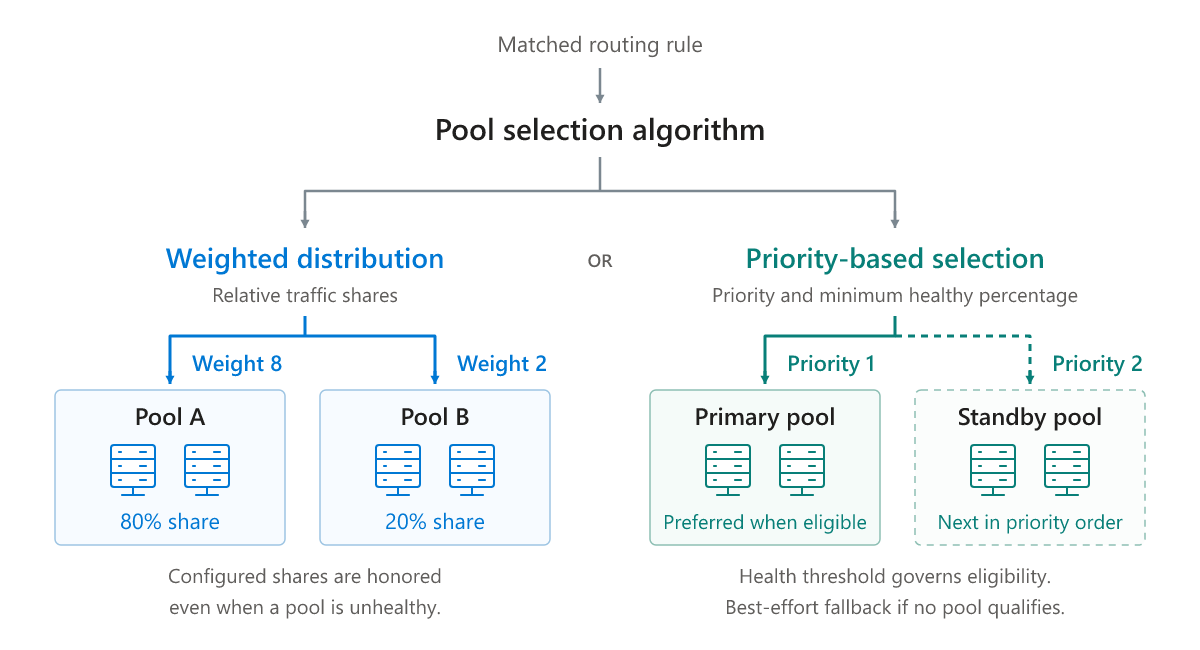
Weighted distribution: split traffic between pools
Weighted distribution gives each pool a share of traffic based on its weight. For example, send a small share to a new application version, then increase its weight as you gain confidence in the deployment.
Use whole-number weights from 0 to 100. Weights are relative and don't need to total 100. At least one pool must have a positive weight; a weight of 0 excludes a pool from selection.
| Backend pool | Weight | Configured traffic share |
|---|---|---|
| Existing version | 8 | 80% |
| New version | 2 | 20% |
The total weight is 10, so the intended shares are 8/10 and 2/10. Weights of 80 and 20 produce the same ratio. These shares describe distribution over time, not an exact request count in every small sample.
Important
Weighted distribution doesn't consider pool health or move an unhealthy pool's traffic share to another pool. If the selected pool has no healthy servers, requests fail. Choose priority-based selection for health-based failover.
Health probes still determine which servers can receive requests within the selected pool.
Priority-based selection: use a primary and standby pools
Priority-based selection sends requests to a preferred, or primary, pool while it meets your health requirement. If it doesn't, Application Gateway checks the other pools in priority order. These standby pools act as backups rather than sharing traffic with the primary pool.
Configure two settings:
- Pool priority: Assign each pool a different value from 1 to 5. Priority 1 is highest, and 5 is lowest.
- Minimum healthy percentage: Set the percentage of servers that must be healthy in each pool, from 0 to 100. A pool qualifies when it meets or exceeds this threshold. An empty pool doesn't qualify for normal selection.
Application Gateway selects the highest-priority pool that meets the requirement. A pool can fall below your threshold while some of its servers are still healthy, so failover can happen before the entire pool becomes unavailable.
Example: fail over before all servers are unhealthy
Suppose a rule has a minimum healthy percentage of 60%, a primary pool with five servers at priority 1, and a standby pool with four servers at priority 2. Health probes determine which servers are healthy.
| Situation | Primary pool health | Standby pool health | Selected pool |
|---|---|---|---|
| One primary server is unhealthy. | 4 of 5 healthy (80%) | 4 of 4 healthy (100%) | Primary. Both pools meet the requirement, so priority 1 takes precedence. |
| Three primary servers are unhealthy. | 2 of 5 healthy (40%) | 4 of 4 healthy (100%) | Standby. The primary is below 60%, so priority 2 is selected. |
In the second situation, new requests move to the standby pool even though two primary servers are still healthy. Server selection then chooses a healthy server within the standby pool.
The same threshold applies separately to each pool, even when their sizes differ. It is a health requirement, not a traffic share. Use weighted distribution if you want to split traffic between pools.
This threshold doesn't measure CPU usage or connection counts. It also differs from a probe's unhealthy threshold, which controls when an individual server is marked unhealthy. See Application Gateway health probes.
If no pool meets the health requirement
If no pool meets the minimum healthy percentage, Application Gateway sends requests to the highest-priority pool.
When a preferred pool recovers
When a higher-priority pool meets the threshold again, new requests return to it immediately. Requests already in progress aren't moved. There is no separate recovery threshold or configurable return delay.
Server selection algorithm
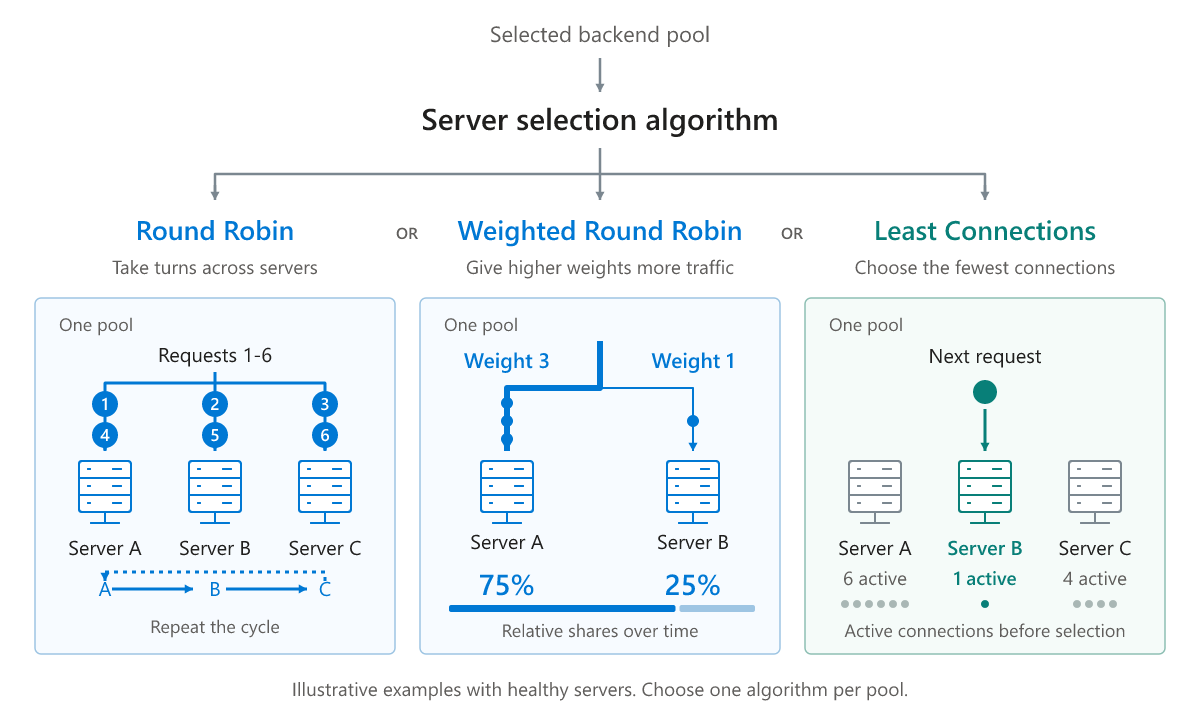
After selecting a pool, its server selection algorithm chooses a healthy server within it. Configure one of the following algorithms for each pool.
Round Robin
Round Robin is the default. It sends requests to each healthy server in turn, distributing them evenly over time. Choose it when servers have similar capacity and requests require similar processing effort.
Weighted Round Robin
Weighted Round Robin gives higher-weight servers a larger share of traffic. Choose it when servers in a pool have different capacities or when you want to control their relative traffic shares.
Give every server a whole-number weight from 0 to 100, with at least one positive weight. Weights don't need to total 100, and a weight of 0 excludes a server from selection. The API requires a weight for each server; the Azure portal starts with equal weights that you can change.
For example, weights of 3 and 1 give one server three times the share of the other. These weights affect distribution within the pool, not the traffic share assigned to the pool itself.
Unlike weighted pool selection, Weighted Round Robin redistributes traffic when a server becomes unhealthy. The algorithm skips that server and uses the remaining healthy servers' relative weights. For example, with weights of 6, 3, and 1, losing the weight-6 server leaves the other two with approximately 75% and 25% of the traffic distributed by the algorithm. The original proportions resume when the server recovers.
Weighted Round Robin supports servers added by IP address or fully qualified domain name (FQDN). It doesn't support pools containing servers added through network interface associations, including mixed pools. See Limitations section.
Least Connections
Least Connections sends each new request to the healthy server with the fewest active connections. Use it when some requests keep servers busy longer than others. Connection count isn't a direct measure of CPU usage or how much processing a request needs.
How session affinity affects distribution
Cookie-based affinity helps keep a client's requests on the same destination. It uses cookies, small values the client sends back with later requests. Enable it in backend HTTP settings when your application needs this behavior.
Affinity changes how the algorithms described earlier select pools and servers.
Weighted pools
A pool with affinity enabled issues an ApplicationGatewayPoolAffinity cookie. Requests without a valid pool cookie use weighted selection. Once a client has a valid cookie, later requests return to that pool instead. Pool health isn't checked, so a client can remain on an unhealthy pool. Requests fail if no servers in that pool are healthy.
Weights therefore control where new sessions are assigned, not every request from existing sessions. Changing weights doesn't move clients already assigned to a pool. Removing a pool or setting its weight to 0 invalidates its pool cookie, and affected clients are reassigned using the remaining weights.
Priority-based pools
Priority-based selection doesn't issue a pool-affinity cookie. Priority and the health requirement choose the pool for every new request, regardless of existing affinity cookies.
Failover or recovery can move a client's next request to another pool even if its previous server is still healthy. Requests already in progress aren't moved. Applications that keep session data only on one server need to account for this change of destination.
Servers within the selected pool
Within the selected pool, a valid server-affinity cookie sends requests to its healthy server. If the cookie is missing or no longer identifies a healthy server in that pool, Application Gateway uses Round Robin, or the configured weights for Weighted Round Robin, and issues a new cookie.
Least Connections isn't applied while cookie-based affinity is enabled. If you want server selection to use active connection counts, disable cookie-based affinity in the associated backend HTTP settings.
For configuration details, see Cookie-based affinity.
FQDNs, virtual machines, and scaling
FQDNs that resolve to multiple addresses
An FQDN can resolve to more than one IP address. Health calculations count those resolved backend IP addresses, not the domain names. A name that resolves to four addresses contributes four servers to the pool's health calculation.
With Weighted Round Robin, an FQDN's weight applies to each IP address it resolves to. Equal weights on two FQDN entries don't necessarily give the names equal total traffic shares if they resolve to different numbers of healthy addresses.
Virtual machines and scale sets
Virtual machines and virtual machine scale sets added through network interface associations support Round Robin, Least Connections, and either pool selection algorithm, but not server weights. To give groups of different capacities different traffic shares, place them in separate pools and use weighted pool selection.
For a virtual machine with a static private IP address, you can add the IP address directly instead of associating its network interface to use Weighted Round Robin. You are then responsible for keeping the pool's address entries up to date.
How scaling affects traffic
New scale-set instances count as unhealthy until they pass a health probe. Adding instances can therefore temporarily lower a pool's healthy percentage and trigger failover. For example, growing from four healthy instances to eight total instances initially makes the pool 50% healthy. With a 60% requirement, it won't qualify again until enough new instances pass their probes.
A pool's configured weight doesn't automatically change when its instance count changes. Review weights as pools grow or shrink, especially when using different-sized scale sets.
Dedicated Backend Connection
Dedicated Backend Connection keeps a separate backend connection for each client connection. It works with a single pool, not weighted or priority-based pool selection; multi-pool configurations with this setting are rejected.
With a single backend pool, the server is selected when a new dedicated connection is created. Later requests on that client connection reuse it. Round Robin and Weighted Round Robin therefore distribute client connections, not individual requests. Weight and health changes affect new connections rather than moving existing ones.
Important
Least Connections with Dedicated Backend Connection has a known limitation: its count can reflect connections created rather than connections currently open. Don't rely on this combination to balance current active connections.
Limitations
Review these restrictions before choosing your configuration:
- Gateway SKU: Pool and server selection capabilities aren't supported on the Basic SKU. Use Standard_v2 or WAF_v2.
- Protocols: Supported for Layer 7 web traffic, not Layer 4 TCP or TLS proxy listeners.
- Multi-pool rules: Supported for Basic routing rules, Advanced routing rules, and the default backend action of an Advanced routing map. Traditional Path-based rules and individual path entries continue to use one pool; for condition-based multi-pool routing on a path, use an Advanced rule with a Path condition.
- Pool limit: Each rule or default backend action supports up to five pool associations. The same pool can't appear more than once within that target configuration.
- Weights: At least one weight must be positive in each weighted pool configuration and each Weighted Round Robin pool. All-zero configurations aren't supported.
- Pool algorithms: Choose either weighted distribution or priority-based selection for each target configuration, not both. Minimum healthy percentage is available only with priority-based selection.
- Weighted Round Robin: Supports IP/FQDN addresses only. Any NIC-associated virtual machine or scale set backend makes the pool ineligible, including pools that also contain IP/FQDN targets.
- Dedicated Backend Connection: Backend HTTP settings with this option enabled can't be associated with pools in a multi-pool rule.
- Redirect-only configurations: A rule or Advanced routing map configured only to redirect traffic doesn't select backend pools and can't include multi-pool selection settings.
A Basic routing rule is different from the Basic gateway SKU. Basic routing rules on Standard_v2 and WAF_v2 can be associated with multiple pools.
Update or remove a backend pool
Pool weights and priorities belong to each rule or default target configuration. The server selection algorithm and server weights belong to the pool, so changing them affects every rule associated with that pool.
You can reuse an existing pool when moving from one pool to multiple pools; you don't need to recreate it. Adding a server or pool doesn't automatically change existing weights, so review them after changing the configuration.
A pool can be associated with more than one rule. Before deleting it, update every associated rule:
- If the rule is associated with only that pool, select a different pool.
- If the rule is associated with multiple pools, remove the pool's association and review the remaining weights or priorities. Removing a pool can change the remaining pools' relative traffic shares.
- Alternatively, delete an associated rule if it is no longer needed.
Save the rule changes, then delete the pool. Removing one pool's association lets you keep the rule for its other pools.