Note
Access to this page requires authorization. You can try signing in or changing directories.
Access to this page requires authorization. You can try changing directories.
Important
HTTP/3 support in Azure Application Gateway is currently in preview. While in preview, functionality, availability, and other aspects of this feature might change in response to feedback.
This preview version is provided without a service level agreement, and isn't recommended for production workloads. Certain features might not be supported or can have constrained capabilities.
For more information, see Supplemental Terms of Use for Microsoft Azure Previews.
Azure Application Gateway supports HTTP/3, the latest version of the Hypertext Transfer Protocol. HTTP/3 uses QUIC, a UDP-based transport protocol, instead of TCP for the connection layer. HTTP/3 can help improve connection performance and reliability for internet-facing applications, especially for clients on mobile or lossy networks.
HTTP/3 can establish connections in a single round trip (1-RTT), which helps reduce connection setup latency compared with earlier HTTP versions. It also supports multiplexing multiple streams over a single connection without TCP head-of-line blocking.
HTTP/3 uses QUIC with built-in TLS 1.3 security.
QUIC-based HTTP/3 features and use cases
HTTP/3 support on Application Gateway provides QUIC-based capabilities for internet-facing applications, including faster connection establishment, independent stream processing, and connection migration across networks.
Faster connection establishment
QUIC reduces connection establishment latency by replacing TCP’s three-way handshake with a 1-RTT handshake. This reduction can significantly reduce connection setup time and improve initial page load performance, especially for latency-sensitive applications.
Workloads such as web applications, messaging platforms, voice assistants, transaction-based systems, mobile banking, notification services, and APIs can benefit from faster connection startup and reduced user-perceived delay.
Independent HTTP streams
HTTP/3 supports multiplexing multiple streams over a single QUIC connection. With TCP-based protocol,packet loss or delay can block delivery of subsequent packets on the same connection, which is known as head-of-line blocking. QUIC handles streams independently, so packet loss affecting one stream doesn't block progress on other streams. This behavior can improve responsiveness for workloads such as web browsing, instant messaging, IoT communication, API traffic, and financial transactions.
Connection migration
QUIC supports connection migration by using connection identifiers instead of relying only on the client IP address and port. This support allows a connection to continue when a client changes networks or receives a new IP address.
QUIC connection migration allows a client’s IP address or port to change without treating the traffic as a new connection. This change can help avoid a new connection setup and TLS handshake when a client moves between networks, such as from cellular to Wi-Fi.
Limitations
During public preview, the following limitations apply:
- Multi-site listeners aren't supported.
- IPv6 listeners and mutual authentication aren't supported.
- Web Application Firewall (WAF) gateways can't use HTTP/3 listeners.
- The Public-Private IP Same Port feature isn't supported for HTTP/3 listeners.
- Azure PowerShell, Azure CLI, and Terraform don't support this feature. Support is planned for general availability.
Enabling HTTP/3
You configure HTTP/3 at the listener level, not at the application gateway level. You can enable HTTP/3 on individual Basic listeners, either when creating a new listener or by updating an existing listener. Use the Azure portal or the REST API to enable HTTP/3. When using the REST API, use API version 2023-02-01 or later.
HTTP/3 uses QUIC and requires TLS 1.3. To enable HTTP/3, the listener must use a predefined TLS policy that supports TLS 1.3. Currently, only the predefined 2022 TLS policies support TLS 1.3. If you don't configure a 2022 predefined TLS policy and the listener uses a default policy that doesn't support TLS 1.3, you can't enable HTTP/3. When you enable HTTP/3 on a listener, it applies only to that listener.
HTTP/3 applies only to frontend client connections. Backend connections continue to use HTTP/1.1.
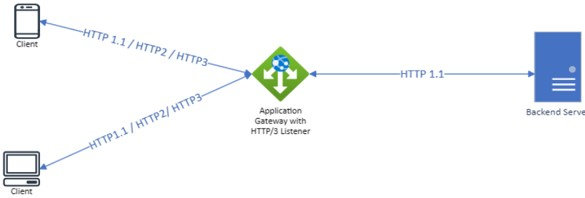
In public preview, you can enable HTTP/3 on an Application Gateway listener by using the Azure portal or the REST API.
Configure HTTP/3 by using the Azure portal
During public preview, you can't enable HTTP/3 on a listener as part of the new application gateway creation flow in the Azure portal. To configure HTTP/3 in the portal, create the application gateway first, and then enable HTTP/3 on a new or existing listener.
- In the Azure portal, open your application gateway.
- Under Settings, select Listeners.
- Select an existing Basic listener, or add a new Basic listener.
- Enable HTTP/3 for the listener. Select Save.
- Connect to the application gateway by using clients that support HTTP/3.
Configure HTTP/3 by using the REST API
To configure HTTP/3 by using the REST API, use Network Resource Provider API version 2023-02-01 or later.
Get the existing Application Gateway resource configuration. Reference: Application Gateways - Get
In the
httpListenerscollection, update the listener that you want to enable HTTP/3 on. Set theenableHttp3property totrue."enableHttp3": trueUpdate the Application Gateway resource by using a PUT request. Reference: Application Gateways - Create Or Update
Connect to the application gateway by using clients that support HTTP/3.