Note
Access to this page requires authorization. You can try signing in or changing directories.
Access to this page requires authorization. You can try changing directories.
Keyless TLS lets Azure Application Gateway terminate TLS by using a certificate whose private key remains in Azure Key Vault Managed HSM. The certificate's public portion is available to Application Gateway, but the private key stays in the HSM and is never exported to the gateway.
This approach is useful when you want Application Gateway to handle TLS termination while keeping private key custody in an HSM boundary. It also supports separation of duties, centralized key management, and better auditability for cryptographic operations.
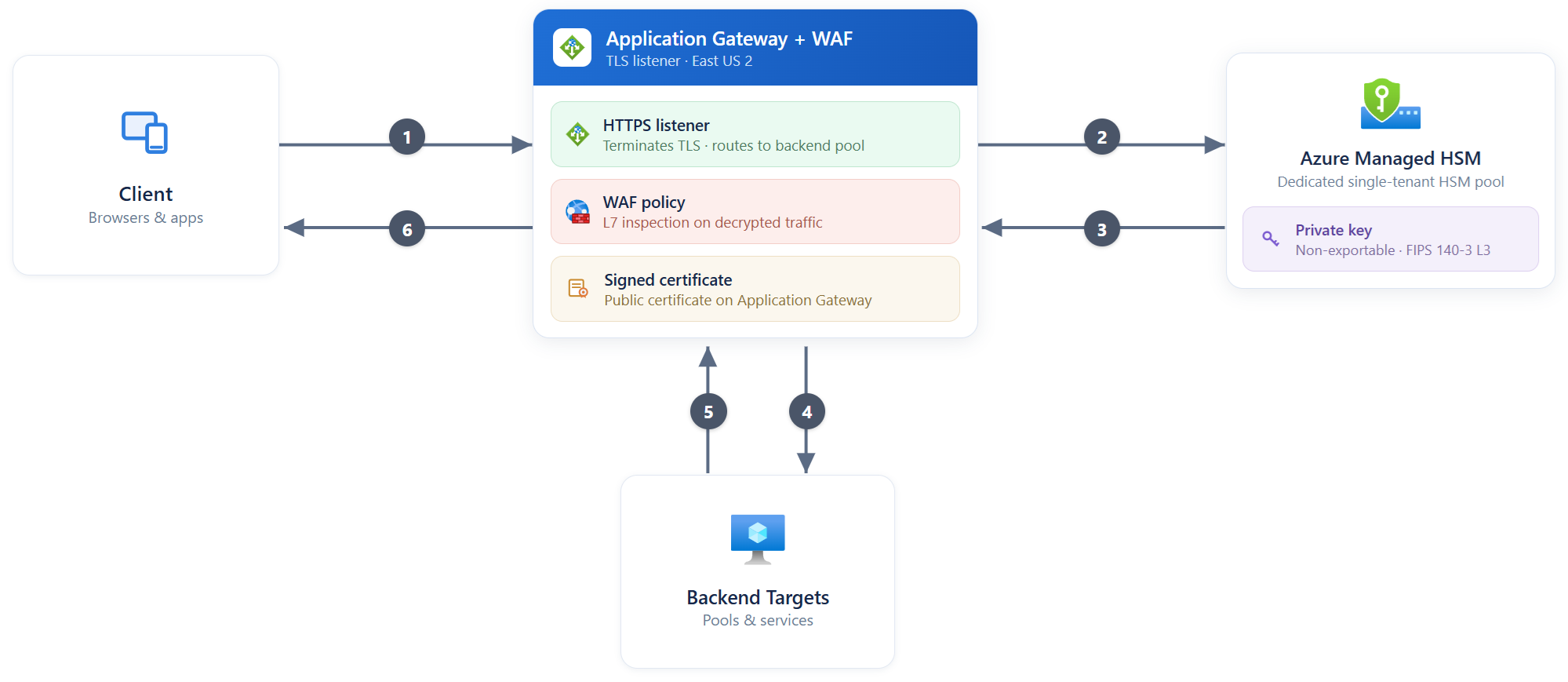
The diagram shows the TLS flow between the client, Application Gateway, backend targets, and Azure Key Vault Managed HSM.
Handshake and request flow
At a high level, the flow looks like this:
- A client opens an HTTPS connection to the gateway listener.
- The gateway calls Managed HSM to sign with the non-exportable key.
- Managed HSM returns the signature and the TLS handshake completes.
- WAF inspects the request, and then the request is forwarded to a backend target.
- The backend target returns its response to the gateway.
- The gateway returns the response to the client over TLS.
The private key never leaves Managed HSM.
Why use it
Keyless TLS can help when you want to:
- Keep private keys inside dedicated HSM-backed storage
- Reduce exposure of sensitive key material on network appliances
- Use managed identities and RBAC for key access
- Audit signing operations through Managed HSM diagnostics
- Apply least-privilege access to specific keys when needed
- Obtain cryptographic evidence that the TLS key was generated and is stored in a FIPS 140-3 Level 3 validated HSM
Requirements
To use keyless TLS with Application Gateway, you typically need:
- An Azure Application Gateway v2 deployment
- An Azure Key Vault Managed HSM instance
- A user-assigned managed identity for Application Gateway
- RBAC permissions for the identity on the Managed HSM key
- A Linux machine with OpenSSL 3.0.13 and the Azure Key Vault Managed HSM TLS offload library for certificate generation
Considerations
- This feature depends on a supported Application Gateway TLS configuration.
- You still need to supply the certificate public portion to Application Gateway.
- Scope HSM permissions as narrowly as possible, especially in production environments.
- Enable diagnostic logging so you can review key usage and signing activity.
Next steps
For the procedure that shows how to provision resources, generate the certificate, and configure Application Gateway, see Tutorial: Configure keyless TLS termination with Azure Key Vault Managed HSM.