Note
Access to this page requires authorization. You can try signing in or changing directories.
Access to this page requires authorization. You can try changing directories.
This quickstart shows you how to deploy an Azure Application Gateway with mutual TLS (mTLS) passthrough using an Azure Resource Manager template (ARM template) and API version 2025-03-01. In passthrough mode, the gateway requests a client certificate but doesn't validate it. Certificate validation and policy enforcement occur at the backend.
Key features
- Associate an SSL profile with the listener for mTLS passthrough.
- No client CA certificate is required at the gateway.
- The
verifyClientAuthModeproperty supportsStrictandPassthroughvalues. - Portal support: You can configure mTLS passthrough directly in the Azure portal.
Note
PowerShell and CLI support for passthrough configuration are currently unavailable. You can configure mTLS passthrough using the Azure portal or ARM templates.
Configure mTLS passthrough using Azure portal
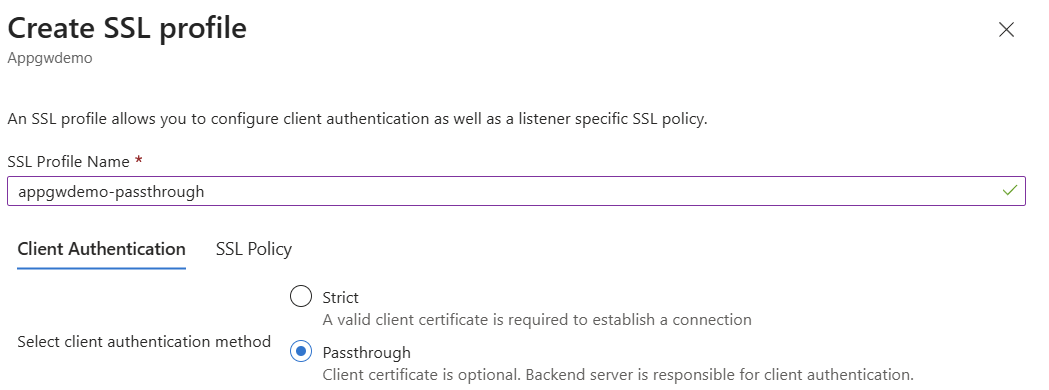
You can configure mTLS passthrough directly in the Azure portal by creating an SSL profile with the Passthrough client authentication method:
Navigate to your Application Gateway resource in the Azure portal.
Under Settings, select SSL profiles.
Select + Add to create a new SSL profile.
Enter a name for your SSL profile.
On the Client Authentication tab, select Passthrough.
In Passthrough mode, the client certificate is optional and the backend server is responsible for client authentication.
- Configure SSL Policy settings as needed.
- Select Add to create the SSL profile.
- Associate the SSL profile with your HTTPS listener.
Prerequisites
- An Azure subscription and resource group.
- Azure CLI installed locally.
- An SSL certificate (Base64-encoded PFX) and password.
- An SSH key for Linux VM admin (if applicable).
- API version
2025-03-01or later for the passthrough property.
Deploy Application Gateway with mTLS passthrough listener
This template creates the following resources:
- A virtual network with two subnets (one delegated to Application Gateway).
- A public IP address for the gateway frontend.
- An Application Gateway (Standard_v2) with:
- SSL certificate and SSL profile for client certificate passthrough.
- HTTPS listener and routing rule.
- Backend pool pointing to an app service.
Update the template with your configuration details and include a valid SSL certificate.
Parameter file: deploymentParameters.json
{
    "$schema": "https://schema.management.azure.com/schemas/2015-01-01/deploymentParameters.json#",
    "contentVersion": "1.0.0.0",
    "parameters": {
        "addressPrefix": {
            "value": "10.0.0.0/16"
        },
        "subnetPrefix": {
            "value": "10.0.0.0/24"
        },
        "skuName": {
            "value": "Standard_v2"
        },
        "capacity": {
            "value": 2
        },
        "adminUsername": {
            "value": "ubuntu"
        },
        "adminSSHKey": {
            "value": "<your-ssh-public-key>"
        },
        "certData": {
            "value": "<Base64-encoded-PFX-data>"
        },
        "certPassword": {
            "value": "<certificate-password>"
        }
    }
}
Template file: deploymentTemplate.json
{
    "$schema": "https://schema.management.azure.com/schemas/2019-04-01/deploymentTemplate.json#",
    "contentVersion": "1.0.0.0",
    "parameters": {
        "addressPrefix": {
            "defaultValue": "10.0.0.0/16",
            "type": "String",
            "metadata": {
                "description": "Address prefix for the Virtual Network"
            }
        },
        "subnetPrefix": {
            "defaultValue": "10.0.0.0/24",
            "type": "String",
            "metadata": {
                "description": "Subnet prefix"
            }
        },
        "skuName": {
            "defaultValue": "Standard_Medium",
            "type": "String",
            "metadata": {
                "description": "Sku Name"
            }
        },
        "capacity": {
            "defaultValue": 2,
            "type": "Int",
            "metadata": {
                "description": "Number of instances"
            }
        },
        "adminUsername": {
            "type": "String"
        },
		"adminSSHKey": {
            "type": "securestring"
        },
        "certData": {
            "type": "String",
            "metadata": {
                "description": "ssl cert data"
            }
        },
        "certPassword": {
            "type": "SecureString",
            "metadata": {
                "description": "ssl cert password"
            }
        }
    },
    "variables": {
        "applicationGatewayName": "mtlsAppGw",
        "idName": "identity",
        "publicIPAddressName": "mtlsPip",
        "virtualNetworkName": "mtlsVnet",
        "subnetName": "appgwsubnet",
        "vnetID": "[resourceId('Microsoft.Network/virtualNetworks',variables('virtualNetworkName'))]",
        "subnetRef": "[concat(variables('vnetID'),'/subnets/',variables('subnetName'))]",
        "publicIPRef": "[resourceId('Microsoft.Network/publicIPAddresses',variables('publicIPAddressName'))]",
        "applicationGatewayID": "[resourceId('Microsoft.Network/applicationGateways',variables('applicationGatewayName'))]",
        "apiVersion": "2025-03-01",
        "identityID": "[resourceId('Microsoft.ManagedIdentity/userAssignedIdentities',variables('idName'))]",
        "backendSubnetId": "[concat(variables('vnetID'),'/subnets/backendsubnet')]"
    },
    "resources": [
        {
            "type": "Microsoft.Network/virtualNetworks",
            "name": "[variables('virtualNetworkName')]",
            "apiVersion": "2024-07-01",
            "location": "[resourceGroup().location]",
            "properties": {
                "addressSpace": {
                    "addressPrefixes": [
                        "[parameters('addressPrefix')]"
                    ]
                },
                "subnets": [
                    {
                        "name": "[variables('subnetName')]",
                        "properties": {
                            "addressPrefix": "[parameters('subnetPrefix')]",
                             "delegations": [
                                {
                                    "name": "Microsoft.Network/applicationGateways",
                                    "properties": {
                                        "serviceName": "Microsoft.Network/applicationGateways"
                                    }
                                }
                            ]
                        }
                    },
                    {
                        "name": "backendSubnet",
                        "properties": {
                            "addressPrefix": "10.0.2.0/24"
                        }
                    }
                ]
            }
        },
        {
            "type": "Microsoft.Network/publicIPAddresses",
            "sku": {
                "name": "Standard"
            },
            "name": "[variables('publicIPAddressName')]",
            "apiVersion": "2024-07-01",
            "location": "[resourceGroup().location]",
            "properties": {
                "publicIPAllocationMethod": "Static"
            }
        },
        {
            "type": "Microsoft.Network/applicationGateways",
            "name": "[variables('applicationGatewayName')]",
            "apiVersion": "[variables('apiVersion')]",
            "location": "[resourceGroup().location]",
            "properties": {
                "sku": {
                    "name": "Standard_v2",
                    "tier": "Standard_v2",
                    "capacity": 3
                },
                "sslCertificates": [
                    {
                        "name": "sslCert",
                        "properties": {
                            "data": "[parameters('certData')]",
                            "password": "[parameters('certPassword')]"
                        }
                    }
                ],
                "sslPolicy": {
                    "policyType": "Predefined",
                    "policyName": "AppGwSslPolicy20220101"
                },
                "sslProfiles": [
                    {
                        "name": "sslnotrustedcert",
                        "id": "[concat(resourceId('Microsoft.Network/applicationGateways',  variables('applicationGatewayName')), '/sslProfiles/sslnotrustedcert')]",
                        "properties": {
                            "clientAuthConfiguration": {
                                "VerifyClientCertIssuerDN": false,
                                "VerifyClientRevocation": "None",
                                "VerifyClientAuthMode": "Passthrough"
                            }
                        }
                    }
                ],
                "gatewayIPConfigurations": [
                    {
                        "name": "appGatewayIpConfig",
                        "properties": {
                            "subnet": {
                                "id": "[variables('subnetRef')]"
                            }
                        }
                    }
                ],
                "frontendIPConfigurations": [
                    {
                        "name": "appGatewayFrontendIP",
                        "properties": {
                            "PublicIPAddress": {
                                "id": "[variables('publicIPRef')]"
                            }
                        }
                    }
                ],
                "frontendPorts": [
                    {
                        "name": "port2",
                        "properties": {
                            "Port": 444
                        }
                    }
                ],
                "backendAddressPools": [
                    {
                        "name": "pool2",
                        "properties": {
                            "BackendAddresses": [
							  {
                                "fqdn": "headerappgw-hsa5gjh8fpfebcfd.westus-01.azurewebsites.net"
                              }
							]
                        }
                    }
                ],
                "backendHttpSettingsCollection": [
                    {
                        "name": "settings2",
                        "properties": {
                            "Port": 80,
                            "Protocol": "Http"
                        }
                    }
                ],
                "httpListeners": [
                    {
                        "name": "listener2",
                        "properties": {
                            "FrontendIPConfiguration": {
                                "Id": "[concat(variables('applicationGatewayID'), '/frontendIPConfigurations/appGatewayFrontendIP')]"
                            },
                            "FrontendPort": {
                                "Id": "[concat(variables('applicationGatewayID'), '/frontendPorts/port2')]"
                            },
                            "Protocol": "Https",
                            "SslCertificate": {
                                "Id": "[concat(variables('applicationGatewayID'), '/sslCertificates/sslCert')]"
                            },
                            "sslProfile": {
                                "id": "[concat(variables('applicationGatewayID'), '/sslProfiles/sslnotrustedcert')]"
                            }
                        }
                    }
                ],
                "requestRoutingRules": [
                    {
                        "Name": "rule2",
                        "properties": {
                            "RuleType": "Basic",
                            "priority": 2000,
                            "httpListener": {
                                "id": "[concat(variables('applicationGatewayID'), '/httpListeners/listener2')]"
                            },
                            "backendAddressPool": {
                                "id": "[concat(variables('applicationGatewayID'), '/backendAddressPools/pool2')]"
                            },
                            "backendHttpSettings": {
                                "id": "[concat(variables('applicationGatewayID'), '/backendHttpSettingsCollection/settings2')]"
                            }
                        }
                    }
                ]
            },
            "dependsOn": [
                "[concat('Microsoft.Network/virtualNetworks/', variables('virtualNetworkName'))]",
                "[concat('Microsoft.Network/publicIPAddresses/', variables('publicIPAddressName'))]"
            ]
        }
    ]
}
Deploy the template
Run the following Azure CLI command to deploy the template:
az deployment group create \
  --resource-group <your-resource-group> \
  --template-file deploymentTemplate.json \
  --parameters @deploymentParameters.json
Validate and test
Validate the deployment
In the Azure portal, navigate to your Application Gateway resource.
Select JSON View and select API version
2025-03-01.Verify that
verifyClientAuthModeis set toPassthroughin the SSL profile:"sslProfiles": [ { "name": "sslnotrustedcert", "id": "<sample-subscription-id>", "etag": "W/\"851e4e20-d2b1-4338-9135-e0beac11aa0e\"", "properties": { "provisioningState": "Succeeded", "clientAuthConfiguration": { "verifyClientCertIssuerDN": false, "verifyClientRevocation": "None", "verifyClientAuthMode": "Passthrough" }, "httpListeners": [ { "id": "<sample-subscription-id>" } ] } } ]
Send a client certificate to the backend
If you need to forward the client certificate to the backend, configure a rewrite rule. For more information, see Rewrite HTTP headers and URL with Application Gateway.
When the client sends a certificate, this rewrite ensures that the client certificate is included in the request headers for backend processing.
Test connectivity
Verify that connections are established even when a client certificate isn't provided.
mTLS passthrough parameters
The following table describes the parameters for mTLS passthrough configuration:
| Name | Type | Description |
|---|---|---|
verifyClientCertIssuerDN |
Boolean | Specifies whether to verify the client certificate issuer name on the gateway. |
verifyClientRevocation |
String | Specifies the client certificate revocation verification mode. |
verifyClientAuthMode |
String | Specifies the client certificate mode. Valid values are Strict and Passthrough. |
Passthrough mode: The gateway requests a client certificate but doesn't enforce it. The backend validates the certificate and enforces the policy.
Security considerations
Follow your organization's security and data handling best practices when you deploy and manage this solution.