Note
Access to this page requires authorization. You can try signing in or changing directories.
Access to this page requires authorization. You can try changing directories.
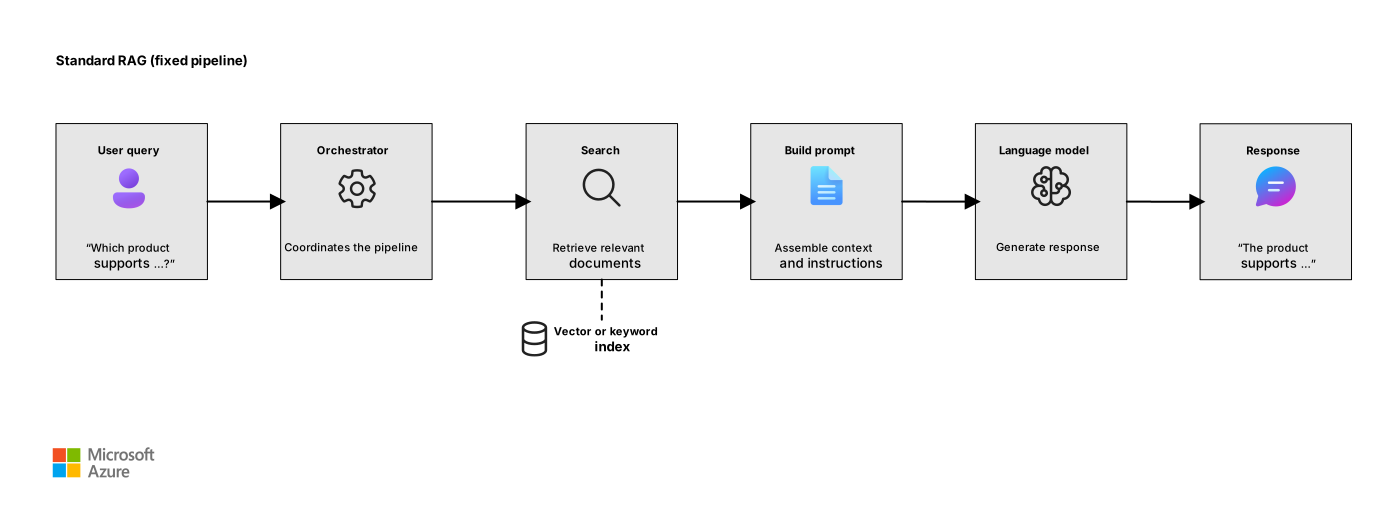
In a standard retrieval-augmented generation (RAG) pipeline, the orchestrator follows a fixed sequence. It accepts a user query, runs a search, assembles context, and calls the language model. The orchestrator doesn't decide whether to search, which indexes to query, or how many retrieval steps to take. You make these decisions when you design the solution.
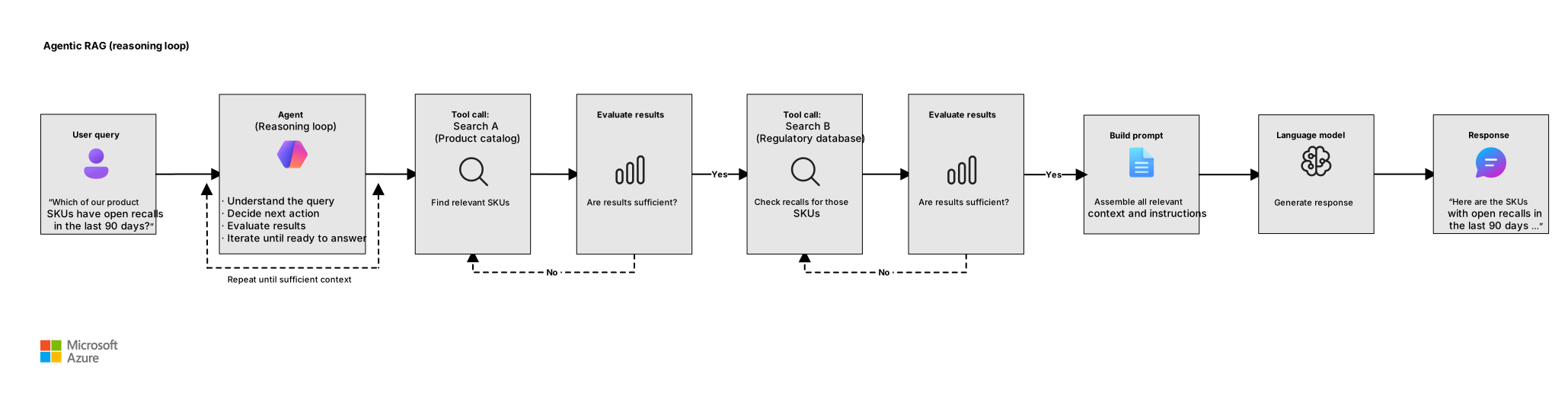
Agentic RAG changes this model. Instead of a fixed pipeline, an AI agent treats retrieval as a tool that it can invoke on demand. The agent reasons about the user query, decides which tools to call, evaluates intermediate results, and iterates until it has enough context to produce a grounded answer. This approach enables multistep reasoning, dynamic query planning, and coordination across heterogeneous data sources.
This article describes when agentic RAG adds value that standard RAG can't provide, how to structure retrieval as tool calls, and how to implement this pattern by using Microsoft Agent Framework and Foundry Agent Service.
This article is part of a series. Read the introduction.
When to use agentic RAG
Standard RAG works well for queries that map to a single search against a single index. But some scenarios exceed what a fixed pipeline can handle. Consider agentic RAG when your workload has:
Multistep reasoning. The user query requires the agent to gather information from one source, analyze the result, and then query a different source based on that analysis. For example, a user asks "Which of our product SKUs have open recalls in the last 90 days?" The agent first retrieves the list of SKUs from an internal catalog and then searches a regulatory database for each SKU.
Dynamic source selection. The agent must choose at runtime which data source to query. A financial analyst's question might require market data from one API, internal earnings reports from a search index, and regulatory filings from a document store. The agent decides which sources are relevant rather than querying all of them.
Query decomposition. Complex questions need to be broken into subsequent queries. A request like "Compare the reliability SLA of our East US and West Europe deployments" requires two independent lookups and a comparison step. The agent decomposes the query and runs each part separately.
Iterative refinement. The first retrieval pass might not return sufficient context. The agent evaluates the results, identifies gaps, and runs more queries with refined terms or filters.
Action and retrieval in the same workflow. The agent gathers information and takes action. For example, a support agent retrieves a customer's order history and then initiates a return through a separate API.
If your queries are straightforward enough that a single search against a single index can resolve them, standard RAG is the better fit. Each agent reasoning step adds latency, token consumption, and complexity. Use agentic RAG when the reasoning and flexibility justify these costs.
Architecture
The following diagrams compare a standard RAG pipeline and an agentic RAG architecture.
Standard RAG:
Agentic RAG:
Download a Visio file of this architecture.
In agentic RAG, the language model acts as the reasoning engine. It receives the user query, inspects its available tools, and generates a function call that requests specific data. The agent runtime runs the function and returns the result to the model. The model decides whether to call another tool or produce a final response. This loop is sometimes called the Reason + Act (ReAct) pattern.
Core components
An agentic RAG system has the following components:
Agents are reasoning entities that orchestrate the workflow. The agent is defined by its instructions or system prompt, an assigned language model, and a set of available tools.
Tools are functions or APIs that the agent can invoke. In an agentic RAG system, at least one tool performs retrieval. Other tools might perform computations, call external APIs, or trigger business actions.
Reasoning loops are iterative cycles in which the agent plans its next action, calls a tool, and evaluates the result. The agent controls when to stop iterating and produce a final response.
Design retrieval as a tool
The central design decision in agentic RAG is how you expose retrieval as a tool that the agent can call. Each retrieval tool should have a clear description so that the language model understands when and how to use it.
Define tool descriptions
The quality of tool descriptions directly affects how accurately the agent selects and calls tools. Follow these guidelines:
Be specific about the data source. Describe what data the tool accesses. For example, "Search the internal HR policy knowledge base for employee benefits, leave policies, and compliance procedures" is more useful than "Search documents."
Specify required and optional parameters. Use typed parameters with descriptions. A search tool might accept a
querystring (required), atop_kinteger (optional, defaults to 5), and afilterobject (optional) for metadata filtering.Describe the return schema. Tell the model what form of data it might receive. Data might be formatted as a list of text chunks with relevance scores or a structured object with specific fields. This information helps the agent reason about the results.
Single tool vs. multiple tools
Decide whether to expose a single general-purpose retrieval tool or multiple specialized tools.
| Approach | When to use | Considerations |
|---|---|---|
| Single retrieval tool | One index, uniform query patterns, straightforward filtering | Limits the model's routing burden. Best when queries are similar in structure. |
| Multiple retrieval tools | Different indexes, heterogeneous data sources, or different query strategies for each source | The agent can select the right source for each subsequent question. Keep the total tool count less than 20 to maintain model accuracy. |
For example, a customer support agent might have three retrieval tools. One tool searches the product knowledge base. Another tool queries the order management API by order ID. The third tool searches internal troubleshooting runbooks. The agent decides which tool to call based on the user's question.
Tool implementation patterns
When you implement retrieval tools, consider the following patterns:
Wrap your existing search logic. If you already have a RAG pipeline that has an optimized search configuration, such as hybrid search, reranking, or filters, wrap that logic in a function. The agent calls the function, and the function handles the search mechanics. For guidance about how to configure these search capabilities, see Information retrieval.
Return the right amount of context. Return the top N most relevant chunks with their metadata. Returning too many results consumes tokens and can dilute the signal. Start with three to five results per tool call and adjust based on evaluation.
Include metadata in results. Return source titles, dates, document IDs, and relevance scores alongside the text. The agent can use this metadata to assess result quality and cite sources in the response.
Support filtering. Expose metadata filters like date range, document category, and product line as tool parameters. This design lets the agent narrow searches without relying only on the search engine's semantic understanding.
Implement agentic RAG by using Agent Service
Agent Service provides a managed platform for building, deploying, and scaling AI agents. You can use its built-in tools for retrieval or register custom function tools that wrap your own search logic.
Use built-in search tools
Agent Service provides the following built-in tools that handle retrieval without custom code:
File search: Upload documents to a vector store, and the agent searches them automatically. Suitable for small to medium document collections for which you want zero-infrastructure vector search. For more information, see File Search tool for agents.
Azure AI Search: Connect an existing AI Search index to your agent. Use this approach when you have an established search pipeline that uses custom analyzers, scoring profiles, or security trimming. For more information, see AI Search tool.
Use function calling for custom retrieval
When your retrieval logic is more complex than a built-in tool supports, define a function tool. Describe the function's name, parameters, and purpose. The agent calls the function when it needs data, and your application runs the search and returns results.
Use this approach when you need to do the following tasks:
- Query multiple indexes or data stores in a single function.
- Apply custom preprocessing to the user's query before searching.
- Post-process or rerank search results before you return them to the agent.
- Call non-search APIs like databases or REST endpoints as part of the retrieval step.
Control the reasoning loop
Agentic RAG introduces a reasoning loop that isn't present in standard RAG. Take the following actions to manage this loop and avoid runaway costs and latency:
Set iteration limits. Cap the number of tool calls per user request. A limit of 5 to 10 iterations is typical. If the agent doesn't converge by that point, the query might need human assistance or a different approach.
Monitor token consumption. Each tool call adds input and output tokens. Track cumulative token usage per request and set budget thresholds.
Use agent instructions to guide behavior. The system prompt or agent instructions should tell the agent when to stop iterating. An example prompt might read "If you gather relevant information from at least two sources, synthesize a response. Don't search more than three times for the same subsequent question."
Implement agentic RAG by using Agent Framework
Agent Framework is the successor to Semantic Kernel and AutoGen. It combines simple agent abstractions with enterprise features such as session-based state management, middleware, telemetry, and graph-based workflows. You can define retrieval as a function tool that the agent calls during its reasoning loop.
Define a retrieval function tool (C#)
Use AIFunctionFactory.Create to turn any method into a function tool. The Description attribute tells the model when to call the function and what each parameter means.
using System.ComponentModel;
using System.Text;
using Azure.AI.Projects;
using Azure.Identity;
using Azure.Search.Documents;
using Azure.Search.Documents.Models;
using Microsoft.Agents.AI;
using Microsoft.Extensions.AI;

[Description("Search the product documentation knowledge base for technical specifications, user guides, and troubleshooting articles.")]
static async Task<string> SearchProductDocs(
    [Description("The search query that describes what information to find")] string query,
    [Description("Maximum number of results to return")] int topK = 5)
{
    // searchClient is your configured Azure AI Search client. Replace the
    // placeholders with your search endpoint and index name.
    var searchClient = new SearchClient(
        new Uri("<your-search-endpoint>"),
        "<your-index-name>",
        new DefaultAzureCredential());

    // Your search logic: hybrid search, reranking, filtering
    var results = await searchClient.SearchAsync<SearchDocument>(
        query, new SearchOptions { Size = topK });

    var formatted = new StringBuilder();
    await foreach (var result in results.Value.GetResultsAsync())
    {
        formatted.AppendLine($"Source: {result.Document["title"]}");
        formatted.AppendLine($"Content: {result.Document["chunk"]}");
        formatted.AppendLine();
    }
    return formatted.ToString();
}

AIAgent agent = new AIProjectClient(
    new Uri("<your-foundry-project-endpoint>"),
    new DefaultAzureCredential())
    .AsAIAgent(
        model: "gpt-4o-mini",
        instructions: "You are a product support agent. Use search tools to find relevant docs before answering. Cite your sources.",
        tools: new[] { AIFunctionFactory.Create(SearchProductDocs) });

Console.WriteLine(await agent.RunAsync(
    "How do I configure high availability for the gateway appliance?"));
When the agent encounters a factual question, it calls SearchProductDocs to retrieve relevant context. For greetings or clarifications, it responds directly without tool calls.
Define a retrieval function tool (Python)
In Python, define a plain function with Annotated type hints and pass it to the Agent constructor. The function's docstring and parameter annotations tell the model when and how to call the function.
from typing import Annotated
from agent_framework import Agent
from agent_framework.foundry import FoundryChatClient
from azure.identity.aio import DefaultAzureCredential

search_client = SearchClient(
    endpoint="<your-search-service-endpoint>",
    index_name="product-docs",
    credential=DefaultAzureCredential(),
)

async def search_product_docs(
    query: Annotated[str, "The search query that describes what information to find"],
    top_k: Annotated[int, "Maximum number of results to return"] = 5,
) -> str:
    """Search the product documentation knowledge base for technical
    specifications, user guides, and troubleshooting articles."""
    # Your search logic: call Azure AI Search, a vector database, or another index
    results = await search_client.search(query, top=top_k)
    formatted = []
    async for result in results:
        formatted.append(f"Source: {result['title']}\nContent: {result['chunk']}")
    return "\n\n".join(formatted)

agent = Agent(
    client=FoundryChatClient(
        project_endpoint="<your-foundry-project-endpoint>",
        model="gpt-4o-mini",
        credential=DefaultAzureCredential(),
    ),
    name="ProductSupportAgent",
    instructions="You are a product support agent. Use search tools to find relevant docs before answering. Cite your sources.",
    tools=[search_product_docs],
)
response = await agent.run("How do I configure high availability for the gateway appliance?")
Combine multiple function tools
You can pass multiple retrieval tools to the same agent. The agent selects the appropriate function based on the user's question:
AIAgent agent = new AIProjectClient(
    new Uri("<your-foundry-project-endpoint>"),
    new DefaultAzureCredential())
    .AsAIAgent(
        model: "gpt-4o-mini",
        instructions: "You are a support agent. Use the appropriate search tool for each question.",
        tools: new[] {
            AIFunctionFactory.Create(SearchProductDocs),
            AIFunctionFactory.Create(SearchOrderHistory),
            AIFunctionFactory.Create(SearchRunbooks)] });
Deploy as a hosted agent
You can deploy an Agent Framework agent to Agent Service as a hosted agent. Package your agent code in a container image, push it to Azure Container Registry, and register it through the Foundry SDK or Azure Developer CLI. The hosting adapter, azure-ai-agentserver-agentframework, exposes your agent as a REST API that's compatible with the Foundry Responses protocol.
Evaluate agentic RAG
Agentic RAG introduces evaluation dimensions beyond standard RAG. In addition to the metrics that the language model end-to-end evaluation phase covers, evaluate the following aspects of your solution:
Tool selection accuracy
Measure how often the agent selects the correct tool for a specific query. Create a test set of queries with expected tool selections and compare the agent's actual calls against the expected calls. Low tool-selection accuracy indicates that tool descriptions need improvement.
Retrieval efficiency
Track the number of tool calls per request. If the agent consistently makes many calls for questions that should require one or two calls, the problem might be poor tool descriptions, insufficient results per call, or an overly cautious system prompt.
End-to-end latency
Each tool call adds a round trip to the search service plus the time for the model to reason about the results. Measure total request latency and break it down by component, including model reasoning time, tool execution time, and result processing time.
Cost per request
Calculate the total cost per request, including all model calls (each reasoning step and the final generation) and all search service calls. Compare this cost against a standard RAG baseline to ensure that the extra reasoning provides enough value.
Design considerations
Review the following considerations when you decide whether to adopt agentic RAG:
Latency. Each reasoning step adds a model call. A standard RAG request with one search and one generation might take 2 to 3 seconds. An agentic RAG request with three to five tool calls might take 8 to 15 seconds. Evaluate whether this latency is acceptable for your user experience.
Cost. More model calls and more tokens consumed per request means higher costs. Evaluate whether the improvement in answer quality justifies the increase.
Reliability. The agent might make suboptimal tool selections, enter reasoning loops, or fail to reach an answer. Build guardrails like iteration limits, timeout budgets, and fallback behavior when the agent can't resolve a query.
Observability. Instrument every step in the reasoning loop. Log which tools the agent calls, what parameters it uses, what results it receives, and how it reasons about those results. Microsoft Foundry agent tracing provides built-in support for this instrumentation.
Security. Each tool that the agent can call is an attack surface. Validate tool parameters, sanitize inputs, and apply least-privilege access to any data sources the tools connect to. Don't pass credentials in tool outputs.
Next steps
- Agent Framework overview
- Function tools in Agent Framework
- Agent Service overview
- Hosted agents in Agent Service
- Function calling in Foundry agents
- Agent tools overview for Agent Service