Note
Access to this page requires authorization. You can try signing in or changing directories.
Access to this page requires authorization. You can try changing directories.
Azure Sandbox is a Terraform-based project that simplifies deploying sandbox environments in Azure. By providing a modular and reusable framework for implementing foundational infrastructure, Azure Sandbox can accelerate the development of innovative new solutions in Azure.
Azure Sandbox is composed of modules with explicit dependencies. Every deployment includes the vnet-shared module. Enable the vnet-app module when you enable any workload or remote connectivity module. Because a fully provisioned environment might be costly, you can manage expenses by stopping or deallocating virtual machines (VMs) when they're not in use or by deploying only the dependent module combinations that your scenario requires. Costs vary depending on your Azure subscription type and region.
Tip
Looking for a different sandbox solution?
Azure Container Apps Sandboxes (preview) is a native Azure service that runs code in hardware-isolated microVMs, with configurable egress control, subsecond startup from prewarmed pools, and snapshot support.
Architecture
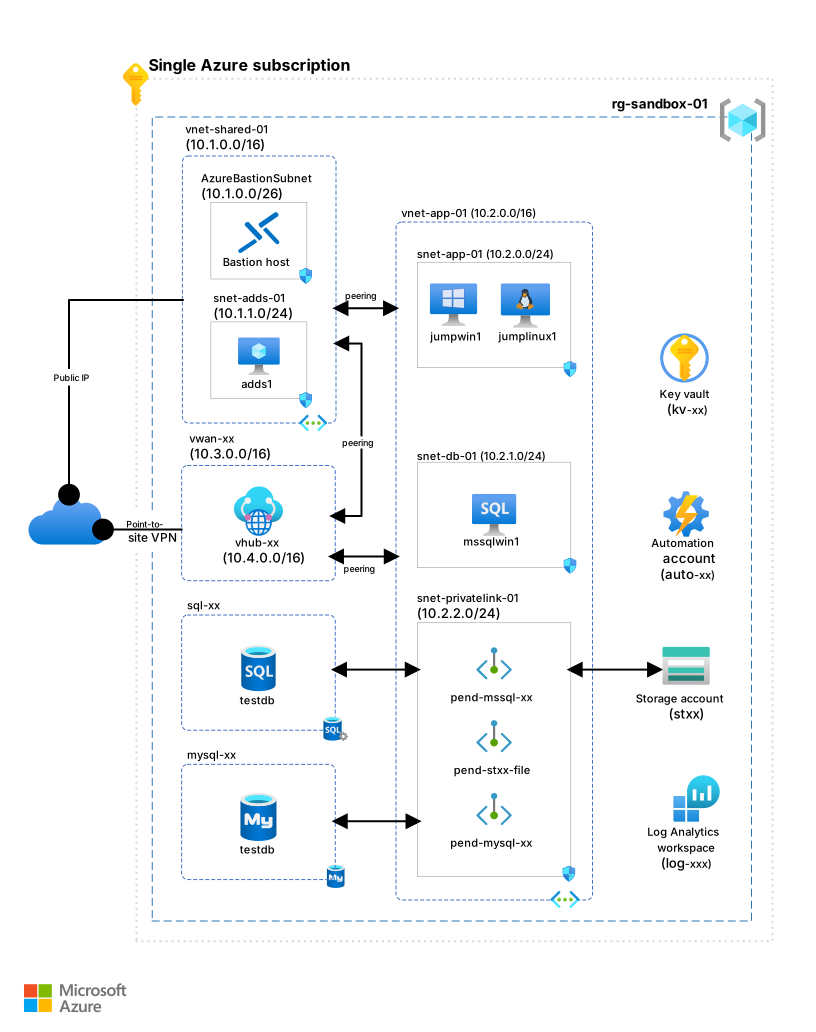
The following diagram shows an example of the Azure Sandbox reference implementation.
Download a Visio file of this architecture.
Modules
The Azure Sandbox reference implementation is organized into Terraform modules. Each module deploys a group of related capabilities as a unit. You deploy the required shared services module first, and then you add only the optional modules that your scenario needs. This modular design helps you control both cost and complexity.
Required shared services module
The shared services virtual network module, vnet-shared, provides the network and identity foundation that every other module depends on.
- A shared services virtual network hosts the centralized infrastructure services and peers with the application virtual network. In this architecture, the shared services virtual network also hosts Azure Private Link private endpoints, and it provides the network foundation for the domain controller, Domain Name System (DNS), and shared security services.
- Active Directory Domain Services (AD DS) provides centralized authentication and domain joining for VMs. In this architecture, AD DS runs on a Windows Server VM that also serves as the private DNS server, and provides name resolution across the sandbox environment.
- Azure Bastion helps secure Remote Desktop Protocol (RDP) and Secure Shell (SSH) access to VMs without using public IP addresses. In this architecture, Azure Bastion enables remote access to sandbox VMs directly through the Azure portal, which reduces the attack surface. As a cost and benefit tradeoff, the sandbox uses the Standard SKU, which costs more than the Developer and Basic SKUs but is needed to emit Azure Bastion audit logs.
- Azure Firewall is a cloud-native firewall service that provides threat intelligence. In this architecture, Azure Firewall helps control outbound internet access and routes its diagnostic logs to the Log Analytics workspace.
- Azure Key Vault centralizes secret storage so that credentials aren't kept in plain text on any VM. In this architecture, Key Vault stores secrets such as the VM administrator credentials, the Linux jump box SSH private key, and the point-to-site virtual private network (VPN) client private key. The service principal secret isn't stored in the key vault. You supply the secret at runtime through the
TF_VAR_arm_client_secretenvironment variable. - A Log Analytics workspace is an Azure Monitor Logs store. In this architecture, the workspace aggregates diagnostic and audit logs from sandbox resources to provide a single location for monitoring and troubleshooting.
- Azure Monitor Private Link Scope keeps monitoring traffic on the private network and prevents the traffic from traversing public endpoints. In this architecture, Azure Monitor Private Link Scope connects the Log Analytics workspace to the sandbox through the
azuremonitorprivate endpoint.
Optional application platform module
The application virtual network module, vnet-app, adds the application virtual network and the shared workload services that the test databases and jump boxes use.
- An application virtual network hosts application workloads. In this architecture, this network peers with the shared services virtual network and provides network isolation for test applications.
- A Windows Server jump box is a domain-joined Windows VM preloaded with administrative and development tools, including Remote Server Administration Tools (RSAT), SQL Server Management Studio, MySQL Workbench, and Visual Studio Code. In this architecture, the jump box provides a management platform for administering sandbox resources.
- Azure Files is a fully managed file share service that you access via the Server Message Block (SMB) protocol. In this architecture, Azure Files provides AD DS–integrated shared storage for the Windows and Linux VMs behind a private endpoint.
- Azure Blob Storage provides object storage behind a private endpoint. In this architecture, Blob Storage hosts the startup configuration scripts that bootstrap the sandbox VMs.
- Azure Container Registry is a managed registry for container images. In this architecture, Container Registry provides a network-isolated registry for images the sandbox uses.
- Workspace-based Application Insights is an application performance monitoring resource that stores its telemetry in the shared Log Analytics workspace. In this architecture, Application Insights provides application-level monitoring for sandbox workloads and connects to the sandbox through Azure Monitor Private Link Scope.
Optional workload modules
Add any combination of these modules to the application platform to test specific database and compute scenarios.
- The
vm-jumpbox-linuxmodule uses a Linux jump box, a domain-joined Ubuntu VM preloaded with DevOps tools including the Azure CLI, Docker, and Helm. In this architecture, the jump box serves as a cross-platform automation and development host. - The
vm-mssql-winmodule uses SQL Server on Azure Virtual Machines, a domain-joined Windows VM that runs a SQL Server instance with full administrative control. In this architecture, SQL Server on Azure Virtual Machines supports testing of legacy applications and custom SQL configurations that require specific database engine features. - The
mssqlmodule uses Azure SQL Database, a fully managed relational database accessed through private endpoints. In this architecture, SQL Database demonstrates cloud-native database patterns. Server-level auditing is enabled by default, with audit logs routed to the Log Analytics workspace. - The
mysqlmodule uses Azure Database for MySQL flexible server, a managed MySQL database service accessed through private endpoints. In this architecture, this service provides a network-isolated database platform for testing open-source applications.
Other optional modules that provide sandbox capabilities include the petstore, avd, and vnet_onprem modules.
Optional remote connectivity module
The vwan module uses Azure Virtual WAN, a networking service that helps secure remote connectivity. In this architecture, Virtual WAN provides point-to-site VPN access for developers and administrators who need network connectivity to the isolated sandbox resources from a remote client.
Deploy the sandbox
The Azure Sandbox environment has the following prerequisites:
- A Microsoft Entra ID tenant
- An Azure subscription
- The Azure role-based access control (Azure RBAC) role assignments listed in Azure RBAC Role Assignments
- A service principal that's configured as described in Service Principal
- A Terraform execution environment
To prepare for a sandbox deployment, see Prerequisites in the Azure Sandbox reference implementation.
To integrate Azure Sandbox with an Azure landing zone, consider the following strategies:
- Place the sandbox subscription in the Sandboxes management group.
- Keep the sandbox isolated from your private network.
- Audit sandbox subscription activity.
- Limit sandbox access, and remove access when it's no longer required.
- Decommission sandboxes after an expiration period to limit costs.
- Create a budget for sandbox subscriptions to help control costs.
For more information, see Landing zone sandbox environments.
To deploy Azure Sandbox, go to the AzureSandbox GitHub repository and begin with Get started - Interactive execution.
Use cases
A sandbox is ideal for accelerating Azure projects. After you deploy your sandbox environment, you can add services and capabilities to use the sandbox for various activities:
- Self-learning
- Hackathons
- Testing
- Development
- Tabletop exercises
- Red team/blue team simulations
- Incident response drills
Important
Azure Sandbox isn't intended for production use. To keep the deployments basic and cost-effective, the deployment doesn't implement all best practices.
Capabilities
Foundational prerequisites can block experimentation on specific Azure services or capabilities. A sandbox environment can accelerate your project by provisioning many core infrastructure components. You can focus on the services or capabilities relevant to your scenario.
For example, the following scenarios use capabilities and configurations that the Azure Sandbox environment provides.
Connect to a Windows jump box VM from the internet.
- Option 1: Internet-facing access by using a web browser and Azure Bastion
- Option 2: Point-to-site VPN connectivity through Virtual WAN
Use a preconfigured AD DS local domain as a domain administrator.
- Preconfigured integrated DNS server
- Preconfigured integration with Azure private DNS zones
- Preconfigured integration with Private Link private endpoints
Use an Azure Files preconfigured file share.
Use a Windows jump box VM as a developer workstation.
- Domain joined to a local domain
- Windows Server RSAT preinstalled for Active Directory and DNS administration
- Visual Studio Code preinstalled with Remote-SSH into a Linux jump box
- SQL Server Management Studio preinstalled
- MySQL Workbench preinstalled
Use a Linux jump box VM as a DevOps agent.
- Domain joined to a local domain by using Winbind
- The Azure CLI, PowerShell, and Terraform preinstalled
- A dynamic Common Internet File System (CIFS) mount provided for a preconfigured Azure Files file share
Use a preconfigured SQL Server VM.
- Domain joined to a local domain
Use a preconfigured SQL database or Azure Database for MySQL flexible server through private endpoints.
Operational excellence
Operational Excellence covers the operations processes that deploy an application and keep it running in production. For more information, see Design review checklist for Operational Excellence.
Instrument sandbox resources for observability so that you can monitor and troubleshoot the environment from a single location by using the optional vwan module or another private path. Configure diagnostic settings on resources to route logs and metrics to a Log Analytics workspace. To balance observability against ingestion cost, enable only the log categories that you need and omit high-volume or premium-only categories unless a scenario requires them.
The Azure Sandbox reference implementation preconfigures several diagnostic settings, for example:
- Azure Firewall application-rule, network-rule, Network Address Translation (NAT)-rule, threat-intelligence, and DNS-query logs and metrics.
- Azure Bastion audit logs and metrics.
- Point-to-site VPN gateway, Internet Key Exchange (IKE), and point-to-site diagnostic logs and metrics.
- Azure Storage write and delete logs and transaction metrics.
- Azure SQL Database server-level audit logs.
- Azure Database for MySQL flexible server slow-query and audit logs and metrics.
Security
Security provides assurances against deliberate attacks and the misuse of your valuable data and systems. For more information, see Design review checklist for Security.
Important
Sandbox environments represent an exploitable attack surface. To reduce risk, use the following security best practices.
Implement strong authentication in the Microsoft Entra ID tenant associated with the Azure subscriptions that you use to provision sandbox environments. Follow the recommendations in SE:05 - Recommendations for identity and access management.
- Use multifactor authentication for all users.
- Use Microsoft Entra Conditional Access policies to restrict access to sandbox environments.
- Use integrated Microsoft Entra authentication to authorize access to Azure platform as a service (PaaS) services like SQL Database and Azure Storage.
Start with a least privilege approach to authorize sandbox use.
- Limit the number of Owner role assignments to at most three, and grant other sandbox users only the permissions and scopes that they need.
- Use Microsoft Entra Privileged Identity Management (PIM) to manage privileged Azure RBAC role assignments scoped to sandbox subscriptions, such as Owner, Contributor, and User Access Administrator.
Maintain data classification compliance. For example, avoid hosting personal data or other sensitive data in a sandbox environment. If you must use sensitive data, use synthetic or de-identified data.
Also, consider the following Secure Future Initiative principles when you design and implement sandbox environments. The Azure Sandbox implementation on GitHub showcases many of these principles.
Secure by design
- Limit the use of shared secrets, and use Key Vault to secure them.
- When you must use shared secrets, use managed identities at run time to retrieve them from Key Vault.
- If you must persist secrets, ensure that they're encrypted and not stored in plain text.
- Never echo secrets to the console or to log files, and never check secrets into source control.
- Avoid persisting provisioning credentials, such as a service principal secret, in state files or Key Vault. Prefer secretless authentication, such as workload identity federation, which uses OpenID Connect (OIDC), or managed identities.
- When you can't avoid using a secret, provide it to the provisioning tool at run time rather than storing it.
- When your infrastructure-as-code tooling supports it, use write-only secret attributes so that secret values never appear in state files.
- Set an expiration date for Key Vault secrets.
- When you select a guest operating system for VMs, only use operating systems that are currently supported and eligible to receive security updates.
Secure by default
- Use encryption as recommended by SE:07 - Recommendations for data encryption.
- Ensure that cryptographic protocols and algorithms, such as Transport Layer Security (TLS) 1.2 or later and Secure Hash Algorithm (SHA)-256 or later, are up-to-date.
- Consider using host encryption for encryption of data at rest on the compute host. For managed disks attached to VMs, data is encrypted at rest by default.
- Avoid using public IP addresses for workload VMs. Use Azure Bastion for secure remote access to VMs.
- Use private endpoints to communicate with Azure services.
- Verify that public network access is disabled after every deployment. The Terraform implementation temporarily enables public access to some services, including Key Vault and Azure Storage, for bootstrapping. After successfully applying the configuration, the implementation disables that access automatically. If an interruption or failure occurs before the implementation applies private settings, these services can remain publicly reachable. Other services, such as SQL Database, are private from creation.
- Configure an explicit outbound path for sandbox resources, for example by routing egress through Azure Firewall or by using NAT as appropriate for your scenario. If you use Azure Firewall for outbound traffic, enable Azure Firewall threat intelligence-based filtering.
Secure operations
- Enable Microsoft Defender Cloud Security Posture Management on sandbox subscriptions.
- Enable Azure Update Manager on all VMs that you use in sandbox environments. Set a regular patching schedule. For SQL Server VMs, enable updates for other Microsoft products in Windows Update to ensure that SQL Server is patched.
- Monitor activity and diagnostic logs by using Azure Monitor and Microsoft Sentinel.
- Decommission individual sandbox resources and sandboxes that you no longer use.
Contributors
Microsoft maintains this article. The following contributor wrote this article.
Principal author:
To see nonpublic LinkedIn profiles, sign in to LinkedIn.