Azure DNS Private Resolver
This article presents a solution for using Azure DNS Private Resolver to simplify hybrid recursive domain name system (DNS) resolution. You can use DNS Private Resolver for on-premises workloads and Azure workloads. DNS Private Resolver simplifies private DNS resolution from on-premises to the Azure private DNS service and from the Azure private DNS service to on-premises.
Architecture
The following sections present alternatives for hybrid recursive DNS resolution. The first section describes a solution that uses a DNS forwarder virtual machine (VM). Subsequent sections explain how to use DNS Private Resolver.
Use a DNS forwarder VM
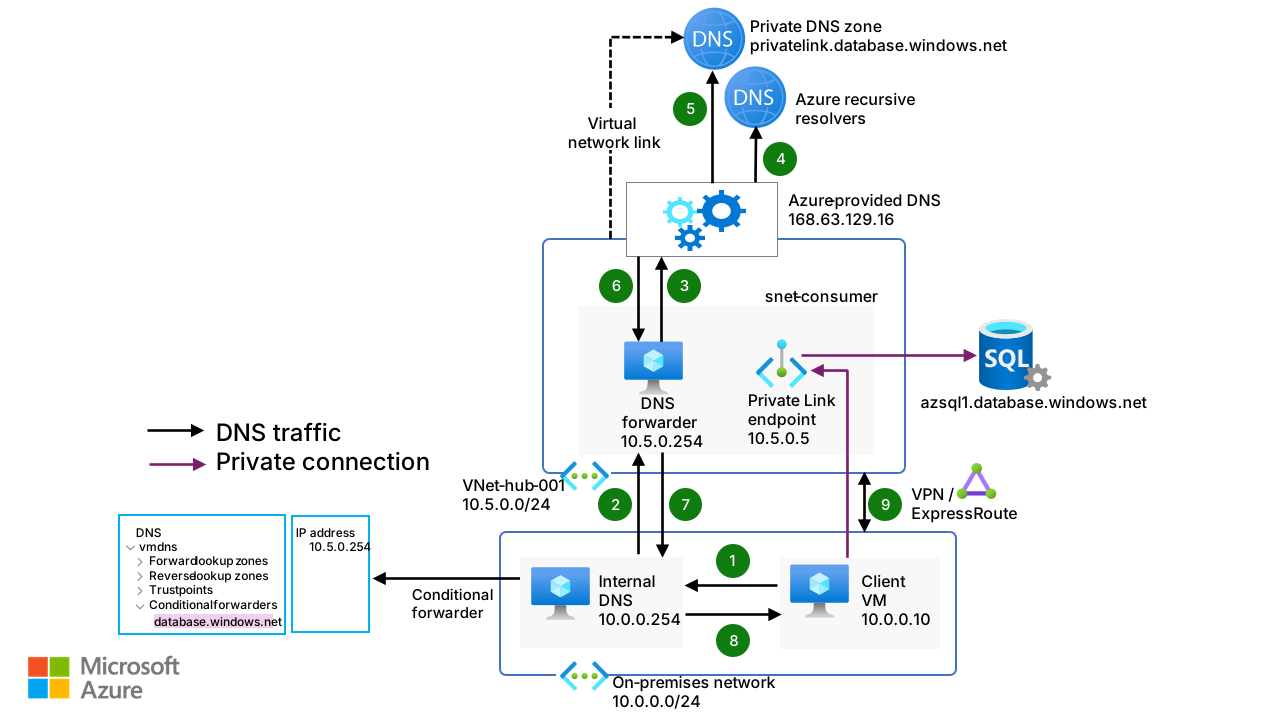
Before DNS Private Resolver was available, a DNS forwarder VM was deployed so that an on-premises server could resolve requests to the Azure private DNS service. The following diagram illustrates the details of this name resolution. A conditional forwarder on the on-premises DNS server forwards requests to Azure, and a private DNS zone is linked to a virtual network. Requests to the Azure service then resolve to the appropriate private IP address.
In this solution, you can't use the Azure public DNS service to resolve on-premises domain names.
Download a PowerPoint file of this architecture.
Workflow
The following workflow corresponds to the previous diagram:
A client VM sends a name resolution request for
azsql1.database.windows.netto an on-premises internal DNS server.A conditional forwarder is configured on the internal DNS server. It forwards the DNS query for
database.windows.netto10.5.0.254, which is the IP address of a DNS forwarder VM.The DNS forwarder VM sends the request to
168.63.129.16, which is the IP address of the Azure internal DNS server.The Azure DNS server sends a name resolution request for
azsql1.database.windows.netto the Azure recursive resolvers. The resolvers respond with the canonical name (CNAME)azsql1.privatelink.database.windows.net.The Azure DNS server sends a name resolution request for
azsql1.privatelink.database.windows.netto the private DNS zoneprivatelink.database.windows.net. The private DNS zone responds with the private IP address10.5.0.5.The response that associates the CNAME
azsql1.privatelink.database.windows.netwith the record10.5.0.5arrives at the DNS forwarder.The response arrives at the on-premises internal DNS server.
The response arrives at the client VM.
The client VM establishes a private connection to the private endpoint that uses the IP address
10.5.0.5. The private endpoint provides the client VM with a more secure connection to an Azure database.
For more information, see Azure private endpoint DNS configuration.
Use DNS Private Resolver
When you use DNS Private Resolver, you don't need a DNS forwarder VM, and Azure DNS is able to resolve on-premises domain names.
The following solution uses DNS Private Resolver in a hub-spoke network topology. As a best practice, the Azure landing zone design pattern recommends that you use this type of topology. A hybrid network connection is established by using Azure ExpressRoute and Azure Firewall. This setup provides a secure hybrid network. DNS Private Resolver is in the hub network.
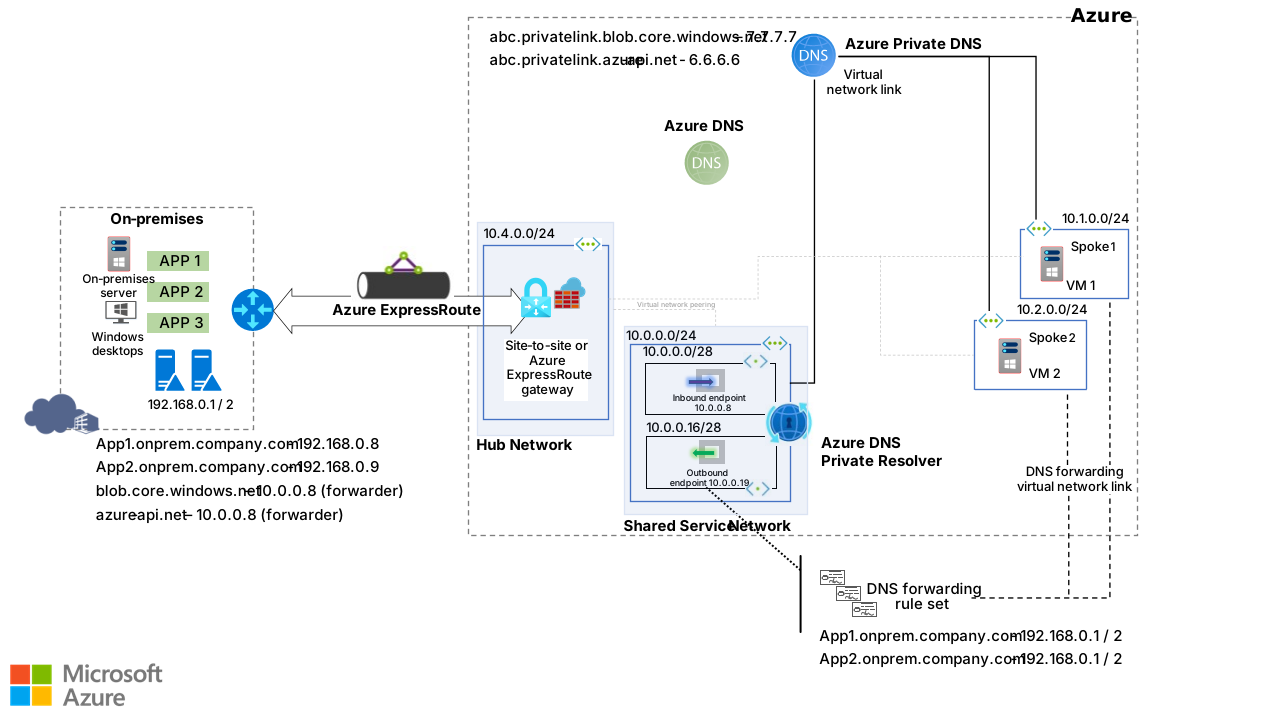
DNS Private Resolver solution components
The solution that uses DNS Private Resolver contains the following components:
An on-premises network. This network of customer datacenters is connected to Azure via ExpressRoute or a site-to-site Azure VPN Gateway connection. Network components include two local DNS servers. One server uses the IP address
192.168.0.1. The other server uses192.168.0.2. Both servers work as resolvers or forwarders for all computers inside the on-premises network.An administrator creates all local DNS records and Azure endpoint forwarders on these servers. Conditional forwarders are configured on these servers for the Azure Blob Storage and Azure API Management services. Those forwarders send requests to the DNS Private Resolver inbound connection. The inbound endpoint uses the IP address
10.0.0.8and is hosted within the hub virtual network.The following table lists the records on the local servers.
Domain name IP address Record type App1.onprem.company.com192.168.0.8 Address mapping App2.onprem.company.com192.168.0.9 Address mapping blob.core.windows.net10.0.0.8 DNS forwarder azure-api.net10.0.0.8 DNS forwarder A hub network.
VPN Gateway or an ExpressRoute connection is used for the hybrid connection to Azure.
Azure Firewall provides a managed firewall. The firewall instance resides in its own subnet.
The following table lists the parameters that are configured for DNS Private Resolver. For App 1 and App 2 DNS names, the DNS forwarding rule set is configured.
Parameter IP address Virtual network 10.0.0.0/24 Inbound endpoint subnet 10.0.0.0/28 Inbound endpoint IP address 10.0.0.8 Outbound endpoint subnet 10.0.0.16/28 Outbound endpoint IP address 10.0.0.19 The hub virtual network is linked to the private DNS zones for Blob Storage and the API service.
Spoke networks.
VMs are hosted in all spoke networks for testing and validating DNS resolution.
All Azure spoke virtual networks use the default Azure DNS server at the IP address
168.63.129.16. And all spoke virtual networks are peered with the hub virtual networks. All traffic, including traffic to and from DNS Private Resolver, is routed through the hub.The spoke virtual networks are linked to private DNS zones. This configuration makes it possible to resolve the names of private endpoint link services like
privatelink.blob.core.windows.net.
Traffic flow for an on-premises DNS query
The following diagram shows the traffic flow that results when an on-premises server issues a DNS request.
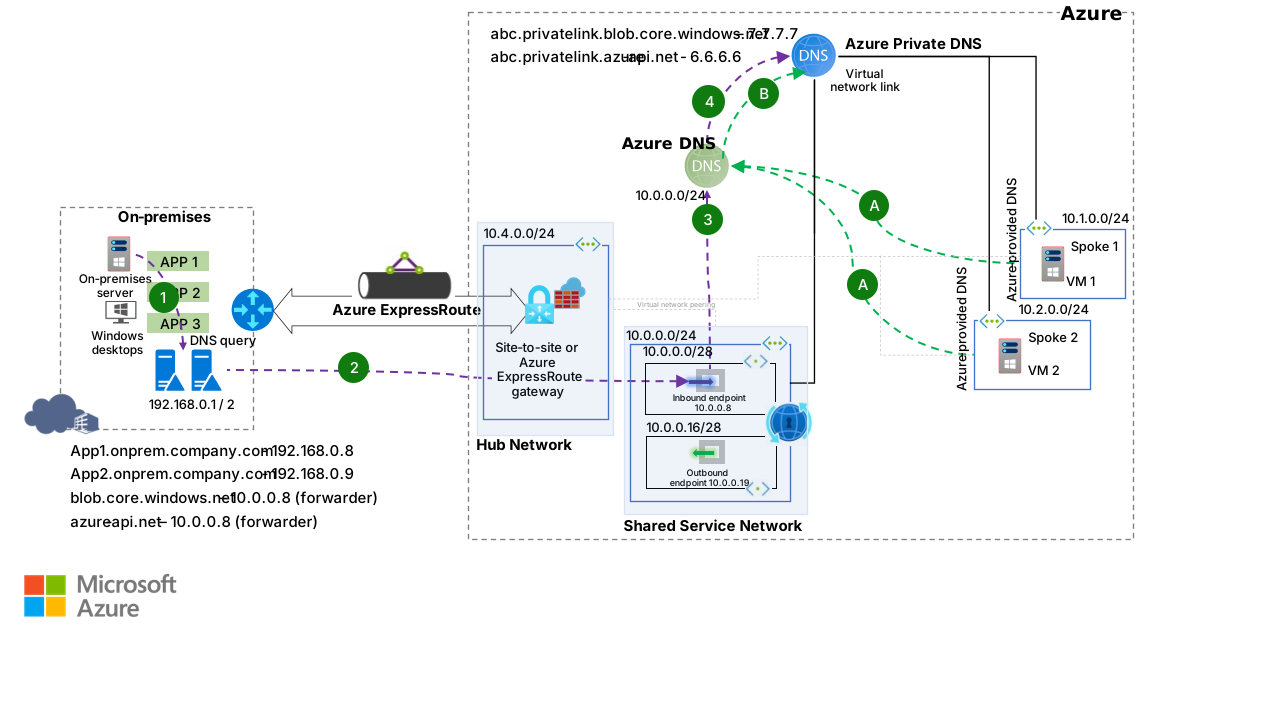
An on-premises server queries an Azure private DNS service record, such as
blob.core.windows.net. The request is sent to the local DNS server at IP address192.168.0.1or192.168.0.2. All on-premises computers point to the local DNS server.A conditional forwarder on the local DNS server for
blob.core.windows.netforwards the request to the DNS resolver at IP address10.0.0.8.The DNS resolver queries Azure DNS and receives information about an Azure private DNS service virtual network link.
The Azure private DNS service resolves DNS queries that are sent through the Azure public DNS service to the DNS resolver inbound endpoint.
Traffic flow for a VM DNS query
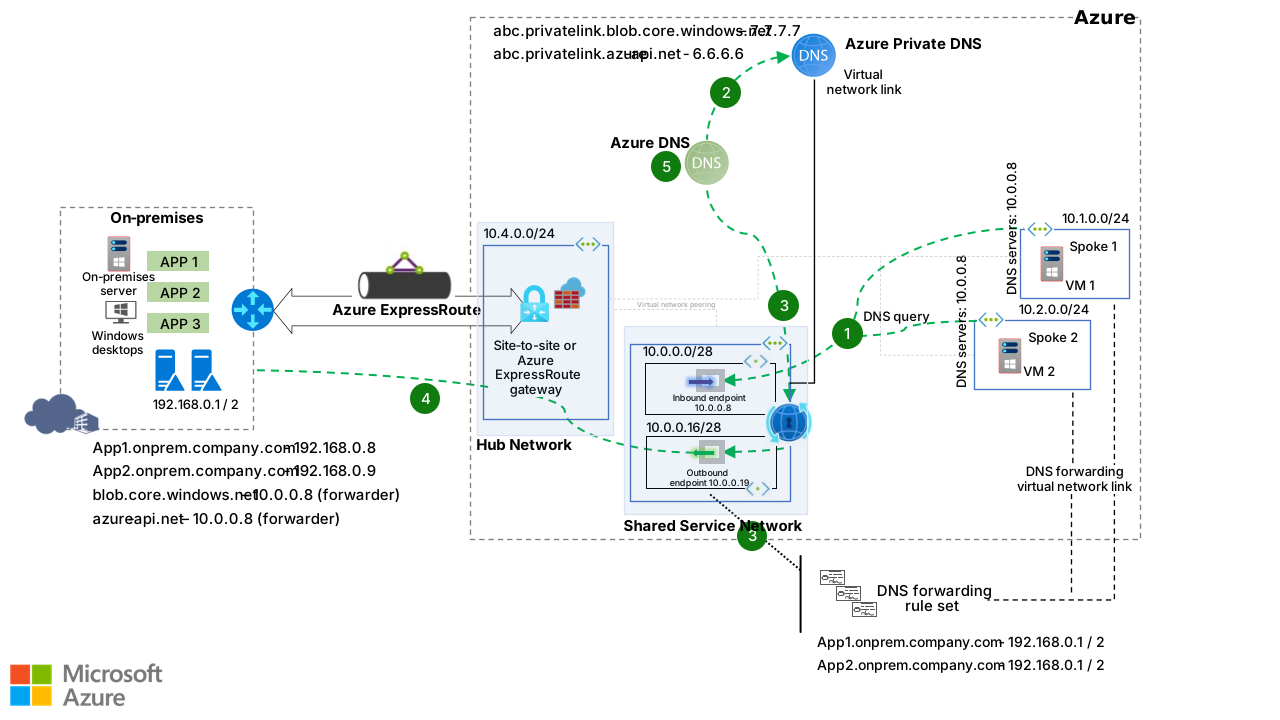
The following diagram shows the traffic flow that results when VM 1 issues a DNS request. In this scenario, the Spoke 1 spoke virtual network attempts to resolve the request.
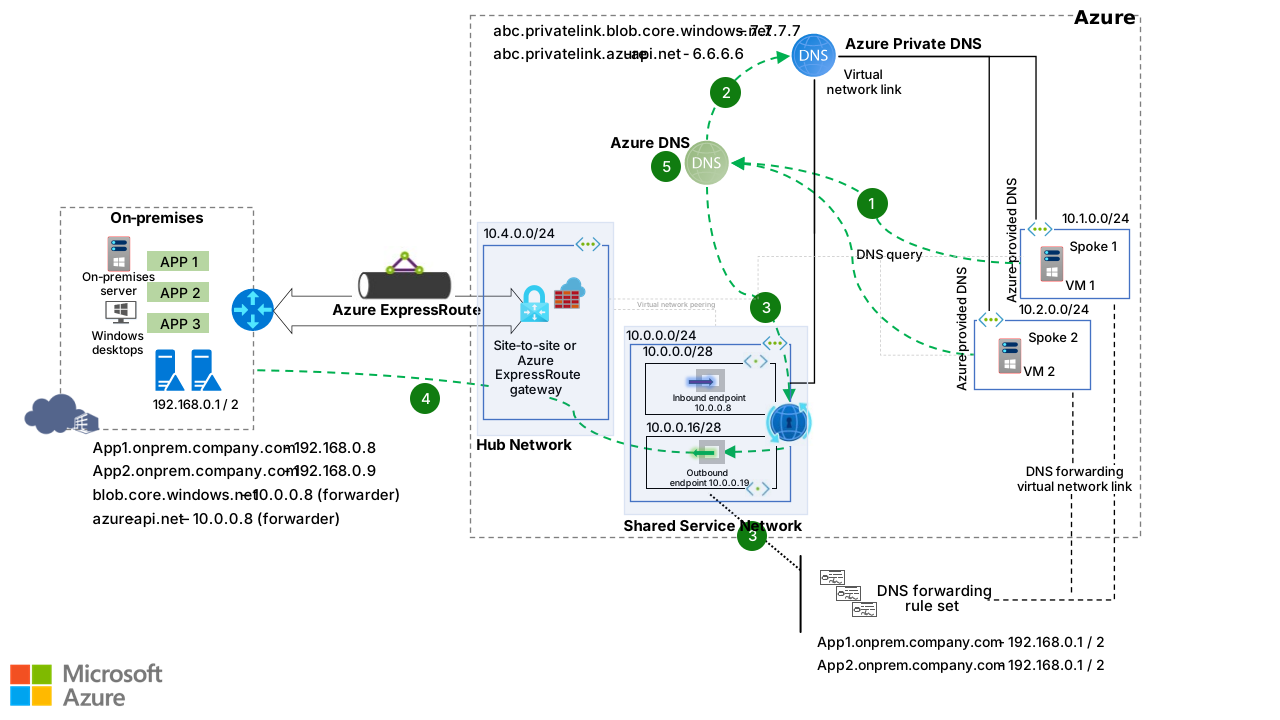
VM 1 queries a DNS record. The spoke virtual networks are configured to use the name resolution that Azure provides. As a result, Azure DNS is used to resolve the DNS query.
If the query attempts to resolve a private name, the Azure private DNS service is contacted.
If the query doesn't match a private DNS zone linked to the virtual network, Azure DNS connects to DNS Private Resolver. The Spoke 1 virtual network has a virtual network link. DNS Private Resolver checks for a DNS forwarding rule set associated with the Spoke 1 virtual network.
If a match is found in the DNS forwarding rule set, the DNS query is forwarded via the outbound endpoint to the IP address specified in the rule set.
If the Azure private DNS service (2) and DNS Private Resolver (3) can't find a matching record, Azure DNS (5) is used to resolve the query.
Each DNS forwarding rule specifies one or more target DNS servers to use for conditional forwarding. The specified information includes the domain name, target IP address, and port.
Traffic flow for a VM DNS query via DNS Private Resolver
The following diagram shows the traffic flow that results when VM 1 issues a DNS request via a DNS Private Resolver inbound endpoint. In this scenario, the Spoke 1 spoke virtual network attempts to resolve the request.
VM 1 queries a DNS record. The spoke virtual networks are configured to use
10.0.0.8as the name resolution DNS server. As a result, DNS Private Resolver is used to resolve the DNS query.If the query attempts to resolve a private name, the Azure private DNS service is contacted.
If the query doesn't match a private DNS zone linked to the virtual network, Azure DNS connects to DNS Private Resolver. The Spoke 1 virtual network has a virtual network link. DNS Private Resolver checks for a DNS forwarding rule set associated with the Spoke 1 virtual network.
If a match is found in the DNS forwarding rule set, the DNS query is forwarded via the outbound endpoint to the IP address specified in the rule set.
If the Azure private DNS service (2) and DNS Private Resolver (3) can't find a matching record, Azure DNS (5) is used to resolve the query.
Each DNS forwarding rule specifies one or more target DNS servers to use for conditional forwarding. The specified information includes the domain name, target IP address, and port.
Traffic flow for a VM DNS query via an on-premises DNS server
The following diagram shows the traffic flow that results when VM 1 issues a DNS request via an on-premises DNS server. In this scenario, the Spoke 1 spoke virtual network attempts to resolve the request.
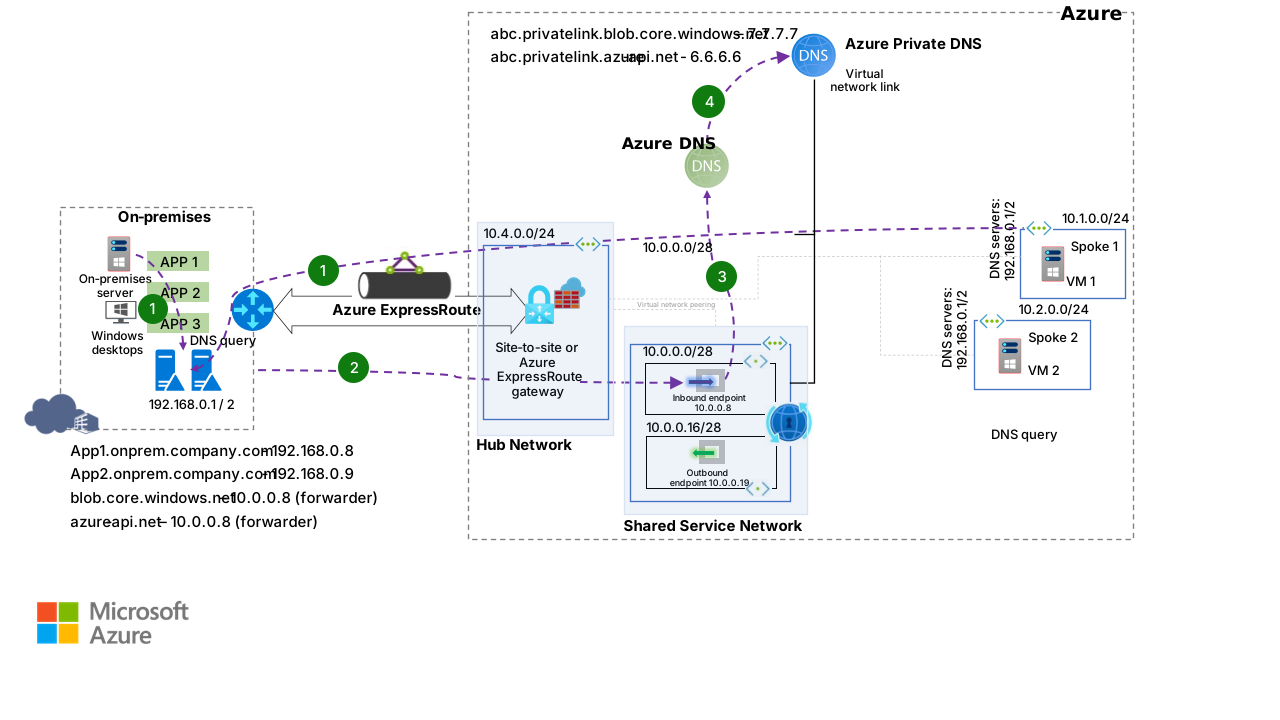
VM 1 queries a DNS record. The spoke virtual networks are configured to use
192.168.0.1/2as the name resolution DNS server. As a result, an on-premises DNS server is used to resolve the DNS query. The request is sent to the local DNS server at IP address192.168.0.1or192.168.0.2.A conditional forwarder on the local DNS server for
blob.core.windows.netforwards the request to the DNS resolver at IP address10.0.0.8.The DNS resolver queries Azure DNS and receives information about an Azure private DNS service virtual network link.
The Azure private DNS service resolves DNS queries that are sent through the Azure public DNS service to the DNS Private Resolver inbound endpoint.
Components
VPN Gateway is a virtual network gateway that lets you send encrypted traffic between an Azure virtual network and an on-premises location over the public internet. In this architecture, a VPN gateway is an optional component for ExpressRoute that enables hybrid connectivity between Azure and on-premises environments for DNS conditional forwarder traffic.
ExpressRoute is a networking service that extends on-premises networks into the Microsoft cloud. It establishes private connections to cloud components like Azure services and Microsoft 365 through a connectivity provider. In this architecture, ExpressRoute is used for hybrid connectivity between Azure and on-premises environments, specifically for DNS conditional forwarder traffic.
Azure Virtual Network is a networking service and the foundational building block for private networks in Azure. It lets Azure resources like VMs securely communicate with each other, the internet, and on-premises networks. In the previous design, the primary purpose of the virtual networks is to host the DNS Private Resolver and Azure Virtual Machines. These virtual networks facilitate seamless communication and integration between various Azure services and on-premises resources.
Azure Firewall is a managed, cloud-based network security service that enforces application and network connectivity policies. It centrally manages policies across multiple virtual networks and subscriptions. In the previous use case, you can implement Azure Firewall to enhance security for network traffic. It provides advanced threat protection, network traffic filtering, and logging capabilities to allow only authorized traffic while blocking potential threats.
DNS Private Resolver is a service that bridges an on-premises DNS with Azure DNS. In this architecture, its primary function is to facilitate DNS queries between Azure DNS private zones and an on-premises environment. This facilitation eliminates the need for VM-based DNS servers. This setup ensures seamless and efficient DNS resolution across hybrid environments, which allows Azure and on-premises resources to communicate DNS resolutions effectively.
Azure DNS is a hosting service for DNS domains that takes advantage of Azure’s infrastructure for name resolution. It plays a crucial role in this design by managing DNS resolution traffic.
The Azure private DNS service is a managed DNS service that resolves domain names within a virtual network and connected virtual networks. It eliminates the need for custom DNS configuration. With private DNS zones, you can assign custom domain names instead of using the default names that Azure provides during deployment.
DNS forwarders are DNS servers that send queries to external servers when they can't resolve domain names on their own. This approach has long been a standard method for DNS resolution. In this article and its use cases, the DNS Private Resolver replaces VM-based DNS forwarders, which provides a more efficient and streamlined approach to DNS resolution.
Scenario details
Azure provides various DNS solutions, including Azure Traffic Manager. Traffic Manager acts as a DNS-based load balancing service. It provides a way to distribute traffic across Azure regions to public-facing applications.
Before DNS Private Resolver was available, you had to use custom DNS servers for DNS resolution from on-premises systems to Azure and from Azure to on-premises systems. Custom DNS solutions have many disadvantages:
Managing multiple custom DNS servers for multiple virtual networks involves high infrastructure and licensing costs.
You have to handle all aspects of installing, configuring, and maintaining DNS servers.
Overhead tasks, such as monitoring and patching these servers, are complex and prone to failure.
There's no DevOps support for managing DNS records and forwarding rules.
It's expensive to implement scalable DNS server solutions.
DNS Private Resolver addresses these obstacles by providing the following features and key advantages:
A fully managed Microsoft service that has built-in high availability and zone redundancy.
A scalable solution optimized for seamless integration with DevOps.
Cost savings when compared with traditional infrastructure as a service-based custom solutions.
Conditional forwarding for Azure DNS to on-premises servers. The outbound endpoint provides this capability, which wasn't previously available. Workloads in Azure no longer require direct connections to on-premises DNS servers. Instead, the Azure workloads connect to the outbound IP address of DNS Private Resolver.
Potential use cases
This solution simplifies private DNS resolution in hybrid networks. It applies to the following scenarios:
Transition strategies during long-term migration to fully cloud-native solutions
Disaster recovery and fault tolerance solutions that replicate data and services between on-premises and cloud environments
Solutions that host components in Azure to reduce latency between on-premises datacenters and remote locations
Considerations
These considerations implement the pillars of the Azure Well-Architected Framework, which is a set of guiding tenets that you can use to improve the quality of a workload. For more information, see Well-Architected Framework.
Reliability
Reliability helps ensure that your application can meet the commitments that you make to your customers. For more information, see Design review checklist for Reliability.
DNS Private Resolver is a cloud-native service designed for high availability and built to integrate seamlessly with DevOps practices, which makes it well-suited for collaborative and automated workflows. It delivers a reliable and enhanced security DNS solution while maintaining simplicity and zero-maintenance for users.
Don't deploy DNS Private Resolver into a virtual network that includes an ExpressRoute virtual network gateway and uses wildcard rules to direct all name resolution to a specific DNS server. This type of configuration can cause management connectivity problems. For more information, see DNS Private Resolver with wildcard rules on an ExpressRoute gateway.
Regional availability
For a list of regions in which DNS Private Resolver is available, see Regional availability.
A DNS resolver can only refer to a virtual network that's located in the same region as the DNS resolver.
Security
Security provides assurances against deliberate attacks and the misuse of your valuable data and systems. For more information, see Design review checklist for Security.
Azure DNS has DNS security extensions in preview.
Cost Optimization
Cost Optimization focuses on ways to reduce unnecessary expenses and improve operational efficiencies. For more information, see Design review checklist for Cost Optimization.
As a solution, DNS Private Resolver is largely cost-effective. One of the primary benefits of DNS Private Resolver is that it's fully managed. This feature eliminates the need for dedicated servers.
To calculate the cost of DNS Private Resolver, use the Azure pricing calculator. For DNS Private Resolver pricing models, see Azure DNS pricing.
Pricing also includes availability and scalability features.
ExpressRoute supports two billing models:
Metered data, which charges you per gigabyte for outbound data transfers.
Unlimited data, which charges you a fixed monthly port fee that covers all inbound and outbound data transfers.
For more information, see ExpressRoute pricing.
If you use VPN Gateway instead of ExpressRoute, the cost varies by the product and is charged per hour. For more information, see VPN Gateway pricing.
Performance Efficiency
Performance Efficiency refers to your workload's ability to scale to meet user demands efficiently. For more information, see Design review checklist for Performance Efficiency.
DNS Private Resolver is a fully managed Microsoft service that can handle millions of requests. Use a subnet address space between /28 and /24. For most users, /26 is most suitable. For more information, see Subnet restrictions.
Networking
The following resources provide information about how to create a DNS private resolver:
Reverse DNS support
Traditionally, DNS records map a DNS name to an IP address. For example, www.contoso.com resolves to 42.3.10.170. Reverse DNS performs the opposite function. It maps an IP address back to a DNS name. For example, the IP address 42.3.10.170 resolves to www.contoso.com.
For more information about Azure support for reverse DNS and how reverse DNS works, see Overview of reverse DNS and support in Azure.
Restrictions
DNS Private Resolver has the following limitations:
DNS Private Resolver rule sets can only be linked to virtual networks that are within the same geographical region as the resolver.
A virtual network can't contain more than one DNS private resolver.
You need to assign a dedicated subnet to each inbound and outbound endpoint.
For more information, see Virtual network restrictions.
Contributors
Microsoft maintains this article. The following contributors wrote this article.
Principal author:
- Moorthy Annadurai | Senior Technical Specialist
To see nonpublic LinkedIn profiles, sign in to LinkedIn.
Next steps
- What is a virtual network link?
- What is Azure DNS?
- What is the Azure private DNS service?
- What is DNS Private Resolver?
- Azure DNS FAQ
- Overview of reverse DNS and support in Azure