Note
Access to this page requires authorization. You can try signing in or changing directories.
Access to this page requires authorization. You can try changing directories.
Azure Linux is a Microsoft-maintained Linux distribution built on the Fedora ecosystem and optimized for Azure. This article explains how Azure Linux is structured, what it includes by default, and where it intentionally draws boundaries.
Note
Azure Linux 4.0 is now in preview and is strictly limited to evaluation and testing purposes. It's not suitable for production use.
How Azure Linux relates to Fedora
Azure Linux derives from Fedora and uses the same RPM-based packaging ecosystem. You get the familiarity of dnf5, Fedora build tooling (mock, fedpkg, koji, kiwi), and modern compiler toolchains — all tracked from upstream Fedora. On top of that foundation, Microsoft adds Azure-specific hardening, a custom kernel, and a managed lifecycle suited for cloud workloads.
The kernel ships as version 6.18 LTS, extended with Hyper-V guest drivers, Azure-specific performance tuning, and security hardening validated across Azure VM SKUs.
Layered architecture
Azure Linux uses a layered model. Each layer builds on the one below it, from hardware and firmware at the base up to your workloads at the top.
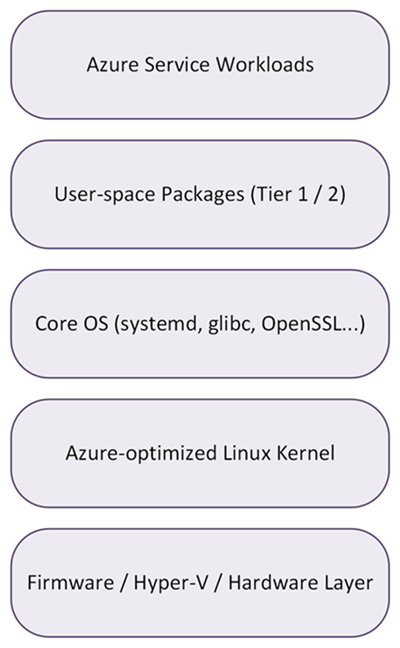
Kernel layer
The custom Azure Linux kernel includes Hyper-V guest drivers, security hardening patches, and performance optimizations tuned for Azure infrastructure. You can choose between Long-Term Support (LTS) kernels for stability or Hardware Enablement (HWE) kernels for new hardware and GPU support. See Release cadence and lifecycle for details.
Core OS layer
This layer provides the minimal root filesystem: systemd for service management, glibc as the C runtime, and OpenSSL for cryptography. These are Tier 1 components, meaning they're version-locked for the lifetime of a major release and receive only security backports. This keeps application binary interface (ABI) stable and behavior predictable.
User-space packages layer
Language runtimes (Python, Go, Rust, Node.js), container tooling, and application dependencies live here. Tier 1 packages are locked for stability. Tier 2 packages are updated on a predictable cadence. For more information, see Release cadence and lifecycle.
Workload layer
Your Azure services and applications run here. Azure Linux presents the same OS foundation, package set, and behavior whether you're running on AKS, Azure VMs, or container images.
Platform scope
Azure Linux is designed for Azure cloud workloads. Although Azure Linux is open source, Microsoft support and lifecycle commitments apply only to Azure scenarios.
The following table outlines what is and isn't supported on Azure Linux:
| Area | Supported | Not supported |
|---|---|---|
| Architectures | x86-64 (v2 minimum), ARMv8 (64-bit) | 32-bit architectures |
| Environments | Azure VMs, AKS, container images | ISO images, on-premises, multicloud, IoT, edge devices |
| User interface | Text-based console, SSH | Graphical desktop environments, GUI installer |
| Virtualization | KVM guests, Hyper-V | Xen |
| Peripheral hardware | Azure-attached storage, networking, GPUs | Bluetooth, Wi-Fi, printers, audio/video, robotics |
| Trusted platform | TPM 2.0 | TPM 1.x |
| Language support | Global locale support available | Not all language packs are included in the base image |
Every Azure Linux image includes waagent and cloud-init. These components are required for Azure integration and must always be present.
Repository structure
Azure Linux ships packages in several separate repositories. Knowing which repository a package comes from helps you reason about supportability, what's available out of the box, and what you need to opt into. For day-to-day package management information, see Package management.
Networking defaults
Azure Linux ships with a networking stack tuned for Azure VMs, AKS nodes, and container workloads. Most workloads can use the defaults without changes.
The following table summarizes the default networking components in Azure Linux and the alternatives that are available if you need to override the defaults for a specific scenario:
| Component | Default | Alternative | Notes |
|---|---|---|---|
| Network manager | systemd‑networkd + cloud‑init | NetworkManager (available, not default) | systemd‑networkd is the default for Azure VM and container scenarios. |
| Firewall | firewalld | N/A | Enabled by default with a deny‑inbound, allow‑outbound policy. |
| Firewall backend | nftables | iptables (legacy, available) | nftables is the modern replacement for iptables. iptables legacy support is available but not default. |
| IPv6 | Enabled and hardened | N/A | Strict sysctl hardening applied for both IPv4 and IPv6. |
Storage defaults
Azure Linux storage defaults are tuned for Azure-attached disks and the Hyper-V hypervisor underneath every Azure VM. The filesystem, boot loader, and clock source are chosen for predictable performance and compatibility with Azure platform features such as snapshots and managed disks.
The following table summarizes the default storage settings in Azure Linux and the alternatives that are available if you need to override the defaults for a specific scenario:
| Setting | Default | Alternatives |
|---|---|---|
| Filesystem | ext4 | xfs, btrfs |
| Boot | GRUB2 bootloader | N/A |
| Clock | Hyper‑V PTP clock source | N/A |
| NVMe | Timeout tuned for Azure attached storage | N/A |
Security architecture
Azure Linux is hardened at every layer, from the kernel up through the supply chain. The following sections describe the security controls that are enabled by default. See Security and compliance for more information.
Mandatory access control
Mandatory access control (MAC) confines processes to the access they actually need, even when they run as root.
Azure Linux 4.0 preview enables SELinux in enforcing mode as its MAC framework.
Secure Boot
Secure Boot ensures only signed bootloaders and kernels run. Kernel lockdown protects the running kernel and disables loading untrusted kernel modules at runtime.
Note
Azure Linux 4.0 is now in preview and its components aren't yet signed for Secure Boot.
Kernel and system hardening
The kernel and userspace are built with mitigations that make exploits harder to write and easier to contain if they succeed.
The following table summarizes the kernel and system hardening capabilities in Azure Linux:
| Capability | Description |
|---|---|
| ASLR | Strong address space layout randomization enabled. |
| Stack protection | Compiler‑level stack protections applied to all packages. |
| Syscall restrictions | Default seccomp profiles and syscall filtering. |
| Minimal base image | Reduced attack surface through minimal package set. |
Cryptography
Azure Linux centralizes cryptographic policy so that algorithms and key sizes stay consistent across OpenSSL, GnuTLS, NSS, and OpenSSH.
The following table summarizes the cryptography settings in Azure Linux:
| Setting | Value |
|---|---|
| FIPS | FIPS 140‑3 certification is mandatory. |
| Crypto policies | Fedora crypto‑policies adopted for consistent algorithm selection. |
| Post‑quantum | ML‑KEM planned, aligned with Fedora and RHEL roadmap. |
Logging and auditing
The following table summarizes the logging and auditing settings in Azure Linux:
| Setting | Value |
|---|---|
| Audit daemon | auditd enabled. |
| Journal storage | Persistent journald storage. |
Related content
- To learn more about Azure Linux, see the Azure Linux overview.
- To plan your update strategy, review the Release cadence and lifecycle.