Note
Access to this page requires authorization. You can try signing in or changing directories.
Access to this page requires authorization. You can try changing directories.
Applies to: Azure Local 2311.2 and later
This topic discusses host networking considerations and requirements for Azure Local disaggregated architectures. For information on disaggregated architectures and the physical connections between machines, see Physical network requirements Azure Local disaggregated deployments.
Network traffic types for Azure Local disaggregated deployments using Fiber Channel SAN storage
Azure Local disaggregated deployments network traffic types:
- Management and compute traffic: Traffic to or from outside the local system. For example, traffic used by the administrator for management of the system like Remote Desktop, Windows Admin Center, Active Directory, etc. It also includes traffic originating from or destined to the compute workloads such as virtual machines (VMs) or AKS clusters.
- Cluster networks traffic: these two networks carry the cluster traffic for SMB-based live migration, the cluster heartbeat and the CSV metadata and redirection. This traffic is layer-2 traffic and is not routable.
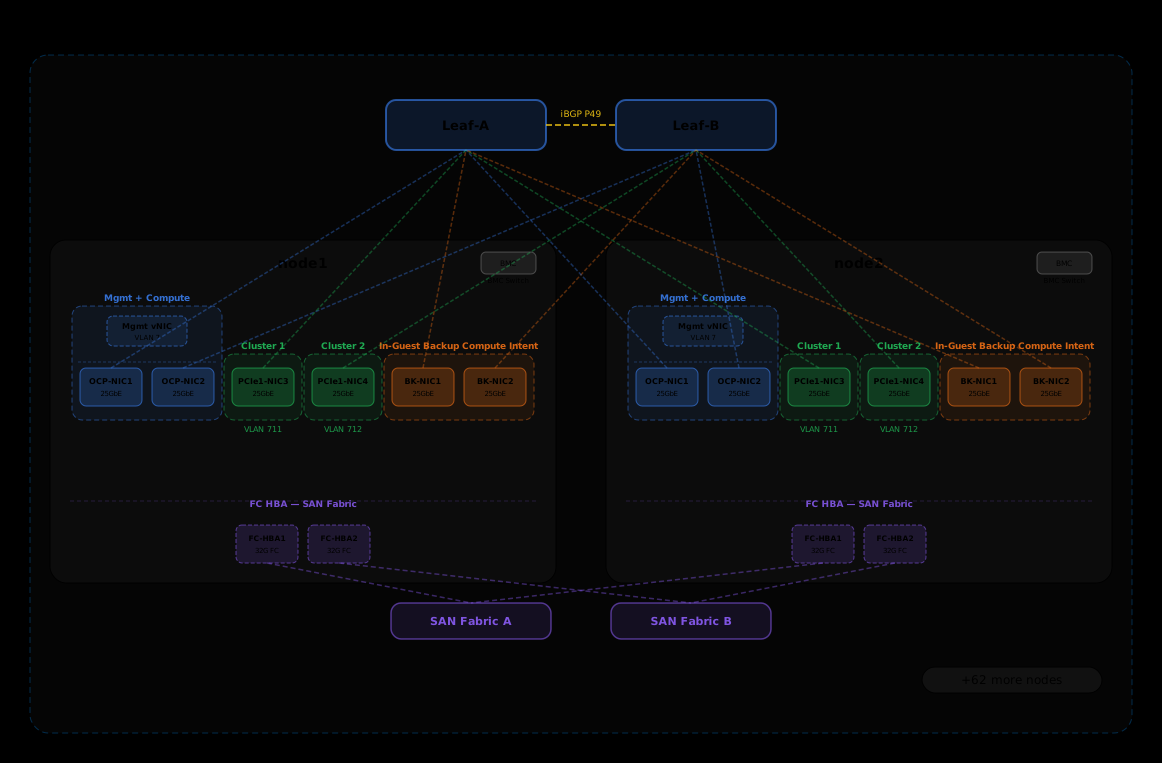
- (Optional) In guest Backup network: Some customers might require to have a dedicated network for traffic originated inside the VMs to backup application data over the network.
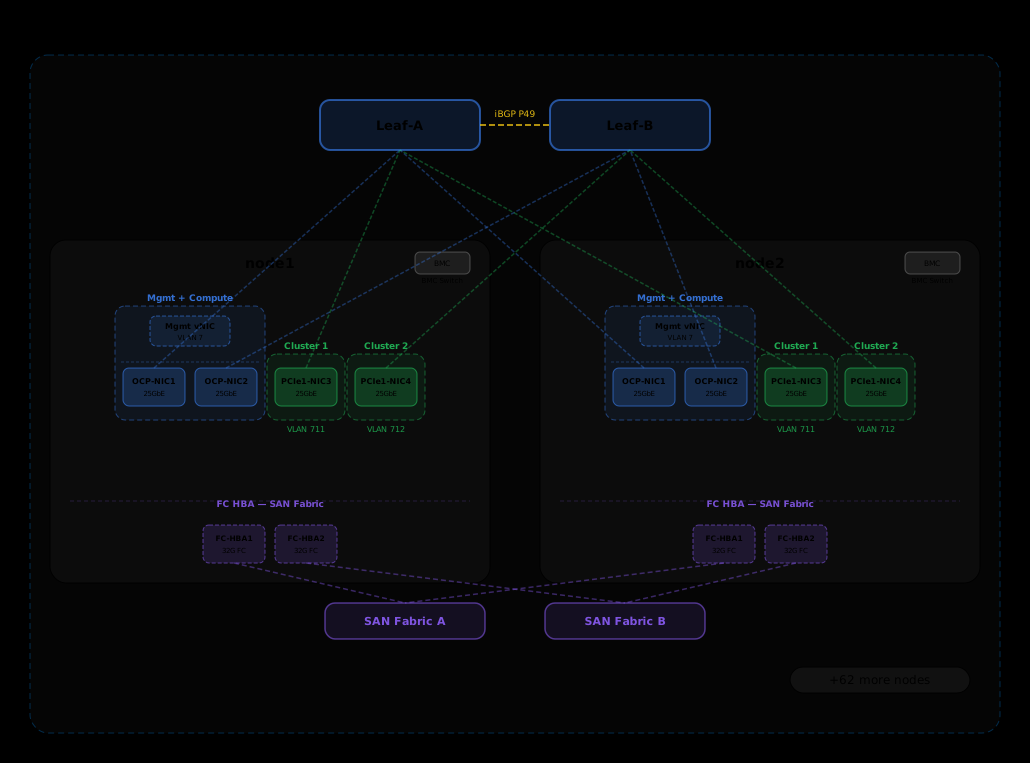
The following diagram represents the host networking configuration for a 64 nodes Azure Local disaggregated deployment based on Fiber Channel SAN. No network adapters required for in-guest backup network.
The following diagram represents the host networking configuration for a 64 nodes Azure Local disaggregated deployment based on Fiber Channel SAN. Additional network adapters required for in-guest backup network.
Select a network adapter
Network adapters are qualified by the network traffic types they are supported for use with. As you review the Windows Server Catalog, the Windows Server 2022 certification now indicates one or more of the following roles. Before purchasing a machine for Azure Local, you must minimally have at least four adapters that are qualified for management, compute and cluster, as these traffic types are required on Azure Local.
For more information about this role-based network adapter qualification, see this Windows Server blog post.
Important
Using an adapter outside of its qualified traffic type is not supported.
| Level | Management Role | Compute Role | Storage Role |
|---|---|---|---|
| Role-based distinction | Management | Compute Standard | cluster SMB Standard |
| Maximum Award | Not Applicable | Compute Premium | cluster SMB Premium |
Note
The highest qualification for any adapter in our ecosystem contains the Management, Compute Premium, and cluster Premium qualifications.

Driver Requirements
Inbox drivers are not supported for use with Azure Local. To identify if your adapter is using an inbox driver, run the following cmdlet. An adapter is using an inbox driver if the DriverProvider property is Microsoft.
Get-NetAdapter -Name <AdapterName> | Select *Driver*
If inbox driver is being used, download and install the latest driver from your OEM partner's website.
Overview of key network adapter capabilities
Important network adapter capabilities used by Azure Local include:
- Dynamic Virtual Machine Multi-Queue (Dynamic VMMQ or d.VMMQ)
- Remote Direct Memory Access (RDMA) for SMB traffic
- Guest RDMA
- Switch Embedded Teaming (SET)
Dynamic VMMQ
All network adapters with the Compute (Premium) qualification support Dynamic VMMQ. Dynamic VMMQ requires the use of Switch Embedded Teaming.
Applicable traffic types: compute
Certifications required: Compute (Premium)
Dynamic VMMQ is an intelligent, receive-side technology. It builds upon its predecessors of Virtual Machine Queue (VMQ), Virtual Receive Side Scaling (vRSS), and VMMQ, to provide three primary improvements:
- Optimizes host efficiency by using fewer CPU cores.
- Automatic tuning of network traffic processing to CPU cores, thus enabling VMs to meet and maintain expected throughput.
- Enables "bursty" workloads to receive the expected amount of traffic.
For more information on Dynamic VMMQ, see the blog post Synthetic accelerations.
RDMA
RDMA is a network stack offload to the network adapter. It allows SMB traffic to bypass the operating system for processing.
RDMA enables high-throughput, low-latency networking, using minimal host CPU resources. These host CPU resources can then be used to run more VMs or containers.
Applicable traffic types: host cluster SMB traffic
Certifications required: Cluster SMB (Standard)
All adapters with SMB (Standard) or (Premium) qualification support host-side RDMA. For more information on using RDMA with guest workloads, see the "Guest RDMA" section later in this article.
Azure Local supports RDMA with either the Internet Wide Area RDMA Protocol (iWARP) or RDMA over Converged Ethernet (RoCE) protocol implementations.
Important
RDMA adapters only work with other RDMA adapters that implement the same RDMA protocol (iWARP or RoCE).
Not all network adapters from vendors support RDMA. The following table lists those vendors (in alphabetical order) that offer certified RDMA adapters. However, there are hardware vendors not included in this list that also support RDMA. See the Windows Server Catalog to find adapters with the Storage (Standard) or Storage (Premium) qualification, which require RDMA support.
Note
InfiniBand (IB) is not supported with Azure Local.
| Network adapter vendor | iWARP | RoCE |
|---|---|---|
| Broadcom | No | Yes |
| Intel | Yes | Yes (some models) |
| Marvell (Qlogic) | Yes | Yes |
| Nvidia | No | Yes |
iWARP
iWARP uses Transmission Control Protocol (TCP), and can be optionally enhanced with Priority-based Flow Control (PFC) and Enhanced Transmission Service (ETS).
Use iWARP if:
- You don't have experience managing RDMA networks.
- You don't manage or are uncomfortable managing your top-of-rack (ToR) switches.
- You won't be managing the solution after deployment.
- You already have deployments that use iWARP.
- You're unsure which option to choose.
RoCE
RoCE uses User Datagram Protocol (UDP), and requires PFC and ETS to provide reliability.
Use RoCE if:
- You already have deployments with RoCE in your datacenter.
- You're comfortable managing the Data Center Bridging (DCB) network requirements.
Guest RDMA
Guest RDMA is not supported on Azure Local.
Switch Embedded Teaming (SET)
SET is a software-based teaming technology that is included in the Windows Server operating system since Windows Server 2016. SET is the only teaming technology supported by Azure Local and works well with compute, storage, and management traffic. SET supports up to eight adapters in a single team. Other network adapters teaming methods, such as Load Balancing/Failover (LBFO), aren't supported.
In Azure Local disaggregated deployments, Network ATC automatically configures both the SET and the vSwitch for the management and compute intent. You shouldn't manually deploy SET using PowerShell, such as with the New-VMSwitch cmdlet. While this command enables Embedded Teaming by default when multiple adapters are listed, the supported approach for Azure Local is to use Network ATC with intents for management and compute traffics
Applicable traffic types: compute, cluster SMB traffic , and management
Certifications required: Compute (Standard) or Compute (Premium)
SET is important for Azure Local because it's the only teaming technology that enables:
- Teaming of RDMA adapters (if needed).
- Dynamic VMMQ.
- Other key Azure Local features (see Teaming in Azure Local).
SET requires the use of symmetric (identical) adapters. Symmetric network adapters are those that have the same:
- make (vendor)
- model (version)
- speed (throughput)
- configuration
Note
SET supports only switch-independent configuration by using either Dynamic or Hyper-V Port load-balancing algorithms. For best performance, Hyper-V Port is recommended for use on all network adapters that operate at or above 10 Gbps. Network ATC makes all the required configurations for SET.
RDMA traffic considerations
If you implement Data Center Bridging (DCB), you must ensure that the PFC and ETS configuration is implemented properly across every network port, including network switches. DCB is required for RoCE and optional for iWARP.
RoCE-based Azure Local implementations require the configuration of three PFC traffic classes, including the default traffic class, across the fabric and all hosts.
QoS settings for Azure Local disaggregated deployments using Fiber Channel SAN
Because all traffic — CSV/Live Migration, and Cluster Heartbeat — runs over TCP, there is no requirement for lossless Ethernet. PFC is disabled on all priorities with no pause frames. Traffic is classified using 802.1p CoS tags and each class is assigned to a dedicated queue with explicit ETS bandwidth reservations enforced through Weighted Round-Robin (WRR) scheduling. CSV/Live Migration (Priority 3) receives a 20% reservation to ensure adequate throughput during VM migrations. Cluster Heartbeat (Priority 7) reserves 1% or 2% — sufficient for lightweight keepalive traffic. Default traffic (Priority 0) absorbs the remaining 79% or 78% of link bandwidth. Under normal conditions all classes can burst to full line rate; the bandwidth guarantees only apply during congestion. Note that in a SAN Fibre Channel configuration, storage traffic runs entirely on the Fiber Channel fabric, separate from the Ethernet network.
| Priority 802.1p | Description | PFC enabled PauseFrame | ETS Bandwidth (25GbE) | ETS Bandwidth (10GbE) |
|---|---|---|---|---|
| 0 | Default Traffic | ❌ No | 79% | 78% |
| 1-2 | NA | NA | NA | NA |
| 3 | CSV/Live Migration | ❌ No | 20% | 20% |
| 5-6 | NA | NA | NA | NA |
| 7 | Cluster heartbeat | ❌ No | 1% | 2% |
Cluster networks SMB traffic models
SMB provides many benefits as the cluster networks protocol for Azure Local disaggregated deployments, including SMB Multichannel. SMB Multichannel isn't covered in this article, but it's important to understand that traffic is multiplexed across every possible link that SMB Multichannel can use.
Note
We only support using multiple subnets and VLANs to separate cluster SMB traffic in Azure Local disaggregated deployments.
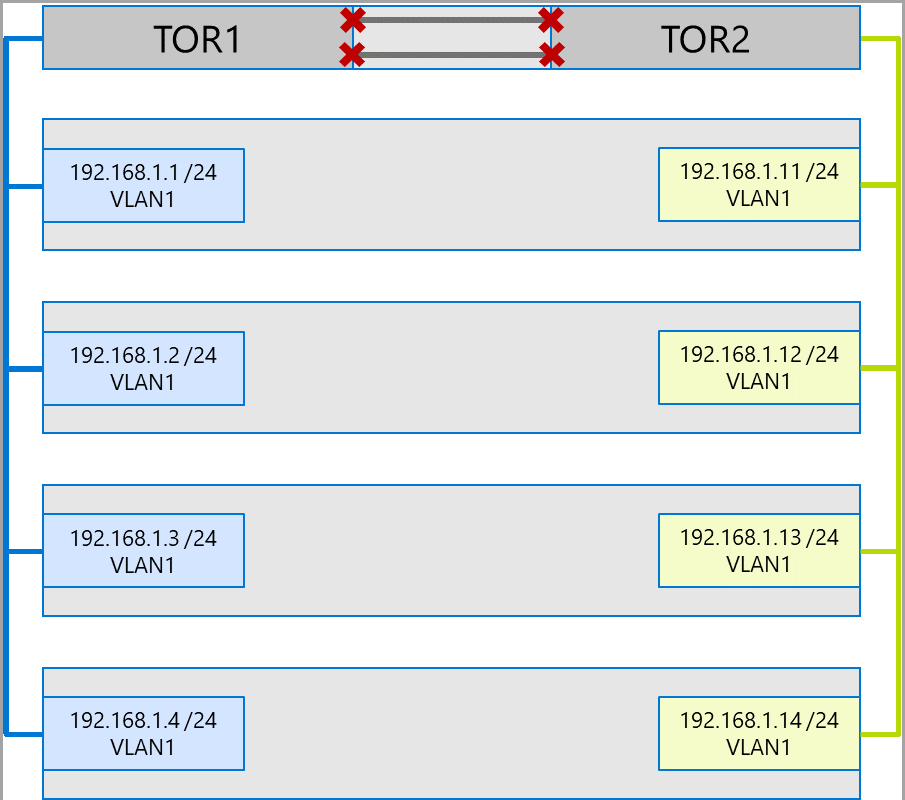
Consider the following example of a four node system. Each machine has two cluster networks ports (left and right side). Because each adapter is on the same subnet and VLAN, SMB Multichannel will spread connections across all available links. Therefore, the left-side port on the first machine (192.168.1.1) will make a connection to the left-side port on the second machine (192.168.1.2). The right-side port on the first machine (192.168.1.12) will connect to the right-side port on the second machine. Similar connections are established for the third and fourth machines.
However, this creates unnecessary connections and causes congestion at the interlink (multi-chassis link aggregation group or MC-LAG) that connects the ToR switches (marked with Xs). See the following diagram:
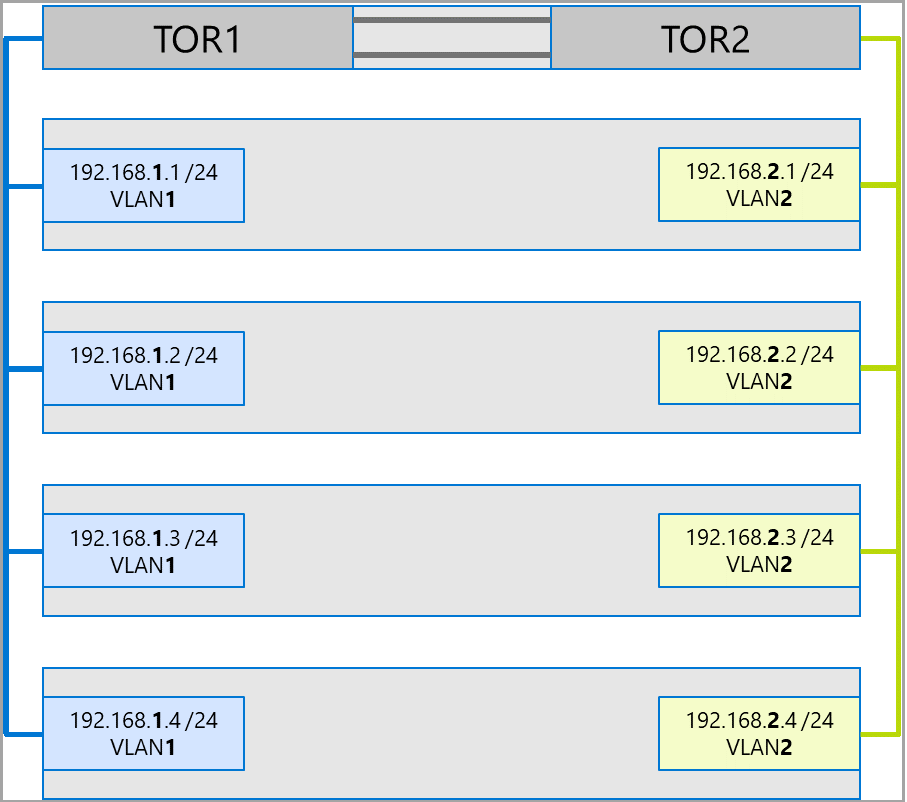
The approach used for Azure Local disaggregated deployments is to use separate subnets and VLANs for each adapters. In the following diagram, the right-hand ports now use subnet 192.168.2.x /24 and VLAN2. This allows traffic on the left-side ports to remain on TOR1 and the traffic on the right-side ports to remain on TOR2.