Note
Access to this page requires authorization. You can try signing in or changing directories.
Access to this page requires authorization. You can try changing directories.
This article describes the scenario where Azure Local is deployed with both an enterprise proxy and an Arc gateway and private endpoints are used.
Currently, Azure Local offers the following distinct methods for outbound connectivity:
Deploy Azure Local without an enterprise proxy and without an Arc gateway.
Deploy Azure Local with an enterprise proxy but without an Arc gateway.
Deploy Azure Local without an enterprise proxy but with an Arc gateway.
Deploy Azure Local with both an enterprise proxy and an Arc gateway.
About Azure private endpoint scenario with proxy and with Arc gateway
Description: Azure Local runs with an enterprise proxy and Arc gateway.
During Arc registration, you specify the enterprise proxy and the proxy bypass list. The Arc registration script automatically configures the host as follows:
WinInet and WinHTTP HTTPS proxy to become
http://localhost:40343. This proxy is the Arc proxy address the host uses to funnel all HTTPS traffic over the Arc gateway tunnel. The script also configures the proxy bypass list you define.WinInet and WinHTTP HTTP proxy to become the enterprise proxy. This proxy sends HTTP traffic directly to the enterprise proxy. Remember that Arc proxy doesn't support HTTP traffic. The script also configures the proxy bypass list you define.
The script also automatically configures the proxy server and bypass list for Environment Variables on each host as follows:
https:http://localhost:40343http:http://customerproxy:portbypasslist: localhost,.svc,kubernetes.default.svc,.svc.cluster.local,192.168.0.0/16,10.0.0.0/8,172.16.0.0/12 plus customer defined bypass endpoints.
The bypass list for Environment Variables is automatically constructed by using the customer defined list of endpoints during Arc registration and appending the default required endpoints for Arc resource bridge.
This proxy and bypass list configuration in Environment Variables is used to configure the proxy inside Arc resource bridge VM during Azure Local deployment.
Outbound connectivity for Azure Local hosts
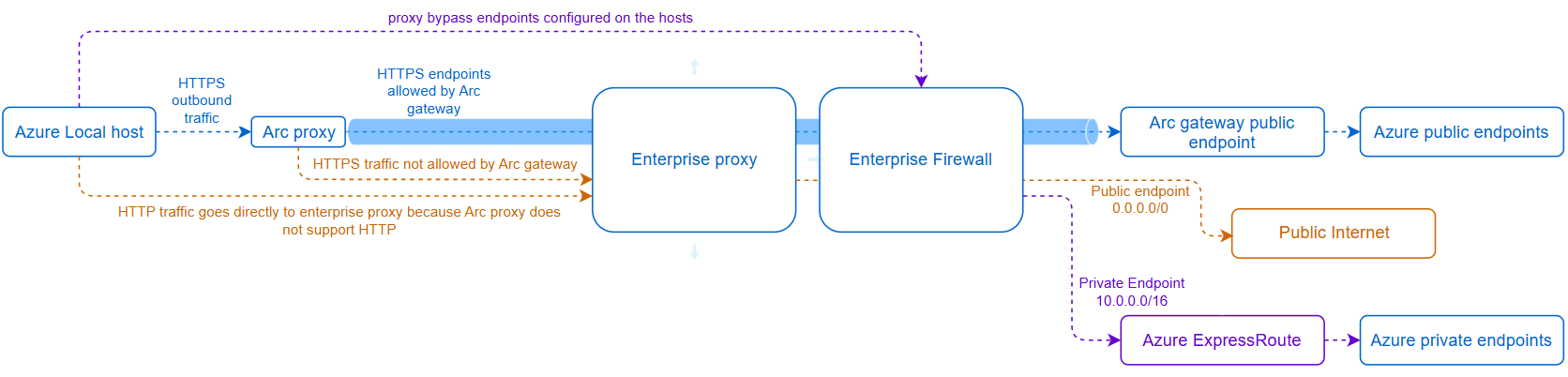
Diagram legend:
- 10.0.0.0/16 is just an example of a private network where you can configure the private endpoint.
- During Arc registration, you specify the enterprise proxy and the proxy bypass list. The Arc registration script automatically configures the host HTTPS proxy to become
http://localhost:40343because Arc gateway is enabled. This proxy is the Arc proxy address the host uses to funnel all HTTPS traffic over the Arc gateway tunnel. - The HTTP proxy is set to use the enterprise proxy. Azure Local hosts send HTTP traffic to the enterprise proxy because Arc gateway doesn't support HTTP.
- All Azure Local hosts send HTTPS outbound traffic to the Arc proxy except the endpoints added to the proxy bypass list.
- If the endpoints are allowed by Arc gateway, the traffic goes directly to the Arc gateway in Azure and from there it reaches the corresponding Azure service endpoint.
- If the endpoints aren't allowed by Arc gateway, Arc proxy retries the connection to the endpoint over the enterprise proxy. Third party endpoints traffic such as OEM endpoints follow this path. Private endpoints also follow this path if they're not added to the proxy bypass list.
- Azure Local Hosts HTTPS traffic that isn't allowed by Arc gateway and is sent to the enterprise proxy must be allowed if the endpoint is legit and required.
- From the enterprise proxy, the non-allowed Arc gateway traffic is then routed to the enterprise firewall, which routes the traffic to public internet or to the private endpoints over Azure ExpressRoute or S2S VPN.
Outbound connectivity for Arc resource bridge VM
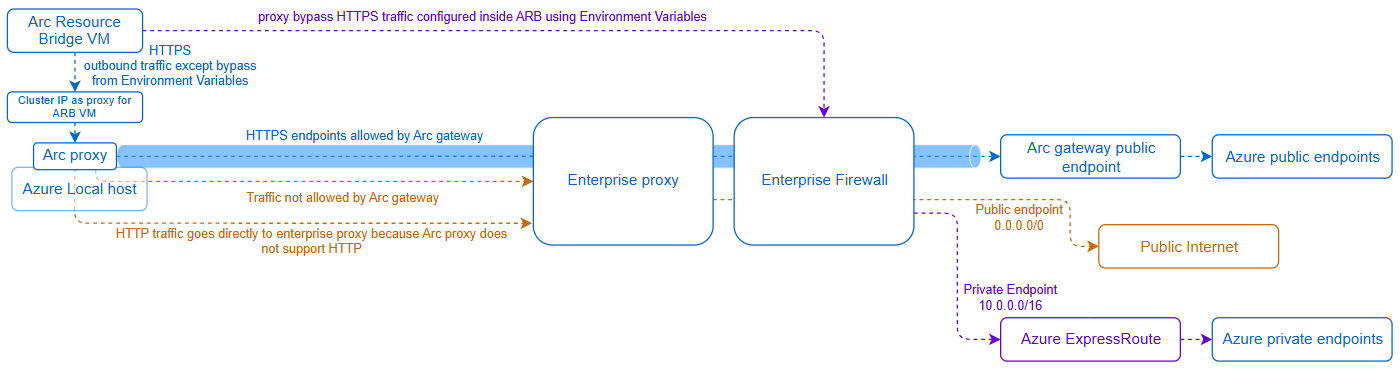
Diagram legend:
10.0.0.0/16 is just an example of a private network where you can configure the private endpoint.
You use environment variables proxy and bypass list configuration on Azure Local nodes to configure the proxy inside the Arc resource bridge VM.
Arc resource bridge has specific endpoints and subnets requirements that must be added to the proxy bypass list. This requirement is automatically handled during deployment, and the following endpoints are added to the customer defined proxy bypass list :
localhost,127.0.0.1,0.0.0.0,kubernetes.default.svc,.svc.cluster.local,.svc,10.0.0.0/8,172.16.0.0/12,192.168.0.0/16
Because Arc gateway is enabled during Arc registration, the Arc resource bridge VM proxy server automatically sets to use the Azure Local Cluster IP on port 40343 and the proxy bypass list uses the environment variables values.
Arc resource bridge VM sends HTTPS outbound traffic to the cluster IP proxy except those endpoints added to the Environment Variables proxy bypass list. Then the traffic is sent to the Arc proxy and behaves as follows:
- If HTTPS endpoint is allowed by Arc gateway, the traffic goes over the tunnel to the Azure services endpoints.
- If Arc gateway doesn't allow an HTTPS endpoint, Arc proxy retries the connection and sends the traffic directly to the enterprise proxy.
- Arc proxy sends HTTPS bypassed endpoints directly to the enterprise firewall. The firewall routes the traffic to public internet or to the private endpoints over Azure ExpressRoute or S2S VPN.
Arc resource bridge VM HTTP traffic goes directly to the enterprise proxy.
From the enterprise proxy, traffic goes to the enterprise firewall. The firewall routes the traffic to public internet or to the private endpoints over Azure ExpressRoute or S2S VPN.
Outbound connectivity for AKS clusters control plane and worker VMs
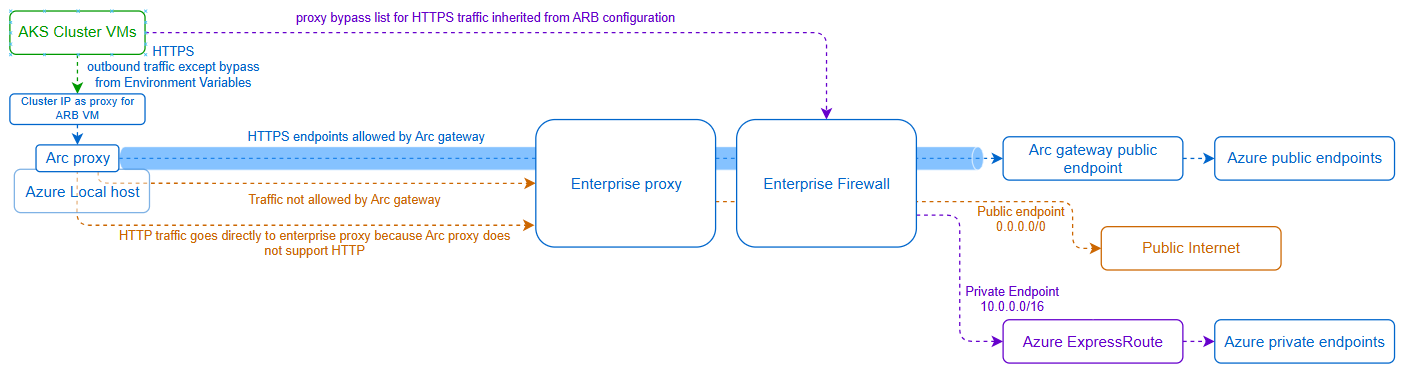
Diagram legend:
- 10.0.0.0/16 is just an example of a private network where you can configure the private endpoint.
- If you deploy new AKS clusters in Azure Local, the AKS cluster control plane VMs and Worker VMs inherit the Arc resource bridge proxy and bypass list configuration. If AKS workloads require access to some private endpoint such as Azure Container Registries, add those endpoints to the proxy bypass list during Arc registration. For example, if you want to add a specific Azure Container Registry endpoint to be used by AKS workloads, append such endpoint to the proxy bypass list
- This requirement is particularly important for scenarios where AKS clusters run on their own LNET and you want the ACR traffic to go directly from the AKS subnet to the enterprise firewall. If you don't add the endpoint to the proxy bypass list during Arc registration, the Arc proxy running on the host on the management network sends the request and the firewall must be configured to allow the request from the host.
- Because Arc gateway is enabled during Arc registration, the AKS Clusters inherit the proxy and proxy bypass list configuration from Arc resource bridge, so proxy server is automatically set to use the Azure Local Cluster IP on port 40343
- AKS Cluster VMs HTTPS outbound traffic goes to the cluster IP proxy except those endpoints added to the proxy bypass list. Then the traffic goes to the Arc proxy and behaves as follows:
- If HTTPS endpoint is allowed by Arc gateway, the traffic goes over the tunnel to the Azure services endpoints.
- If Arc gateway doesn't allow an HTTPS endpoint, Arc proxy retries the connection and sends the traffic directly to the enterprise proxy.
- Arc proxy sends HTTPS bypassed endpoints directly to the enterprise firewall. The firewall routes the traffic to public internet or to the private endpoints over Azure ExpressRoute or S2S VPN.
- AKS Cluster VMs send HTTP outbound traffic directly to the enterprise proxy.
- From the enterprise proxy, traffic goes to the enterprise firewall. The firewall routes the traffic to public internet or to the private endpoints over Azure ExpressRoute or S2S VPN.
- PODs running on AKS worker nodes are independent and can have their own proxy and bypass list configuration, which you define during POD application deployment.
Outbound connectivity for Azure Local VMs
- Azure Local VMs can have their own proxy and Arc gateway configuration independent from the hosts. Azure Local hosts configuration doesn't create any dependency.
- If Azure Local VMs don't have proxy configuration, the traffic goes over the defined LNET default gateway.
- You can configure Arc gateway independently for Azure Local VMs regardless of whether the infrastructure uses it.
- Azure Local VMs can use the same or different Arc gateway from the hosts.
Private endpoints considerations when deploying Azure Local with proxy and Arc gateway
Key Vault private endpoints: (vault.azure.net)
Azure Local requires a Key Vault for deployment. You can use a Key Vault on a private endpoint, but you must allow public access until the initial deployment is complete. Azure portal and HCI RP need to configure the Key Vault secrets during deployment. Once deployment is completed, you can restrict Key Vault access to only allow private networks. You can restrict public access without any constraints for other customer Key Vaults used for workloads.
Storage account private endpoints: (blob.core.windows.net)
Azure Local with two nodes requires a Storage Account for deployment. You can use a Storage Account on a private endpoint, but you must allow public access until the initial deployment is complete. Azure portal and HCI RP need to configure the cloud witness during deployment. Once deployment is completed, you can restrict Storage Account access to only allow private networks. You can restrict public access without any constraints for other customer Storage accounts used for workloads. If your security team wants to ensure that this storage account endpoint is specifically allowed in your firewall from your Azure Local nodes as source IP, you must add the endpoint to the proxy bypass list, so the traffic is sent directly to your firewall instead of going through the Arc gateway tunnel.
Azure Container Registry private endpoints for AKS: (azurecr.io)
It's common for customers to pull images for their AKS workloads from private Azure Container Registry endpoints. In those scenarios, although it is possible to send the private endpoints traffic over the Arc proxy, include the specific ACR FQDN endpoints to the Environment Variables proxy bypass during Arc. It's not supported to use wildcards such as *.azurecr.io because Arc resource bridge VM uses specific ACR endpoints and the proxy bypass list applies not only to AKS but also to Arc resource bridge VM.
Azure Site Recovery private endpoints (privatelink.siterecovery.windowsazure.com)
Arc gateway doesn't allow the Azure Site Recovery private endpoints FQDNs. That restriction means that traffic can follow two outbound paths depending on your security requirements:
Option 1: Outbound path for Azure Site Recovery private endpoints: Don't include the FQDNs to the proxy bypass list. If you don't add the FQDNs to the proxy bypass list, the traffic goes to your enterprise proxy and must have SSL inspection disabled. From the proxy, the request routes to your firewall and then to the private endpoint via express route according to your routing policies.
Option 2: Outbound path for Azure Site Recovery private endpoints: Include the FQDNs to the proxy bypass list. If you add the FQDNs to the proxy bypass list, the traffic goes directly to your firewall and then to the private endpoint via express route according to your routing policies.
If you plan to use Azure Site Recovery in Azure Local to protect your workloads, make sure you configure the private endpoints as described in this article. Enable replication for private endpoints in Azure Site Recovery
Next steps
Learn more about using private endpoints with Azure Local in other scenarios: