Note
Access to this page requires authorization. You can try signing in or changing directories.
Access to this page requires authorization. You can try changing directories.
Important
The restore operation supports restoring the backup to the same version of Azure Local disconnected environment.
This article explains the restore process for disconnected operations for Azure Local environments. It provides practical steps to trigger a restore and parameter configurations to customize it. Operators need access to the Operator subscription and role-based access control (RBAC) permissions.
For more information, see Disconnected operations for Azure Local.
Tip
Restore disconnected operations for Azure Local before cloud deployment on the new instance to avoid repair registration of the management cluster. If you restore on the same instance as the backup, you can run the restore after cloud deployment. In that case, follow the management cluster rehydration sequence to re-register the management cluster. For the recommended end-to-end order, see Post-restore rehydration overview for disconnected operations.
Overview
The backup feature currently backs up only the control plane VM data. It doesn't include associated workloads or configured clusters. The restore functionality restores the control plane data from the backup. So, ensure that you configure the same version of Azure Local disconnected where you restore the backup.
Why back up and restore operations?
Backup capability is critical because the Azure Local with disconnected operations virtual machine (VM) acts as the control plane. It stores authoritative metadata for subscriptions, resource groups, policies, and connected Azure Local resources. Any corruption or loss of this control plane disrupts the entire environment. Regular backups protect against catastrophic failures, infrastructure loss, or misconfigurations by capturing the control plane state at specific points in time. The restore functionality helps return your environment to its state at the time of the backup.
Prerequisites
Before you restore your system, complete these prerequisites:
Operator access: Ensure your identity has the required OperatorRP RBAC role in the Operator subscription.
Environment Setup: Ensure that you have a fresh Azure Local Disconnected environment that you set up and that the version matches the backup version. Cross-version restores aren't supported.
Root Certificate: For the restore VM, ensure that the new VM uses the same root certificate authority (CA) to maintain trust.
Server Message Block (SMB) share: Ensure the SMB share that stores the backup file is accessible from the new environment.
Decryption key: Ensure the decryption key that you stored externally is available. You need to provide it during the restore process.
Import restore module (required): Before you run any restore cmdlets, import the restore module from your Operations Module by using its full path:
# Import the restore cmdlets from the Operations Module (use the full path on your system)
Import-Module "<full path to Operations Module>\Azure.Local.Restore.psm1"
Trigger and monitor a restore
To trigger the restore, open an administrator PowerShell session and invoke the restore operation by passing the requested parameters. This operation initiates the restore process, which runs in the background.
To trigger and monitor the restore, follow these steps:
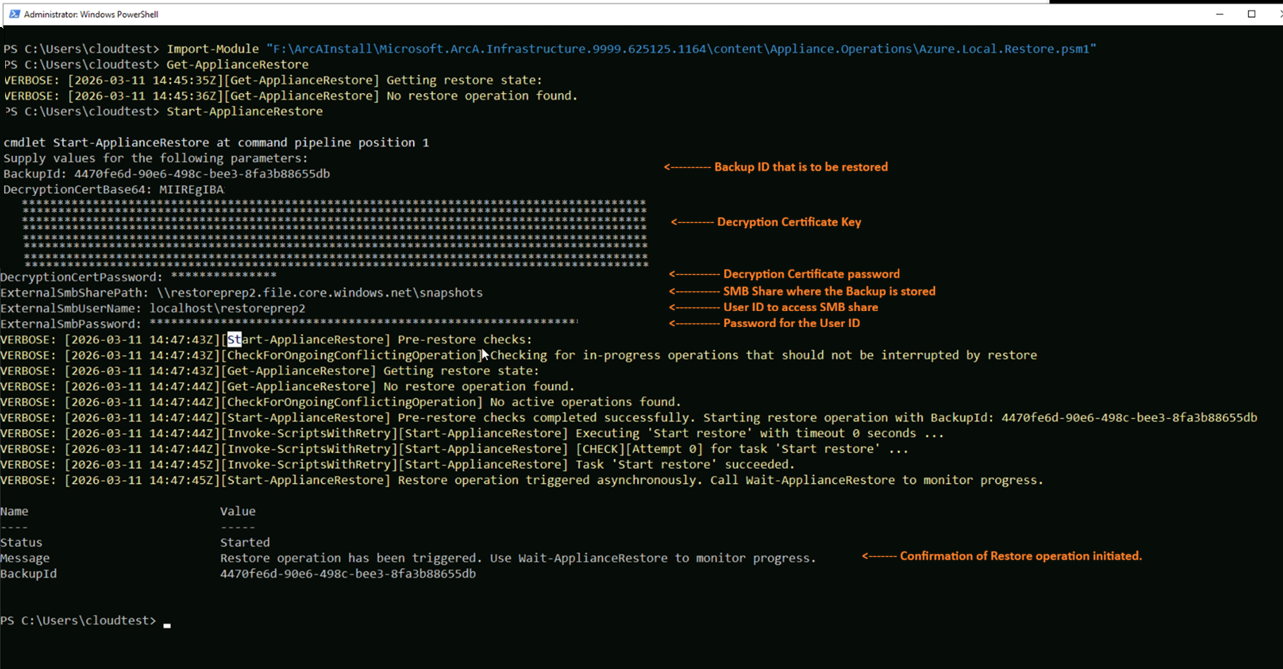
Trigger the restore operation.
Start-ApplianceRestoreHere's an example output:
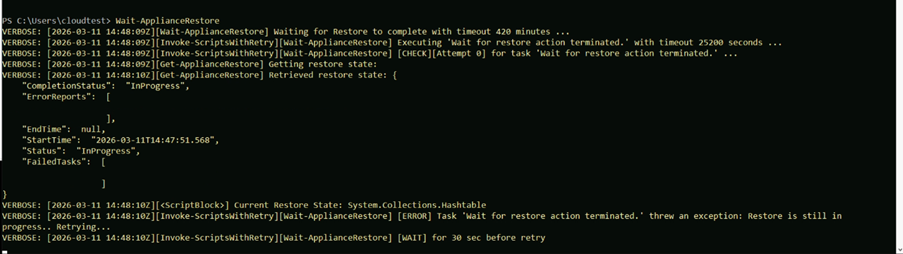
Track the restore status until it completes, where status refreshes every 30 seconds.
Wait-ApplianceRestoreHere's an example output:
Restore Completion - After a few hours, the restore operation completes. You can check the status by using the following command:
Get-ApplianceRestoreHere's an example output:

Post restore environment mismatch
Important
Before you initiate a restore, the backup state and the current environment state might have differences in the workload state of the control plane data. The restore operation can cause a drift in the resource metadata.
- Lost resources: You can't recover cloud-only resources that you created after the backup. You must recreate these resources.
- Untracked Arc resources: You need to rehydrate or re-register resources that you created after the backup and exist on the cluster but are missing in restored metadata. To recover a data cluster that you created after the backup, see Recover a data cluster created after backup following a disconnected operations restore.
- Phantom / Resurrected resources: You need to clean up resources that you deleted after the backup but reappear as metadata after restoring.
- Drifted resources: Restored environment reflects old state for resources that you updated after backup. This state might break authentication or management until remediated.
- Azure Local cluster infra drift: You need to repair registration and re-Arc actions for membership changes or new clusters registered after the backup. See Reconnect Azure Arc on cluster machines after a disconnected operations restore and Re-register the management or data cluster (created post backup) on a restored disconnected operations for Azure Local setup.
- Certificate expiry / rotation: Older backups might contain expired certificates or mismatched client authentication certificate. You need manual remediation and rotation.
Next steps
- For the recommended end-to-end order of the post-restore rehydration steps: Post-restore rehydration overview for disconnected operations.
- To reconnect an existing data cluster from backup to the restored environment: Reconnect a data cluster after a disconnected operations restore.
- To re-register a management cluster (if restore was initiated after cloud deployment): Re-register the management or data cluster (created post backup) on a restored disconnected operations for Azure Local setup.
- To re-register data cluster created after backup, do this: Recover a data cluster created after backup following a disconnected operations restore.
This feature is available only in Azure Local 2603 or later.