Note
Access to this page requires authorization. You can try signing in or changing directories.
Access to this page requires authorization. You can try changing directories.
Applies to: Hyperconverged deployments of Azure Local
Important
This feature is currently in PREVIEW. See the Supplemental Terms of Use for Microsoft Azure Previews for legal terms that apply to Azure features that are in beta, preview, or otherwise not yet released into general availability.
The post-deployment proxy update and Arc gateway bypass features require Azure Local 2610 or later.
Note
This post-deployment workflow doesn't support releases earlier than 2610. Upgrade the Azure Local instance before you use these procedures to change proxy or bypass settings.
Starting with Azure Local 2610, you have two preview options for changing how an existing Azure Local instance routes outbound traffic:
- Update the Azure Local proxy configuration by using
Update-AzureLocalProxy. This option coordinates proxy changes across the Azure Local machines and Azure Arc resource bridge. - Bypass Azure Arc gateway for selected allowed endpoints by configuring the
gatewayBypassproperty on the Arc gateway resource. This cloud-side option applies only to endpoints that Arc gateway allows and changes their path without changing proxy settings on each machine.
This article helps you choose an option and provides the procedures for both. For initial proxy configuration during Azure Arc registration, see Register Azure Local with Azure Arc without using Arc gateway or Register Azure Local with Azure Arc using Arc gateway.
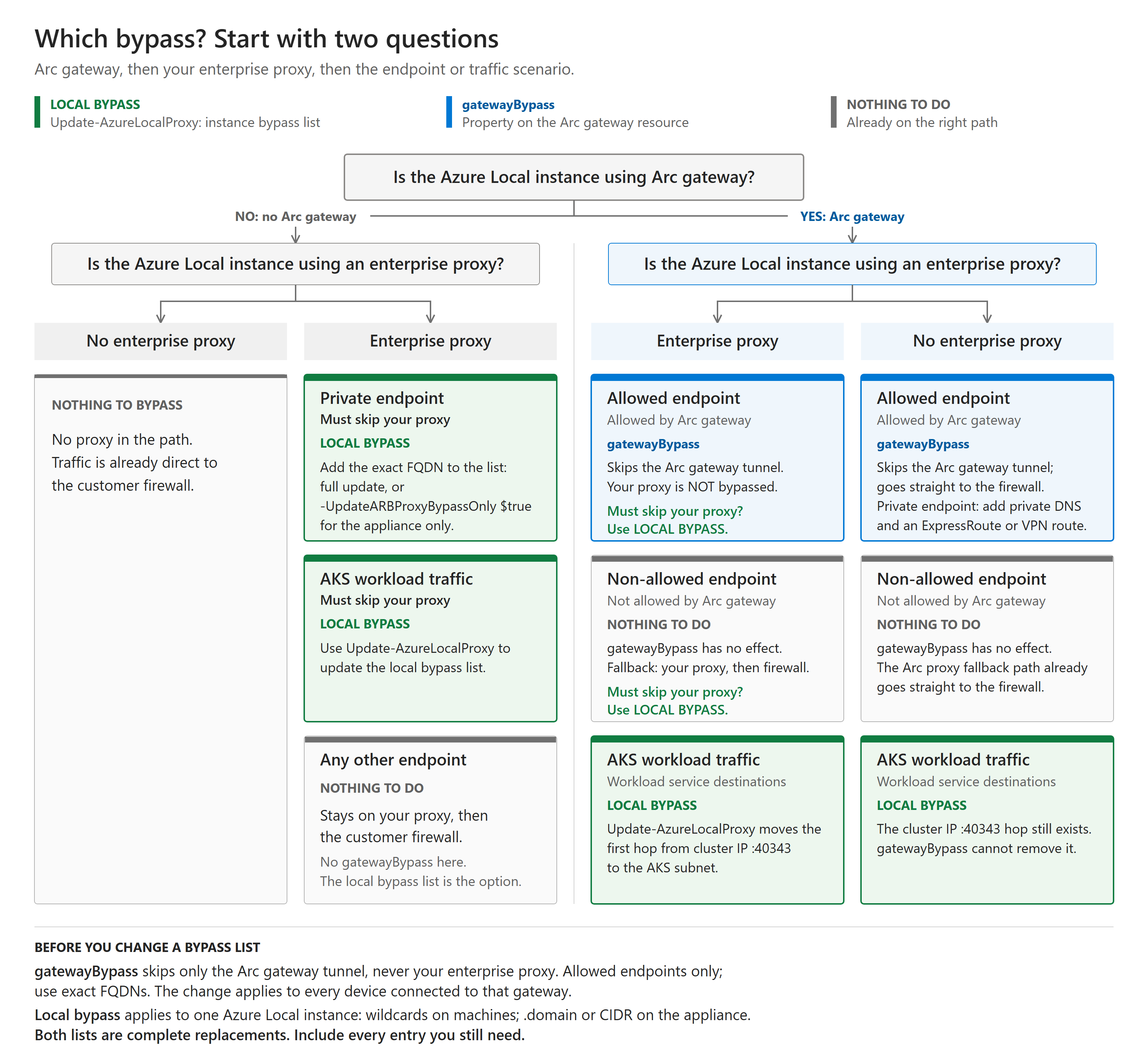
Choose an option
The two options work at different layers and aren't interchangeable.
The procedures in this article are organized into two options:
- Option A: Update the local proxy configuration. Use
Update-AzureLocalProxyto add, change, or remove an enterprise proxy or update the local proxy bypass list. - Option B: Configure Arc gateway bypass. Use Arc gateway
gatewayBypasswhen Arc gateway is enabled and specific service endpoints must bypass the gateway tunnel without changing the local proxy configuration.
| Requirement | Use this option | What changes |
|---|---|---|
| Add, change, or remove an enterprise proxy | Update-AzureLocalProxy |
WinINet and WinHTTP settings on every Azure Local machine and the proxy configuration used by Azure Arc resource bridge |
| Update the local proxy bypass list across the instance | Update-AzureLocalProxy |
Proxy bypass settings on the Azure Local machines and Azure Arc resource bridge |
| Make AKS traffic to endpoints such as a specific Azure Key Vault or Azure Container Registry use the AKS subnet default gateway instead of the cluster IP proxy | Update-AzureLocalProxy |
The infrastructure proxy bypass configuration inherited by new AKS clusters. Existing clusters require the additional actions described in this article. |
| Send traffic for an endpoint allowed by Arc gateway outside the gateway tunnel without changing each machine's proxy configuration | Arc gateway gatewayBypass |
The cloud-side Arc gateway resource used by associated Arc agents. A configured enterprise proxy remains in the path. |
| Apply the same Arc gateway routing exception centrally to resources that use the gateway | Arc gateway gatewayBypass |
The gateway routing decision for every matching destination |
| Reach a private endpoint directly without using the enterprise proxy | Update-AzureLocalProxy |
The local proxy bypass list. Matching traffic follows the source subnet's default route to the customer firewall. |
Compare the bypass options
Before you choose an option, consider its scope and operational effect:
| Consideration | Option A: Local proxy update with Update-AzureLocalProxy |
Option B: Cloud-side Arc gateway gatewayBypass |
|---|---|---|
| Configuration location | The Azure Local instance | The Arc gateway resource in Azure |
| Scope | Only the targeted Azure Local instance | Every Arc-enabled device or resource that uses the Arc gateway |
| Components changed | Proxy configuration on every Azure Local machine and Azure Arc resource bridge. An Azure Arc resource bridge-only update is also available. | No proxy configuration changes on the Azure Local machines or Azure Arc resource bridge |
| Traffic effect | Matching traffic bypasses the local Arc proxy and enterprise proxy on the updated components and follows the source subnet's default route | For an allowed endpoint, matching traffic bypasses only the Arc gateway tunnel. If an enterprise proxy is configured, the traffic still uses it. |
| Endpoint matching | Supports bypass entries appropriate to the updated component, including wildcard domain notation for machine-level updates and Linux domain or CIDR notation for Azure Arc resource bridge-only updates | Applies only to endpoints allowed by Arc gateway and requires each exact endpoint FQDN. Wildcards aren't supported. |
| Main benefit | Controls enterprise proxy and proxy bypass behavior for one Azure Local instance, including destinations that aren't Arc gateway traffic | Provides one central configuration that applies consistently to all devices and resources connected to the Arc gateway |
| Main tradeoff | Runs an update across the Azure Local instance. You must preserve the complete bypass list and separately account for existing AKS clusters. | Has a broader scope. Every new endpoint affects all devices and resources connected to the Arc gateway, and each endpoint must be added individually. |
Use the following rules to choose the network path:
| Endpoint and required path | Configuration | Result when an enterprise proxy is configured |
|---|---|---|
| Arc gateway allows the endpoint, and only the Arc gateway tunnel must be skipped | Cloud-side gatewayBypass |
Traffic skips Arc gateway but still goes through the enterprise proxy and customer firewall. |
| Arc gateway doesn't allow the endpoint | No gatewayBypass entry |
Arc proxy automatically uses its fallback path through the enterprise proxy and customer firewall. Use local proxy bypass only if the enterprise proxy must also be skipped. |
| The endpoint must bypass both Arc gateway and the enterprise proxy, such as a private endpoint that should use the source subnet's direct route | Local bypass with Update-AzureLocalProxy |
Traffic bypasses both proxies and follows the source subnet's default route to the customer firewall. |
Updating the local proxy bypass list starts a coordinated operation on the targeted Azure Local instance. A full update changes WinINet and WinHTTP proxy configuration on every machine and updates Azure Arc resource bridge. The bypass list is a complete replacement, so include all existing entries that must remain. Existing AKS clusters don't automatically receive post-deployment proxy changes. For details, see Apply the change to existing AKS clusters.
Updating gatewayBypass changes one cloud resource and doesn't run a proxy update on the Azure Local machines. The change applies to every Arc-enabled device or resource connected to that Arc gateway, not only one Azure Local instance. It applies only to endpoints that Arc gateway allows. Non-allowed endpoints already follow the Arc proxy fallback path and aren't candidates for gatewayBypass. Check the current Arc gateway endpoint guidance before choosing an option. Use exact FQDNs and evaluate the effect on all connected devices before adding or removing an entry. The gatewayBypass array is also a complete replacement.
Important
Arc gateway bypass doesn't add an endpoint to the WinINet, WinHTTP, or Azure Arc resource bridge proxy bypass lists. It only prevents an endpoint allowed by Arc gateway from traversing the gateway tunnel. If an enterprise proxy is configured, the endpoint still goes through that proxy. To bypass both Arc gateway and the enterprise proxy—for example, to reach a private endpoint directly—use the local proxy bypass list and allow the source subnet's path in DNS, routing, and the customer firewall.
Apply your selected option
Select a tab to show the procedure for that option.
Run Update-AzureLocalProxy instead of changing Azure Arc resource bridge directly. Don't run the underlying az arcappliance proxy update command.
Prerequisites for updating the local proxy
Confirm the following prerequisites:
- Azure Local solution version 2610 or later.
- Registration with Azure and a deployed, running Azure Arc resource bridge.
- Healthy, connected machines.
- Local administrator permissions on an Azure Local machine.
- You have the enterprise proxy address, if applicable, and the complete bypass list that you want to apply.
- Your proxy doesn't require authentication. Authenticated proxies, Proxy Auto-Configuration (PAC) files, and proxy endpoints that use a
.localdomain aren't supported.
Plan a maintenance window. The update can take several minutes, depending on the number of machines in the instance.
Import the ProxyConfiguration module
Before you can run Update-AzureLocalProxy, import the ProxyConfiguration module into your PowerShell session. The Azure Local deployment artifacts include the module. It's not available in the default module path.
$proxyConfigNuget = Get-ASArtifactPath -NugetName Microsoft.AzureLocal.ArcGateway.Deploy.ProxyConfiguration
$proxyConfigModulePath = "content\PowerShell\Roles\ProxyConfiguration\ProxyConfiguration.psm1"
Import-Module -Name "$proxyConfigNuget\$proxyConfigModulePath" -Force -Verbose:$false
Verify that the command is available:
Get-Command Update-AzureLocalProxy
Tip
You only need to import the module once per PowerShell session. After you import it, you can run Update-AzureLocalProxy as many times as needed in that session.
Understand the parameters
Update-AzureLocalProxy uses the following parameters:
| Parameter | Type | Description |
|---|---|---|
ProxyServer |
String | Proxy server URL, such as http://proxy.contoso.com:8080. Use an empty string ("") when you remove the enterprise proxy. Omit this parameter when you update only the Azure Arc resource bridge bypass list. |
BypassList |
String | Comma-separated, complete replacement list of addresses that bypass the proxy. Include every entry that you want to retain. |
UpdateARBProxyBypassOnly |
Switch | Omit this switch to update proxy settings on the machines and Azure Arc resource bridge. Include -UpdateARBProxyBypassOnly without a value to update only the bypass list in Azure Arc resource bridge. |
Bypass list formats
The required notation depends on whether you include the UpdateARBProxyBypassOnly switch:
| Element | Full update (switch omitted) | Azure Arc resource bridge only (switch included) |
|---|---|---|
| Domain | *.contoso.com |
.contoso.com |
| Subnet | 192.168.1.* |
192.168.1.0/24 |
| Separator | Comma | Comma |
A full update configures Windows components, which use asterisk wildcard notation. An Azure Arc resource bridge-only update configures a Linux-based appliance, which uses dot-prefix domain and Classless Inter-Domain Routing (CIDR) notation.
Important
BypassList is a full replacement. Include all existing entries and all new entries. Any existing entry that you omit is removed.
The cmdlet adds required entries derived from the instance configuration if they aren't present. These entries include:
- The cluster IP address, machine names, domain name, and subnet ranges.
localhostand127.0.0.1.- The Kubernetes entries
kubernetes.default.svc,.svc.cluster.local, and.svcfor Azure Arc resource bridge and theNO_PROXYenvironment variable.
For clarity and change tracking, include the required entries explicitly in the bypass list.
Update the proxy configuration
The following examples use an instance named AzCluster1 with two machines named node1 and node2.
Add an enterprise proxy
To add an enterprise proxy for the first time, run a full update and use Windows wildcard notation:
Update-AzureLocalProxy `
  -ProxyServer "http://proxy.contoso.com:8080" `
  -BypassList "localhost,*.contoso.com,node1,node2,192.168.1.*,192.168.2.*,192.168.3.*,AzCluster1"
Change the enterprise proxy
To change the proxy server address, provide the new address and the complete bypass list:
Update-AzureLocalProxy `
  -ProxyServer "http://newproxy.contoso.com:8080" `
  -BypassList "localhost,*.contoso.com,node1,node2,192.168.1.*,192.168.2.*,192.168.3.*,AzCluster1"
Remove the enterprise proxy
To stop routing traffic through an enterprise proxy, use empty strings for the proxy server and bypass list:
Update-AzureLocalProxy `
  -ProxyServer "" `
  -BypassList ""
Note
Removing the enterprise proxy doesn't remove Azure Arc gateway. If Arc gateway is enabled, its required bypass entries are preserved and the HTTPS proxy continues to use http://localhost:40343. Provide the required bypass list when Arc gateway is enabled.
Add a machine to the bypass list
When you add a machine to the instance, update the bypass list on both the machines and Azure Arc resource bridge. The following example adds node3:
Update-AzureLocalProxy `
  -ProxyServer "http://proxy.contoso.com:8080" `
  -BypassList "localhost,*.contoso.com,node1,node2,node3,192.168.1.*,192.168.2.*,192.168.3.*,AzCluster1"
Add a service endpoint to the bypass list
To route a service endpoint directly instead of through the enterprise proxy or Arc proxy, add its exact fully qualified domain name (FQDN) to the complete bypass list. For example, add <storage-account-name>.blob.core.windows.net for a cloud witness storage account or an Azure Site Recovery cache storage account that uses a private endpoint.
Tip
If Arc gateway is enabled and you only need Arc agent traffic to selected endpoints to bypass the Arc gateway tunnel, use the cloud-side Arc gateway bypass option. Don't use the cloud-side option when AKS workload traffic must bypass the cluster IP proxy; use the local proxy bypass option and account for existing AKS clusters.
Use a full update when both the Azure Local machines and Azure Arc resource bridge must bypass the endpoint. Preserve the current enterprise proxy address and every existing bypass entry. If the instance uses Arc gateway without an enterprise proxy, specify an empty string for ProxyServer; Arc gateway remains enabled and the HTTPS proxy remains http://localhost:40343.
Update-AzureLocalProxy `
  -ProxyServer "http://proxy.contoso.com:8080" `
  -BypassList "localhost,*.contoso.com,<storage-account-name>.blob.core.windows.net,node1,node2,192.168.1.*,192.168.2.*,192.168.3.*,AzCluster1"
Don't add a broad entry such as *.blob.core.windows.net when only specific storage accounts should bypass the proxy. Confirm that the storage account FQDN resolves to its private endpoint IP and that routing sends the traffic through Azure ExpressRoute or a site-to-site VPN.
Update only the Azure Arc resource bridge bypass list
Use this option when the proxy server and machine-level settings don't change. Provide BypassList and the -UpdateARBProxyBypassOnly switch without a value; omit ProxyServer. Because the bypass list is applied directly to the Linux-based appliance, use Linux domain and CIDR notation:
Update-AzureLocalProxy `
  -BypassList "localhost,192.168.1.0/24,192.168.2.0/24,192.168.3.0/24,.contoso.com,node1,node2,AzCluster1" `
  -UpdateARBProxyBypassOnly
This option requires an existing enterprise proxy or Arc gateway configuration. It doesn't change WinHTTP, WinINet, or the HTTP_PROXY and HTTPS_PROXY environment variables on the machines.
Move to private path connectivity
To replace a public-path proxy with the private IP and explicit proxy port of an Azure Firewall instance, see Move Azure Local from public path to private path connectivity. That article covers network preparation, migration, validation, cutover, and rollback.
Confirm and monitor the update
The cmdlet displays the planned values and asks for confirmation. Review the values, and then enter Yes to apply the changes. Any other response cancels the operation.
When the operation finishes, the following message appears:
[SUCCESS] Azure Local proxy configuration has been updated successfully.
Review the logs even when the operation succeeds:
- Cmdlet log:
C:\MASLogs\Update-AzureLocalProxy-YYYY-MM-DD.HH-mm-ss.log - Action plan log:
C:\MASLogs\ProxyConfiguration-UpdateAzureLocalProxy-*.log
Verify the updated configuration
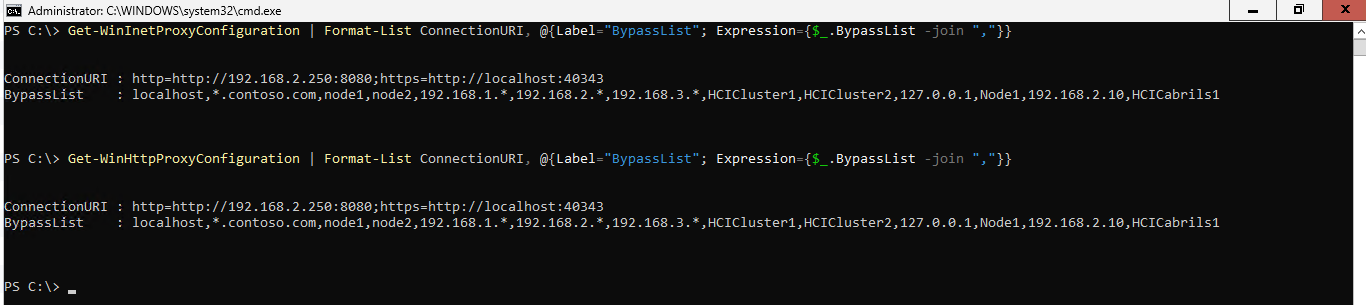
Verify the WinHTTP and WinINet proxy server and complete bypass list on each machine:
Get-WinHttpProxyConfiguration | Format-List ConnectionURI, @{Label="BypassList"; Expression={$_.BypassList -join ","}}
Get-WinInetProxyConfiguration | Format-List ConnectionURI, @{Label="BypassList"; Expression={$_.BypassList -join ","}}
Each command displays ConnectionURI and BypassList on separate lines. Confirm that ConnectionURI contains the expected HTTP and HTTPS proxy addresses and that BypassList contains all expected entries.
Verify the Azure Connected Machine agent configuration and connectivity:
azcmagent show
azcmagent check
View the Azure Arc resource bridge proxy configuration:
Get-ARBProxyConfiguration
Confirm that the output shows the expected HTTP, HTTPS, and ByPass values.

Choose local proxy bypass for AKS endpoints
Use Update-AzureLocalProxy, not cloud-side gatewayBypass, when AKS workloads must connect directly to endpoints such as a specific Azure Key Vault or an Azure Container Registry used to pull container images.
AKS control plane and worker VMs use the proxy configuration inherited from Azure Arc resource bridge. When Arc gateway is enabled, HTTPS traffic without the required local bypass entry is sent to the cluster IP on the Arc proxy port and then forwarded to the Arc proxy on the Azure Local node that owns the cluster IP. This first hop occurs whether Arc gateway allows the endpoint, doesn't allow it, or includes it in cloud-side gatewayBypass. Without Arc gateway, traffic uses the configured enterprise proxy, if any, rather than the cluster IP proxy.
Cloud-side gatewayBypass doesn't update the proxy or no-proxy configuration used by AKS or move traffic back to the AKS subnet's egress path. Pods can have independent proxy and bypass settings defined during application deployment; review those settings separately.
With the endpoint in the local proxy bypass configuration, matching AKS traffic follows the AKS subnet's default route to its customer firewall instead of using the cluster IP proxy. Ensure that DNS, the subnet route table, and firewall rules permit every endpoint used by the workload. For example, include the specific Key Vault FQDN or all required registry and registry data endpoint FQDNs for the Azure Container Registry that hosts the AKS images.
Important
New AKS clusters inherit the updated proxy configuration. Existing AKS clusters don't receive the change automatically. Update the Azure Local proxy configuration, and then delete and re-create existing AKS clusters. Review Apply the change to existing AKS clusters before changing the network path.
Apply the change to existing AKS clusters
New AKS clusters inherit the updated proxy settings from Azure Arc resource bridge. Existing AKS clusters don't automatically receive the new settings.
The recommended option is to delete and re-create existing AKS clusters after you update the proxy. New clusters inherit the complete updated configuration.
If workload redeployment isn't possible, you can refresh the worker machines by scaling each node pool up and then back down. This workaround updates only the worker machines. The control plane retains the previous proxy configuration, and the cluster can continue to report that its configuration is out of sync.
Warning
The scale-out and scale-down procedure is a workaround for a known preview limitation. Test the procedure in a nonproduction environment before you use it on a production workload. You perform this workaround at your own risk because it doesn't update the AKS control plane and might not restore full proxy consistency. Microsoft Support might require you to delete and re-create the AKS cluster if connectivity or configuration issues remain.
Scale the node pool up to create worker machines that inherit the new proxy settings:
az aksarc nodepool scale \
  --resource-group <resource-group> \
  --cluster-name <cluster-name> \
  --name <node-pool-name> \
  --node-count <increased-count>
Wait for the new machines to become ready, and then list the nodes:
kubectl get nodesMark each old node for deletion during scale-down:
kubectl annotate node <node-name> cluster.x-k8s.io/delete-machine="true"Return the node pool to its original size:
az aksarc nodepool scale \
  --resource-group <resource-group> \
  --cluster-name <cluster-name> \
  --name <node-pool-name> \
  --node-count <original-count>
Troubleshoot proxy updates
If an update fails, don't retry it immediately. Review the console output and logs first.
| Issue | Resolution |
|---|---|
| The bypass list is rejected | Remove spaces between entries and use Windows notation for a full update or Linux notation for an appliance-only update. |
| Settings differ between machines and Azure Arc resource bridge | Don't run az arcappliance to change the proxy. Review the action plan logs, and then contact Microsoft Support. |
| A retry fails in the same PowerShell session | Close PowerShell, open a new elevated session, and retry after you address the original error. |
| Permissions are denied | Confirm that you opened PowerShell as a local administrator. |
When you contact Microsoft Support, provide:
- The command that you ran, with sensitive values redacted.
- The console output and error messages.
- The approximate operation time and the machine where you ran it.
- The Azure Local solution version and whether Arc gateway is enabled.
- The cmdlet and action plan logs from
C:\MASLogs.