Note
Access to this page requires authorization. You can try signing in or changing directories.
Access to this page requires authorization. You can try changing directories.
This article provides an overview of GitHub Enterprise Local, a solution that enables organizations to run GitHub Enterprise Server (GHES) on Azure Local infrastructure. It's designed for regulated industries requiring data sovereignty and disconnected operations. This article covers the architecture, capabilities, deployment models, and planning considerations.
Important
This feature is currently in PREVIEW. See the Supplemental Terms of Use for Microsoft Azure Previews for legal terms that apply to Azure features that are in beta, preview, or otherwise not yet released into general availability.
Overview
GitHub Enterprise Local enables organizations to run GHES as a fully self-hosted DevOps platform on Azure Local infrastructure. This solution is designed for organizations that require data sovereignty, disconnected or air‑gapped operations, and full control over source code, CI/CD pipelines, and developer workflows.
GitHub Enterprise Local is deployed as a prebuilt virtual appliance on Azure Local and operates entirely within customer‑owned infrastructure. All repositories, metadata, artifacts, and execution remain on‑premises while preserving a GitHub‑consistent developer experience.
GitHub Enterprise Local brings GitHub's enterprise developer platform into sovereign private cloud environments using Azure Local. It's intended for regulated industries such as government, defense, finance, healthcare, and critical infrastructure where public cloud usage is restricted or prohibited.
The solution leverages Azure Local for infrastructure lifecycle management while GitHub Enterprise Server (GHES) delivers:
Source code management
Pull requests and code reviews
Issues and project tracking
GitHub Actions for CI/CD (via self‑hosted runners)
GitHub Packages for artifact management
GitHub Advanced Security
GHES runs without internet connectivity by default, enabling fully disconnected deployments.
Why use GitHub Enterprise Local?
Organizations choose GitHub Enterprise Local for the following reasons:
Data sovereignty and compliance: All code and artifacts stay on your infrastructure, supporting strict regulatory and jurisdictional requirements.
Disconnected operations: Supports air‑gapped or intermittently connected environments without dependency on GitHub.com.
Enterprise‑grade DevOps: Provides near feature consistency with GitHub.com, including Actions, Packages, and Advanced Security, fully behind the firewall.
Azure‑consistent operations: Uses familiar Azure Local and Azure Arc operational models for VM lifecycle, monitoring, and infrastructure updates.
GitHub Enterprise Local capabilities
The GHES virtual appliance delivers these capabilities entirely on your infrastructure.
Core GitHub platform
Private repositories and organizations
Pull requests, code reviews, and branch protection
Issues, wikis, and project collaboration
CI/CD and artifacts
GitHub Actions with self‑hosted runners for fully offline pipelines
GitHub Packages supporting npm, NuGet, Maven, and container images
Actions storage and feature limitations
- GitHub Actions logs and artifacts require external object storage, such as Azure Blob Storage or an S3-compatible API endpoint
Security and compliance
GitHub Advanced Security features, including code scanning, secret scanning, and dependency alerts
Full audit logging and compliance reporting
Integration with enterprise identity providers, such as SAML and Microsoft Entra ID
Architecture and deployment model
Deploy GitHub Enterprise Local by using the following model:
Infrastructure layer
Azure Local Integrated Systems or Premier Solutions hardware
Azure Arc-enabled management for Azure Local infrastructure and VM lifecycle
GitHub appliance layer
Prebuilt GHES VM image deployed as a virtual machine
Persistent data disks for repositories and metadata
Operations layer
Azure Local manages VM availability and infrastructure updates
GitHub administrators manage application configuration, upgrades, user access, and ongoing maintenance (including keeping GHES updated to the latest supported version) via the GHES admin console.
You can configure High availability and replica‑based failover based on your requirements.
Connectivity modes and deployment scenarios
Azure Local supports both connected and fully disconnected deployment modes. In a connected deployment, Azure Local integrates with Azure services to enable centralized monitoring, updates, and policy management. In disconnected environments, the Azure control plane and management services run locally within your environment. Organizations can operate in fully isolated or air-gapped scenarios while maintaining local management capabilities.
GitHub Enterprise Local operates independently of Azure Local's connectivity state. Organizations can deploy GitHub Enterprise Local in either connected or disconnected environments, and the connectivity mode of GitHub Enterprise Local doesn't need to match the Azure Local configuration. In connected deployments, GitHub Enterprise Local can integrate with external services such as object storage (for example, Azure Blob Storage) to support capabilities like GitHub Actions artifacts and package storage. In disconnected deployments, GitHub Enterprise Local runs entirely within your infrastructure, with all functionalities operating locally and without external service dependencies.
Together, this model allows you to adopt a connectivity posture that fits your requirements, from fully disconnected to fully connected to hybrid, without compromising sovereignty, control, or the developer experience.
AI-assisted developer experience
After deployment, GitHub Enterprise Local extends the developer experience with AI-assisted workflows tailored to both connected and disconnected environments.
Connected environments leverage cloud-hosted AI (for example, GitHub Copilot and GitHub CLI) to enable code completion, chat, explanation, and workflow automation. This approach accelerates development while preserving existing IDE, repository, and CI/CD workflows.
Disconnected (air‑gapped) environments maintain a similar experience by using GitHub CLI–style workflows paired with local inference endpoints (for example, Foundry Local). This approach ensures prompts, code context, and inference stay within your controlled boundaries.
Foundry Local enables local model hosting on Azure Local, supporting chat, code assistance, scripting, and agentic workflows. This approach allows teams to preserve AI productivity while meeting sovereignty, compliance, and operational control requirements. Foundry Local supports bring-your-own models (BYOM), so organizations can deploy custom or fine-tuned models on Azure Local by using local inference endpoints.
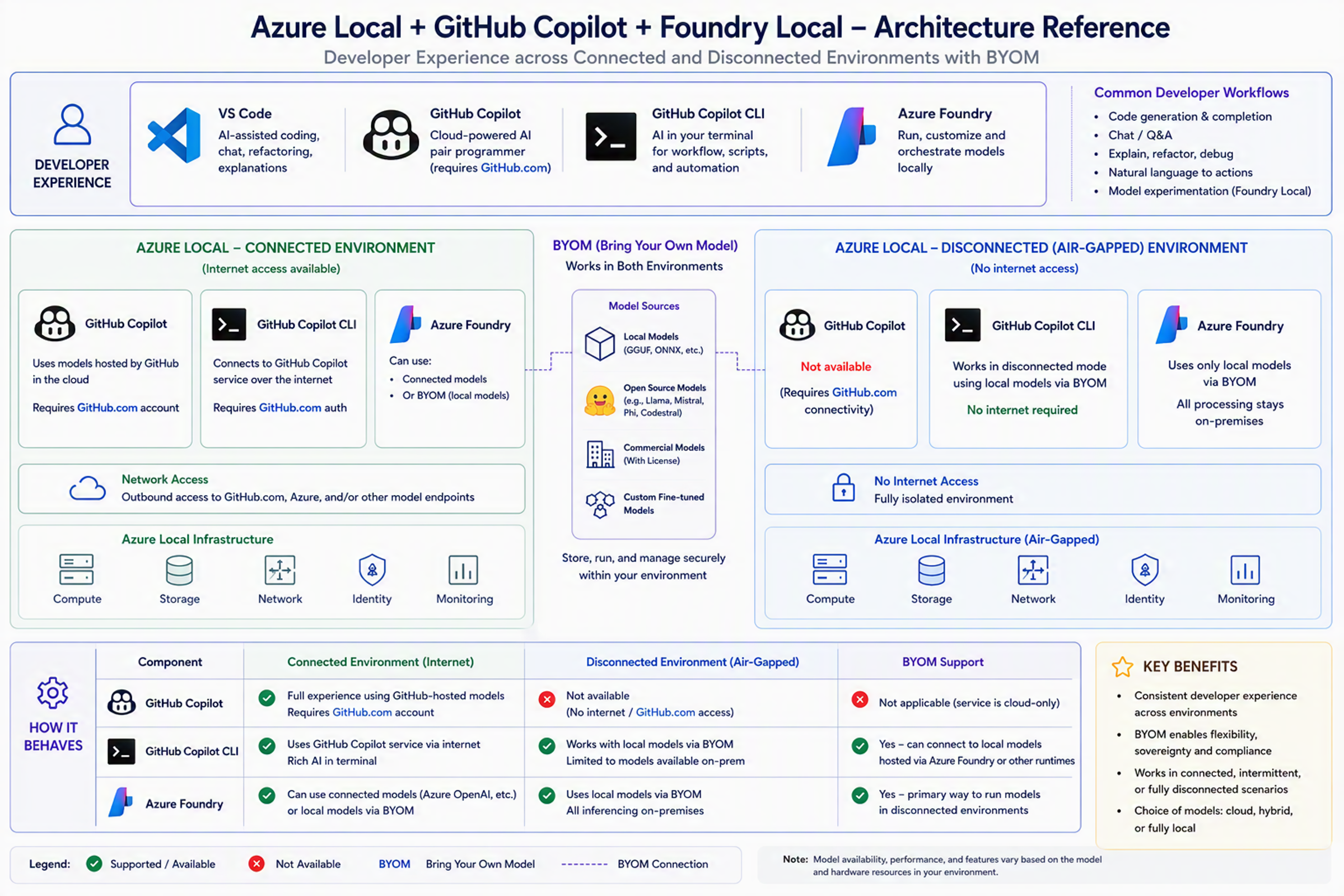
Together, these capabilities provide a consistent, flexible AI developer experience across cloud and on‑prem environments. This approach balances productivity with security and compliance.
Security and sovereignty
GitHub Enterprise Local aligns with Azure Local security capabilities, including:
Network isolation and firewall policies that you define.
FIPS‑validated cryptography through the underlying Azure Local platform.
Identity, access, and auditing that you control.
This model helps you meet stringent compliance frameworks while maintaining modern DevOps practices.
For hardware and sizing guidance, see GitHub Enterprise Local prerequisites.
Billing overview
GitHub Enterprise Local combines user-based application licensing, Azure Local infrastructure-based billing, and separate pricing for AI services such as Copilot and Foundry.
To run GitHub Enterprise Local, you must purchase a GitHub Enterprise license. The license follows a seat-based billing model. Charges are calculated monthly based on the number of active users consuming licenses. The model uses a unique-user model where each user consumes a single seat regardless of how many environments they access.
Azure Local uses an infrastructure-based billing model rather than a user-based one. You're billed per physical CPU core per month for the Azure Local host, independent of the number of developers or applications running on top of the platform.
AI services, including GitHub Copilot and Foundry, are priced separately from GitHub Enterprise Local and Azure Local.
As a result, the total cost of ownership has three clearly separated components: GitHub's user-based application licensing, Azure Local's core-based infrastructure charges, and optional AI service costs. This separation provides transparency between software licensing costs, platform consumption, and AI service usage.
For more information:
- Billing for GitHub Enterprise
- GitHub Enterprise pricing
- Azure Local billing and payment
- Azure Local pricing
- GitHub Copilot plans and pricing
Next steps
For onboarding and deployment steps, see Get started with GitHub Enterprise Local (preview).
Review the Azure Local overview.
Compare connected and disconnected operations for deployment planning.
Review the Foundry Local overview.
Review the GitHub Advanced Security and protection offering.
Prepare for public preview onboarding.