Note
Access to this page requires authorization. You can try signing in or changing directories.
Access to this page requires authorization. You can try changing directories.
Applies to:  Azure SQL Database
This article provides an overview of the local development experience tailored for Azure SQL Database.
Overview
The Azure SQL Database local development experience is a combination of tools and services that empowers application developers and database professionals to design, build, validate, and publish database schemas while working offline.
The following diagram illustrates the inner and outer loop processes in the development lifecycle, highlighting how developers interact with Azure SQL Database both locally and in the cloud:
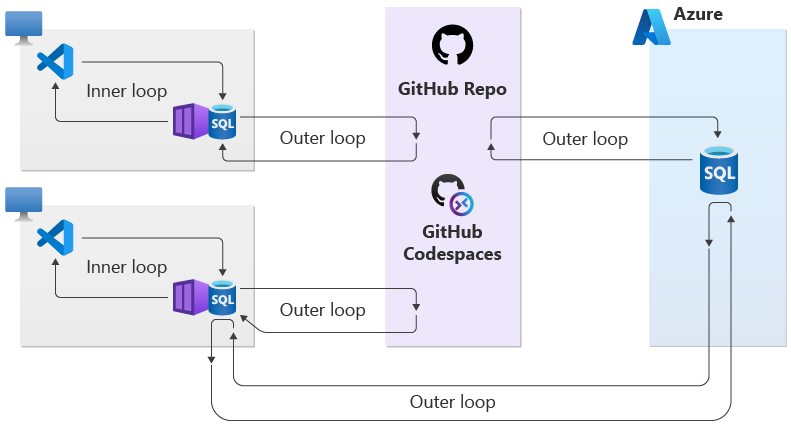
The following sections describe both the inner and outer loop in detail:
Inner loop
The inner loop is the local development cycle, where you write, run, and debug code on your own machine.
You work against a local database engine that runs in a container, so you get immediate feedback without deploying to Azure. Use the Azure SQL Database container (Preview) to develop against the Azure SQL Database engine, or use the SQL Server-based Dev Container Templates described later in this article.
You define the database schema in a SQL Database project whose target platform is Azure SQL Database. Building the project validates schema compatibility with that target platform, whether your local engine is Azure SQL Database or SQL Server. This validation doesn't replace testing application behavior against Azure SQL Database in Azure.
Outer loop
The outer loop encompasses the broader development lifecycle, including collaboration, continuous integration, and deployment to production.
You push changes made in the inner loop to a shared repository, such as a GitHub repository, where you can review, test, and merge them.
From the repository, automated workflows (for example, through GitHub Actions or GitHub Codespaces) build and deploy the application, including any database changes, to Azure services.
In the outer loop, you deploy the application and database to Azure, where they run in a live environment.
Tools and extensions
Several tools and extensions streamline the local development experience. The following table provides a high-level overview of these options, each addressing different aspects of the development lifecycle.
| Tool or extension | Description | Compatible with |
|---|---|---|
| Azure SQL Database container (Preview) | Runs the Azure SQL Database engine locally for development and testing without an Azure subscription. It's a database engine, not a preconfigured application development environment. | Supported Linux container runtimes on macOS, Linux, and Windows with WSL2; native x64 and ARM64 images. |
| Azure SQL Database Dev Container Templates | Provides preconfigured development environments, eliminating manual setup and ensuring consistency. Supports multiple popular languages. | Visual Studio Code GitHub Codespaces |
| MSSQL extension for Visual Studio Code | Enables connection, query execution, and script testing against a database, whether local or in Azure SQL Database. Also provides a guided setup experience for local Azure SQL Database containers. | Visual Studio Code GitHub Codespaces |
| SQL Database Projects extension | Capture an existing schema, design objects declaratively, commit the schema to version control, and publish it to a database. Set the project's target platform to Azure SQL Database to validate schema compatibility at build time. Included in the SQL Server extension pack. | Visual Studio Code GitHub Codespaces |
Azure SQL Database container
The Azure SQL Database container runs the Azure SQL Database engine on your computer, rather than the SQL Server engine used by the Dev Container Templates. Use it to develop applications, test schema changes, and run continuous integration (CI) tests with Azure SQL-compatible drivers and object-relational mappers (ORMs).
Note
Azure SQL Database container is in public preview. It's free for local development and testing, with no Azure subscription or credit card required.
Run the container with a supported Linux container runtime on macOS, Linux, or Windows with WSL2. Native images are available for x64 and ARM64 hosts. After the initial image download, you can run local queries offline; external services still require connectivity.
To get started, follow Build with Azure SQL Database container. For guided setup in Visual Studio Code, see Build locally with Azure SQL Database container and SQL Server container.
The container is for development, testing, CI, and demos, not production. It doesn't provide Azure-managed capabilities such as automated backups, high availability, or elastic pools. Keep your SQL Database project's target platform set to Azure SQL Database, and test against the cloud service before deployment because preview restrictions, defaults, and feature support can differ.
Azure SQL Database Dev Container templates
Dev containers give you a preconfigured development environment, so you don't need to install and configure the tools yourself. The current templates pair an application container for your language with a local SQL Server container and a sample database defined as a SQL Database project. They don't use the Azure SQL Database container described in the preceding section.
The project's target platform is Azure SQL Database, so the project build tells you whether your schema works in Azure SQL Database. Build the project after every schema change, and test your application against a database in Azure SQL Database before you deploy.
Note
Dev containers can run both locally in Visual Studio Code using the Dev Containers extension and in the cloud using GitHub Codespaces.
To learn more about the Azure SQL Database Dev Container Templates, see Dev Container Templates for Azure SQL Database overview