Note
Access to this page requires authorization. You can try signing in or changing directories.
Access to this page requires authorization. You can try changing directories.
This article helps decision makers define the operational standards teams use to keep workloads aligned with their sovereignty requirements. It's the third step in the process to help decision makers with sovereignty adoption.

Sovereignty requirements don't end when a workload is deployed. Regulations change. Services evolve. People, processes, and configurations drift over time. Without operational standards, a workload that was sovereign at launch can gradually fall out of alignment, creating legal, regulatory, or geopolitical risk. This article builds on the Cloud Adoption Framework's Manage methodology and focuses only on the operational requirements that sovereignty adds to your existing management model.
Outcome: By the end of defining your operational standards, you have defined the expectations, responsibilities, and processes workload teams must follow to maintain alignment with sovereignty requirements over time.
Decision tree and architectures
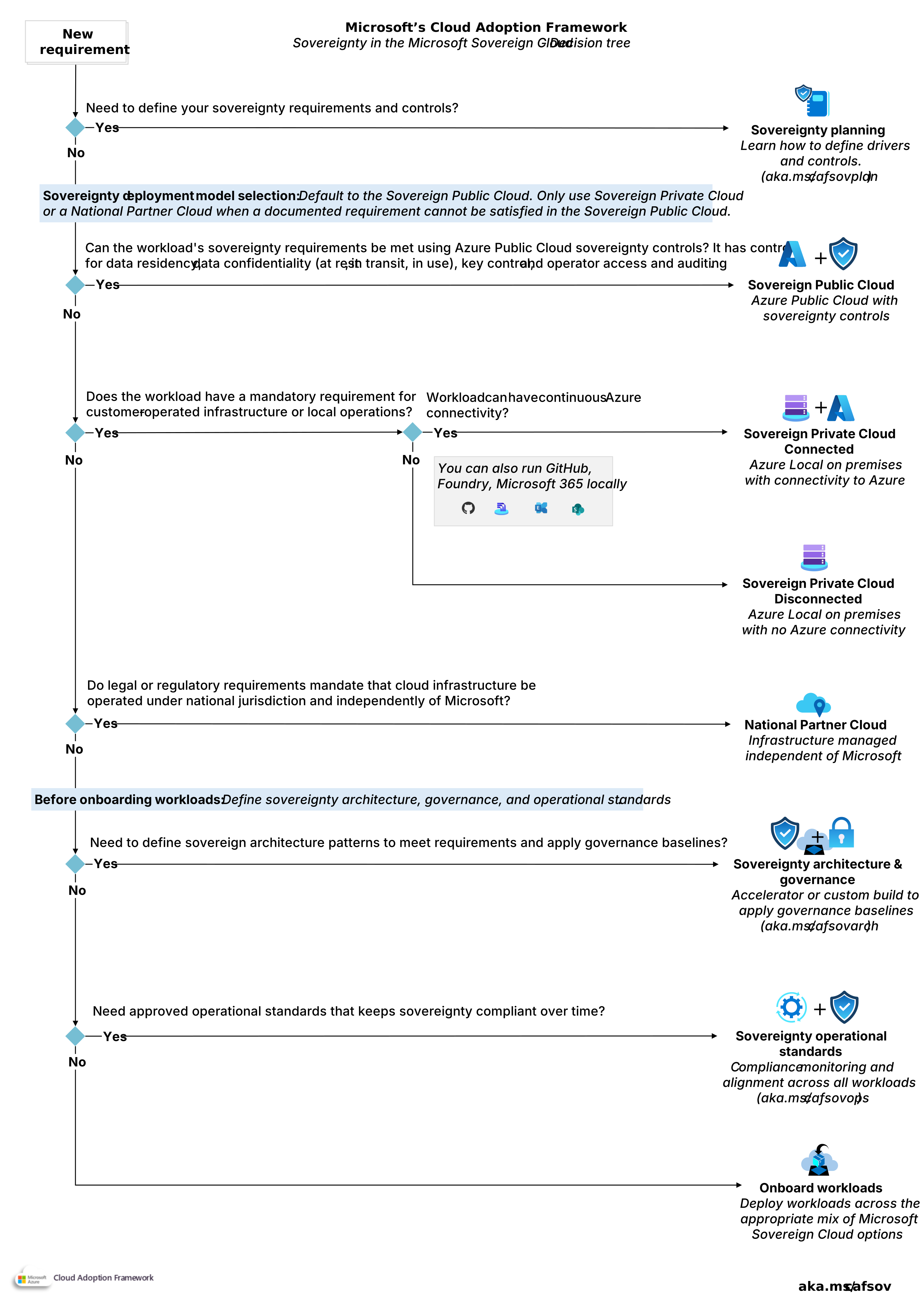
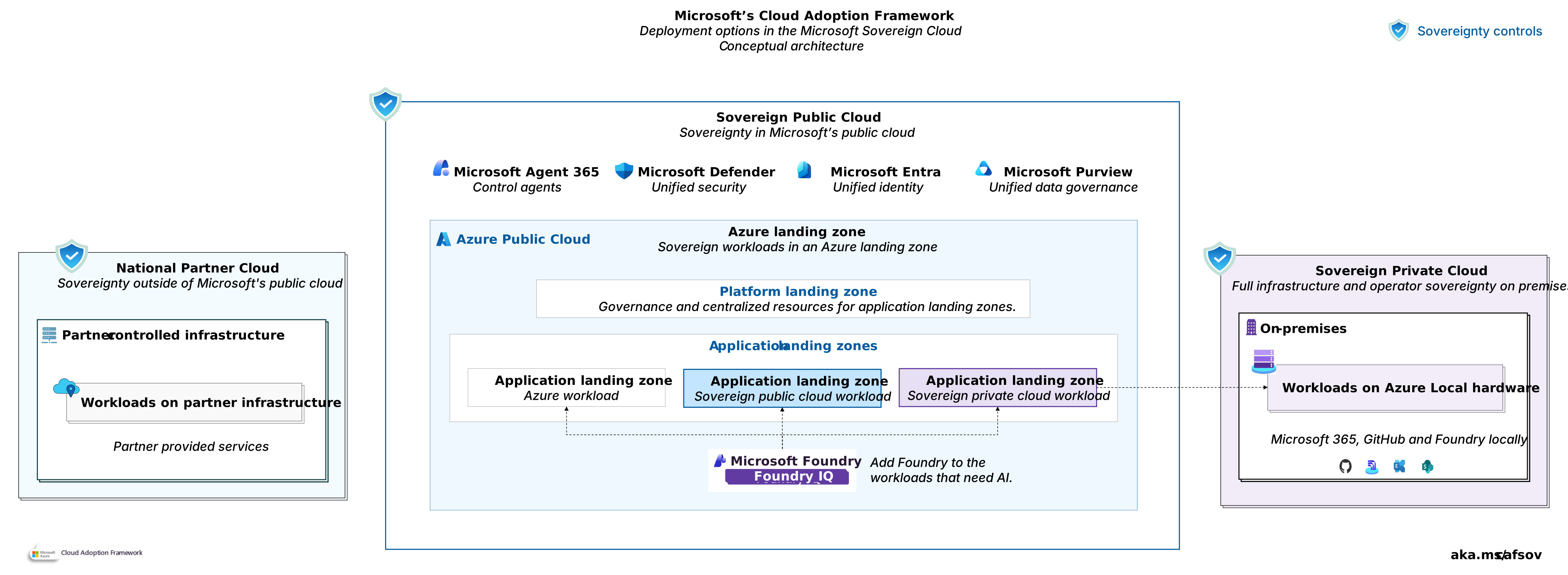
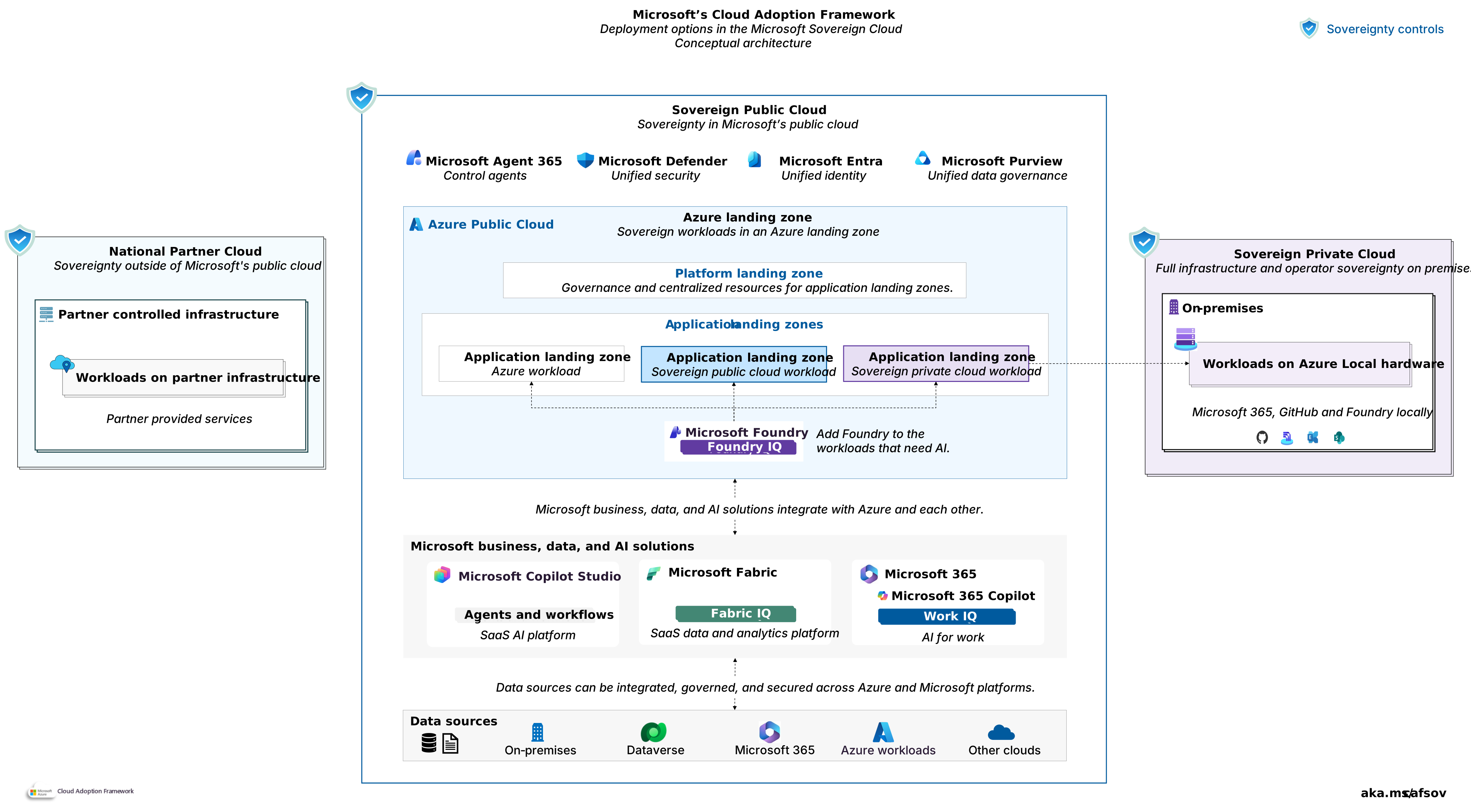
Decision tree for the Microsoft Sovereign Cloud. Download a PowerPoint file of this architecture.
1. Sovereignty monitoring
Are you compliant? Sovereignty monitoring provides continuous assurance that sovereignty controls remain effective after go-live. To manage sovereignty drift, establish a service catalog, a sovereignty change management process, an exception management process, clear control ownership, and integration with risk management.
See table for common drift conditions.
| Drift category | Examples | Preventative operational standard |
|---|---|---|
| Deployment drift | Unapproved region.Unapproved service. | Service catalog |
| Configuration drift | Control removed.Encryption setting changed.Classification mismatch. | Change management process |
| Operational drift | Access review missed.Expired exception.Evidence not maintained. | Exception managementControl ownershipRisk management integration |
Require your workload teams to implement monitoring and compliance capabilities that detect sovereignty drift, support operational reviews, and provide evidence for audits and regulatory reporting.
Sovereign Public Cloud: Teams should use the Sovereign Control Panel to view and report sovereignty posture. You can also use the control signal on Azure Policy and the Microsoft Defender for Cloud regulatory compliance dashboard.
Sovereign Private Cloud (Azure Local): Decide whether sovereignty monitoring relies on Azure-connected management services, local processes, or a combination of both.
Connected operations: Require teams to use Azure Arc governance and monitoring capabilities to identify compliance issues and sovereignty drift.
Disconnected operations: Require local monitoring, audit collection, and evidence management processes. See Monitor disconnected operations for Azure Local.
Hybrid: Define which sovereignty signals are monitored centrally and which require local monitoring and audit processes. This model can include connected management systems with disconnected workload environments.
National Partner Cloud: Agree with the operator on required compliance signals, reporting requirements, escalation procedures, and reporting cadence before go-live.
Not every sovereignty drift condition carries the same level of risk. Define risk-based remediation requirements. Ensure every sovereignty finding has an accountable owner and that identified risks, control gaps, and approved exceptions are recorded in the risk register.
2. Evidence management
A sovereignty control that you can't demonstrate is effectively unenforceable. Establish an evidence management standard that proves sovereignty controls remain effective over time. Evidence supports audits, regulatory reviews, exception approval, and risk management activities.
Sovereign Public Cloud: Define approved sources of compliance and operational evidence. Organizations commonly use capabilities such as Azure Policy, Microsoft Defender for Cloud, Azure Monitor, Microsoft Purview Compliance Manager, or Azure Confidential Ledger. The tools you use are less important than your ability to demonstrate compliance with sovereignty requirements and produce evidence when requested.
Sovereign Private Cloud: Decide whether to manage evidence through connected services, local processes, or a combination of both. Ensure evidence management aligns with sovereignty requirements regardless of where you collect or store evidence.
Connected operations: Connected environments can send evidence through Azure Arc and Azure management services, so select the region where you store evidence.
Disconnected operations: Disconnected environments must collect, retain, and report evidence locally and use local mechanisms for tamper-evident record keeping.
National Partner Cloud: Confirm how the operator collects, retains, protects, and reports evidence. Validate that the approach supports your sovereignty, audit, and regulatory requirements before go-live.
Review evidence regularly rather than waiting for audits. Treat missing evidence, expired exceptions, or incomplete records as sovereignty risks and track them through the organization's risk management process.
3. Access
Decide who can administer sovereign workloads and under what conditions. Sovereignty requirements often extend beyond standard access control requirements. They can include citizenship, residency, personnel screening, local oversight, or approval requirements. Establish an operator access standard that defines who is eligible for privileged access and how that access is governed.
Sovereign Public Cloud: Establish standards for privileged access governance and Microsoft access oversight. Microsoft Entra Privileged Identity Management supports just-in-time access. Customer Lockbox provides approval workflows for Microsoft access requests. Data Guardian provides oversight by EU residents of Microsoft's production touches in EU/EFTA regions.
Sovereign Private Cloud: Apply the same standard through your own RBAC model, approval process, session monitoring, and support procedures. In connected operations, organizations commonly implement these controls through local RBAC, Azure RBAC for Arc-managed resources, Privileged Identity Management, and Just Enough Administration. Ensure support access follows the same approval, monitoring, and auditing requirements.
National Partner Cloud: The partner operates the environment, so provider access follows the partner's model. Agree how the operator approves and logs privileged access before go-live and confirm it against the service matrix.
4. Data security
Decide where operational data can be stored, processed, transferred, and recovered. Sovereignty requirements often apply to operational data as well as business data. Logs, telemetry, audit records, backup copies, forensic evidence, and encryption keys can all have residency or jurisdiction requirements. Keep operational data within the approved sovereignty boundary by default. Require documented approval for any exception.
Sovereign Public Cloud: Define approved regions for operational data and monitoring services. Ensure Azure Monitor and Log Analytics workspaces are deployed to approved regions and turn off geo-redundant export. For organizations operating in Europe, the EU Data Boundary can help keep supported customer data processing within the EU and EFTA regions.
Sovereign Private Cloud: Decide where operational data is collected, stored, and retained. Connected environments can send operational data to Azure services. Select approved destinations that align with sovereignty requirements. Disconnected environments require local collection, retention, and reporting processes.
National Partner Cloud: Confirm what operational data leaves the sovereignty boundary, where it is stored, and what jurisdictions apply. Validate the operator's data handling model against your sovereignty requirements before go-live.
5. Disaster recovery
Follow your organization's business continuity and disaster recovery standards for recovery objectives, backup, replication, and failover design. For general guidance, see Protect your cloud estate. Sovereignty requires you to decide where a sovereign workload is permitted to recover during a disruption. Define any emergency exceptions in advance and manage them through your risk management process.
Sovereign Public Cloud: Select recovery locations that remain within your approved sovereignty boundary. Validate that backup, replication, and failover designs align with your residency requirements. Determine whether workloads can fail over only to Azure regions or to the Sovereign Private Cloud. If you want to use the Sovereign Private Cloud as a recovery option, define the approved failover targets, the conditions that permit their use, and the sovereignty requirements that must remain in effect after failover.
Sovereign Private Cloud: Decide where sovereign workloads can recover before an incident occurs. Recovery might remain on infrastructure you control or use approved sovereign recovery environments. Document approved recovery locations and any restrictions on cross-jurisdiction recovery. For options, see Disaster recovery for Azure Local.
National Partner Cloud: Recovery follows the partner's continuity design. Confirm the approved recovery locations and any cross-jurisdiction rules with the operator.
Test sovereignty-specific recovery requirements as part of your disaster recovery exercises. Examples include validating approved recovery locations, emergency approval processes, and sovereignty verification activities after recovery.
6. Workload onboarding
Before a workload with sovereignty requirements goes live, verify that it meets the organization's sovereignty standard. The onboarding gate establishes the workload's approved sovereignty baseline and ensures any remaining risks are visible and accepted.
Confirm the following items before production deployment:
Sovereignty classification assigned: The workload has an approved sovereignty classification and inherits the corresponding control baseline. See Sovereignty classification.
Required controls validated: The controls required by the sovereignty classification are effective and compliant.
Baseline evidence captured: The workload's initial sovereignty baseline is recorded and retained as evidence of compliance.
Exceptions approved: Any unmet requirement is documented as an approved exception with a defined expiration date, risk owner, and remediation plan. Record exceptions in the risk register before go-live.
The onboarding gate should be a formal approval point. Don't enter production any workload with sovereignty requirements without an assigned classification, validated controls, baseline evidence, and approved handling of any remaining risks.
Next step
Workload design: