Note
Access to this page requires authorization. You can try signing in or changing directories.
Access to this page requires authorization. You can try changing directories.
Microsoft Azure Container Instances network profiles are being deprecated. Previously, Cloud Shell in a private virtual network required a network profile. When you created this deployment, you granted permissions to the Container Instances service over your network profile so that it could perform necessary networking actions.
For Cloud Shell to work in a private virtual network after this deprecation, you must assign the
same Role-based access control (RBAC) role, Network Contributor, to Container Instances for the
delegated subnet.
Note
As of June 12, 2026, the ARM and Bicep templates for network deployment assign the necessary permissions. For any deployments created using the previous templates, you must assign the role by September 30, 2026, to avoid disruption of your Cloud Shell deployment. For more information, see the FAQ section of this article. For more information about the templates, see Deploy Azure Cloud Shell in a virtual network with quickstart templates.
This article outlines what to expect as Cloud Shell transitions off of network profiles and the steps you need to take to assign the proper permissions.
What to expect during the migration period
To prevent the disruption of your Cloud Shell service, we're gradually migrating subscriptions that have Cloud Shell deployed in a private virtual network away from network profiles. After migration you'll see a one-time prompt to confirm your virtual network configuration and container subnet. Select the appropriate subnet for your Cloud Shell deployment from the Subnet dropdown menu. Only subnets that have been delegated to Azure Container Instances (Microsoft.ContainerInstance/containerGroups) are available to select. To delegate a subnet to Azure Container Instances, see Add or remove subnet delegation in Azure virtual network.
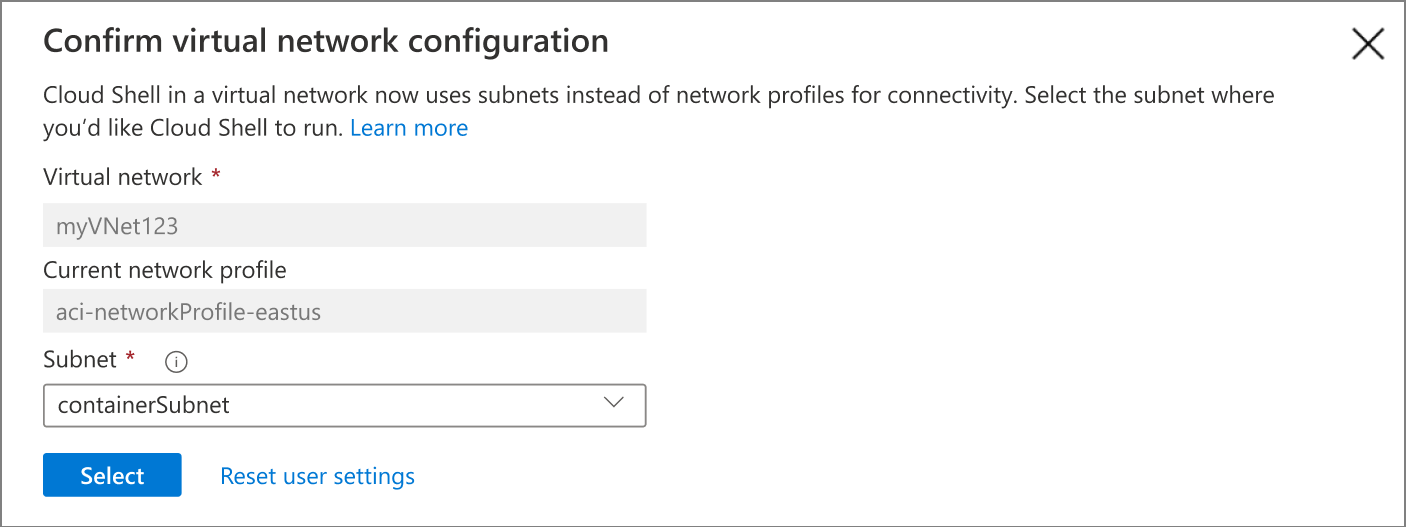
After you complete this one-time network configuration, you'll be prompted to assign the Network Contributor role to the Azure Container Instances service principal for the virtual network. This
prompt occurs for every user until the role is assigned.
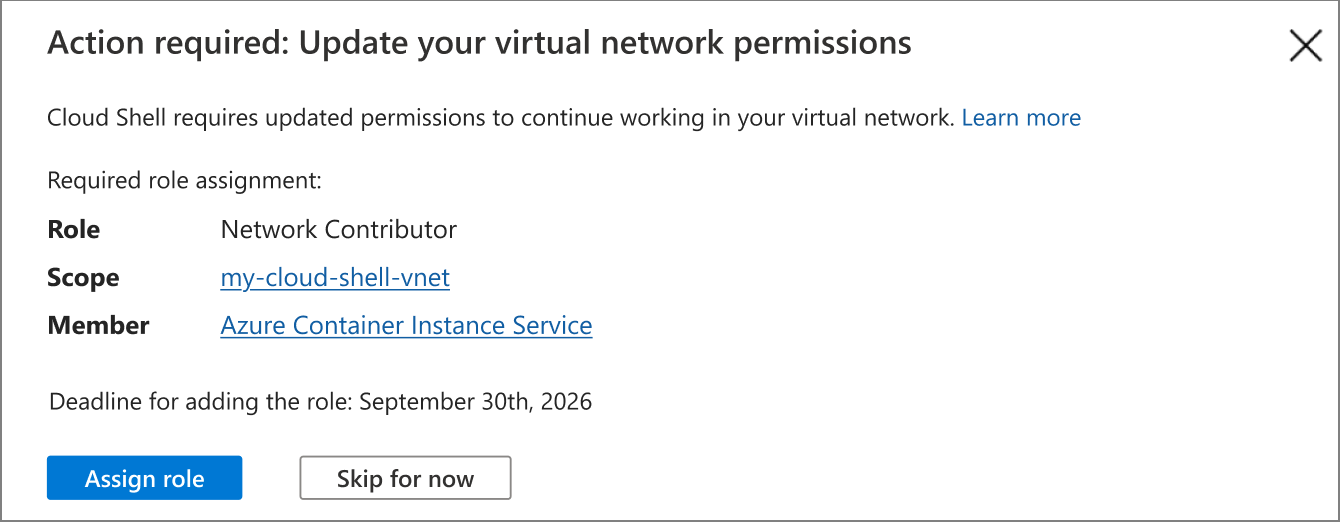
There's a 90-day grace period to assign the role, after which Cloud Shell no longer works in the private virtual network until the role is assigned. During that 90-day grace period, you can continue to use Cloud Shell by skipping the permission assignment. This grace period ensures that users who don't have the necessary permissions to assign the role can continue using Cloud Shell while they work with their administrator to set the proper permissions. Setting the permissions is a one-time event. Once the role is assigned, your users are able to use Cloud Shell in the private virtual network without interruption.
How to assign the necessary role
To assign the role, you need Microsoft.Authorization/roleAssignments/write access on your virtual
network. The following Azure Built-in roles have this permission:
OwnerUser Access AdministratorRole Based Access Control Administrator
There are many ways to assign the Network Contributor role to the Container Instances service
principal for the virtual network. Select a tab to see instructions for different methods of role
assignment.
Use the following steps to assign the Network Contributor role to the Container Instances service
principal for the virtual network using the Azure portal:
- Sign into the Azure portal.
- Open Virtual networks and select the virtual network that your Cloud Shell is deployed in.
- On the left menu, select Access control (IAM).
- From the top menu, select the Add menu, the select Add role assignment.
- From the Add role assignment pane, search for and select the
Network Contributorrole, then select Next. - From the Members pane, select User, group, or service principal for the Assign access to field.
- Select Select Members then search for and select Azure Container Instance Service.
- Select Next, then Review + assign to create the role assignment.
Use the following steps to confirm the role assignment:
- Navigate to the virtual network you're deploying Cloud Shell into.
- On the left menu, select Access control (IAM). Select Role assignments.
- Validate that Azure Container Instance Service is listed under Network Contributor. The
scope should be
This resource.
Frequently asked questions (FAQs)
What happens if I don't add the required role assignment to my virtual network by the deadline?
If you don't add the required role assignment by September 30, 2026, you can't use Cloud Shell within your virtual network. To restore access to Cloud Shell, you must add the role assignment.
I don't have permission to create the role assignment. Why?
You must have Microsoft.Authorization/roleAssignments/write access to make this change. The Azure
Built-in roles that have this permission are Owner, User Access Administrator, and
Role Based Access Control Administrator.
Can I set the scope of the role assignment to the subnet instead of the full virtual network resource?
Yes, Azure Container Instances only needs Network Contributor access to the subnet where the Cloud Shell container is deployed. For simplicity, the instructions in this article apply the role assignment to the whole virtual network because subnet role assignments don't appear in the Azure portal.
Specifically, Azure Container Instances needs the
Microsoft.Network/virtualNetworks/subnets/join/action permission scoped to the subnet. The
built-in Network Contributor role fulfills this requirement.
Why are the official ARM/Bicep templates still creating network profiles if they're being deprecated?
As of June 12, 2026, the templates are creating network profiles and setting the new role assignment to avoid customer impact during the migration. We're migrating customers off network profiles over several months to reduce potential impact. Once the migration is complete, we'll remove the network profile creation step in a future update.
Why is this new role assignment needed for this feature that's working today without it?
Cloud Shell uses Azure Container Instances to deploy containers into your virtual network.
Previously, Container Instances accessed your subnet through a network profile. The network profile
was used to hold the NIC configuration, validate address spaces, and validate IP availability.
Container Instances needed Network Contributor permissions on the network profile.
Network profiles are being deprecated to simplify networking configuration. Azure Container Instances now requires the Network Contributor role on your virtual network or subnet to deploy the Cloud Shell container. This new role assignment replaces the access that was previously granted through the network profile.
My teammates and I share a virtual network setup. Do we each have to take action?
The role assignment just needs to be added once per virtual network. The instructions in this article include validation steps to determine if the role assignment is assigned. Each individual user might also see a one-time guided experience in Cloud Shell to confirm their virtual network configuration and container subnet during the migration.
I use Cloud Shell within multiple virtual networks. Do I need to add the role assignment to each one?
Yes, Azure Container Instances needs to be added as a Network Contributor for each virtual network
used for Cloud Shell.