Note
Access to this page requires authorization. You can try signing in or changing directories.
Access to this page requires authorization. You can try changing directories.
Microsoft's Signing Transparency (MST) captures and preserves measurements about Microsoft services so that auditors and customers can independently verify the integrity and authenticity of what's running in production. This article describes how service teams use MST end-to-end: what goes into a payload, which claims are required, how transparent statements work, and how auditing flows together.
For the underlying architecture and cryptography, see Microsoft's Signing Transparency concepts. For step-by-step verification instructions, see Verify ledger integrity and inspect entries.
The following diagram shows how a confidential service uses MST end-to-end, from build-pipeline measurement extraction through customer or auditor verification:
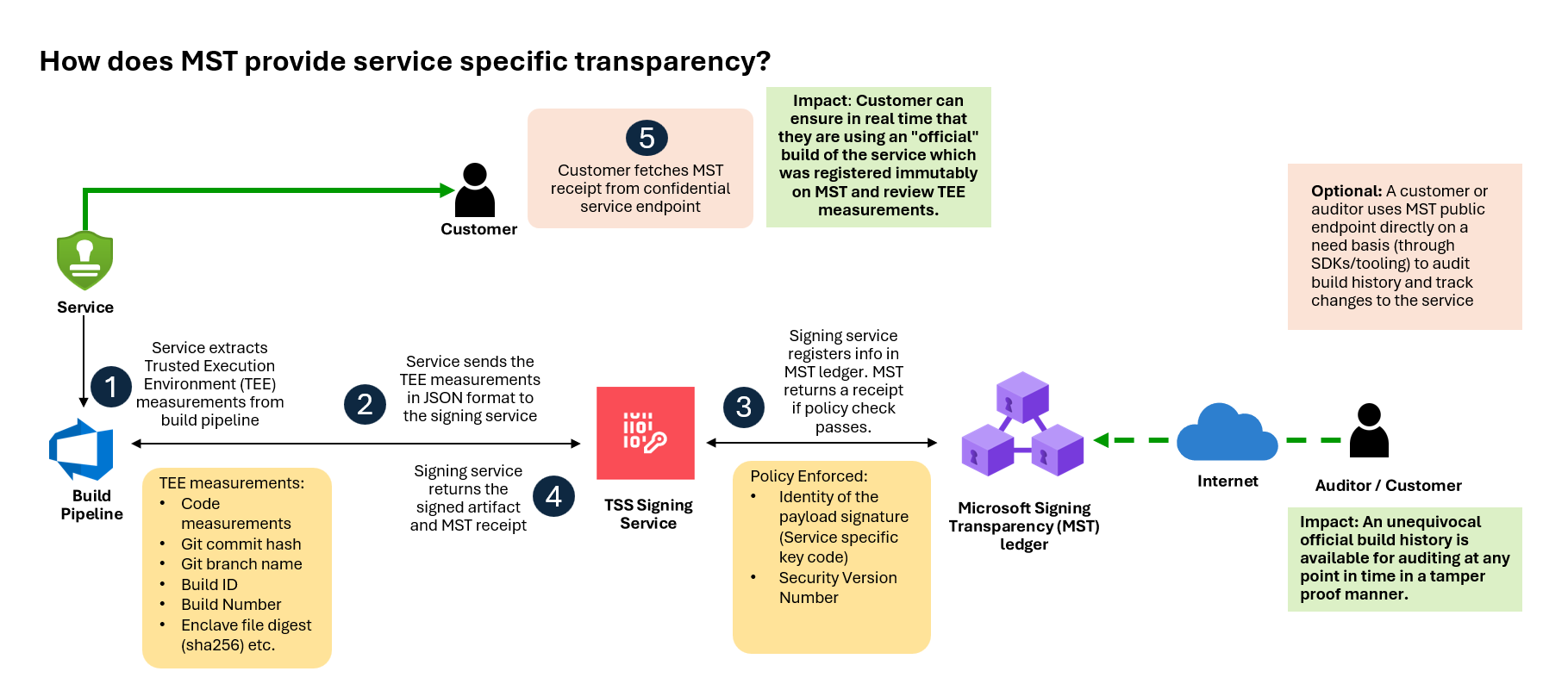
How service teams use Microsoft's Signing Transparency
A service team integrates with MST by following these steps:
- Complete onboarding so the prerequisites are in place.
- Produce a payload that describes what is made transparent.
- Transparently sign the payload using a signing key and the required claims so that it's registered in MST.
MST and the Ledger Explorer then handle the rest of the transparency flow on behalf of the service team:
- MST returns a transparent statement. When the signed payload is registered, MST issues a countersigned receipt that proves inclusion in the append-only ledger. The service team carries this transparent statement forward (for example, alongside the artifact it describes), but doesn't have to build the receipt structure itself. See Transparent statements.
- Ledger Explorer surfaces statements to auditors. Auditors and customers query the ledger directly through Ledger Explorer to find registered statements, inspect their claims, and verify inclusion proofs—no extra publishing step is required from the service team. See Use Azure Confidential Ledger Explorer.
Payloads
A payload is the data that's captured, signed, and stored in MST. Payloads typically include the measurements and metadata that an auditor needs to verify a service. Common payload components include:
- Build environment parameters: Details about the environment in which the software was built, including compiler versions, build configurations, and other relevant settings.
- Version control information: Source code repository details, commit hashes, branch names, and other version control metadata that help trace the origin of the software.
- Binary measurements: Cryptographic hashes of binaries, container images, or other executable artifacts. They confirm that software wasn't tampered with after the build.
- Security policies: Security policies that were enforced during the build or deployment process, where applicable.
- Container image layers: For containerized applications, the digests and signatures of each layer of the container image.
Each component is captured and stored in the append-only ledger, so any tampering or unauthorized change is detectable. Payloads are signed with cryptographic keys, and the signatures are verified by auditors to confirm the integrity and authenticity of the data.
Required claims
Claims are added at the time of the payload signing operation and travel in the signing envelope, where they're visible to the verifying policy. The key used for signing has an EKU (Extended Key Usage), and the EKU together with the root CA appears in the issuer claim.
Service teams set the claims in a way that supports the auditing experience.
| Claim | Purpose |
|---|---|
| Issuer | Identifies the signing authority. Contains the signing key's EKU together with the root CA, so verifiers can map a signed statement back to a specific MST-integrated service. |
| Subject | Links the signed statement to the entity it describes (for example, a service identifier, FQDN, digest, or product ID). The subject should be immutable. See RFC 8392, section 3.1.2. |
| SVN | Security version number. A monotonically increasing positive integer that policies use to identify versions and reject older ones. |
| ContentType | Payload content type that's being signed (for example, application/json). |
For the issuer identifiers (EKU and Service ID) used by each MST-integrated service, see EKU and Subject identifiers.
Transparent statements
When a payload is successfully registered, MST returns a transparent statement. A transparent statement is a structure that contains the original signed statement together with a countersignature issued by MST, embedded in the signed statement's unprotected headers.
Verifying a transparent statement proves:
- The statement was successfully registered in the ledger.
- The statement passed the registration policies the ledger enforces.
For the underlying receipt structure and how inclusion proofs work, see Receipts and inclusion proofs.
Auditing
The auditing workflow has four high-level steps:
- Preserve historic measurements. MST stores measurements in an append-only ledger, providing a tamper-evident history of the service.
- Verify measurements. Auditors use tools provided by the service to check transparent statements and confirm that the recorded measurements match the expected values. Verification focuses on the integrity of the transparent statement, not on inspecting the payload contents.
- Document verification steps. MST provides documentation and samples that describe how to verify transparent statements and the underlying data structures, so audits are repeatable.
- Expose measurements to auditors. A service exposes its captured measurements through a well-defined API. This lets an auditor link the currently running service version to the version that was registered in the ledger, providing confidence that the build was registered before code ran in production.
Together, these steps make sure that measurements are accurately captured, securely stored, and verifiable by auditors—improving the overall transparency and trustworthiness of the service.
For the cryptographic underpinnings of tamper detection, see Tamper detection and auditability.
Payload examples
The following examples show how a service team might construct a payload for two common confidential-computing scenarios. Use them as a starting point; the specific fields you include depend on your service and registration policy.
Confidential service measurements (AMD SEV-SNP, Confidential ACI)
{
    "source": {
        "commit": "<git-commit-sha>",
        "branch": "refs/heads/main"
    },
    "build": {
        "id": "<build-id>",
        "number": "<build-number>"
    },
    "security-policy-base64": "<base64-encoded-security-policy>",
    "security-policy-fragments-signed-base64": [
        "<base64-encoded-signed-fragment-1>",
        "<base64-encoded-signed-fragment-2>"
    ]
}
Confidential service measurements (Intel SGX)
{
    "source": {
        "commit": "<git-commit-sha>",
        "branch": "refs/heads/main"
    },
    "build": {
        "id": "<build-id>",
        "number": "<build-number>"
    },
    "sgx-enclave": {
        "mrsigner": "<mrsigner-hex>",
        "mrenclave": "<mrenclave-hex>",
        "enclaveFileSha256": "<enclave-file-sha256-hex>"
    }
}