Note
Access to this page requires authorization. You can try signing in or changing directories.
Access to this page requires authorization. You can try changing directories.
Important
This feature is currently in preview and is provided without a service-level agreement. At this time, previews aren't recommended for production workloads. Certain features of this preview aren't supported or might have capability constraints. For more information, see supplemental terms of use for Microsoft Azure previews.
The Agentic Retrieval Toolkit (https://aka.ms/AgenticRetrieval) is a reference implementation for building multi-step retrieval-augmented generation (RAG) applications on Azure. It combines Azure Cosmos DB for NoSQL vector search, full-text search, Azure OpenAI embeddings, and large language model reasoning to retrieve diverse evidence and generate grounded answers.
Unlike a basic one-shot RAG pipeline, this toolkit performs iterative retrieval. It first retrieves relevant documents, generates a preliminary answer, identifies information gaps, creates follow-up sub-questions, retrieves additional evidence, and synthesizes a final answer. Use this toolkit when you need a reference architecture for RAG scenarios that require more than a single retrieval pass. It is useful for complex questions, multi-document synthesis, scientific or technical corpora, and workloads where retrieved context should be diversified before answer generation.
The repository includes scripts for document ingestion, Cosmos DB container setup, embedding generation, retrieval, answer generation, timing analysis, and sample evaluation workflows.
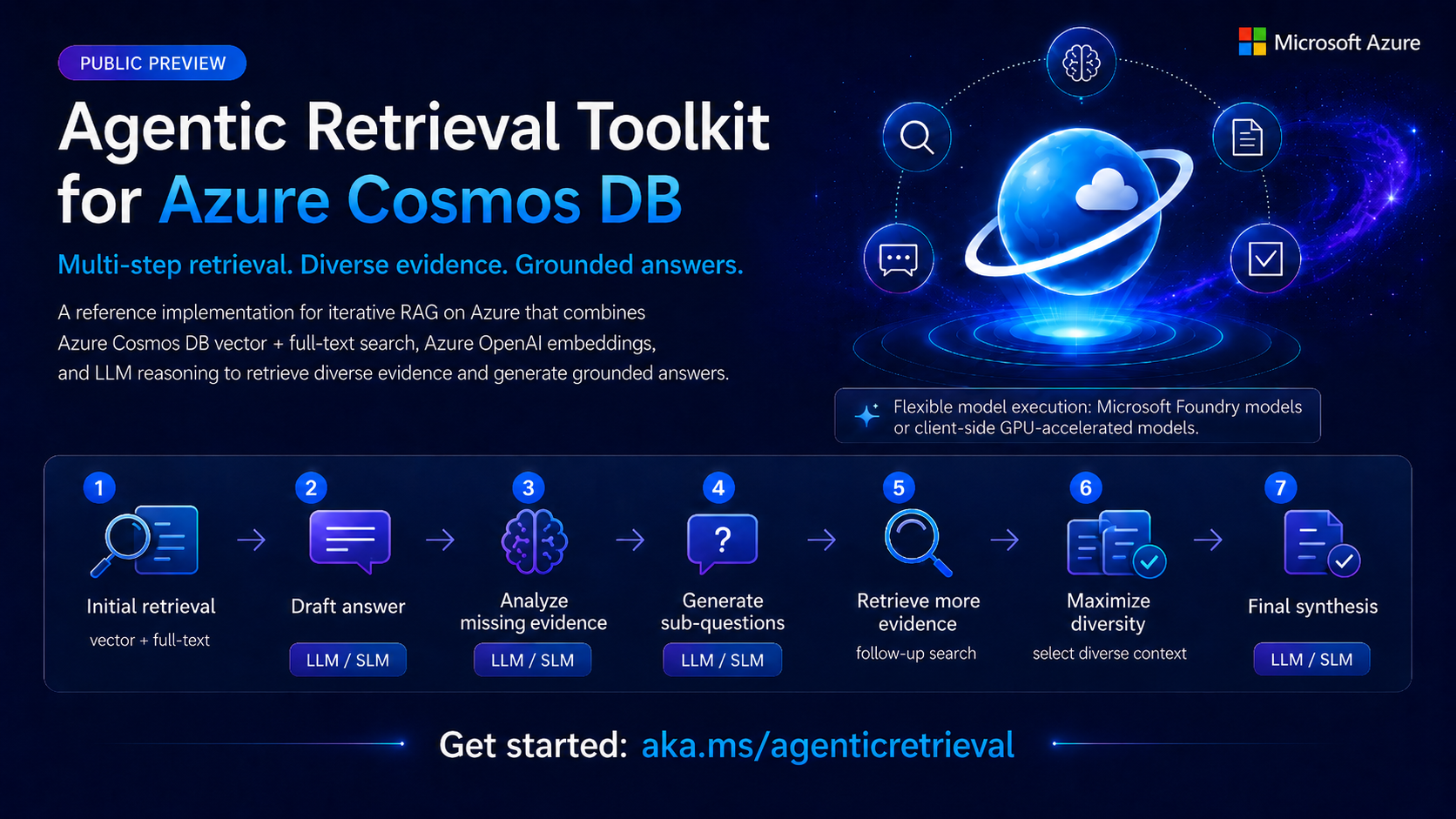
What the toolkit does
The toolkit supports the following capabilities:
- Ingest documents from JSON, JSONL, folders, or custom parsers.
- Generate embeddings with Microsoft Foundry Azure OpenAI models or a compatible embedding endpoint.
- Store documents and embeddings in Azure Cosmos DB containers.
- Configure vector indexes and full-text indexes for each source.
- Retrieve documents using both vector similarity and full-text search.
- Select diverse context with greedy log-determinant selection.
- Optionally rerank retrieved documents with the Azure Cosmos DB semantic ranker.
- Use an LLM to decompose questions into focused follow-up queries.
- Generate grounded answers from retrieved context.
- Run batch evaluation over predefined question files.
Architecture
The toolkit has two main stages.
The ingestion stage reads configured document sources, generates embeddings, and uploads records to Azure Cosmos DB. Each source maps to a Cosmos DB container and defines its own document root, embedding fields, retrieval settings, vector index policy, and full-text policy.
The retrieval stage answers user questions by combining several retrieval and reasoning steps:
- Retrieve initial context using vector search and full-text search.
- Generate a preliminary answer from the retrieved context.
- Identify missing information or weak parts of the answer.
- Generate focused sub-questions for the missing information.
- Retrieve additional context for those sub-questions.
- Regenerate or synthesize a final answer grounded in the retrieved evidence.
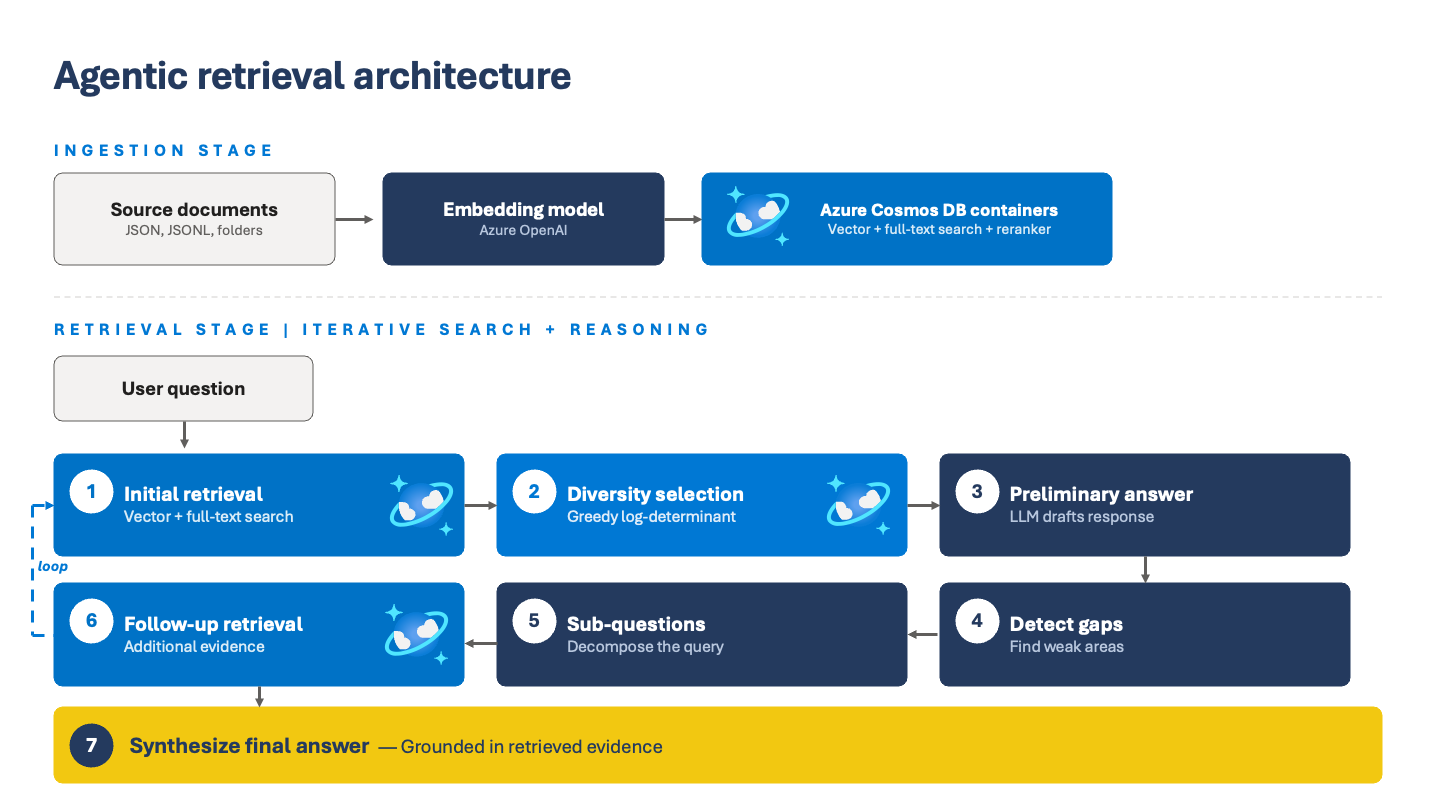
Primary components
| Component | Description |
|---|---|
| Ingestion script | Reads source documents, generates embeddings, creates or uses configured Cosmos DB containers, and uploads documents. |
| Cosmos DB retriever | Runs vector and full-text queries across one or more configured sources. |
| Diversity selector | Uses greedy log-determinant selection to reduce redundant retrieved chunks. |
| LLM client | Calls Azure OpenAI for answer generation, sub-question decomposition, synthesis, and embeddings. |
| Decomposed RAG pipeline | Coordinates retrieval, preliminary answering, gap detection, follow-up retrieval, and final synthesis. |
| Evaluation runner | Processes a JSON file of questions and writes intermediate traces and final answer files. |
Supported data sources
The default sample data is small and intended for testing. The toolkit can also ingest larger corpora. Each source is configured under cosmos.sources in the configuration file.
A source can define:
- The Cosmos DB container name.
- The partition key path.
- The embedding field.
- The source document folder or JSONL file.
- Fields used to generate embeddings.
- Vector retrieval limits.
- Full-text retrieval fields.
- Cosmos DB indexing and full-text policies.
- An optional custom parser for non-JSON formats.
Batch evaluation versus application usage
The command-line workflow is designed for batch Q&A and evaluation. It reads a predefined question file, runs the retrieval pipeline for each question, and writes outputs to an out directory.
That does not mean the retrieval pipeline is limited to predefined questions. Application code can call the pipeline directly with a user-provided question string. The predefined questions file is only the CLI driver.
For app integration, initialize the retriever and pipeline once at startup, then call the pipeline for each user request.