Note
Access to this page requires authorization. You can try signing in or changing directories.
Access to this page requires authorization. You can try changing directories.
Microsoft Embedding 1 is a multimodal embedding model. It embeds text, search queries, and images, including document pages rendered as images, into one vector space. A text query can then retrieve a text passage, a photo, or a scanned page that contains a chart, table, or diagram.
The model is built for retrieval over enterprise documents, such as reports, manuals, and slides, where much of the information is in charts, tables, and layout rather than in plain text. It returns dense embeddings, multi-vector embeddings, or both. Dense output has the lowest storage cost and retrieval latency. Multi-vector output can improve retrieval quality, especially for visual documents and text that requires fine-grained semantic matching.
Microsoft Embedding 1 is available in Azure Cosmos DB and is coming soon to Microsoft Foundry.
Note
Microsoft built Microsoft Embedding 1 on Qwen 3.5 and fine-tuned it for retrieval.
When to use this model
| Use case | Why this model fits | Example |
|---|---|---|
| Visual document retrieval | It embeds each document page as an image, so you can retrieve information from its text, charts, tables, and diagrams without a separate text-extraction step. | "Which region's revenue fell in Q3?" matches a bar chart on page 14 of a financial report. |
| Text-to-image search | Text and images share one vector space, so a text query can retrieve an image directly, without captions. | "Something to wear on a rainy hike" matches a photo of a hooded waterproof shell. |
| Semantic search | It matches by meaning, so results don't depend on the exact wording of the query. | "Walking near water" matches a description of a lakeside trail. |
| Retrieval-augmented generation (RAG) | It retrieves the passages and pages that ground a language model's answer. | A support agent retrieves the manual page that contains a torque spec before it answers. |
Use dense output for text-heavy content. Use multi-vector output for visual documents. For the accuracy difference, see Benchmarks.
Model specifications
| Property | Value |
|---|---|
| Model name | microsoft-embedding-1-large |
| Release stage | Preview |
| Inputs | Text, search queries, images |
| Image formats | JPEG, PNG, GIF, WebP |
| Maximum text input | 8,192 tokens |
| Output | Dense (one vector per input), multi-vector, or both |
| Dense dimensions | 1,024, 1,536, 2,048, or 2,560 (Matryoshka). Default: 2,560. |
| Multi-vector dimensions | 128, 256, 512, 1024 per vector. Default 256. |
| Output encoding | float16/ float32 in base64 |
| Similarity metric | Dense: Cosine, L2, Inner Product Multi-vector: MaxSim |
| Languages | English, Spanish, French, Portuguese, Italian |
| SDKs | Python (azure-data-ai 1.1.0b1) and .NET (Azure.Data.AI 1.1.0-beta.1) |
| Regions | East US, East US 2, North Central US, West Central US, West US 2, West US 3, Poland Central |
Input kinds
The model encodes stored content and search queries differently. Set kind on each input:
kind |
Use for |
|---|---|
text (default) |
Content you store and search, such as passages and descriptions. |
query |
The user's search terms. |
image |
Images and document pages, such as scanned manuals, report pages, and product photos. |
Output options
vector_kind |
Returns | Use for |
|---|---|---|
dense (default) |
One vector per input | The lowest vector-storage cost and retrieval latency among the model's output options. |
multi |
Multiple vectors per input, scored with MaxSim | Visual documents and text that requires fine-grained semantic matching. |
dense_multi |
Both | Retrieve candidates with dense vectors, and then rerank them with multi-vector scores. |
Multi-vector output uses late-interaction (MaxSim) scoring. Both output types were trained to support truncation using Matryoshka Representation Learning (MRL), so you can choose fewer vector dimensions to reduce storage costs.
Two settings let you reduce storage while continuing to use multi-vector embeddings.
- Dimensions controls the number of values in each vector. Multi-vector output supports 128, 256, 512, or 1,024 dimensions. Smaller dimensions reduce storage but can affect retrieval quality.
- Maximum vectors per input controls how many vectors multi-vector output returns. The service uses token pooling to combine token-level vectors into a smaller set. For example, a cap of 32 returns up to 32 vectors per input, rather than one for every token.
You can adjust both settings to fit your storage budget or database. Lower dimensions make each vector smaller; a lower vector cap reduces how many you store. Compare retrieval quality on your data before choosing a configuration.
Storage at float16
The model produces float16 embeddings. The service can return these values as float32 for infrastructure compatibility. You can cast them back to float16 without losing precision.
| Output | Size |
|---|---|
| Dense, 2,560 dimensions | 5,120 bytes / 5 KiB per input |
| Dense, 1,024 dimensions | 2,048 bytes / 2 KiB per input |
| Multi-vector, 128 dimensions | 256 bytes × number of vectors |
| Multi-vector, 128 dimensions, capped at 32 vectors | Up to 8 KiB per input |
| Multi-vector, 256 dimensions, capped at 32 vectors | Up to 16 KiB per input |
Benchmarks
BEIR: Text retrieval
BEIR measures how well a model retrieves relevant text documents.
| Model | Dimensions | Mean nDCG@10 (×100) |
|---|---|---|
| Microsoft Embedding 1 (dense) | 1,536 | 54.92 |
| Microsoft Embedding 1 (dense) | 2,560 | 55.29 |
| OpenAI text-embedding-3-large | 3,072 | 55.43 |
| OpenAI text-embedding-3-small | 1,536 | 51.08 |
At 2,560 dimensions, Microsoft Embedding 1 performs similarly to OpenAI text-embedding-3-large while using a 16.7% lower storage footprint (2,560 versus 3,072). Its overall mean is 55.29, just 0.14 points below 55.43 for text-embedding-3-large.
At 1,536 dimensions, Microsoft Embedding 1 scores 54.92, compared with 51.08 for OpenAI text-embedding-3-small at the same dimension count, a lead of 3.84 points.
ViDoRe v3: Visual-document retrieval
ViDoRe v3 measures retrieval quality for visual documents, including pages with charts, tables, and diagrams.
| Output | Setting | ViDoRe v3 |
|---|---|---|
| Dense | 1,536 dimensions | 59.0 |
| Dense | 2,560 dimensions | 60.4 |
| Multi-vector | 256 dimensions | 66.0 |
| Multi-vector | 1,024 dimensions | 66.2 |
Balance retrieval quality and storage
Multi-vector embeddings give you more options than choosing between a small dense vector and a large set of token-level vectors. Adjust the dimensions and maximum vectors per document to find a balance that fits your workload.
The chart compares three Microsoft Embedding 1 configurations on ViDoRe v3. Higher means better retrieval quality; farther left means less storage. Each point represents a different vector dimension. The "Multi-vector (max vectors = 32)" configuration uses token pooling to combine token-level vectors into at most 32 vectors per document. You can score the reduced vector set with the same MaxSim scoring function used for unconstrained multi-vector output.
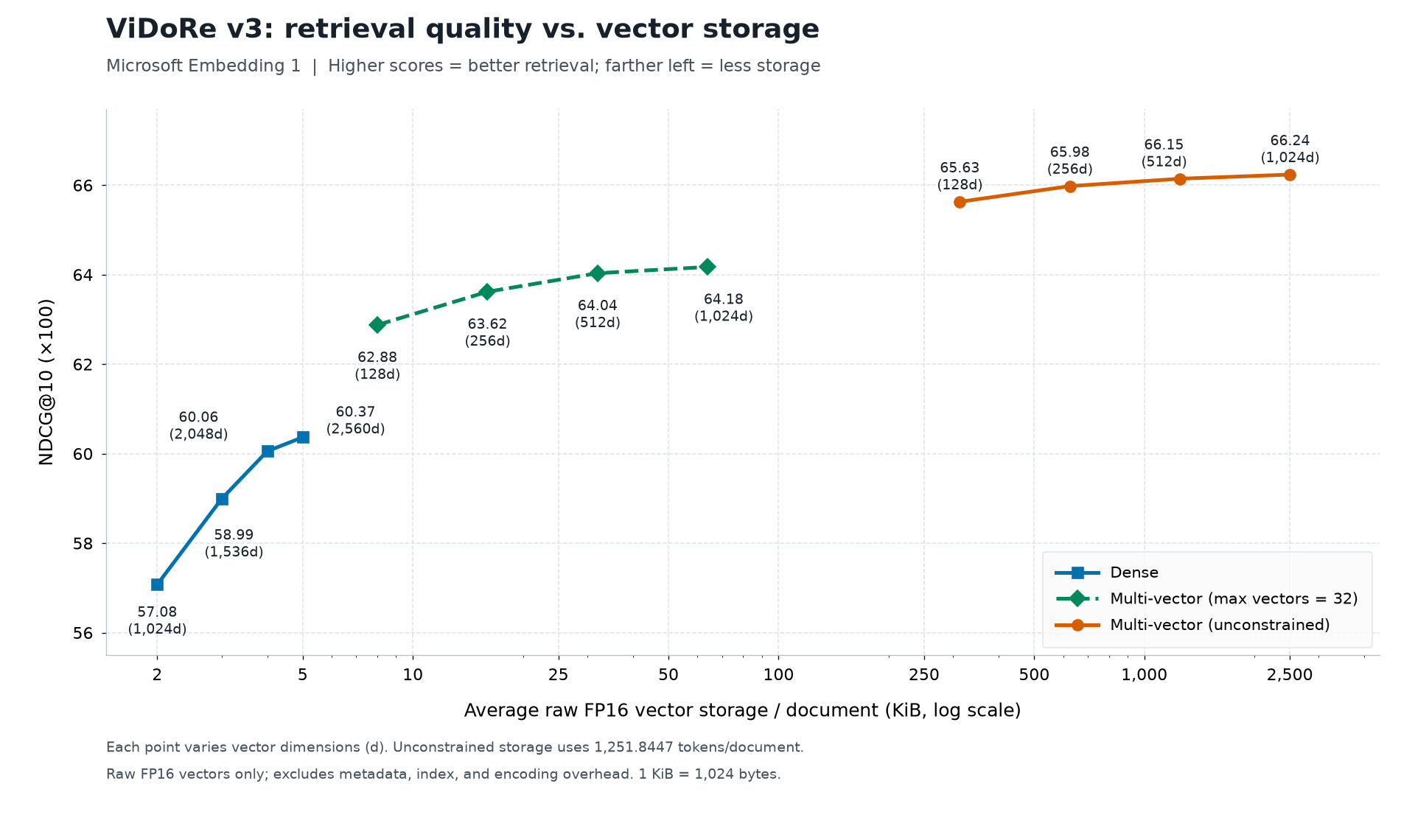
At 128 dimensions, the 32-vector configuration scores 62.88, compared with 60.37 for the highest-scoring dense configuration shown. It uses 8 KiB per document, versus about 313 KiB for unconstrained multi-vector output at the same dimensions: roughly 39× less storage, with some reduction in retrieval quality.
Storage figures represent raw FP16 vectors, excluding metadata, index, and encoding overhead. Evaluate these settings on your own data to choose the smallest configuration that meets your retrieval-quality needs.
BEIR and ViDoRe v3 benchmark scores are as of November 13, 2026.
Get started today
To enable the endpoint and configure access, follow Generate embeddings.
Generate embeddings
These examples embed a text passage and an image in one request. Images are read from Azure Blob Storage. See Image inputs.
The response includes one result for every input, in input order. Input IDs are optional. These examples omit IDs and collect the default dense embeddings in the same order as the inputs.
$env:EMBEDDING_ENDPOINT = "<inference-endpoint>"
$env:IMAGE_BLOB_URL = "https://<storage-account>.blob.core.windows.net/<container>/<blob-name>"
$env:IMAGE_SAS_TOKEN = "<user-delegation-sas-token>"
az login
python -m pip install --upgrade --pre azure-data-ai
Include --upgrade to upgrade an existing Azure Data AI installation to the latest preview.
Alternatively, install the specific embedding-enabled release:
python -m pip install "azure-data-ai==1.1.0b1"
Install Azure Identity for the Microsoft Entra authentication examples:
python -m pip install azure-identity
import os

from azure.data.ai import InferenceClient
from azure.identity import DefaultAzureCredential

with DefaultAzureCredential() as credential:
    with InferenceClient(
        endpoint=os.environ["EMBEDDING_ENDPOINT"],
        credential=credential,
    ) as client:
        response = client.get_embeddings(
            model="microsoft-embedding-1-large",
            inputs=[
                {
                    "content": "The lakeside walking route is accessible throughout the year.",
                },
                {
                    "kind": "image",
                    "url": os.environ["IMAGE_BLOB_URL"],
                    "sasToken": os.environ["IMAGE_SAS_TOKEN"],
                },
            ],
        )

# Get the dense embeddings from the response in input order.
embeddings = [item.embedding for item in response.data]
API reference
Request parameters
| Python | .NET | Required | Default | Description |
|---|---|---|---|---|
model |
model |
Yes | None | microsoft-embedding-1-large |
inputs |
inputs |
Yes | None | Items to embed. See Input fields. |
dimensions |
dimensions |
No | Dense: 2,560; multi-vector: 256 | Dense: 1,024, 1,536, 2,048, or 2,560. Multi-vector: 128, 256, 512, or 1,024. |
vector_kind |
vectorKind |
No | dense |
dense, multi, or dense_multi |
max_num_vectors |
maxNumVectors |
No | No limit | Maximum vectors per input for multi or dense_multi. |
output_data_kind |
outputDataKind |
No | Service default | Numeric type, such as Float32. |
encoding_format |
encodingFormat |
No | Float | Float or Base64 |
delivery |
delivery |
No | inline |
inline returns vectors in the response. link returns a results-file URL. |
Input fields
| Python | .NET | Used with | Description |
|---|---|---|---|
kind |
Kind |
All | text (default), query, or image |
content |
Content |
Text, query | Text to embed. |
url |
Uri |
Image | HTTPS blob URL, without a query string. |
sasToken |
SasToken |
Image | Read-only, user-delegation SAS token. |
id |
Id |
Optional | Optional label, echoed in the matching result when supplied. Omit it to match results by input order. |
Request limits
| Limit | Value |
|---|---|
| Text or query inputs | 1 per request |
| Image inputs | 8 per request, plus 1 optional text or query input |
| Text length | 8,192 tokens. Longer input is truncated, with a warning. |
| Image size | 20 MiB and 50 megapixels per image. 20 MiB per request. |
| Request body | 30,000,000 bytes |
Each input returns its own embedding. Text and images in one request aren't combined into one vector.
Response
| Field | Description |
|---|---|
data[].id |
The optional input ID, when supplied. Match results to inputs by position when you omit IDs. |
data[].embedding |
Dense vector. |
data[].multi_embedding |
Vectors for multi or dense_multi output. |
model |
Model that produced the vectors. Store it with your vectors. |
usage |
Billed text and image tokens. |
warnings |
Present when the request succeeded with a problem, such as truncated input. |
With link delivery, data is empty, and output contains a results-file URL and a SAS token. Don't log the token.
Image inputs
The model reads images from Azure Blob Storage. It doesn't accept image bytes in the request.
- Sign the SAS by using the same identity that calls the model.
- Use read-only, HTTPS-only tokens that expire in about 15 minutes.
- Assign Storage Blob Data Reader to the caller for access to the image blob.
- Storage firewall rules still apply when you use a SAS.
For steps, see Prepare image inputs.
Best practices
- Use the same model, vector kind, and dimensions for documents and queries. You can't compare embeddings from different models.
- Store
modelwith each vector. - Embed questions with
kind: "query". - Test dimensions and output types on your own data, and then choose the smallest setting that meets your accuracy target.
- Chunk text longer than 8,192 tokens.
Pricing
Billing is per input token. Images are converted to tokens. The usage field reports billed tokens.
Charges are currently billed through the Azure Cosmos DB gateway.
| Input | Price per 1M tokens |
|---|---|
| Text and query | $0.12 |
| Image | $0.40 |
Limitations
- Text longer than 8,192 tokens is truncated.
- You must store images in Azure Blob Storage.
- Multi-vector output requires MaxSim scoring in your retrieval system.
Troubleshooting
| Error | Cause | Fix |
|---|---|---|
| HTTP 403 | The calling identity doesn't have access to the inference endpoint, or a permission change hasn't taken effect. | Check endpoint access permissions and allow a few minutes for recent permission changes to take effect. |
| HTTP 429 | Rate limit exceeded. | Retry after the Retry-After interval. |
EMBEDDING_INPUT_INVALID |
The request exceeds a limit or has invalid content. | Check Request limits. |
EMBEDDING_BLOB_READ_FAILED |
The service can't read an image. | Check that the blob exists, the SAS is valid and was signed by the caller, and network rules allow access. |