Note
Access to this page requires authorization. You can try signing in or changing directories.
Access to this page requires authorization. You can try changing directories.
This article explains how to configure Dynamic Data Masking on your Azure Cosmos DB account.
Important
Dynamic Data Masking is in public preview. This feature is provided without a service level agreement. For more information, see Supplemental Terms of Use for Microsoft Azure Previews.
Overview
Dynamic Data Masking (DDM) is a server-side, policy-based security feature in Azure Cosmos DB that helps protect sensitive data from unauthorized access. DDM dynamically masks data for nonprivileged users, ensuring that sensitive information is redacted in real-time before being presented to applications, while the original data remains unchanged in the database.
DDM helps organizations meet security, compliance, and regulatory requirements by limiting exposure of sensitive data such as personal data and protected health information.
How dynamic data masking helps
- Limits sensitive data exposure: Only privileged users can view unmasked data; others see masked or redacted values.
- Policy-based enforcement: Masking is applied based on user roles and privileges.
- Compliance support: Helps meet regulatory requirements for data privacy and protection.
- No impact on stored data: Masking occurs at query time; the underlying data remains unchanged.
Supported masking strategies
| Type | Description | Example |
|---|---|---|
| Default | String values are replaced with a fixed mask as XXXX Numeric values are replaced with a default value of 0 Boolean values are always set to false |
Original: Redmond Masked: XXXXOriginal: 95 Masked: 0Original: true Masked: false |
| Custom String | A portion of the string is masked based on a defined starting index and length using MaskSubstring(Start, Length) | MaskSubstring(3,5) Original: Washington Masked: WasXXXXXon |
Only the first letter of the username and the domain ending (such as .com) remain visible. All other characters are replaced with X characters. |
Original: alpha@microsoft.com Masked: aXXXX@XXXXXXXXX.com |
How to set up dynamic data masking on Azure Cosmos DB
Note
Dynamic Data Masking (DDM) requires a Microsoft Entra ID managed identity, account keys aren't supported.
Enable dynamic data masking
Dynamic Data Masking can be configured for an account via the Features tab located under the Settings navigation pane.
Note
Once Dynamic Data Masking is enabled on an account, it can't be turned off. Enabling this feature could require up to 15 minutes before it's ready in Azure Cosmos DB.
Create role definition with permissions
Data masking utilizes Azure Cosmos DB data plane [role-based access control] (how-to-connect-role-based-access-control.md). To implement data masking, you must create role definitions and assign data action permissions for unmasking, as illustrated in the example. The built-in Data Contributor role includes unmask permissions, whereas the Data Reader role doesn't have unmask permissions by default.
Generate a new GUID using
New-Guidcommand in PowerShell and paste the generated GUID onto the JSON body here (after/sqlRoleDefinitions/<NEW_GUID_HERE>). Create a JSON file namedunmasked_role_definition.jsonwith the following content:{ "Id": "/subscriptions/aaaa0a0a-bb1b-cc2c-dd3d-eeeeee4e4e4e/resourceGroups/Your-resource-group-name/providers/Microsoft.DocumentDB/databaseAccounts/Your-CosmosDB-account-name/sqlRoleDefinitions/00000000-0000-0000-0000-000000009999", "RoleName": "unmaskroledefinition1", "Type": "CustomRole", "AssignableScopes": [ "/" ], "Permissions": [ { "DataActions": [ "Microsoft.DocumentDB/databaseAccounts/readMetadata", "Microsoft.DocumentDB/databaseAccounts/sqlDatabases/containers/items/read", "Microsoft.DocumentDB/databaseAccounts/sqlDatabases/containers/items/unmask", "Microsoft.DocumentDB/databaseAccounts/sqlDatabases/containers/executeQuery" ], "NotDataActions": [] } ] }Run this command to create the role definition:
az cosmosdb sql role definition create `
  --account-name "Your-CosmosDB-account-name" `
  --resource-group "Your-resource-group-name" `
  --body "@unmasked_role_definition.json"
Assign users to a role
After you define the roles, the next step is to assign users to each role. Based on these role definitions, users fall into two groups: high-privilege and low-privilege users.
High privilege user
Grant a user with elevated privileges the unmask permission at the container level.
az cosmosdb sql role assignment create `
--account-name "Your-CosmosDB-account-name" `
--resource-group "Your-resource-group-name" `
--scope "/" `
--principal-id "zzzzz-yyyy01-xxxx02-www3w3" `
--role-definition-id "/subscriptions/aaaa0a0a-bb1b-cc2c-dd3d-eeeeee4e4e4e/resourceGroups/Your-resource-group-name/providers/Microsoft.DocumentDB/databaseAccounts/Your-CosmosDB-account-name/sqlRoleDefinitions/00000000-0000-0000-0000-000000009999"
Low privilege user
A low privilege user has minimal permissions, such as the built-in Cosmos DB Data Reader role.
az cosmosdb sql role assignment create `
--account-name "Your-CosmosDB-account-name" `
--resource-group "Your-resource-group-name" `
--scope "/" `
--principal-id "zzzzz-yyyy01-xxxx02-www3w3" `
--role-definition-id "/subscriptions/aaaa0a0a-bb1b-cc2c-dd3d-eeeeee4e4e4e/resourceGroups/Your-resource-group-name/providers/Microsoft.DocumentDB/databaseAccounts/Your-CosmosDB-account-name/sqlRoleDefinitions/00000000-0000-0000-0000-000000000001"
(Optional) List role definitions
Run the following command to display and verify role definitions.
az cosmosdb sql role definition list `
  --account-name "Your-CosmosDB-account-name" `
  --resource-group "Your-resource-group-name"
Apply data masking policy
Note
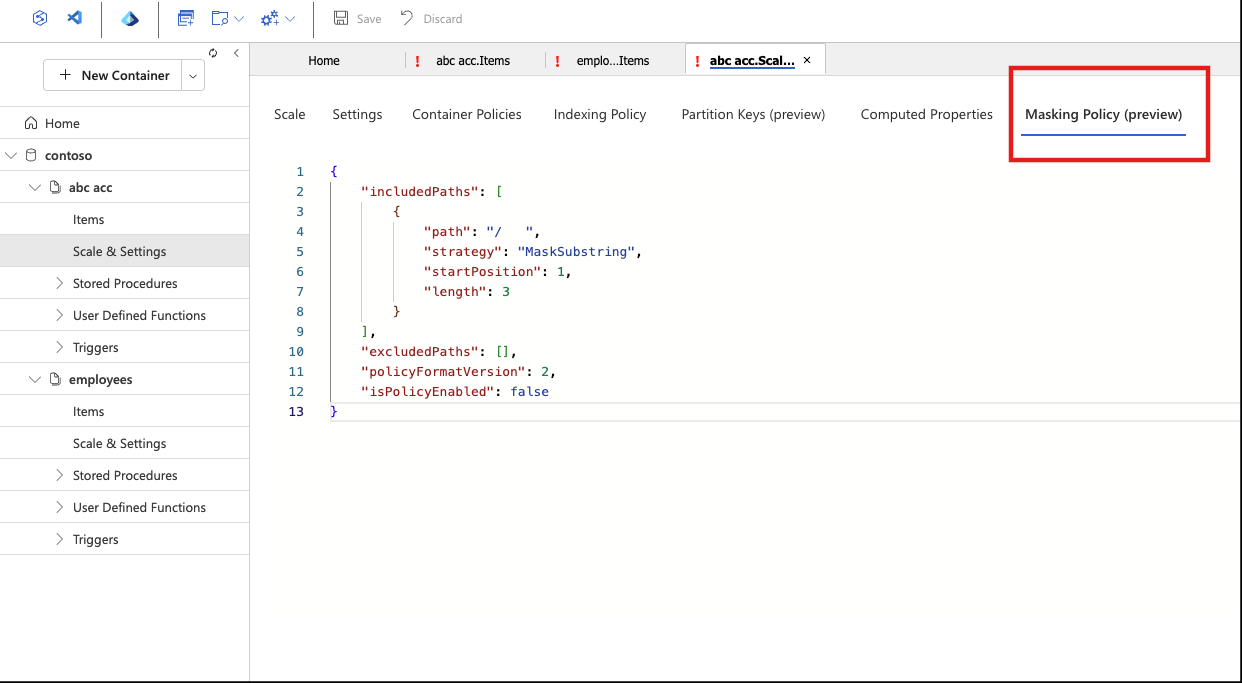
The Masking Policy section is displayed only when the Dynamic Data Masking feature is enabled.
In the Azure portal, go to your Azure Cosmos DB account, select Container, then Settings, and under Masking Policy, create the data masking policy.
Note
If no masking strategy is specified, the default strategy is applied automatically.
"dataMaskingPolicy":
{
  "includedPaths": [
    {
      "path": "/" // Mask all fields
    },
    {
      "path": "/profile/contact/email",
      "strategy": "Email" //Email strategy overrides the default mask
    },
    {
      "path": "/employment/history/[]/company",
      "strategy": "MaskSubstring", // MaskSubstring overrides the default mask
      "startPosition": 2,
      "length": 4
    }
  ],
  "excludedPaths": [
    {
      "path": "/projects/[]/projectId" //Exclude projectId from masking
    },
    {
      "path": "/id"
    },
    {
      "path": "/department"
    },
    {
      "path": "/employment/history/[]/duration"
    },
    {
      "path": "/projects/[]/details/technologies"
    }
  ],
  "isPolicyEnabled": true
}
Result
{
    "id": "ab12345-678a-4b7a-8d94-987654321",
    "department": "Marketing",
    "profile": {
        "name": {
            "first": "XXXX",
            "last": "XXXX"
        },
        "contact": {
            "email": "uXXXX@XXXXXXX.com",
            "phone": "XXXX"
        },
        "address": {
            "street": "XXXX",
            "city": "XXXX",
            "zipcode": "XXXX"
        }
    },
    "employment": {
        "role": "XXXX",
        "startDate": "XXXX",
        "history": [
            {
                "company": "CoXXXXy2",
                "duration": "1 year",
                "position": "XXXX"
            }
        ]
    },
    "skills": [
        {
            "name": "XXXX",
            "proficiency": "XXXX"
        },
        {
            "name": "XXXX",
            "proficiency": "XXXX"
        }
    ],
    "projects": [
        {
            "projectId": "1a",
            "name": "XXXX",
            "details": {
                "description": "XXXX",
                "teamSize": 0,
                "durationMonths": 0,
                "technologies": [
                    "MS Word",
                    "MS Excel",
                    "Project Management"
                ]
            }
        },
        {
            "projectId": "2a",
            "name": "XXXX",
            "details": {
                "description": "XXXX",
                "teamSize": 0,
                "durationMonths": 0,
                "technologies": [
                    "Dot Net",
                    "MS Excel"
                ]
            }
        }
    ],
    "_rid": "E1234+Uyj18CAAAACCCCC==",
    "_self": "dbs/E8mBDw==/colls/E8mBD+Uyj18=/docs/E1234+Uyj18CAAAACCCCC==/",
    "_etag": "\"00001000-0000-0400-0000-98y1234z0000\"",
    "_attachments": "attachments/",
    "_ts": 1234567890
}
Valid and invalid paths
Valid paths
{ "path": "/CreditCard", "strategy": "MaskSubstring", "startPosition": 0, "length": 8 } // Masks first 8 characters using MaskSubstring(startPosition, length)
{ "path": "/profile/contact/phone", "strategy": "MaskSubstring", "startPosition": 4, "length": 6} // Masks characters for a nested field
{ "path": "/SSN", "strategy": "Default"} // Fully masked using default strategy
{ "path": "/PhoneNumber"} // Default masking applied
{ "path": "/Email", "strategy": "Email" } // Email masking strategy applied
{ "path": "/profile/contact/email", "strategy": "Email"} //Email masking strategy applied for a nested field
{ "path": "/Address/ZipCode" } // Masks the nested ZipCode field using the default masking method
{ "path": "/Projects/[]/name" } // Masks the name field within an array using the default strategy
{ "path": "/projects/[]/details/[]/technologies"} // Masking the technologies field in nested array using default strategy
Invalid paths
{ "path": "/projects/[]", "strategy": "Default"} // Path can't end with []
{ "path": "/projects/[1]/name", "strategy": "Default"} // Specific index in array isn't supported
Effect of dynamic data masking on capacity planning
Dynamic Data Masking (DDM) helps protect sensitive data by applying masking rules at query time. While the feature is transparent to applications, there are specific considerations for compute usage:
Queries with Masked Data: Applying masking rules requires extra processing to mask sensitive fields before returning the result, which slightly increases the Request Units (RU) consumed compared to queries without masking.
Other Scenarios: For queries that don't involve masked columns, Dynamic Data Masking has no effect on compute usage.
Limitations and restrictions
- Dynamic data masking is limited to the NoSQL API in Azure Cosmos DB.
- Once data masking is enabled at the account level, it remains active and can't be turned off.
- Enabling masking by itself doesn’t add cost, unless a masking policy is applied to a container.
- In the MaskSubstring strategy, only positive start positions are allowed. Reverse indexing isn’t allowed.
- Exclude paths can be used only when all paths(/) are included in the policy.
- Masking values on specific array indexes isn’t supported.
- If either the ID or the Partition Key is masked, the document view in Data Explorer (portal) doesn't work.
- Change feed (both Latest and AllVersionsAndDeletes) isn’t available for low-privileged users.
- Fabric Mirroring, materialized views, and backups (periodic or continuous) operate on unmasked data.
- Complex queries could occasionally expose unmasked data or enable inference of sensitive values. Dynamic Data Masking is intended to minimize data exposure for unauthorized users, not to prevent direct database access, or exhaustive queries.