Note
Access to this page requires authorization. You can try signing in or changing directories.
Access to this page requires authorization. You can try changing directories.
Use vector search in Azure Cosmos DB with the Python client library. Store and query vector data efficiently in your applications.
This quickstart uses a sample hotel dataset in a JSON file with vectors from the text-embedding-3-small model. The dataset includes hotel names, locations, descriptions, and vector embeddings.
Find the sample code with resource provisioning on GitHub.
Prerequisites
An Azure subscription
- If you don't have an Azure subscription, create a free account
An existing Azure Cosmos DB resource data plane access
- If you don't have a resource, create a new resource
- Firewall configured to allow access to your client IP address
- Role-based access control (RBAC) roles assigned:
- Cosmos DB Built-in Data Contributor (data plane)
- Role ID:
00000000-0000-0000-0000-000000000002
-
- Custom domain configured
- Role-based access control (RBAC) role assigned:
- Cognitive Services OpenAI User
- Role ID:
5e0bd9bd-7b93-4f28-af87-19fc36ad61bd
text-embedding-3-smallmodel deployed
Tip
Agent Kit helps coding agents work with Azure Cosmos DB quickly and efficiently using recommended best practices. To get started, run:
npx skills add AzureCosmosDB/cosmosdb-agent-kit
To learn more, see Azure Cosmos DB Agent Kit.
Create data file with vectors
Create a new data directory for the hotels data file:
mkdir dataDownload the raw data file with vectors to your
datadirectory:curl -o data/HotelsData_toCosmosDB_Vector.json https://raw.githubusercontent.com/Azure-Samples/cosmos-db-vector-samples/refs/heads/main/data/HotelsData_toCosmosDB_Vector.json
Create a Python project
Create a new sibling directory for your project, at the same level as the data directory, and open it in Visual Studio Code:
mkdir vector-search-quickstart
code vector-search-quickstart
In the terminal, create and activate a Python virtual environment:
python -m venv .venvsource .venv/bin/activateCreate a
requirements.txtfile in your project root with the following content:azure-cosmos>=4.7.0 azure-identity>=1.18.0 openai>=1.57.0 python-dotenv>=1.0.1Install the required packages:
pip install -r requirements.txt- azure-cosmos - Azure Cosmos DB client library for database operations
- azure-identity - Azure authentication library for passwordless (managed identity) connections
- openai - OpenAI SDK for generating embeddings with Azure OpenAI
- python-dotenv - Loads environment variables from a
.envfile
Create a
.envfile in your project root for environment variables:# Identity for local developer authentication with Azure CLI AZURE_TOKEN_CREDENTIALS=AzureCliCredential # Azure OpenAI Embedding Settings AZURE_OPENAI_EMBEDDING_MODEL=text-embedding-3-small AZURE_OPENAI_EMBEDDING_API_VERSION=2024-08-01-preview AZURE_OPENAI_EMBEDDING_ENDPOINT= # Cosmos DB configuration AZURE_COSMOSDB_ENDPOINT= # Data file DATA_FILE_WITH_VECTORS=../data/HotelsData_toCosmosDB_Vector.json FIELD_TO_EMBED=Description EMBEDDED_FIELD=DescriptionVector EMBEDDING_DIMENSIONS=1536Replace the placeholder values in the
.envfile with your own information:AZURE_OPENAI_EMBEDDING_ENDPOINT: Your Azure OpenAI resource endpoint URLAZURE_COSMOSDB_ENDPOINT: Your Azure Cosmos DB endpoint URL
Understand the document schema
Before building the application, understand how vectors are stored in Azure Cosmos DB documents. Each hotel document contains:
- Standard fields:
HotelId,HotelName,Description,Category, etc. - Vector field:
DescriptionVector- an array of 1536 floating-point numbers representing the semantic meaning of the hotel description
Here's a simplified example of a hotel document structure:
{
  "HotelId": "1",
  "HotelName": "Stay-Kay City Hotel",
  "Description": "This classic hotel is fully-refurbished...",
  "Rating": 3.6,
  "DescriptionVector": [
    -0.04886505,
    -0.02030743,
    0.01763356,
    ...
    // 1536 dimensions total
  ]
}
Key points about storing embeddings:
- Vector arrays are stored as standard JSON arrays in your documents
- Vector policy defines the path (
/DescriptionVector), data type (float32), dimensions (1536), and distance function (cosine) - Indexing policy creates a vector index on the vector field for efficient similarity search
- The vector field should be excluded from standard indexing to optimize insertion performance
These policies are defined in the Bicep templates for the distance metrics for this sample project. For more information on vector policies and indexing, see Vector search in Azure Cosmos DB.
Create code files for vector search
Create a src directory for your Python files. Add two files: vector_search.py and utils.py for your vector search implementation:
mkdir src
touch src/__init__.py
touch src/vector_search.py
touch src/utils.py
Create code for vector search
Paste the following code into the vector_search.py file.
"""Azure Cosmos DB NoSQL Vector Search — main entry point.

Loads hotel data, bulk-inserts into the selected container (DiskANN or
QuantizedFlat), generates a query embedding via Azure OpenAI, and
executes a VectorDistance() similarity search.
"""

import os
import sys
from pathlib import Path

from dotenv import load_dotenv

sys.path.insert(0, str(Path(__file__).parent))

from utils import (
    get_clients_passwordless,
    get_clients,
    insert_data,
    print_search_results,
    read_file_return_json,
    validate_field_name,
    get_query_activity_id,
)

# ---------------------------------------------------------------------------
# Load environment
# ---------------------------------------------------------------------------
load_dotenv()

ALGORITHM_CONFIGS: dict[str, dict[str, str]] = {
    "diskann": {
        "container_name": "hotels_diskann",
        "algorithm_name": "DiskANN",
    },
    "quantizedflat": {
        "container_name": "hotels_quantizedflat",
        "algorithm_name": "QuantizedFlat",
    },
}


def _build_config() -> dict[str, str | int]:
    """Build runtime configuration from environment variables."""
    return {
        "query": "quintessential lodging near running trails, eateries, retail",
        "db_name": os.getenv("AZURE_COSMOSDB_DATABASENAME", "Hotels"),
        "algorithm": os.getenv("VECTOR_ALGORITHM", "diskann").strip().lower(),
        "data_file": os.getenv("DATA_FILE_WITH_VECTORS", "../data/HotelsData_toCosmosDB_Vector.json"),
        "embedded_field": os.getenv("EMBEDDED_FIELD", "DescriptionVector"),
        "embedding_dimensions": int(os.getenv("EMBEDDING_DIMENSIONS", "1536")),
        "deployment": os.getenv("AZURE_OPENAI_EMBEDDING_MODEL", "text-embedding-3-small"),
        "distance_function": os.getenv("VECTOR_DISTANCE_FUNCTION", "cosine"),
    }


def main() -> None:
    """Run the vector search demonstration."""
    config = _build_config()

    # Try passwordless auth first, fall back to key-based
    clients = get_clients_passwordless()
    if not clients["ai_client"] or not clients["db_client"]:
        clients = get_clients()

    ai_client = clients["ai_client"]
    db_client = clients["db_client"]

    try:
        algorithm = config["algorithm"]
        if algorithm not in ALGORITHM_CONFIGS:
            valid = ", ".join(ALGORITHM_CONFIGS)
            raise ValueError(
                f"Invalid algorithm '{algorithm}'. Must be one of: {valid}"
            )

        if not ai_client:
            raise RuntimeError(
                "Azure OpenAI client is not configured. "
                "Please check your environment variables."
            )
        if not db_client:
            raise RuntimeError(
                "Cosmos DB client is not configured. "
                "Please check your environment variables."
            )

        algo_cfg = ALGORITHM_CONFIGS[algorithm]
        container_name = algo_cfg["container_name"]

        database = db_client.get_database_client(config["db_name"])
        print(f"Connected to database: {config['db_name']}")

        container = database.get_container_client(container_name)
        print(f"Connected to container: {container_name}")
        print(f"\n📊 Vector Search Algorithm: {algo_cfg['algorithm_name']}")
        print(f"📏 Distance Function: {config['distance_function']}")

        # Verify the container exists
        try:
            container.read()
        except Exception as e:
            status_code = getattr(e, "status_code", None)
            if status_code == 404:
                raise RuntimeError(
                    f"Container or database not found. Ensure database "
                    f"'{config['db_name']}' and container '{container_name}' "
                    f"exist before running this script."
                ) from e
            raise

        data_path = Path(__file__).parent.parent / config["data_file"]
        data = read_file_return_json(str(data_path))
        insert_data(container, data)

        embedding_response = ai_client.embeddings.create(
            model=config["deployment"],
            input=[config["query"]],
        )
        query_embedding = embedding_response.data[0].embedding

        safe_field = validate_field_name(config["embedded_field"])
        query_text = (
            f"SELECT TOP 5 c.HotelName, c.Description, c.Rating, "
            f"VectorDistance(c.{safe_field}, @embedding) AS SimilarityScore "
            f"FROM c "
            f"ORDER BY VectorDistance(c.{safe_field}, @embedding)"
        )

        print("\n--- Executing Vector Search Query ---")
        print(f"Query: {query_text}")
        print(
            f"Parameters: @embedding (vector with {len(query_embedding)} dimensions)"
        )
        print("--------------------------------------\n")

        results = list(
            container.query_items(
                query=query_text,
                parameters=[{"name": "@embedding", "value": query_embedding}],
                enable_cross_partition_query=True,
            )
        )

        # Extract diagnostics
        response_headers = container.client_connection.last_response_headers
        activity_id = get_query_activity_id(response_headers)
        if activity_id:
            print(f"Query activity ID: {activity_id}")

        request_charge_raw = response_headers.get("x-ms-request-charge", "0") if response_headers else "0"
        try:
            request_charge = float(request_charge_raw)
        except (ValueError, TypeError):
            request_charge = 0.0

        print_search_results(results, request_charge)

    except Exception as error:
        print(f"App failed: {error}", file=sys.stderr)
        sys.exit(1)


if __name__ == "__main__":
    main()
This code:
- Configures either a
DiskANNorquantizedFlatvector algorithm from environment variables. - Connects to Azure OpenAI and Azure Cosmos DB using passwordless authentication.
- Loads pre-vectorized hotel data from a JSON file.
- Inserts data into the appropriate container.
- Generates an embedding for a natural-language query (
quintessential lodging near running trails, eateries, retail). - Executes a
VectorDistanceSQL query to retrieve the top 5 most semantically similar hotels ranked by similarity score. - Handles errors for missing clients, invalid algorithm selection, and non-existent containers/databases.
Understand the code: Generate embeddings with Azure OpenAI
The code creates embeddings for query text:
embedding_response = ai_client.embeddings.create(
    model=config["deployment"],  # OpenAI embedding model, e.g. "text-embedding-3-small"
    input=[config["query"]],     # List of description strings to embed
)
query_embedding = embedding_response.data[0].embedding
This OpenAI API call for client.embeddings.create converts text like "quintessential lodging near running trails" into a 1536-dimension vector that captures its semantic meaning. For more details on generating embeddings, see Azure OpenAI embeddings documentation.
Understand the code: Store vectors in Azure Cosmos DB
All documents with vector arrays are inserted using the upsert_item function:
for item in data:
    doc = {"id": item["HotelId"], **item}
    response = container.upsert_item(body=doc)
This inserts hotel documents including their pre-generated DescriptionVector arrays into the container. Each document gets an id field mapped from HotelId, and the function handles upserts so documents can be safely re-inserted.
Understand the code: Run vector similarity search
The code performs a vector search using the VectorDistance function:
query_text = (
    f"SELECT TOP 5 c.HotelName, c.Description, c.Rating, "
    f"VectorDistance(c.{safe_field}, @embedding) AS SimilarityScore "
    f"FROM c "
    f"ORDER BY VectorDistance(c.{safe_field}, @embedding)"
)

results = list(
    container.query_items(
        query=query_text,
        parameters=[{"name": "@embedding", "value": query_embedding}],
        enable_cross_partition_query=True,
    )
)
This code builds a parameterized SQL query that uses the VectorDistance function to compare the query's embedding vector (@embedding) against each document's stored vector field (DescriptionVector), returning the top 5 hotels with their name and similarity score, ordered from most similar to least similar. The query embedding is passed as a parameter to avoid injection and comes from a prior Azure OpenAI embeddings.create call.
What this query returns:
- Top 5 most similar hotels based on vector distance
- Hotel properties:
HotelName,Description,Rating SimilarityScore: A numeric value indicating how similar each hotel is to your query- Results ordered from most similar to least similar
For more information on the VectorDistance function, see VectorDistance documentation.
Create utility functions
Paste the following code into utils.py:
"""Shared utilities for Azure Cosmos DB NoSQL vector search.

Provides client initialization (passwordless and key-based), JSON I/O,
bulk insert with RU tracking, field validation, and result formatting.
"""

import json
import os
import re
import time
from typing import Any, Optional


def get_clients() -> dict[str, Any]:
    """Get Azure OpenAI and Cosmos DB clients using key-based authentication.

    Returns dict with 'ai_client' and 'db_client' (either may be None if
    the required environment variables are missing).
    """
    from azure.cosmos import CosmosClient
    from openai import AzureOpenAI

    ai_client = None
    db_client = None

    api_key = os.getenv("AZURE_OPENAI_EMBEDDING_KEY", "")
    api_version = os.getenv("AZURE_OPENAI_EMBEDDING_API_VERSION", "")
    endpoint = os.getenv("AZURE_OPENAI_EMBEDDING_ENDPOINT", "")
    deployment = os.getenv("AZURE_OPENAI_EMBEDDING_MODEL", "")

    if api_key and api_version and endpoint and deployment:
        ai_client = AzureOpenAI(
            api_key=api_key,
            api_version=api_version,
            azure_endpoint=endpoint,
            azure_deployment=deployment,
        )

    cosmos_endpoint = os.getenv("AZURE_COSMOSDB_ENDPOINT", "")
    cosmos_key = os.getenv("AZURE_COSMOSDB_KEY", "")

    if cosmos_endpoint and cosmos_key:
        db_client = CosmosClient(url=cosmos_endpoint, credential=cosmos_key)

    return {"ai_client": ai_client, "db_client": db_client}


def get_clients_passwordless() -> dict[str, Any]:
    """Get Azure OpenAI and Cosmos DB clients using DefaultAzureCredential.

    Uses managed identity / Azure CLI credentials for passwordless auth.
    Returns dict with 'ai_client' and 'db_client' (either may be None).
    """
    from azure.cosmos import CosmosClient
    from azure.identity import DefaultAzureCredential, get_bearer_token_provider
    from openai import AzureOpenAI

    ai_client = None
    db_client = None

    api_version = os.getenv("AZURE_OPENAI_EMBEDDING_API_VERSION", "")
    endpoint = os.getenv("AZURE_OPENAI_EMBEDDING_ENDPOINT", "")
    deployment = os.getenv("AZURE_OPENAI_EMBEDDING_MODEL", "")

    if api_version and endpoint and deployment:
        credential = DefaultAzureCredential()
        token_provider = get_bearer_token_provider(
            credential, "https://cognitiveservices.azure.com/.default"
        )
        ai_client = AzureOpenAI(
            api_version=api_version,
            azure_endpoint=endpoint,
            azure_deployment=deployment,
            azure_ad_token_provider=token_provider,
        )

    cosmos_endpoint = os.getenv("AZURE_COSMOSDB_ENDPOINT", "")

    if cosmos_endpoint:
        credential = DefaultAzureCredential()
        db_client = CosmosClient(url=cosmos_endpoint, credential=credential)

    return {"ai_client": ai_client, "db_client": db_client}


def read_file_return_json(file_path: str) -> list[dict[str, Any]]:
    """Read a JSON file and return its parsed contents."""
    print(f"Reading JSON file from {file_path}")
    try:
        with open(file_path, "r", encoding="utf-8") as f:
            return json.load(f)
    except FileNotFoundError:
        print(f"Error: File '{file_path}' not found")
        raise
    except json.JSONDecodeError as e:
        print(f"Error: Invalid JSON in file '{file_path}': {e}")
        raise


def write_file_json(file_path: str, json_data: Any) -> None:
    """Serialize data to a JSON file."""
    try:
        with open(file_path, "w", encoding="utf-8") as f:
            json.dump(json_data, f, indent=2, ensure_ascii=False)
        print(f"Wrote JSON file to {file_path}")
    except IOError as e:
        print(f"Error writing to file '{file_path}': {e}")
        raise


def _get_document_count(container: Any) -> int:
    """Return the number of documents in a Cosmos DB container."""
    query = "SELECT VALUE COUNT(1) FROM c"
    results = list(container.query_items(query=query, enable_cross_partition_query=True))
    return results[0] if results else 0


def insert_data(
    container: Any, data: list[dict[str, Any]]
) -> dict[str, Any]:
    """Bulk-insert documents into a Cosmos DB container.

    Skips insertion if the container already has documents.
    Each item gets an 'id' field mapped from 'HotelId'.

    Returns a dict with total, inserted, failed, skipped, and requestCharge.
    """
    existing_count = _get_document_count(container)

    if existing_count > 0:
        print(f"Container already has {existing_count} documents. Skipping insert.")
        return {
            "total": 0,
            "inserted": 0,
            "failed": 0,
            "skipped": existing_count,
            "requestCharge": 0.0,
        }

    print(f"Inserting {len(data)} items...")

    inserted = 0
    failed = 0
    total_request_charge = 0.0

    start_time = time.time()

    for item in data:
        doc = {"id": item["HotelId"], **item}
        try:
            response = container.upsert_item(body=doc)
            inserted += 1
            ru = _extract_ru_from_headers(container.client_connection.last_response_headers)
            total_request_charge += ru
        except Exception as e:
            status_code = getattr(e, "status_code", None)
            if status_code == 409:
                inserted += 1
            else:
                failed += 1
                print(f"  Insert failed for item {item.get('HotelId', '?')}: {e}")

    duration = time.time() - start_time
    print(f"Bulk insert completed in {duration:.2f}s")
    print(f"\nInsert Request Charge: {total_request_charge:.2f} RUs\n")

    return {
        "total": len(data),
        "inserted": inserted,
        "failed": failed,
        "skipped": 0,
        "requestCharge": total_request_charge,
    }


def _extract_ru_from_headers(headers: Optional[dict[str, str]]) -> float:
    """Extract the request charge (RU) from Cosmos DB response headers."""
    if not headers:
        return 0.0
    raw = headers.get("x-ms-request-charge", "0")
    try:
        return float(raw)
    except (ValueError, TypeError):
        return 0.0


def validate_field_name(field_name: str) -> str:
    """Validate a field name is a safe SQL identifier.

    Prevents NoSQL injection when interpolating field names into queries.
    Allows only letters, digits, and underscores; must start with a letter
    or underscore.

    Raises ValueError if the field name is invalid.
    """
    pattern = re.compile(r"^[A-Za-z_][A-Za-z0-9_]*$")
    if not pattern.match(field_name):
        raise ValueError(
            f'Invalid field name: "{field_name}". '
            "Field names must start with a letter or underscore and "
            "contain only letters, numbers, and underscores."
        )
    return field_name


def print_search_results(
    search_results: list[dict[str, Any]],
    request_charge: Optional[float] = None,
) -> None:
    """Print vector search results in a consistent format."""
    print("\n--- Search Results ---")
    if not search_results:
        print("No results found.")
        return

    for i, result in enumerate(search_results, 1):
        score = result.get("SimilarityScore", 0.0)
        name = result.get("HotelName", "Unknown")
        print(f"{i}. {name}, Score: {score:.4f}")

    if request_charge is not None:
        print(f"\nVector Search Request Charge: {request_charge:.2f} RUs")
    print("")


def get_query_activity_id(response_headers: Optional[dict[str, str]]) -> Optional[str]:
    """Extract the activity ID from Cosmos DB query response headers."""
    if not response_headers:
        return None
    return response_headers.get("x-ms-activity-id")


def get_bulk_operation_rus(headers: Optional[dict[str, str]]) -> float:
    """Extract total RU cost from Cosmos DB response headers."""
    return _extract_ru_from_headers(headers)
This utility module provides these key functions:
get_clients_passwordless: Creates and returns clients for Azure OpenAI and Azure Cosmos DB using passwordless authentication. Enable RBAC on both resources and sign in to Azure CLIinsert_data: Inserts data into an Azure Cosmos DB container and tracks Request Units (RUs) for each operationprint_search_results: Prints the results of a vector search, including the score and hotel namevalidate_field_name: Validates that a field name exists in the dataget_bulk_operation_rus: Extracts total RU cost from Azure Cosmos DB response headers
Authenticate with Azure CLI
Sign in to Azure CLI before you run the application so the app can access Azure resources securely.
az login
The code uses your local developer authentication to access Azure Cosmos DB and Azure OpenAI with the get_clients_passwordless function from utils.py. When you set AZURE_TOKEN_CREDENTIALS=AzureCliCredential, you deterministically select which credential DefaultAzureCredential uses from its credential chain. The function relies on DefaultAzureCredential from azure-identity, which walks an ordered chain of credential providers but honors the environment variable to resolve to Azure CLI credentials first. Learn more about how to Authenticate Python apps to Azure services using the Azure Identity library.
Run the application
Use the VECTOR_ALGORITHM environment variable to select which vector index implementation to run. The variable controls which Azure Cosmos DB container the application connects to.
Linux/macOS:
VECTOR_ALGORITHM=diskann python -m src.vector_search
Windows:
$env:VECTOR_ALGORITHM="diskann"; python -m src.vector_search
The app logging and output show:
- Container connection status
- Data insertion status
- Search results with hotel names and similarity scores
Connected to database: Hotels
Connected to container: hotels_diskann

📊 Vector Search Algorithm: DiskANN
📏 Distance Function: cosine

Reading JSON file from ..\data\HotelsData_toCosmosDB_Vector.json
Container already has 50 documents. Skipping insert.

--- Executing Vector Search Query ---
Query: SELECT TOP 5 c.HotelName, c.Description, c.Rating, VectorDistance(c.DescriptionVector, @embedding) AS SimilarityScore FROM c ORDER BY VectorDistance(c.DescriptionVector, @embedding)
Parameters: @embedding (vector with 1536 dimensions)
--------------------------------------

Query activity ID: <ACTIVITY_ID>

--- Search Results ---
1. Royal Cottage Resort, Score: 0.4991
2. Country Comfort Inn, Score: 0.4786
3. Nordick's Valley Motel, Score: 0.4635
4. Economy Universe Motel, Score: 0.4461
5. Roach Motel, Score: 0.4388

Vector Search Request Charge: 5.33 RUs
Distance metrics
Azure Cosmos DB supports three distance functions for vector similarity:
| Distance Function | Score Range | Interpretation | Best For |
|---|---|---|---|
| Cosine (default) | 0.0 to 1.0 | Higher scores (closer to 1.0) indicate greater similarity | General text similarity, Azure OpenAI embeddings (used in this quickstart) |
| Euclidean (L2) | 0.0 to ∞ | Lower = more similar | Spatial data, when magnitude matters |
| Dot Product | -∞ to +∞ | Higher = more similar | When vector magnitudes are normalized |
The distance function is set in the vector embedding policy when creating the container. This is provided in the infrastructure in the sample repository. It is defined as part of the container definition.
{
    name: 'hotels_diskann'
    partitionKeyPaths: [
        '/HotelId'
    ]
    indexingPolicy: {
        indexingMode: 'consistent'
        automatic: true
        includedPaths: [
        {
            path: '/*'
        }
        ]
        excludedPaths: [
        {
            path: '/_etag/?'
        }
        {
            path: '/DescriptionVector/*'
        }
        ]
        vectorIndexes: [
        {
            path: '/DescriptionVector'
            type: 'diskANN'
        }
        ]
    }
    vectorEmbeddingPolicy: {
        vectorEmbeddings: [
        {
            path: '/DescriptionVector'
            dataType: 'float32'
            dimensions: 1536
            distanceFunction: 'cosine'
        }
        ]
    }
}
This Bicep code defines an Azure Cosmos DB container configuration for storing hotel documents with vector search capabilities.
| Property | Description |
|---|---|
partitionKeyPaths |
Partitions documents by HotelId for distributed storage. |
indexingPolicy |
Configures automatic indexing on all document properties (/*) except the system _etag field and the DescriptionVector array to optimize write performance. Vector fields don't need standard indexing because they use a specialized vectorIndexes configuration instead. |
vectorIndexes |
Creates either a DiskANN or quantizedFlat index on the /DescriptionVector path for efficient similarity searches. |
vectorEmbeddingPolicy |
Defines the vector field's characteristics: float32 data type with 1536 dimensions (matching the text-embedding-3-small model output) and cosine as the distance function to measure similarity between vectors during queries. |
Interpret similarity scores
In the example output using cosine similarity:
- 0.4991 (Royal Cottage Resort) - Highest similarity, best match for "lodging near running trails, eateries, retail"
- 0.4388 (Roach Motel) - Lower similarity, still relevant but less matching
- Scores closer to 1.0 indicate stronger semantic similarity
- Scores near 0 indicate little similarity
Important notes:
- Absolute score values depend on your embedding model and data
- Focus on relative ranking rather than absolute thresholds
- Azure OpenAI embeddings work best with cosine similarity
For detailed information on distance functions, see What are distance functions?
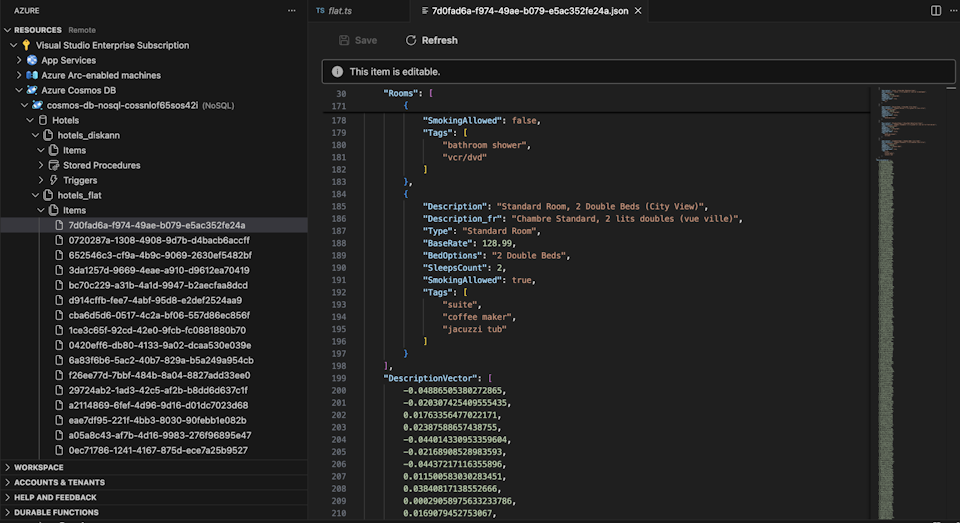
View and manage data in Visual Studio Code
Select the Cosmos DB extension in Visual Studio Code to connect to your Azure Cosmos DB account.
View the data and indexes in the Hotels database.
Clean up resources
When you no longer need the API for NoSQL account, you can delete the corresponding resource group.
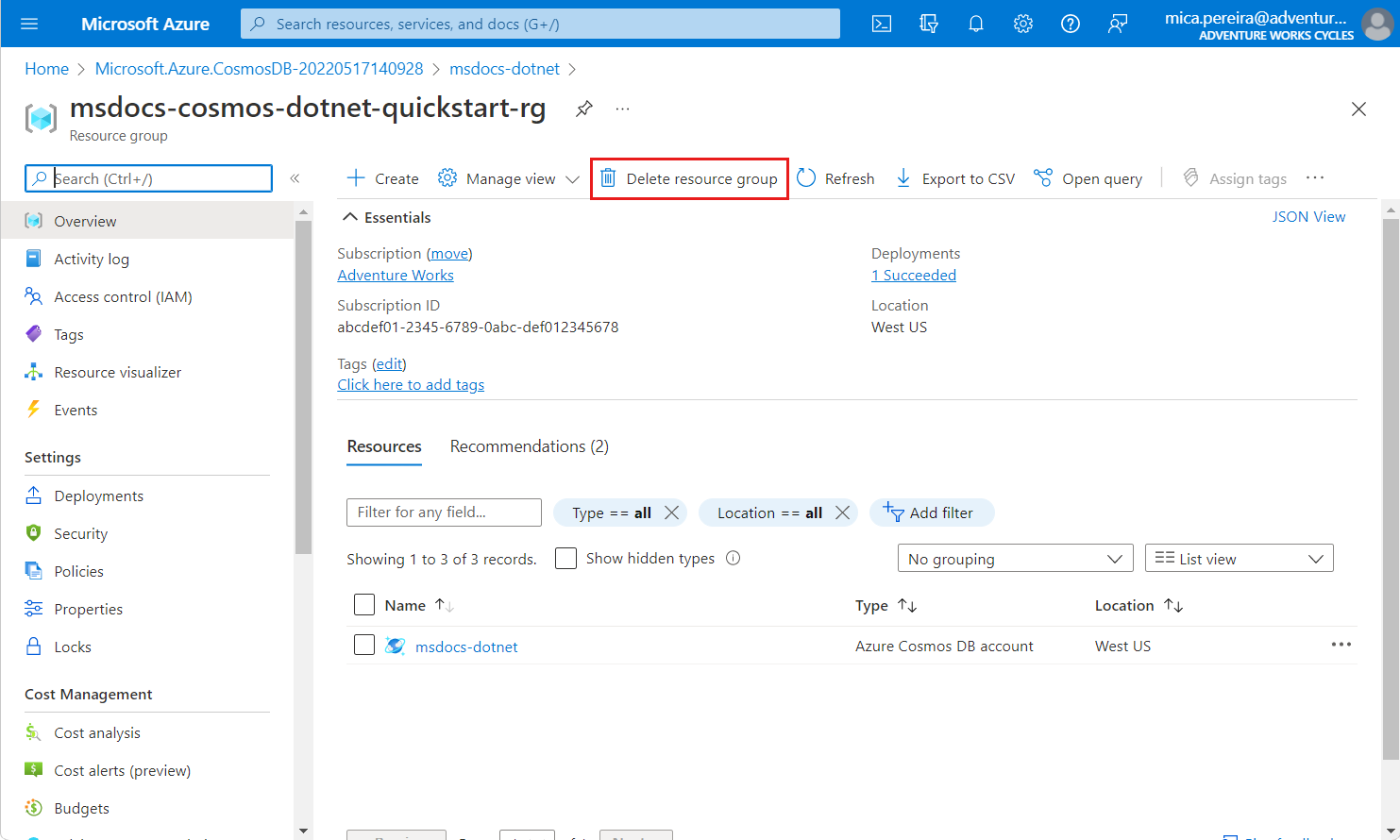
Navigate to the resource group you previously created in the Azure portal.
Tip
In this quickstart, we recommended the name
msdocs-cosmos-quickstart-rg.Select Delete resource group.
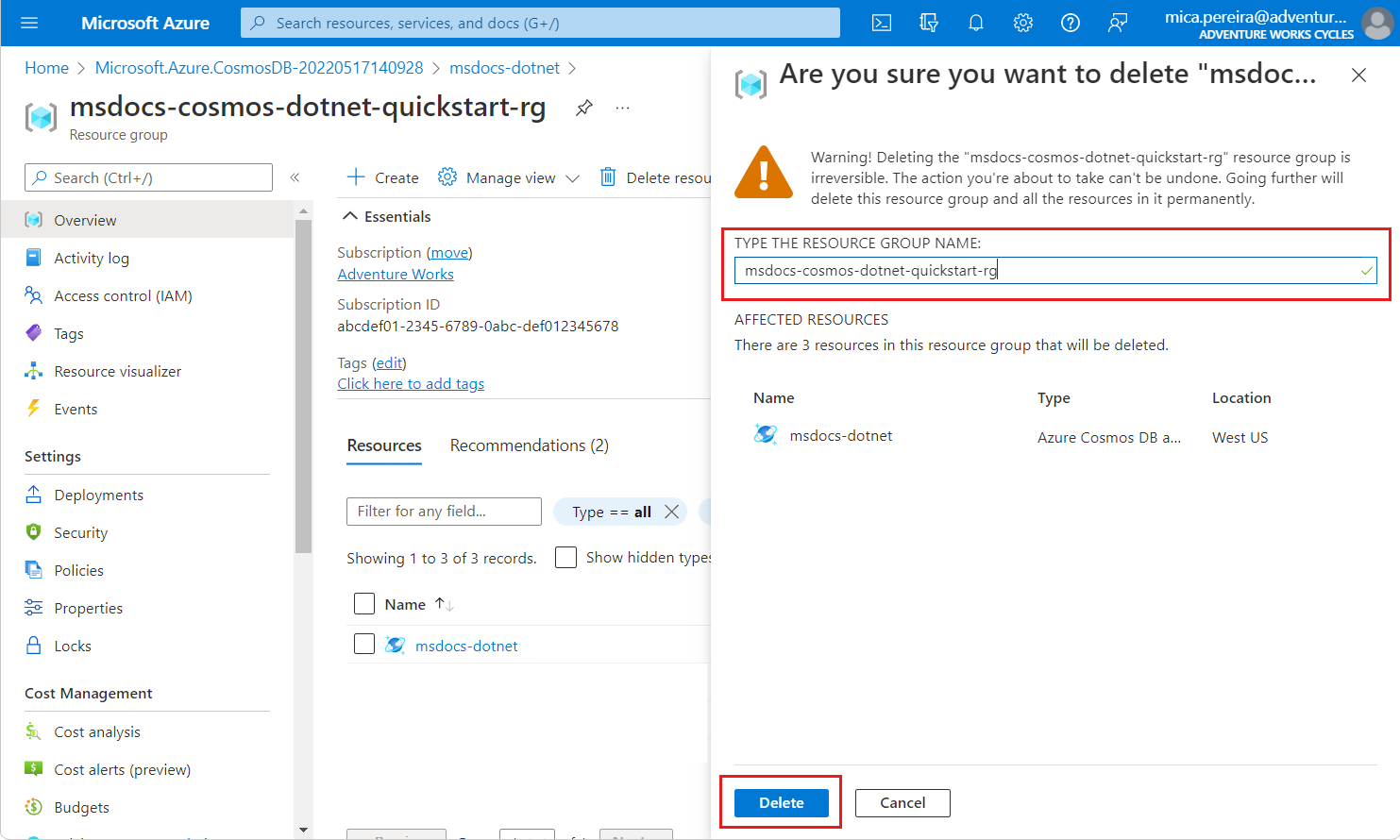
On the Are you sure you want to delete dialog, enter the name of the resource group, and then select Delete.