Note
Access to this page requires authorization. You can try signing in or changing directories.
Access to this page requires authorization. You can try changing directories.
Save on your Copilot Credit costs when you buy a pre-purchase plan. Pre-purchase plans are commit units (CUs) bought at discounted tiers in your purchasing currency for a specific product. The more you buy, the greater the discount. Purchased CUs pay down qualifying costs in US dollars (USD). So, if Microsoft Copilot Studio generates a retail cost of $100 based on Copilot Credit usage, then 100 Copilot Credit CUs (CCCUs) are consumed.
Your Copilot Credit pre-purchase plan automatically uses your CCCUs to pay for eligible Copilot Credit usage during its one-year term or until Copilot Credit CUs run out. Your pre-purchase plan Copilot Credit CUs start paying for your Copilot usage without having to redeploy or reassign the plan. By default, plans are configured to renew at the end of the one-year term.
Prerequisites
To buy a pre-purchase plan, you must have one of the following Azure subscriptions and roles:
- For an Azure subscription, the owner role or reservation purchaser role is required.
- For an Enterprise Agreement (EA) subscription, the Reserved Instances policy option must be enabled. To enable that policy option, you must be an EA administrator of the subscription.
- For a Cloud Solution Provider (CSP) subscription, follow one of these articles:
Determine the right size to buy
To get started, estimate your expected Copilot Credit usage. This helps you determine the appropriate size for your pre-purchase plan. Each pre-purchase plan has a one-year term.
For example, suppose you expect to consume 1,500,000 Copilot Credit with custom agents created in Microsoft Copilot Studio. Assuming the pay-as-you-go rate for Copilot Credit to be $0.01, then at the pay-as-you-go rate, this will cost $15,000. By purchasing Tier 2 (15,000 CU) pre-purchase plan, let's say the cost of that tier is $14,100, it will give a 6% saving compared to the pay-as-you-go rate for the same usage.
Note
Pre-purchase plan discounts don't combine with other discounts you might have. If you have additional discounts, the pre-purchase plan discount is applied independently, which may result in a lower effective discount rate than the listed tier percentage. Factor in your existing discounts when estimating savings.
Purchase Copilot Credit commit units
Purchase Copilot Credit pre-purchase plans in the Azure portal reservations.
Go to the Azure portal
Navigate to the Reservations service.
On the Purchase reservations page, select Copilot Credit Pre-Purchase Plan.

On the Select the product you want to purchase page, select a subscription. Use the Subscription list to select the subscription used to pay for the reserved capacity. The payment method of the subscription is charged the upfront costs for the reserved capacity. Charges not are deducted from the enrollment's Azure Prepayment (previously called monetary commitment) balance or charged as overage. The Copilot Credit prepurchase plan is billed as a separate charge and appears as its own line item on your invoice.
Select a scope.
- Single resource group scope - Applies the reservation discount to the matching resources in the selected resource group only.
- Single subscription scope - Applies the reservation discount to the matching resources in the selected subscription.
- Shared scope - Applies the reservation discount to matching resources in eligible subscriptions that are in the billing context. For Enterprise Agreement customers, the billing context is the enrollment.
- Management group - Applies the reservation discount to the matching resource in the list of subscriptions that are a part of both the management group and billing scope.
Select how many Copilot Credit commit units you want to purchase.
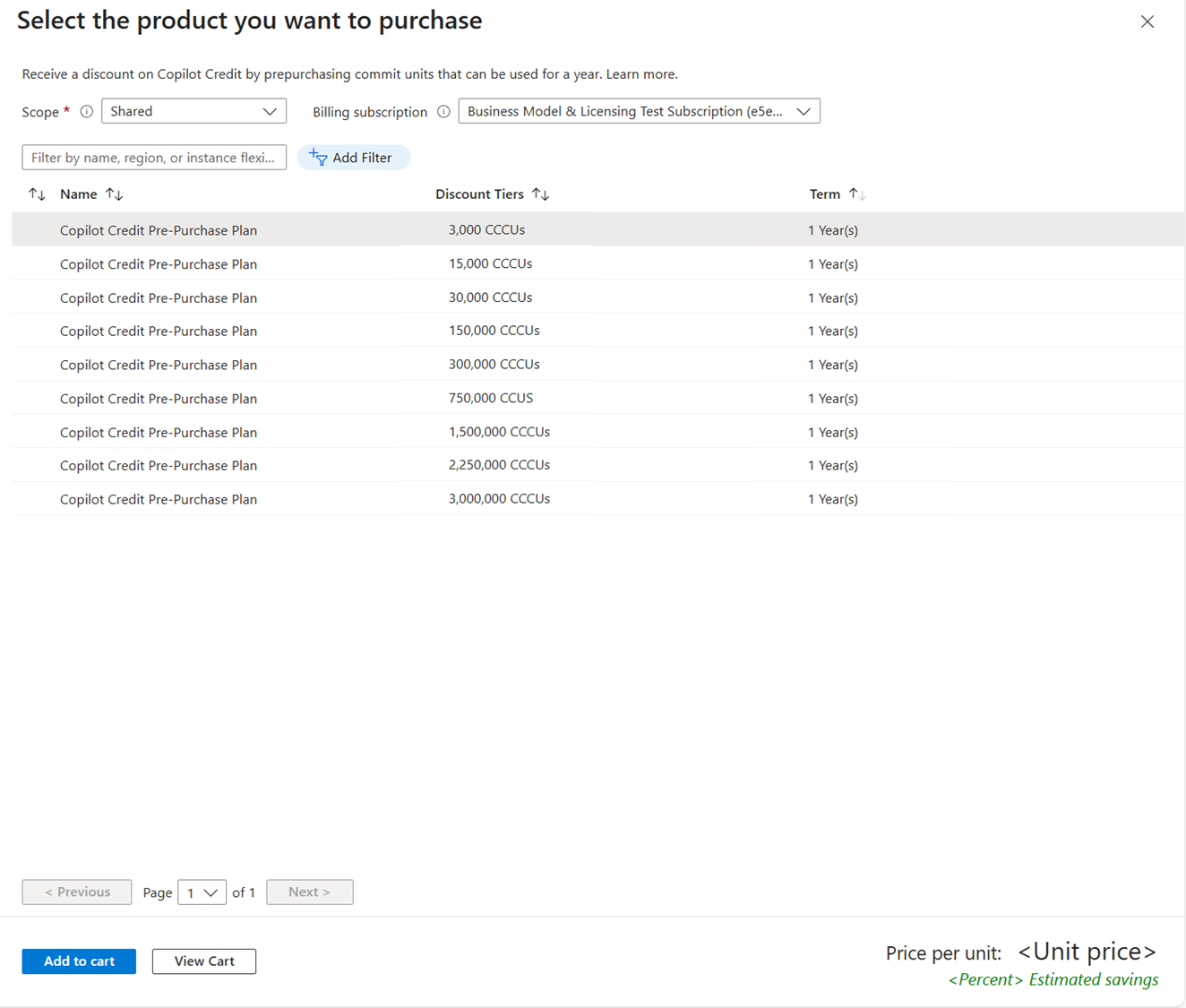
Choose to automatically renew the pre-purchase reservation. The setting is configured to renew automatically by default. For more information, see Renew a reservation.
Change scope and ownership
You can make the following types of changes to a reservation after purchase:
- Update reservation scope
- Update who can view or manage the reservation. For more information, see Who can manage a reservation by default.
You can't split or merge a Copilot Credit Pre-Purchase Plan. For more information about managing reservations, see Manage reservations after purchase.
Cancellations and exchanges
Cancel and exchange operations aren't supported for Copilot Credit Pre-Purchase Plans. All purchases are final.
Related content
To learn more about Azure Reservations, see the following articles:
To learn more about Copilot Credit costs, see Plan costs and understand Copilot Credit pricing and billing.