Note
Access to this page requires authorization. You can try signing in or changing directories.
Access to this page requires authorization. You can try changing directories.
This article describes an enterprise architecture for Azure CycleCloud or Azure CycleCloud Workspace for Slurm. Use it to coordinate networking, security, identity, storage, and DNS decisions before deployment. For the detailed deployment procedure, see Plan your CycleCloud Workspace for Slurm deployment and Deploy CycleCloud Workspace for Slurm with the CLI.
Architecture
Deploy shared connectivity and security services in a hub virtual network. Deploy CycleCloud, Slurm nodes, and HPC storage in a peered spoke virtual network. Keep public IP addresses off CycleCloud and workload VMs.
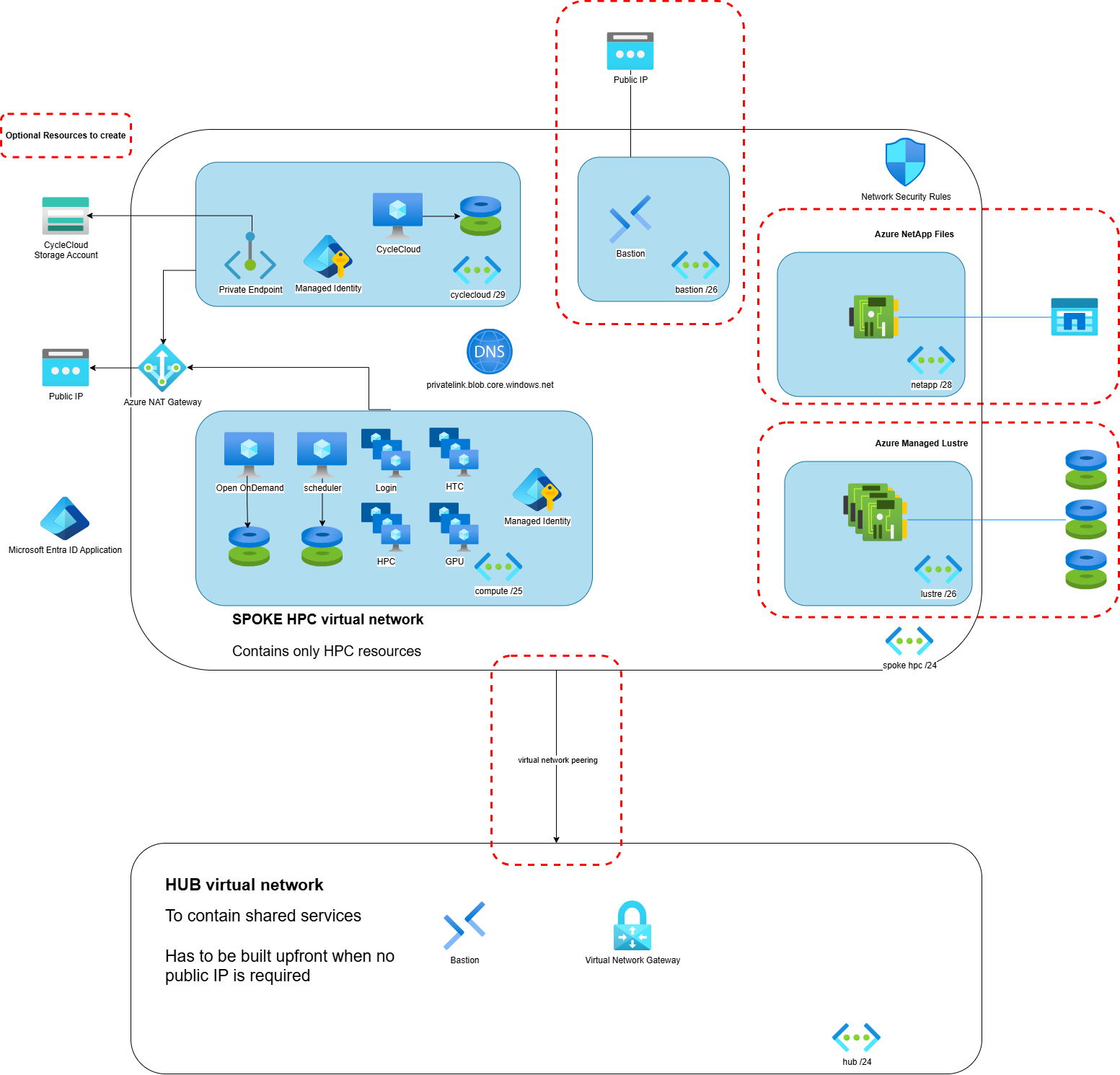
The architecture has these security boundaries:
- Hub virtual network: Hosts shared connectivity and inspection services, such as Azure VPN Gateway, ExpressRoute, Azure Firewall, an HTTP/S proxy, or Azure Bastion.
- CycleCloud spoke: Hosts separate subnets for the CycleCloud VM and cluster nodes. Add dedicated subnets for Azure Bastion, Azure NetApp Files, or Azure Managed Lustre when you deploy those services in the spoke.
- Private administration: Administrators reach CycleCloud and sign-in nodes through private connectivity or Azure Bastion. CycleCloud and workload VMs don't need public IP addresses.
- Private storage: CycleCloud reaches its project storage account through a private endpoint. Private DNS resolves the storage account to the private endpoint.
- Controlled egress: Azure Firewall, an HTTP/S proxy, private endpoints, service endpoints, or approved package mirrors provide required outbound access.
Important
The CycleCloud Workspace for Slurm 2026.08.07 template can deploy workload VMs without public IP addresses, but its Azure Bastion and optional NAT Gateway each use a managed public IP address. If policy prohibits every public IP resource, predeploy Azure Bastion Premium with private-only access or use VPN or ExpressRoute, and don't enable the template's Bastion or NAT Gateway options.
Plan the deployment sequence
1. Establish the hub
Before you deploy the CycleCloud spoke:
- Create or select the hub virtual network.
- Configure private connectivity from your enterprise network by using VPN Gateway or ExpressRoute.
- Select an administrative access path. Azure Bastion provides access without public IP addresses on target VMs. For Open OnDemand, use VPN or ExpressRoute because the Bastion tunneling scenario isn't supported.
- Configure centralized egress and inspection. If you use Azure Firewall or a proxy, define the routes and allow lists before you deploy CycleCloud.
- Configure a DNS resolver that can resolve Azure private DNS zones and your enterprise zones from the spoke.
2. Prepare the spoke network
Size the spoke address space for the maximum cluster size, including autoscaling nodes. Create separate subnets for CycleCloud and compute because their access policies differ. For CycleCloud Workspace for Slurm brownfield deployments, also meet the subnet size and delegation requirements in the deployment planner.
Peer the hub and spoke in both directions. If the spoke uses the hub's VPN or ExpressRoute gateway, enable gateway transit on the hub peering and remote gateway use on the spoke peering. A spoke that uses the hub gateway can't have its own virtual network gateway.
The following Bicep example peers existing hub and spoke virtual networks in different resource groups. It doesn't deploy CycleCloud resources or network security rules. Create main.bicep and peering.bicep in the same directory.
The main.bicep file deploys the peering module to each virtual network's resource group:
targetScope = 'subscription'

param hubResourceGroupName string
param hubVnetName string
param spokeResourceGroupName string
param spokeVnetName string
param useHubGateway bool = true

module hubToSpoke './peering.bicep' = {
  name: 'hub-to-cyclecloud-spoke'
  scope: resourceGroup(hubResourceGroupName)
  params: {
    localVnetName: hubVnetName
    remoteVnetId: resourceId(subscription().subscriptionId, spokeResourceGroupName, 'Microsoft.Network/virtualNetworks', spokeVnetName)
    peeringName: 'hub-to-cyclecloud-spoke'
    allowGatewayTransit: useHubGateway
    useRemoteGateways: false
  }
}

module spokeToHub './peering.bicep' = {
  name: 'cyclecloud-spoke-to-hub'
  scope: resourceGroup(spokeResourceGroupName)
  params: {
    localVnetName: spokeVnetName
    remoteVnetId: resourceId(subscription().subscriptionId, hubResourceGroupName, 'Microsoft.Network/virtualNetworks', hubVnetName)
    peeringName: 'cyclecloud-spoke-to-hub'
    allowGatewayTransit: false
    useRemoteGateways: useHubGateway
  }
}
The peering.bicep module creates one direction of the peering:
param localVnetName string
param remoteVnetId string
param peeringName string
param allowGatewayTransit bool
param useRemoteGateways bool

resource localVnet 'Microsoft.Network/virtualNetworks@2024-05-01' existing = {
  name: localVnetName
}

resource peering 'Microsoft.Network/virtualNetworks/virtualNetworkPeerings@2024-05-01' = {
  parent: localVnet
  name: peeringName
  properties: {
    remoteVirtualNetwork: {
      id: remoteVnetId
    }
    allowVirtualNetworkAccess: true
    allowForwardedTraffic: true
    allowGatewayTransit: allowGatewayTransit
    useRemoteGateways: useRemoteGateways
  }
}
For the maintained implementation that creates a CycleCloud spoke, subnets, network security group (NSG), optional peering, and optional managed edge services, see the 2026.08.07 Workspace network Bicep.
3. Configure private storage and DNS
Use a private endpoint for the CycleCloud project storage account. In Azure commercial regions, link the privatelink.blob.core.windows.net private DNS zone to every virtual network that must resolve the storage account privately.
Creating a private endpoint doesn't disable the storage account's public endpoint. After you validate private access, disable public network access or restrict the storage firewall according to policy.
For cluster node names, choose a resolution method that covers all compute subnets. If a cluster spans subnets, use an Azure private DNS zone or configure CycleCloud.hosts.standalone_dns.subnets. For more information, see Configure your Azure subscription.
4. Apply network security rules
Associate NSGs with the CycleCloud and compute subnets. Start with deny-by-default rules and add only the flows that your topology needs:
- Permit administrators to reach CycleCloud HTTPS and sign-in-node SSH only through the approved hub access path.
- Permit required communication within the Slurm cluster and to shared storage.
- For direct CycleCloud communication, permit cluster nodes to reach the CycleCloud private address on TCP 9443.
- If your policy permits a public IP on the return proxy, permit cluster nodes to reach it on TCP 37140 and permit CycleCloud to initiate SSH to it. Don't open TCP 9443 from every cluster node when all communication uses the return proxy.
- Permit CycleCloud outbound HTTPS to required Azure control-plane and identity endpoints through the approved egress path.
See Operate in a locked-down network for required Azure service endpoints and direct node-to-CycleCloud communication. See Enable return proxy for the alternative communication path.
Important
CycleCloud currently assigns a public IP address to a return-proxy node when AssociatePublicIpAddress isn't specified. Setting the attribute to false causes the node to fail. For a strict no-public-IP deployment, don't enable return proxy. Use direct private TCP 9443 communication between cluster nodes and CycleCloud. For more information, see Node networking configuration.
5. Configure outbound access
CycleCloud needs controlled access to Azure Resource Manager, Microsoft Entra ID, storage, and any enabled monitoring services. Cluster nodes might also need operating-system packages, container images, and application dependencies.
Choose one or more of these patterns:
- Route internet-bound traffic through Azure Firewall or another network virtual appliance in the hub.
- Configure an HTTP/S proxy for CycleCloud and, when required, for cluster nodes.
- Use private endpoints or service endpoints for supported Azure services.
- Mirror packages and container images into repositories that the private network can reach.
- Prestage CycleCloud projects when access to GitHub is blocked, as described in Operate in a locked-down network.
The CycleCloud return proxy forwards node management communication to CycleCloud. It isn't a general-purpose internet proxy.
6. Deploy CycleCloud Workspace for Slurm
Use the current CycleCloud Workspace for Slurm release. Release 2026.08.07 supports CycleCloud 8.9.2.
For an enterprise network, use a brownfield deployment and provide the existing virtual network and subnet resource IDs. The Workspace template doesn't create NSGs, routes, hub services, or a web proxy for an existing network. Configure and validate those resources before deployment.
Use the maintained mainTemplate.bicep instead of copying its resource definitions. To generate a parameters file and deploy the template, follow Deploy CycleCloud Workspace for Slurm with the CLI.
Validate the secured deployment
Before production cutover, verify that:
- CycleCloud and cluster VMs have no public IP addresses.
- Administrators can reach the CycleCloud portal and sign-in nodes only through the approved private path.
- The CycleCloud VM resolves the storage account to its private endpoint, and the storage public endpoint is disabled or restricted.
- CycleCloud can authenticate and call required Azure APIs through the controlled egress path.
- Cluster nodes can stage projects, mount storage, join Slurm, and report status through direct private TCP 9443 communication. If policy permits a public IP on the return-proxy node, validate the TCP 37140 return-proxy path instead.
- DNS resolves scheduler, sign-in, and execute nodes across every compute subnet.
- NSG flow logs and firewall or proxy logs show no unexpected denied dependencies.
- Autoscaling works from zero nodes and returns to zero after a representative job.
For current H-series validation, use Standard_HB368rs_v5 where it's available. Confirm image support, regional quota, VM-family quota, and capacity before production use.