Note
Access to this page requires authorization. You can try signing in or changing directories.
Access to this page requires authorization. You can try changing directories.
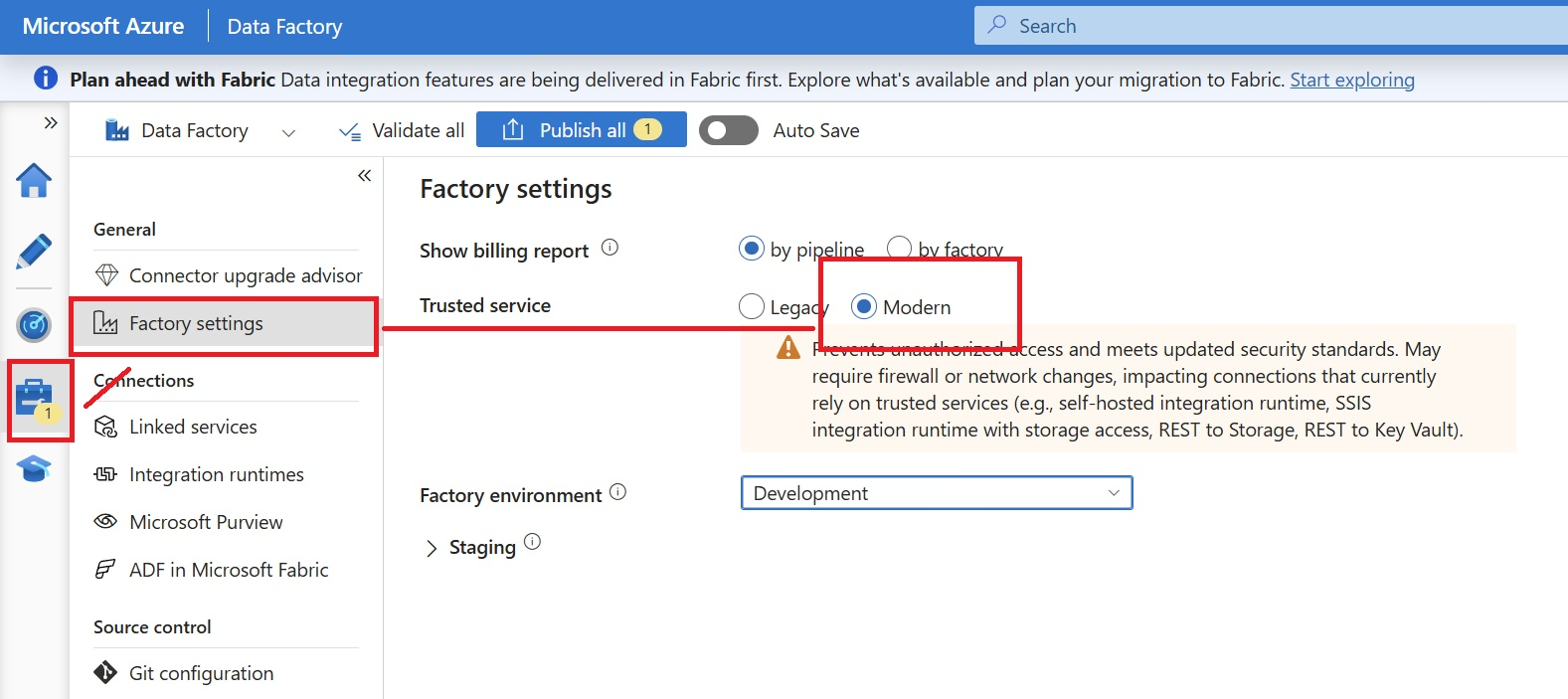
The Trusted service setting in Azure Data Factory is a Factory settings capability that controls how Data Factory accesses protected resources such as Azure Storage accounts and Azure Key Vault. To strengthen security, prevent unauthorized access, and align with evolving security standards, Azure Data Factory introduces a new Modern trusted service capability alongside the existing Legacy mechanism.
The legacy Trusted Service capability allowed Azure Data Factory to securely access firewall-protected Azure Storage and Key Vault resources through the "Allow trusted Microsoft services" exception, reducing the need for manual network allowlists. Learn more in the Azure Data Factory Trusted Service announcement.
Microsoft recommends adopting the Modern trusted service setting for all new and existing Data Factory deployments. This model offers a more secure and future-ready approach for accessing protected resources and aligns with Azure's latest security standards. Understanding these modes and the upcoming retirement of legacy trusted service access helps organizations strengthen their security posture and plan a smooth transition.
Trusted service modes
Azure Data Factory provides a Trusted service setting under Factory settings, allowing customers to choose between two modes:
- Legacy: Uses the existing trusted services mechanism, which enables Data Factory to access Azure Storage accounts and Azure Key Vault through managed identities combined with firewall exceptions.
- Modern: Uses an enhanced security model designed to provide stronger protection against unauthorized access while meeting current security and compliance requirements.
What's changing with trusted service in Azure Data Factory
Note
The Modern option is the recommended setting. It helps prevent unauthorized access and meet updated security standards. It might require firewall or network changes for connections that currently rely on trusted services, such as SHIR, Azure-SSIS integration runtime with storage access, REST to Storage, and REST to Key Vault.
Retirement of legacy trusted services
The legacy trusted services capability is scheduled to retire in August 2027. After this date, Data Factory scenarios that continue to depend on the legacy model might no longer be able to access Azure Storage accounts or Azure Key Vault through managed identities combined with trusted service firewall exceptions.
By transitioning to Modern trusted service, organizations can strengthen their security posture, reduce reliance on firewall exceptions, and prepare for the retirement of legacy trusted service access in August 2027.
Note
To ensure uninterrupted service and a seamless transition, customers are encouraged to begin planning their migration to the Modern Trusted Service well in advance of the August 2027 timeline.
If your workload doesn't use one of the affected configurations, no action is required.
Changes in trusted service bypass behavior
The following configurations rely on the legacy trusted service model. Review your Data Factory resources for these configurations.
| Scenario | Identity type | Target service | Legacy access pattern |
|---|---|---|---|
| Data Factory self-hosted integration runtime (SHIR) | System-assigned managed identity | Azure Storage | Trusted access based on a managed identity |
| Azure-SSIS integration runtime through Azure Storage Connection Manager | System-assigned managed identity | Azure Storage | Trusted access based on a managed identity |
| Data Factory SHIR as a proxy for Azure-SSIS integration runtime | System-assigned managed identity | Azure Storage | Trusted access based on a managed identity |
| REST linked service or Web activity | System-assigned managed identity | Azure Storage | Trusted access based on a managed identity |
| REST linked service or Web activity | System-assigned or user-assigned managed identity | Azure Key Vault | Trusted Azure services firewall exception |
Recommended access patterns (Modern mode)
Some workloads might require additional firewall or network configuration after moving to Modern trusted service. To avoid service disruptions, update your integration runtime and linked service configurations before August 2027, move to Modern trusted service, and validate any affected connections to Azure Storage accounts and Azure Key Vault by using one of the following supported access patterns.
Important
Migrate non-production factories first. Validate connectivity before you update production factories.
IP allow-listing
Use IP allow-listing when your SHIR or Azure-SSIS integration runtime uses stable outbound public IP addresses. This option enables you to add the IP address of your SHIR or Azure-SSIS integration runtime to the firewall rules for the target Azure Storage account or Azure Key Vault.
For more information, see grant access from an internet IP range for Azure Storage and Azure Key Vault network security.
Managed virtual network
Use a Data Factory managed virtual network when you want Azure Data Factory to manage the integration runtime network boundary and access Azure Storage accounts or Azure Key Vault by using private endpoints from Azure integration runtime.
For more information, see Managed virtual networks and managed private endpoints in Azure Data Factory.
Customer-owned virtual network
Use a customer-owned virtual network when your organization manages networking directly or when Azure-SSIS integration runtime must join your own virtual network. This option allows access to Azure Storage accounts and Azure Key Vault through a virtual network service endpoint or private endpoint.
For more information, see Join an Azure-SSIS integration runtime to a virtual network.
If you don't transition to Modern trusted service or one of the supported network access patterns before August 2027, you might no longer be able to use Data Factory SHIR, Azure-SSIS integration runtime, and REST linked service scenarios to access Azure Storage accounts or Azure Key Vault with a managed identity and trusted service firewall exception.