Note
Access to this page requires authorization. You can try signing in or changing directories.
Access to this page requires authorization. You can try changing directories.
Important
This feature is in Beta.
Agent memory gives your agents long-term memory that persists across conversations. Azure Databricks stores the memory in Lakebase and manages the storage, indexing, and search for you, so your agents can remember user preferences, past decisions, and accumulated context without you operating a database.
Note
During the preview, you are billed for the underlying Lakebase instance that stores your memory entries. No additional charges apply for agent memory itself. Pricing is subject to change as the preview progresses.
Use agent memory when you want your agents to:
- Remember user preferences, facts, and decisions across separate conversations.
- Personalize responses based on what an agent learned in earlier sessions.
- Share accumulated knowledge across agents and projects.
- Improve in accuracy and efficiency over time.
Agent memory works with agents built on any framework. For short-term conversation history within a single interaction, use agent sessions.
Requirements
- Install Python 3.10 or above, to use the AgentKit SDK. AgentKit SDK is the Databricks Python client for agent APIs which the examples below use. You can also call the REST API directly from any language, with no Python requirement.
- To use
memory_store.put()ormemory_store.list(path=...), installdatabricks-agentbricks0.6.0 and above.
How agent memory works
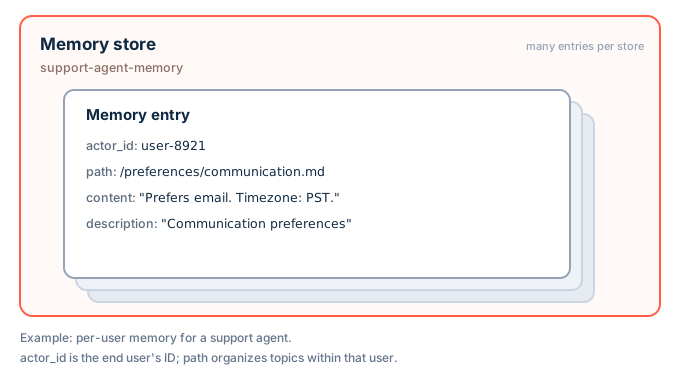
Agent memory has two levels:
- A memory store is the workspace-scoped container for an agent's memories. Creating a store provisions the backing Lakebase storage automatically. You address a store by its store ID, which you choose when you create the store.
- A memory entry is an individual piece of content in a store. Each entry has a free-form text
content, a shortdescriptionused for retrieval, and a set of fields that organize and partition it:actor_id(required): who the memory belongs to, such as an end user or another agent.session_id(optional): the session that the memory belongs to. Leave it unset for memory that applies across the actor's sessions.path(required): a filesystem-like path that organizes entries within an actor, such as/preferences/response-style.md.
An entry is uniquely identified by the combination of actor_id, session_id, and path. The same path under two different sessions, or under a session and without one, holds two separate entries.
Entries get into a store in two ways: your agent or application writes them directly, or a memory pipeline distills them from the conversations in a session store.
Retrieval
Retrieve memory two ways:
- List entries for an actor, optionally filtered by
session_id, apathprefix, or an exactpath. Use this to browse or render an index of what an agent knows. - Search entries for an actor with a natural-language query. Search returns the most relevant entries ranked by relevance score.
A session_id filter on either operation returns only the entries saved with that session. It doesn't return entries saved without a session.
Get started
The AgentKit SDK and REST API examples set up agent memory for a support agent: they create a memory store, save a user's preference, and recall it in a later conversation. The Agent Bricks CLI example connects a memory store to an agent that you build and deploy with the CLI. Choose the client that fits your project. A memory store ID must be 3 to 56 characters, start with a lowercase letter, end with a letter or number, and contain only lowercase letters, numbers, and hyphens.
AgentKit SDK
The AgentKit SDK is the Databricks Python client for agent APIs, distributed in the databricks-agentbricks package. It authenticates with the Databricks SDK's WorkspaceClient.
Install the AgentKit SDK:
pip install databricks-agentbricksCreate a memory store for your agent.
AgentKitClientauthenticates with yourWorkspaceClientcredentials:from databricks.sdk import WorkspaceClient from databricks_agentkit import AgentKitClient client = AgentKitClient(WorkspaceClient()) memory_store = client.memory_stores.create("support-agent-memory")Save a memory after the agent learns something durable about a user.
actor_idis whose memory this is,pathorganizes it within that actor, anddescriptionimproves retrieval:memory_store.add( actor_id="user-123", path="/preferences/communication.md", content="Prefers email over phone. Timezone: PST. Enterprise subscription.", description="User 123 communication preferences", )add()fails withALREADY_EXISTSif an entry already exists at that path. To create the entry or update the existing one, callmemory_store.put()with the same arguments.Recall the user's memories in a later conversation with a natural-language search:
results = memory_store.search(actor_id="user-123", query="communication preferences", limit=10)
REST API
The clients call the REST API under /api/2.0/agents/memory-stores. Call it directly for languages other than Python.
Generate an OAuth token with the Databricks CLI:
databricks auth login --host ${DATABRICKS_HOST}
export DATABRICKS_TOKEN=$(databricks auth token | jq -r .access_token)
Create a memory store for your agent:
curl -X POST "https://${DATABRICKS_HOST}/api/2.0/agents/memory-stores?managed_memory_store_id=support-agent-memory" \
  -H "Authorization: Bearer ${DATABRICKS_TOKEN}" -H "Content-Type: application/json" \
  -d '{"description": "Support agent memory"}'
Save a memory entry for a user.
actor_idis whose memory this is,pathorganizes it, anddescriptionimproves retrieval:curl -X POST "https://${DATABRICKS_HOST}/api/2.0/agents/memory-stores/support-agent-memory/entries" \ -H "Authorization: Bearer ${DATABRICKS_TOKEN}" -H "Content-Type: application/json" \ -d '{"actor_id": "user-123", "path": "/preferences/communication.md", "content": "Prefers email over phone.", "description": "Communication preferences"}'If an entry already exists at that path, the request fails with
ALREADY_EXISTS(HTTP 409). To update the existing entry instead, look it up by path. The lookup returns the path's entries for every session, so pick the one whosesession_idmatches. The last segment of itsnameis the entry ID:curl -G "https://${DATABRICKS_HOST}/api/2.0/agents/memory-stores/support-agent-memory/entries" \ -H "Authorization: Bearer ${DATABRICKS_TOKEN}" \ --data-urlencode "actor_id=user-123" --data-urlencode "path=/preferences/communication.md"Then update the entry's content by its ID:
curl -X PATCH "https://${DATABRICKS_HOST}/api/2.0/agents/memory-stores/support-agent-memory/entries/<entry-id>?update_mask=content" \
  -H "Authorization: Bearer ${DATABRICKS_TOKEN}" -H "Content-Type: application/json" \
  -d '{"content": "Prefers email over phone. Timezone: PST."}'
Recall the user's memories with a natural-language search:
curl -X POST "https://${DATABRICKS_HOST}/api/2.0/agents/memory-stores/support-agent-memory/entries:search" \
  -H "Authorization: Bearer ${DATABRICKS_TOKEN}" -H "Content-Type: application/json" \
  -d '{"actor_id": "user-123", "query": "communication preferences"}'
Agent Bricks
If you build your agent with the Agent Bricks CLI, agentbricks init declares a memory store in agent.toml. agentbricks deploy creates the store if it doesn't already exist and grants the deployed agent access to it.
Choose a path:
Start empty (most agents): Deploy the agent.
agentbricks deploycreates the memory store thatagentbricks initdeclared. To deploy an agent namedmy-agent, run the following:agentbricks deploy my-agentStart with memories already in the store: Create the store first, add entries, then bind the store to the agent and deploy.
To create a store named
my-agent-memory, run the following. The output includes the store ID, a generated identifier that's separate from the store name:agentbricks memory stores create --name my-agent-memoryTo add an entry, run the following, replacing
<store-id>with the store ID from the previous step:agentbricks memory entries create --store <store-id> --actor-id you@example.com \ --path /preferences/style.md --content "Prefers Python and concise answers with code examples."To bind the store and deploy the agent, run the following.
agentbricks memory bindreplaces the store name inagent.toml, andagentbricks deployfinds the existing store by name and uses it instead of creating a new one:agentbricks memory bind my-agent-memory agentbricks deploy my-agent
--path is the entry's key inside the store, not a file on your machine. --actor-id is the user the memory belongs to. A deployed agent uses the signed-in user's email as the actor ID, so seed each entry with the email of the user who chats with the agent.
In the Agent Bricks CLI, memory bind and agentbricks deploy refer to a store by its name. Commands that act on a single store, such as memory entries create, take the generated store ID.
Give your agent memory tools
To let an agent decide when to save and recall memory, wrap the client operations as tools and instruct the agent on when to use them in its system prompt. Set the actor_id in trusted application code from the verified end-user identity. Never let the model choose whose memory to read or write.
The following example wraps the AgentKit SDK memory_store from Get started as tools for the OpenAI Agents SDK.
from agents import Agent, function_tool

def make_memory_tools(memory_store, actor_id: str):
    @function_tool
    def search_memory(query: str) -> str:
        """Search long-term memory for relevant facts about the user."""
        results = memory_store.search(actor_id=actor_id, query=query, limit=10)
        return "\n\n".join(f"{r.memory.path}: {r.memory.content}" for r in results) or "No memory found."

    @function_tool
    def save_memory(path: str, content: str, description: str = "") -> str:
        """Save a durable, long-term memory about the user, replacing any memory at the same path."""
        memory_store.put(actor_id=actor_id, path=path, content=content, description=description or None)
        return f"Saved memory at {path}"

    @function_tool
    def list_memories() -> str:
        """List the paths and descriptions of the user's long-term memories."""
        memories = memory_store.list(actor_id=actor_id)
        return "\n".join(f"{m.path}: {m.description}" if m.description else m.path for m in memories) or "No memory found."

    @function_tool
    def forget_memory(path: str) -> str:
        """Delete the long-term memory at a path, such as when the user asks you to forget it."""
        memories = list(memory_store.list(actor_id=actor_id, path=path))
        for memory in memories:
            memory.delete()
        return f"Forgot memory at {path}" if memories else f"No memory at {path}"

    return [search_memory, save_memory, list_memories, forget_memory]

agent = Agent(
    name="Support agent",
    instructions="Save durable user preferences, recall them when relevant, and forget them when the user asks.",
    tools=make_memory_tools(memory_store, actor_id="user-123"),
)
put() creates the entry, or replaces the content of the entry already at that path. To add the content as new lines instead, pass append=True. put() isn't atomic, so concurrent writes to the same path can overwrite each other. list(path=...) returns the entries at that exact path in every session, so forget_memory also deletes any entry saved at the path under a session.
The same pattern works with the Claude Agent SDK and other frameworks: wrap the store's search, put, list, and delete operations as the framework's tool type.
If you also run a memory pipeline on the same memory store, the pipeline can rewrite, merge, split, or delete the entries your agent saves for any actor it processes.
Partition and secure memory
Within a store, actor_id is how you separate whose memories are whose. Every list and search is scoped to a single actor_id, so pick the strategy that matches what your agent needs to remember:
- Private memory for each user: Set
actor_idto the verified end-user identity. Each user gets their own partition, and the agent only recalls that user's entries.- Example: A support agent remembers one user's communication preferences and past tickets.
- Shared memory for a group: Set
actor_idto a fixed key you choose, such as a team, project, or organization ID. Everyone reads and writes the same memories.- Example: A team agent remembers a shared glossary of company terms and internal conventions.
- Memory split by something else: Build
actor_idfrom your own values, such as a tenant ID or auser:projectcomposite.- Example: A multi-tenant app sets
actor_idto{tenant}:{user}so each customer's users stay isolated from one another.
- Example: A multi-tenant app sets
Set actor_id in your application code from trusted caller context: the verified end-user identity for per-user memory, or a trusted team or project key for shared memory. Never let the model choose it. If your strategy depends on an end-user identity, reject requests that don't carry one rather than falling back to a shared actor_id.
Warning
actor_id separates memories, but it is not an access control. Memory stores are workspace-scoped, so any principal that can reach a store can read and write every entry across all actors. The store, not the actor, is the security boundary. For strict isolation between tenants or users, create a separate memory store per boundary.
To let another principal, such as your agent's service principal, use a store, grant it access with the store's grant-permission operation (memory_store.grant_permission(principal_id) in the AgentKit SDK). Only the store's creator or a workspace admin can grant access.
Limitations
- Agent memory provides long-term memory only. For short-term conversation history, see agent sessions.
- Search ranks entries by relevance, combining full-text (BM25) and semantic matching over each entry's content and description. It returns up to 100 entries and doesn't support pagination.
- Access control is enforced at the store level. Per-entry and per-actor access control are not available.
- Store access control covers a store's entries. Any workspace user can list and get memory stores, including their IDs and descriptions.
- You can't change a store's ID after you create it. Only
descriptioncan be updated.