Note
Access to this page requires authorization. You can try signing in or changing directories.
Access to this page requires authorization. You can try changing directories.
Find answers to frequently asked questions about file events for external locations.
What are file events?
File events let Azure Databricks detect new or changed files via cloud notifications instead of repeatedly scanning your storage. File events reduce ingestion latency and cloud storage listing costs and are enabled by default on new external locations.
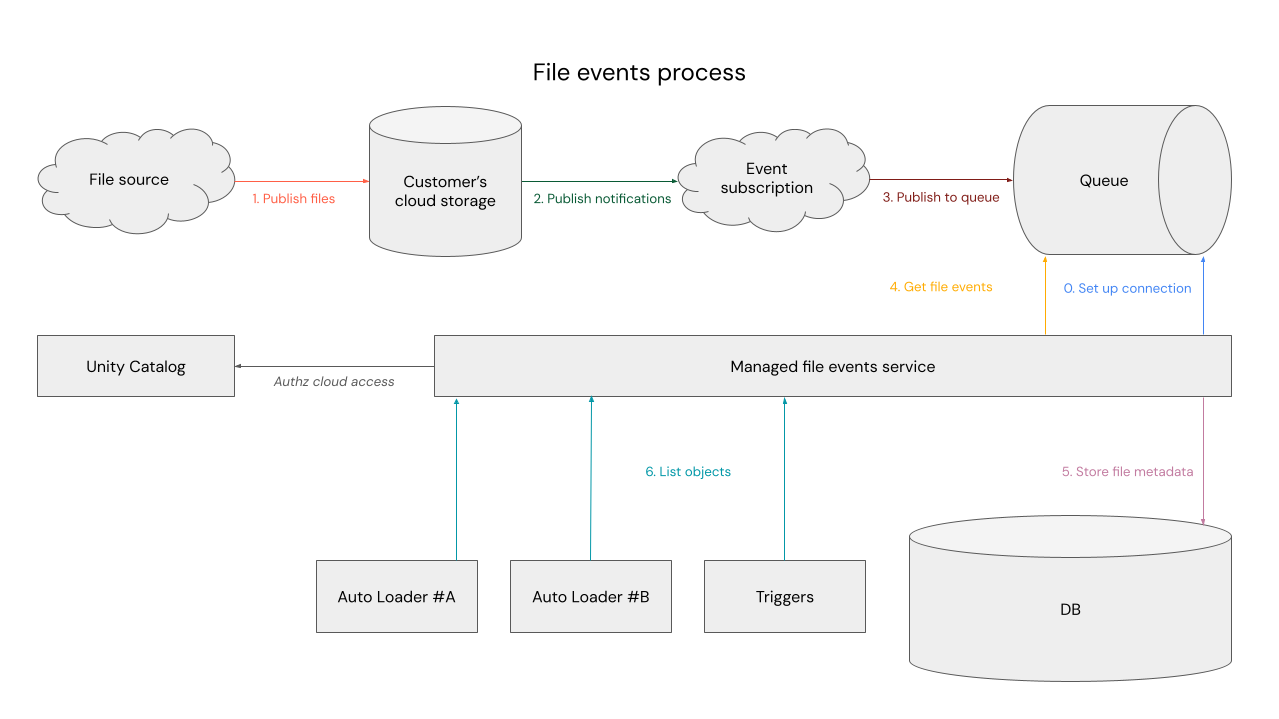
How do file events work?
When you enable file events with type Automatic, Azure Databricks configures your storage account to send file change notifications using Azure Event Grid and Azure Storage Queues. The Azure Databricks file events service reads file path metadata from the queue to discover new and changed files. As a safety net, the service also performs periodic full directory listings to verify no files are missed.
The notification infrastructure never transmits file contents.
Which Azure Databricks features use file events?
The following features use file events when you enable them on an external location:
- Auto Loader: Detects new files for incremental ingestion without expensive directory listings. Starting with Databricks Runtime 18.1 and above, Auto Loader automatically uses file events when available (
useManagedFileEvents = if_available). - File arrival triggers: Automatically start your job when new files arrive, providing better resource utilization and cost efficiency because your cluster runs only when there are new files to process. File arrival triggers are significantly more scalable with file events enabled. See Trigger jobs when new files arrive.
- Table update triggers: Automatically start your job based on updates in a table. Table update triggers are significantly more scalable with file events enabled. See Trigger jobs when source tables are updated.
How can I enable file events in my pipelines and jobs?
First, enable file events for your external location. See Set up file events for an external location.
If you use file events with file arrival or table update triggers, you don't need to take additional action. The job automatically benefits from file events.
Also, if you use Auto Loader with Databricks Runtime 18.1 or above, you don't need to take additional action. The pipeline automatically benefits from file events. If you use an earlier runtime version, enable file events on the pipeline:
spark.readStream.option("cloudFiles.useManagedFileEvents", "true")...
What if I'm not using Auto Loader or triggers today?
You can turn off file events at any time and Azure Databricks cleans up the notification resources for you. Databricks recommends keeping file events enabled.
Can I opt out of file events?
Azure Databricks enables file events by default for new external locations because they reduce costs and improve performance for ingestion workloads.
To create an external location without file events:
Catalog Explorer
- In Catalog Explorer, begin creating a new external location.
- If the storage credential does not have file events permissions, you see a validation warning. Click Force create to continue.
- After creation, verify that file events are turned off by selecting the location and unchecking the file events setting.
API
Set enable_file_events to false in the create external location request.
To disable file events on an existing external location, see Set up file events for an external location.