Note
Access to this page requires authorization. You can try signing in or changing directories.
Access to this page requires authorization. You can try changing directories.
To check data quality monitoring expenses, query the system table system.billing.usage. For more information on querying billing records, see Billable usage system table reference.
Anomaly detection expenses
To view only anomaly detection expenses, use the filter usage_metadata.schema_id is NOT NULL. Anomaly detection is enabled at the schema level, so checking for a non-null schema_id identifies costs related to anomaly detection.
SELECT usage_date, sum(usage_quantity) as dbus
FROM system.billing.usage
WHERE
  usage_date >= DATE_SUB(current_date(), 30) AND
  billing_origin_product = "DATA_QUALITY_MONITORING" AND
  usage_metadata.schema_id is NOT NULL
GROUP BY usage_date
ORDER BY usage_date DESC
Data profiling expenses
To check expenses, use a query or the billing portal.
View usage from the system table system.billing.usage
You can check data profiling expenses using the system table system.billing.usage. Data profiling is billed under a serverless jobs SKU but does not require your account to be enabled for serverless compute for workflows.
For more information on querying billing records, see Billable usage system table reference.
SELECT usage_date, sum(usage_quantity) as dbus
FROM system.billing.usage
WHERE
  usage_date >= DATE_SUB(current_date(), 30) AND
  sku_name like "%JOBS_SERVERLESS%" AND
  custom_tags["LakehouseMonitoring"] = "true"
GROUP BY usage_date
ORDER BY usage_date DESC
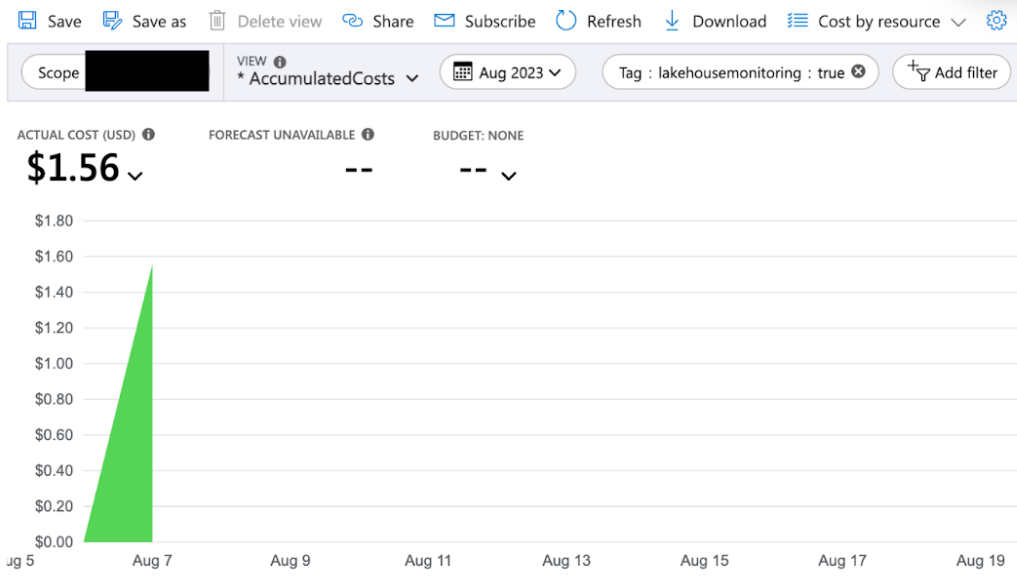
View usage from the billing portal
You can also check data profiling expenses using the billing portal.
- Log in to the Azure portal and view your billing account.
- Select the tag
lakehousemonitoring : true.