Note
Access to this page requires authorization. You can try signing in or changing directories.
Access to this page requires authorization. You can try changing directories.
Build your first AI agent using Mosaic AI Agent Framework. In this tutorial, you will:
- Author an agent using Agent Framework.
- Add a tool to your agent.
- Deploy your agent to a Databricks model serving endpoint.
For a conceptual introduction to agents and other gen AI apps, see What are gen AI apps?
Requirements
Your workspace must have the following features enabled:
- Unity Catalog
- Mosaic AI Agent Framework
- Foundation models (pay-per-token, provisioned throughput, or external models). See Features with limited regional availability
Example notebook
This notebook contains all the code you need to author and deploy your first AI agent. Import the notebook to your Azure Databricks workspace to run it.
Mosaic AI agent demo
Define the agent
An AI agent consists of the following:
- A large language model (LLM) that can reason and make decisions
- Tools that the LLM can use to do more than just generate text, such as running Python code or fetching data
Run the following code in a Databricks notebook to define a simple tool-calling agent:
Install the required Python packages:
%pip install -U -qqqq mlflow databricks-openai databricks-agents" dbutils.library.restartPython()mlflow: Used for agent development and agent tracing.databricks-openai: Used to connect to the Databricks-hosted LLM and access Unity Catalog tools.databricks-agents: Used to package and deploy the agent.
Define the agent. This code snippet does the following:
- Connects to the Databricks model serving endpoint using the OpenAI client.
- Enables MLflow tracing using
autolog(). This adds instrumentation so you can see what your agent does when you submit a query. - Adds the
system.ai.python_exectool to your agent. This built-in Unity Catalog function allows your agent to run Python code. - Uses MLflow helper functions (
output_to_responses_items_stream,create_function_call_output_item) to convert streaming LLM output to a Responses API-compatible format.
import json import mlflow from databricks.sdk import WorkspaceClient from databricks_openai import UCFunctionToolkit, DatabricksFunctionClient # Import MLflow utilities for converting from chat completions to Responses API format from mlflow.types.responses import output_to_responses_items_stream, create_function_call_output_item # Enable automatic tracing for easier debugging mlflow.openai.autolog() # Get an OpenAI client configured to connect to Databricks model serving endpoints openai_client = WorkspaceClient().serving_endpoints.get_open_ai_client() # Load Databricks built-in tools (Python code interpreter) client = DatabricksFunctionClient() builtin_tools = UCFunctionToolkit(function_names=["system.ai.python_exec"], client=client).tools for tool in builtin_tools: del tool["function"]["strict"] def call_tool(tool_name, parameters): if tool_name == "system__ai__python_exec": return DatabricksFunctionClient().execute_function("system.ai.python_exec", parameters=parameters).value raise ValueError(f"Unknown tool: {tool_name}") def call_llm(prompt): for chunk in openai_client.chat.completions.create( model="databricks-claude-3-7-sonnet", messages=[{"role": "user", "content": prompt}], tools=builtin_tools, stream=True ): yield chunk.to_dict() def run_agent(prompt): """ Send a user prompt to the LLM, and yield LLM + tool call responses The LLM is allowed to call the code interpreter tool if needed, to respond to the user """ # Convert output into Responses API-compatible events for chunk in output_to_responses_items_stream(call_llm(prompt)): yield chunk.model_dump(exclude_none=True) # If the model executed a tool, call it and yield the tool call output in Responses API format if chunk.item.get('type') == 'function_call': tool_name = chunk.item["name"] tool_args = json.loads(chunk.item["arguments"]) tool_result = call_tool(tool_name, tool_args) yield {"type": "response.output_item.done", "item": create_function_call_output_item(call_id=chunk.item["call_id"], output=tool_result)}
Test the agent
Test the agent by querying it with a prompt that requires running Python code:
for output_chunk in run_agent("What is the square root of 429?"):
print(output_chunk)
In addition to the LLM's output, you will see detailed trace information directly in your notebook. These traces help you debug slow or failed agent calls. These traces were automatically added using mlflow.openai.autolog() .
Deploy the agent
Now that you have an agent, you can package and deploy it to a Databricks serving endpoint. Start collecting feedback on a deployed agent by sharing it with others and chatting with it using a built-in chat UI.
Prepare agent code for deployment
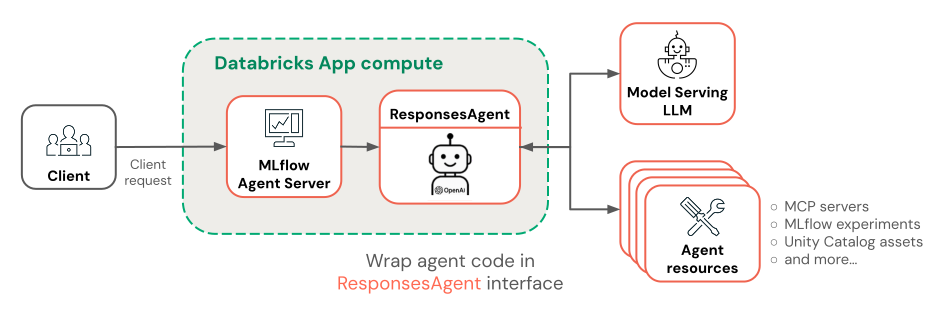
To prepare your agent code for deployment, wrap it using MLflow's ResponsesAgent interface. The ResponsesAgent interface is the recommended way to package agents for deployment on Azure Databricks.
To implement the
ResponsesAgentinterface, define bothpredict_stream()(for streaming responses) andpredict()(for non-streaming requests) methods. Because the underlying agent logic already outputs Responses API-compatible events, the implementation is straightforward:from mlflow.pyfunc import ResponsesAgent from mlflow.types.responses import ResponsesAgentRequest, ResponsesAgentResponse, ResponsesAgentStreamEvent class QuickstartAgent(ResponsesAgent): def predict_stream(self, request: ResponsesAgentRequest): # Extract the user's prompt from the request prompt = request.input[-1].content # Stream response items from our agent for chunk in run_agent(prompt): yield ResponsesAgentStreamEvent(**chunk) def predict(self, request: ResponsesAgentRequest) -> ResponsesAgentResponse: outputs = [ event.item for event in self.predict_stream(request) if event.type == "response.output_item.done" ] return ResponsesAgentResponse(output=outputs)Add the following code to your notebook to test your
ResponsesAgentclass:from mlflow.types.responses import ResponsesAgentRequest AGENT = QuickstartAgent() # Create a ResponsesAgentRequest with input messages request = ResponsesAgentRequest( input=[ { "role": "user", "content": "What's the square root of 429?" } ] ) for event in AGENT.predict_stream(request): print(event)Combine all of your agent code into a single file so you can log and deploy it.
- Consolidate all of your agent code into one notebook cell.
- At the top of the cell, add the
%%writefile quickstart_agent.pymagic command to save your agent to a file. - At the bottom of the cell, call
mlflow.models.set_model()with your agent object. This tells MLflow which agent object to use when serving predictions. This step effectively configures the entry point to our agent code.
Your notebook cell should look like the following:
%%writefile quickstart_agent.py
import json
from databricks.sdk import WorkspaceClient
from databricks_openai import UCFunctionToolkit, DatabricksFunctionClient
import mlflow
from mlflow.pyfunc import ResponsesAgent
from mlflow.types.responses import (
ResponsesAgentRequest,
ResponsesAgentResponse,
ResponsesAgentStreamEvent,
output_to_responses_items_stream,
create_function_call_output_item
)
# Enable automatic tracing for deployed agent
mlflow.openai.autolog()
# Get an OpenAI client configured to talk to Databricks model serving endpoints
openai_client = WorkspaceClient().serving_endpoints.get_open_ai_client()
# Load Databricks built-in tools (Python code interpreter)
client = DatabricksFunctionClient()
builtin_tools = UCFunctionToolkit(function_names=["system.ai.python_exec"], client=client).tools
for tool in builtin_tools:
del tool["function"]["strict"]
def call_tool(tool_name, parameters):
if tool_name == "system__ai__python_exec":
return DatabricksFunctionClient().execute_function("system.ai.python_exec", parameters=parameters).value
raise ValueError(f"Unknown tool: {tool_name}")
def call_llm(prompt):
for chunk in openai_client.chat.completions.create(
model="databricks-claude-3-7-sonnet",
messages=[{"role": "user", "content": prompt}],
tools=builtin_tools,
stream=True
):
yield chunk.to_dict()
def run_agent(prompt):
"""
Send a user prompt to the LLM, and yield LLM + tool call responses
The LLM is allowed to call the code interpreter tool if needed, to respond to the user
"""
# Convert output into Responses API-compatible events
for chunk in output_to_responses_items_stream(call_llm(prompt)):
yield chunk.model_dump(exclude_none=True)
# If the model executed a tool, call it and yield the tool call output in Responses API format
if chunk.item.get('type') == 'function_call':
tool_name = chunk.item["name"]
tool_args = json.loads(chunk.item["arguments"])
tool_result = call_tool(tool_name, tool_args)
yield {"type": "response.output_item.done", "item": create_function_call_output_item(call_id=chunk.item["call_id"], output=tool_result)}
class QuickstartAgent(ResponsesAgent):
def predict_stream(self, request: ResponsesAgentRequest):
# Extract the user's prompt from the request
prompt = request.input[-1].content
# Stream response items from our agent
for chunk in run_agent(prompt):
yield ResponsesAgentStreamEvent(**chunk)
def predict(self, request: ResponsesAgentRequest) -> ResponsesAgentResponse:
outputs = [
event.item
for event in self.predict_stream(request)
if event.type == "response.output_item.done"
]
return ResponsesAgentResponse(output=outputs)
AGENT = QuickstartAgent()
mlflow.models.set_model(AGENT)
Log the agent
Log your agent and register it to Unity Catalog. This packages your agent and its dependencies into a single artifact for deployment.
import mlflow
from mlflow.models.resources import DatabricksFunction, DatabricksServingEndpoint
from pkg_resources import get_distribution
# Change the catalog name ("main") and schema name ("default") to register the agent to a different location
registered_model_name = "main.default.quickstart_agent"
# Specify Databricks resources that the agent needs to access.
# This step lets Databricks automatically configure authentication
# so the agent can access these resources when it's deployed.
resources = [
DatabricksServingEndpoint(endpoint_name="databricks-claude-3-7-sonnet"),
DatabricksFunction(function_name="system.ai.python_exec"),
]
mlflow.set_registry_uri("databricks-uc")
logged_agent_info = mlflow.pyfunc.log_model(
artifact_path="agent",
python_model="quickstart_agent.py",
extra_pip_requirements=[f"databricks-connect=={get_distribution('databricks-connect').version}"],
resources=resources,
registered_model_name=registered_model_name
)
Deploy the agent
Deploy your registered agent to a serving endpoint:
from databricks import agents
deployment_info = agents.deploy(
model_name=registered_model_name,
model_version=logged_agent_info.registered_model_version,
scale_to_zero=True
)
After the agent endpoint starts, you can chat with it using AI Playground or share it with stakeholders for feedback.
Next steps
Choose where to go next based on your goals:
Measure and improve your agent’s quality: See Agent Evaluation quickstart.
Build more advanced agents: Create an agent that performs RAG using unstructured data, handles multi-turn conversations, and uses Agent Evaluation to measure quality. See Tutorial: Build, evaluate, and deploy a retrieval agent.
Learn how to build agents using other frameworks: Learn how to build agents using popular libraries like LangGraph, pure Python, and OpenAI. See Author AI agents in code