Note
Access to this page requires authorization. You can try signing in or changing directories.
Access to this page requires authorization. You can try changing directories.
Train machine learning (ML) models on your governed data, register them in Unity Catalog, and move them from development to production with machine learning operations (MLOps). MLOps is a set of processes and automated steps for managing the code, data, and models of a machine learning system. On Azure Databricks, you manage all three on one platform with unified access control, so you don't move data between systems to train, evaluate, and serve a model.
Note
Models in Unity Catalog aren't available in Azure Government regions.
How MLOps works on Azure Databricks
MLOps combines three practices:
| Practice | What it manages | Azure Databricks tools |
|---|---|---|
| DataOps | The tables, feature tables, training sets, and predictions for a model | Unity Catalog and Lakeflow pipelines |
| ModelOps | Experiments, model versions, evaluation, and deployment | MLflow, and Models in Unity Catalog |
| DevOps | Project code, tests, continuous integration and continuous delivery (CI/CD), and promotion between environments | Git folders and Declarative Automation Bundles (see Operations and CI/CD) |
The following diagram shows how data scientists develop models in a development workspace, using production data governed by Unity Catalog, MLflow tracking, and project code stored in a Git provider.
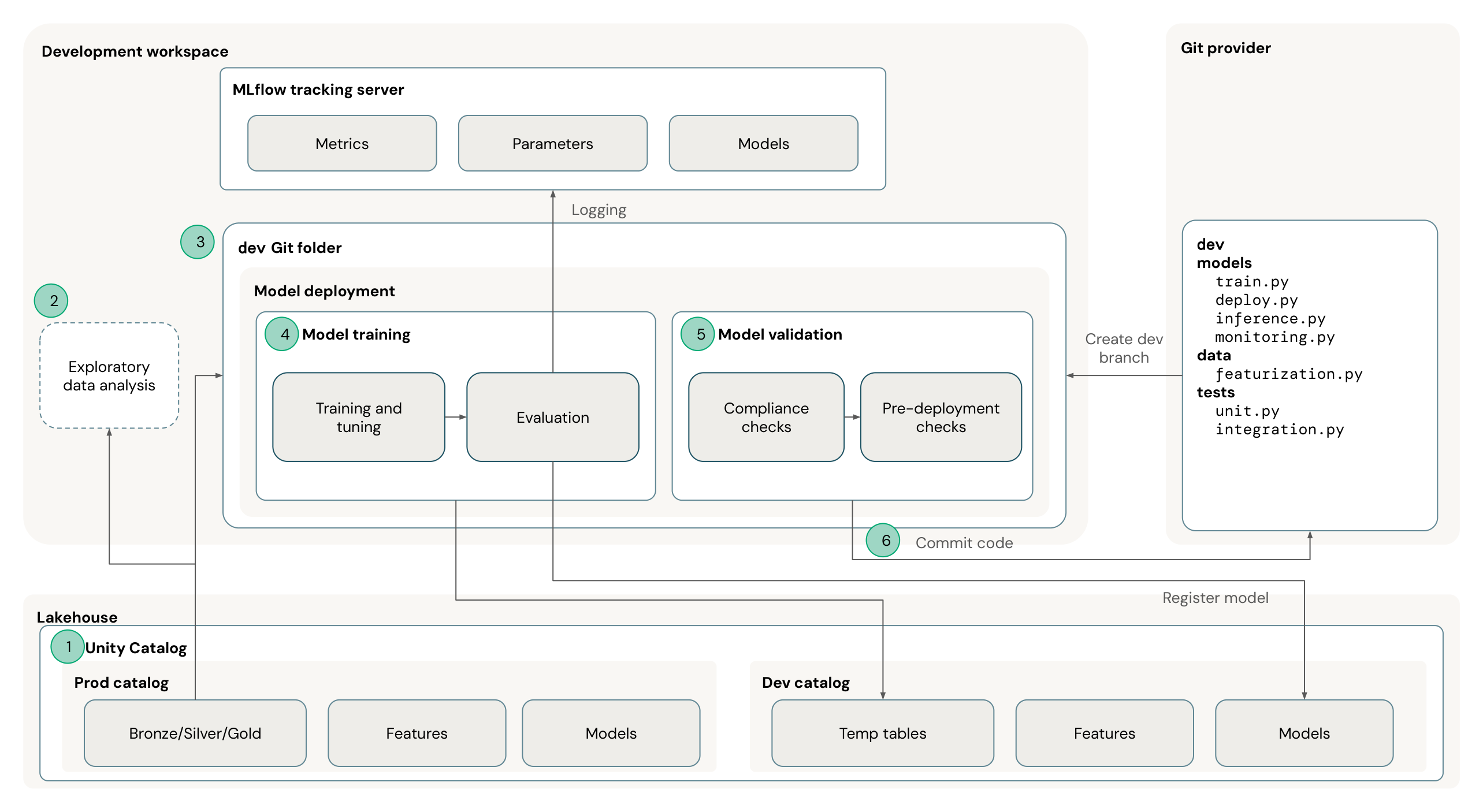
Model development is iterative: repeat exploration, training, validation, and code updates as you refine the model. The numbers in the diagram correspond to the following activities:
- Govern data and models: Use Unity Catalog to control access to the production and development catalogs. The production catalog contains governed tables, features, and models. The development catalog holds temporary tables, features, and models created during development.
- Explore production data: Read the production tables and features that you have permission to access. Explore the data in the development workspace to understand it and prepare for training.
- Develop on a Git branch: Create a development branch in your Git provider and work with that branch in an Azure Databricks Git folder. Keep the project code for data preparation, training, inference, monitoring, and tests together.
- Train and evaluate models: Train and tune candidate models, then evaluate their performance. Use MLflow to track parameters, metrics, and models, and register candidate models in the development catalog.
- Validate models: Run compliance and pre-deployment checks before promoting a model beyond development. Use the results to decide whether the model is ready or needs further changes.
- Commit project code: Commit and push code changes to the development branch in your Git provider. Repeat this step as the code changes, so that you can review, test, and deploy them through your CI/CD workflow.
Databricks recommends a separate environment for each stage of model development, such as development, staging, and production, with clearly defined transitions between them. Use model aliases, such as Challenger for a candidate model and Champion for the production model, so that inference jobs load the current production model without code changes. See MLOps workflows on Azure Databricks.
Deploy the MLOps quickstart
The mlops-quickstart repository is an end-to-end MLOps project on the Iris dataset that you deploy with Declarative Automation Bundles. It creates jobs that ingest data into a feature table, train a classification model and register it in Unity Catalog with the Challenger alias, evaluate and approve the model with an MLflow 3 deployment job before it becomes the Champion, and run batch inference with the Champion model. It includes GitHub Actions and Azure DevOps pipelines that deploy to development and production targets.
To adapt the project to your own data and model, use the Genie Code skills that the repository includes. See Adapt this template with Genie Code in the repository.
Before you deploy the quickstart, get familiar with Operations and CI/CD. The quickstart uses Declarative Automation Bundles and GitHub Actions.
Essential reads
These references cover the model lifecycle in Unity Catalog, MLflow 3 setup, and the training workflows for classic ML and deep learning:
| Resource | What it covers |
|---|---|
| Manage model lifecycle in Unity Catalog | The end-to-end reference for the model lifecycle in Unity Catalog |
| Get started with MLflow 3 for models | How to set up MLflow 3 for models, with an example notebook |
| MLflow 3 traditional ML workflow | Classic ML training and tracking with MLflow 3 |
| MLflow 3 deep learning workflow | Deep learning training and tracking with MLflow 3 |
Build your first model
The following three guides cover building the feature tables that supply a model's inputs, registering a model, and scoring data with it:
| Task | Description | Guide |
|---|---|---|
| Feature tables | A demo that builds feature tables, point-in-time lookups, and online feature serving | Build feature tables for machine learning |
| Model registration | Model training, or import of a saved or Hugging Face model, and registration in Unity Catalog with MLflow | Register a model in Unity Catalog |
| Batch inference | Batch scoring with a registered model loaded by alias, with predictions written to a table | Run batch inference with a registered model |
Next steps
| Resource | Description |
|---|---|
| Build feature tables for machine learning | Build feature tables in Unity Catalog for training and inference |
| Manage model lifecycle in Unity Catalog | Learn how to register, alias, load, and share models in Unity Catalog |