Note
Access to this page requires authorization. You can try signing in or changing directories.
Access to this page requires authorization. You can try changing directories.
This page explains reserved provisioned throughput for Foundation Model APIs: what it is, when to use it, how to size a reservation, and how to create and manage an endpoint that uses it.
What is reserved provisioned throughput?
Reserved provisioned throughput is a capacity option for Azure Databricks Foundation Model APIs. Instead of using a per-token offering, which draws on a shared pool of capacity, you reserve a fixed amount of dedicated capacity for a set term. You measure that capacity in model units, and Azure Databricks holds it for you for the length of the reservation.
Because the capacity is dedicated and reserved in advance, throughput and latency stay consistent for that capacity even when overall demand on shared pay-per-token is high. Traffic above your reserved capacity is rate-limited, not served automatically on pay-per-token. To send that overflow to pay-per-token instead of rejecting it, configure a fallback on the model service in front of your endpoint. See Handle traffic above your reserved capacity.
When to use reserved provisioned throughput
Reserved provisioned throughput is designed for workloads that need dependable capacity rather than best-effort access to a shared pool. Databricks recommends it when:
- You are powering a business-critical application or agent, where a production feature depends on the model and cannot compete with other traffic for shared capacity.
- You need more consistent availability and uptime than shared pay-per-token, so heavy demand on the shared pool has less impact on your throughput.
- You are scaling to high or sustained volumes of predictable traffic, and are hitting capacity or rate-limit constraints on pay-per-token or priority pay-per-token.
If your traffic is exploratory or low-volume, see pay-per-token or priority pay-per-token.
Supported models
Reserved provisioned throughput is available on supported foundation models. Azure Databricks curates eligibility per model, and the create flow shows only the models that you can reserve.
Reserved provisioned throughput is available for the following models:
| Provider | Model | Endpoint name |
|---|---|---|
| Zhipu AI | GLM 5.3 | databricks-glm-5-3 |
| Zhipu AI | GLM 5.3 Flash | databricks-glm-5-3-flash |
| Zhipu AI | GLM 5.2 (legacy) | databricks-glm-5-2 |
| Moonshot AI | Kimi K3 | databricks-kimi-k3 |
| DeepSeek | DeepSeek V4.1 Flash | databricks-deepseek-v4-1-flash |
| Alibaba Cloud | Qwen3.5 122B A10B | databricks-qwen35-122b-a10b |
Note
Qwen3.5 122B A10B is in Public Preview. Reach out to your Databricks account team for enablement.
How reserved provisioned throughput works
You reserve capacity in model units. A model unit is a unit of provisioned throughput that sets how much work your endpoint can handle per minute. More model units means more throughput held for you. You reserve model units in increments of 50, starting at a minimum of 50.
You create a reservation by choosing how many model units to reserve and for how long (the term). Azure Databricks provisions that dedicated capacity for the full term. An endpoint can hold more than one reservation at a time, and its total reserved capacity is the sum of the model units across its active reservations.
The following terms describe the pieces of a reserved provisioned throughput endpoint:
| Term | What it means |
|---|---|
| Model unit | The unit of provisioned capacity. More model units means more reserved throughput. Use the model unit estimator to size your pool from your expected traffic. |
| Reservation | One prepaid grant of model units and a term on an endpoint. An endpoint can hold several reservations at the same time, each with its own model units and term-end date. |
| Term | The length of a reservation: 1 month or 3 months. A longer term carries a lower per-unit rate. |
| Coverage | The total model units that your endpoint's active reservations add up to. |
| Fallback | A backup destination you configure on the model service for traffic above your coverage. Azure Databricks does not route traffic to pay-per-token automatically. Without a fallback, traffic above your coverage is rate-limited. See Handle traffic above your reserved capacity. |
Decide how much to reserve
How many model units you reserve is up to you. You can put your whole workload on dedicated capacity, or reserve less and send the overflow to pay-per-token with a fallback (see Handle traffic above your reserved capacity):
- Reserve a baseline, and send peaks to a fallback. Reserve enough model units to cover your steady, everyday traffic, and configure a fallback so bursts above that baseline run on pay-per-token. You commit to less capacity and pay per-token only for the overflow, in exchange for best-effort shared capacity on those bursts.
- Reserve for your peak. Reserve enough model units to cover your busiest expected load, so your whole workload runs on dedicated capacity. This gives the most consistent behavior, in exchange for a larger commitment.
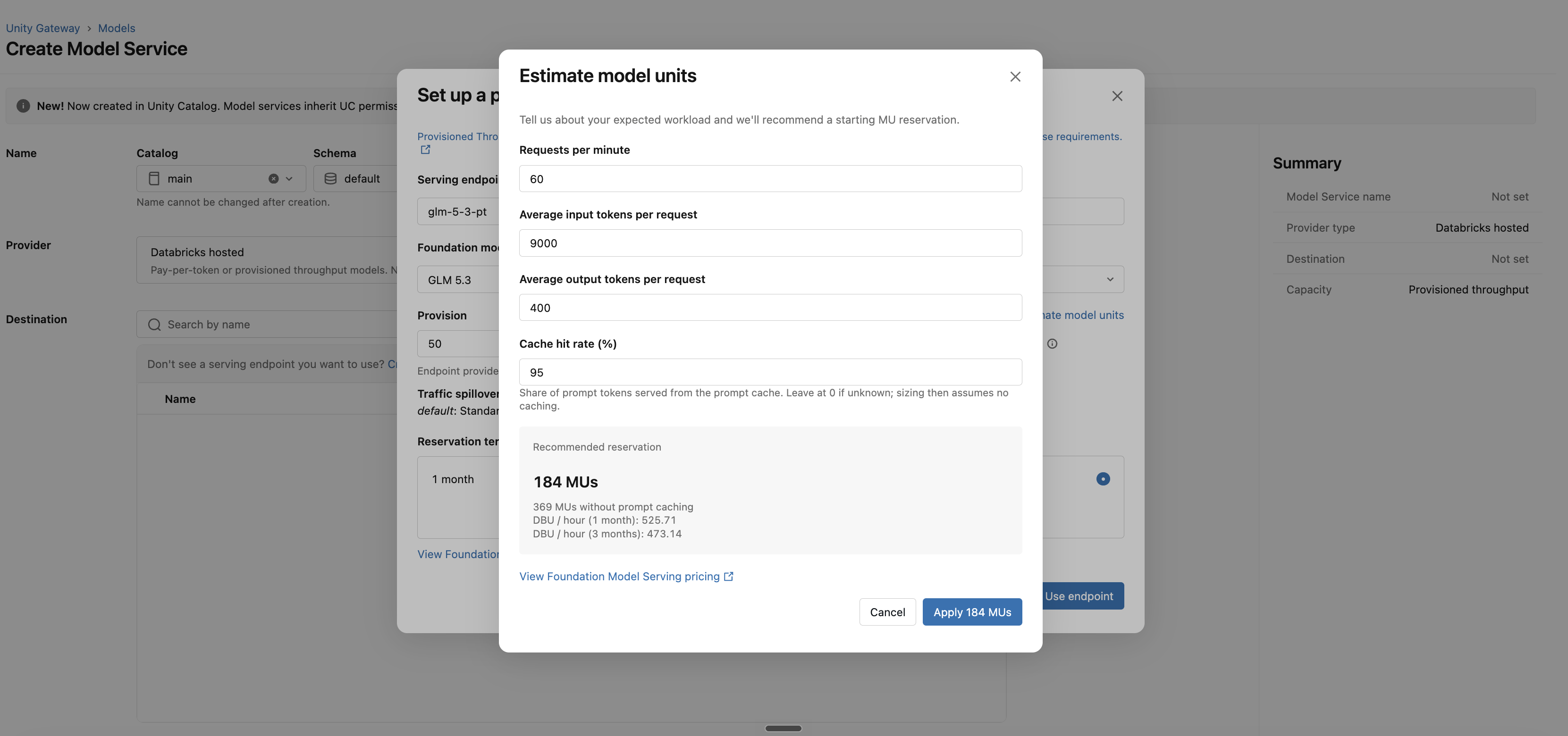
Either way, you translate your workload into model units with the built-in Estimate model units tool in the create flow. Enter your expected request shape and the estimator returns the model units you need:
- The number of requests per minute you expect.
- The average number of input tokens per request.
- The average number of output tokens per request.
- Your expected cache hit rate.
To size a baseline, enter your typical traffic. To reserve for your peak, enter your busiest expected traffic. You can run the estimator as many times as you want before you commit.
Reserved provisioned throughput compared to pay-per-token
Reserved provisioned throughput and pay-per-token are complementary, not either-or. You can reserve dedicated capacity for your core traffic and configure a fallback to pay-per-token for anything beyond your reserved pool. The following table shows where each option fits.
| Capability | Pay-per-token | Reserved provisioned throughput |
|---|---|---|
| Pricing basis | Per token, as used | Reserved capacity, billed for the full term |
| Capacity | Shared pool, best-effort | Dedicated pool, reserved for you |
| Latency under load | Can vary with shared demand | Consistent for reserved capacity |
| Reservation | None | 1 or 3 months |
| Best for | Spiky, internal, or exploratory traffic | External, business-critical applications or agents in production |
How pricing works
Reserved provisioned throughput bills on the capacity you reserve, not on the requests you send. You are billed for the entire reservation for its full term, regardless of whether you use the reserved capacity.
| What happens | How it's billed |
|---|---|
| Traffic within your reserved capacity | Billed as reserved capacity for the full term. |
| Traffic above your reserved capacity, with a fallback configured | Pay-per-token on the overflow only, billed by the fallback destination. |
| Traffic above your reserved capacity, with no fallback | Rate-limited, not billed. |
| Traffic after a reservation expires | Handled like any traffic above your reserved capacity: pay-per-token if you configured a fallback, otherwise rate-limited. |
- A longer term carries a lower per-unit rate than a shorter one.
- When an endpoint holds reservations of different terms at the same time, each is priced independently at its own rate.
- Specific rates depend on the model and term.
Before you start
| Requirement | Detail |
|---|---|
| Model permission | You need MANAGE on the foundation model in Unity Catalog (the system.ai.<model> registered model). If you don't have it, ask an admin to grant it in Catalog Explorer. See Foundation model Unity Catalog permissions. |
| An eligible model | You can create reserved provisioned throughput only on eligible models. See Supported models. |
Create a reserved provisioned throughput endpoint
You create reserved provisioned throughput from Unity Gateway.
In Unity Gateway, select + Model.
Name the model service.
For the Destination, choose provisioned throughput, then select the link to create a new serving endpoint in the workspace. The Set up a provisioned throughput endpoint dialog opens.
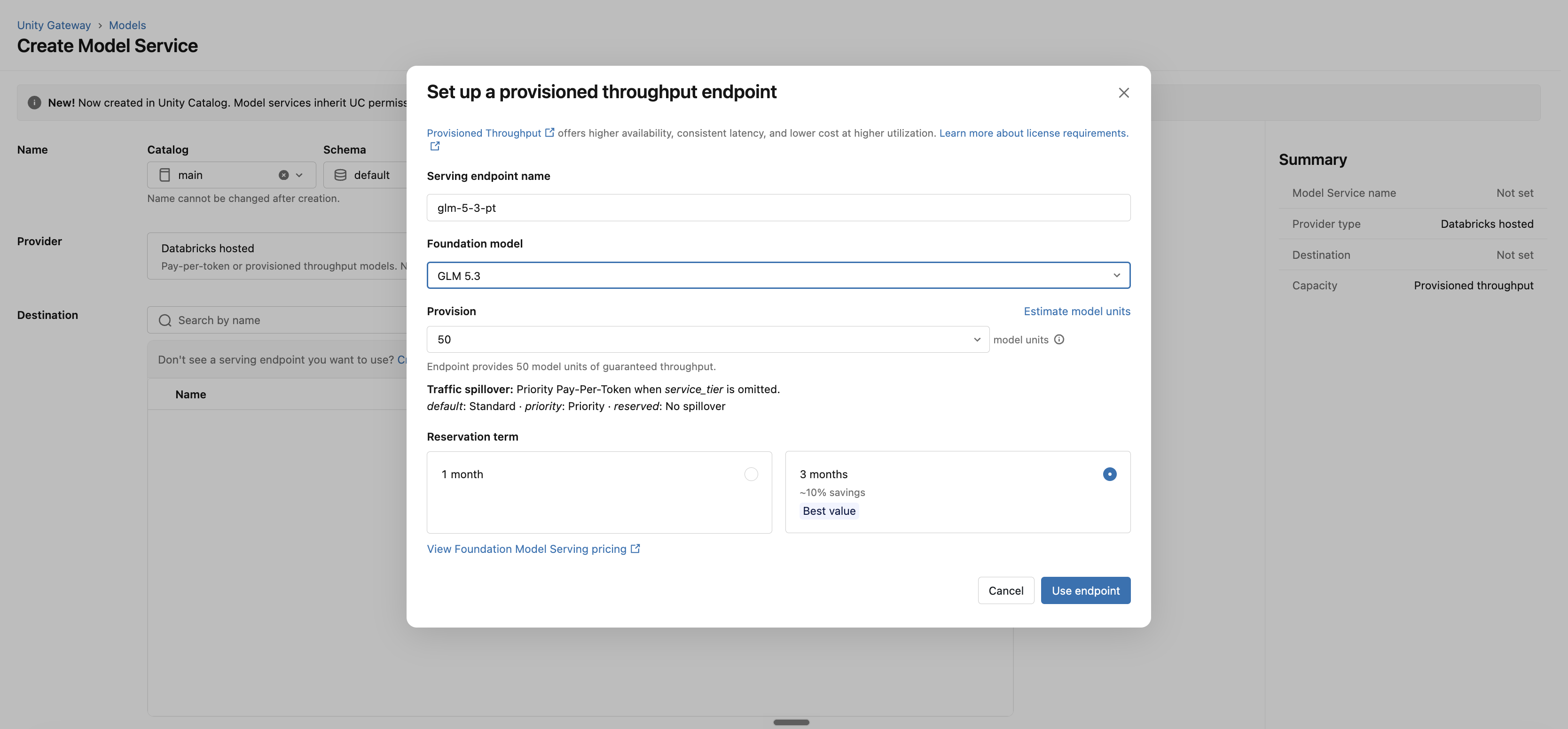
Select an eligible foundation model.
Set your model units, in increments of 50. To size the pool, select Estimate model units, enter your expected workload (requests per minute, average input and output tokens per request, and your expected cache hit rate), and the estimator returns the model units you need. See Decide how much to reserve.
Pick a reservation term: 1 month or 3 months. A longer term carries a lower per-unit rate.
Review your model units and term, then create the endpoint. Azure Databricks provisions the dedicated capacity.
Note
An endpoint's capacity type is fixed when you create it. You can't convert an existing endpoint to reserved provisioned throughput later. Create a new reserved provisioned throughput endpoint instead.
View and monitor
The endpoint detail page shows an Active configuration section headed Reserved provisioned throughput that lists your reserved model units and each reservation's term, expiry date, and status. When an endpoint holds multiple stacked reservations, from scale-ups or upgrades, they appear as a list.
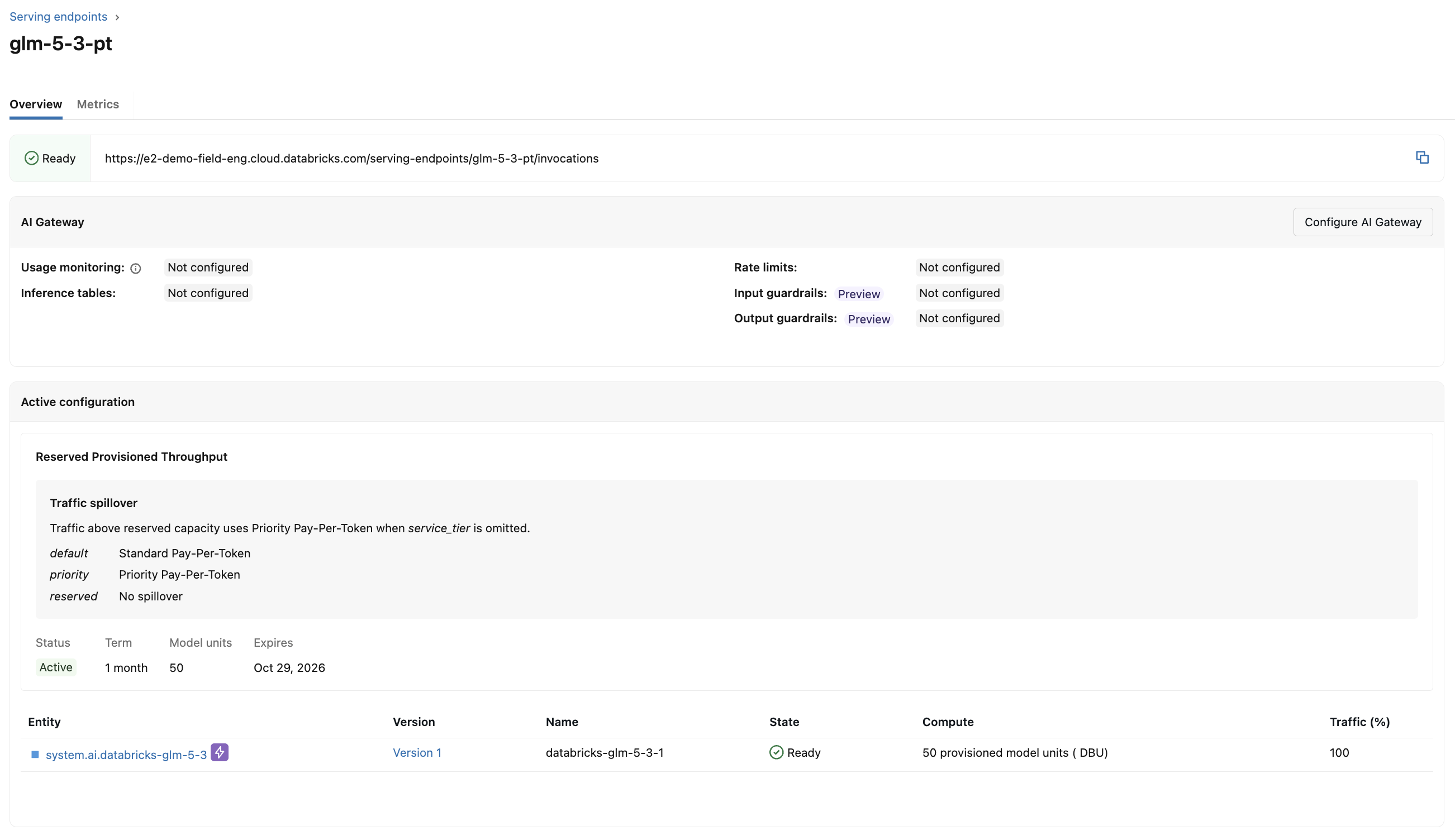
The Metrics tab shows the usual serving telemetry, including requests per minute, error count, latency (p50, p90, p95, and p99), token counts, and time-to-first-token, so you can watch usage and decide when to scale.
Scale up capacity
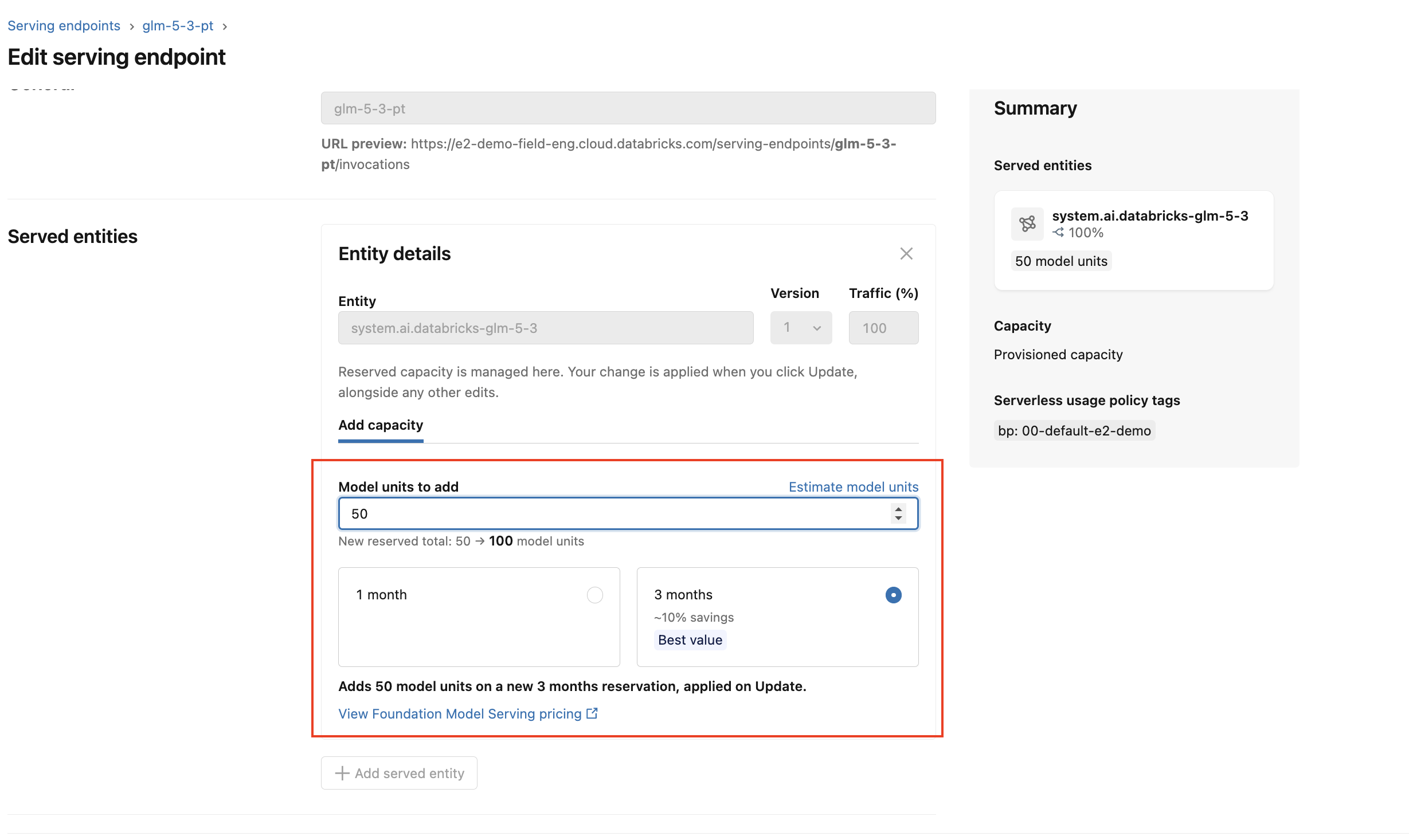
To add capacity, open Edit > Add capacity, enter the number of model units to add (in increments of 50), and choose a term. This creates a new reservation stacked on top of your existing ones. It does not modify or interrupt what you already have. The detail page then lists each reservation, expiring on its own schedule.
Expiry
- At expiry, the reserved pool lapses. Traffic is then handled like any traffic above your reserved capacity: it goes to your configured pay-per-token fallback, or is rate-limited if you have no fallback. See Handle traffic above your reserved capacity.
- To keep reserved capacity after a term ends, create a new reservation before the current one expires. See Scale up capacity.
- Expired reservations stay visible with an Expired badge and are retained, not deleted.
Handle traffic above your reserved capacity
A reserved provisioned throughput endpoint serves traffic from your reserved capacity only. Azure Databricks does not route overflow to pay-per-token automatically. When traffic exceeds your reserved capacity, whether from a burst or because a reservation has expired, those requests are rejected with a rate-limit error.
To keep serving that overflow, configure a fallback on the Unity Gateway model service in front of your endpoint. Set your reserved provisioned throughput endpoint as the primary destination and a pay-per-token or priority pay-per-token endpoint as the fallback. When the reserved endpoint returns a rate-limit error, the model service retries the request against the fallback destination, so your workload keeps running and you pay per-token only for the overflow.
For setup steps, see Configure routing and fallbacks for models.
Limitations
- You can create one reserved provisioned throughput endpoint per model, per workspace, in the current release.
- Reservations are prepaid and run for their full term. You can't cancel a reservation partway through.
- You can't delete an endpoint that has an active reservation until the reservation ends.
- Users without
MANAGEon the model see read-only views.
For more Foundation Model APIs limits, see Foundation Model APIs limits and quotas.