Note
Access to this page requires authorization. You can try signing in or changing directories.
Access to this page requires authorization. You can try changing directories.
Defender for Containers uses a different design for each Kubernetes environment. The design depends on whether the environment runs in:
Azure Kubernetes Service (AKS) - Microsoft's managed service for developing, deploying, and managing containerized applications.
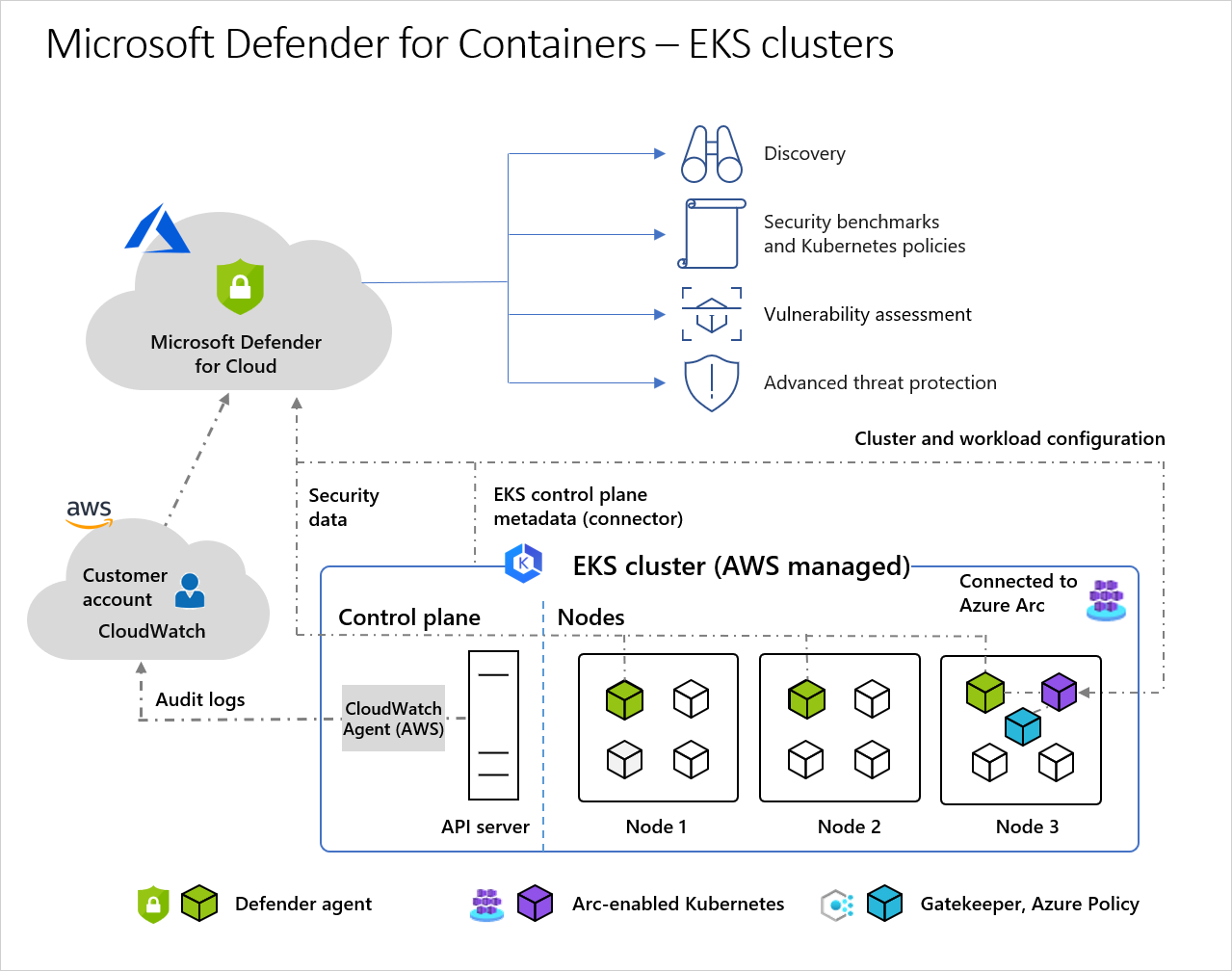
Amazon Elastic Kubernetes Service (EKS) in a connected Amazon Web Services (AWS) account - Amazon's managed service for running Kubernetes on AWS without needing to install, operate, and maintain your own Kubernetes control plane or nodes.
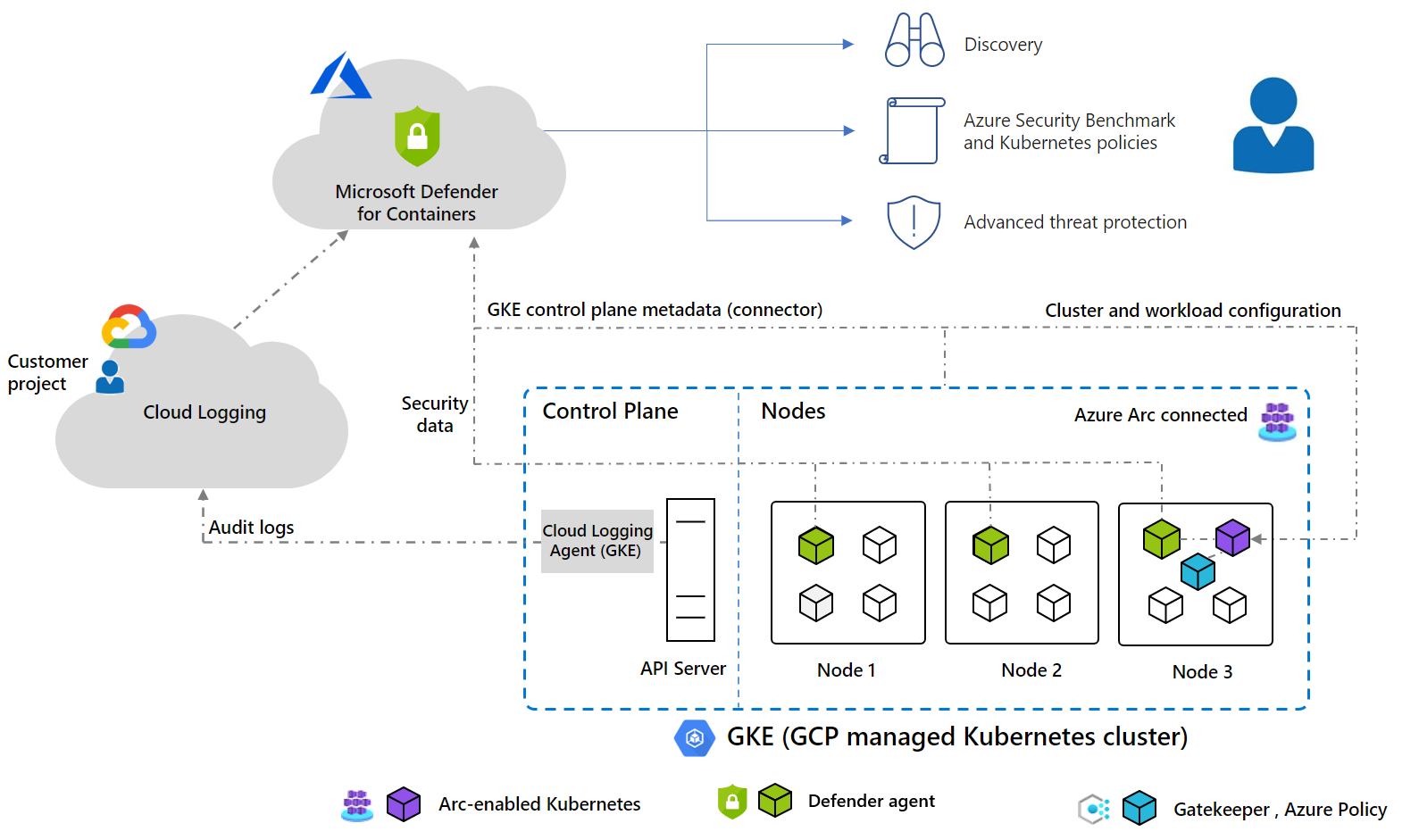
Google Kubernetes Engine (GKE) in a connected Google Cloud Platform (GCP) project - Google’s managed environment for deploying, managing, and scaling applications using GCP infrastructure.
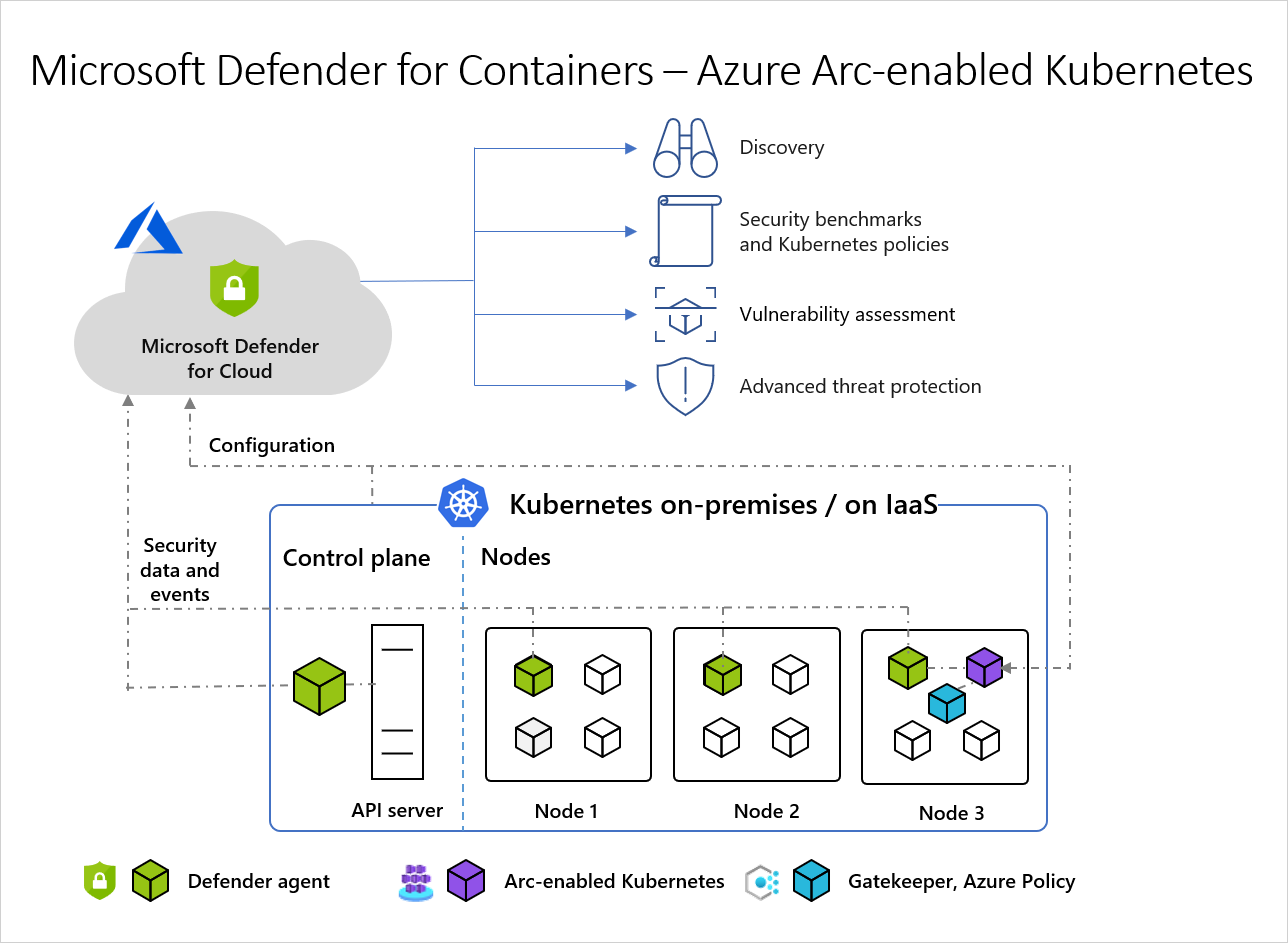
An unmanaged Kubernetes distribution (using Azure Arc-enabled Kubernetes) - Cloud Native Computing Foundation (CNCF) certified Kubernetes clusters hosted on-premises or on IaaS.
Note
Defender for Containers support for Arc-enabled Kubernetes clusters (AWS EKS and GCP GKE) is a preview feature.
To protect your Kubernetes containers, Defender for Containers receives and analyzes:
- Audit logs and security events from the API server
- Cluster configuration information from the control plane
- Workload configuration from Azure Policy
- Security signals and events from the node level
For more information about implementation details such as supported operating systems, feature availability, and outbound proxy, see Defender for Containers feature availability.
Architecture for each Kubernetes environment
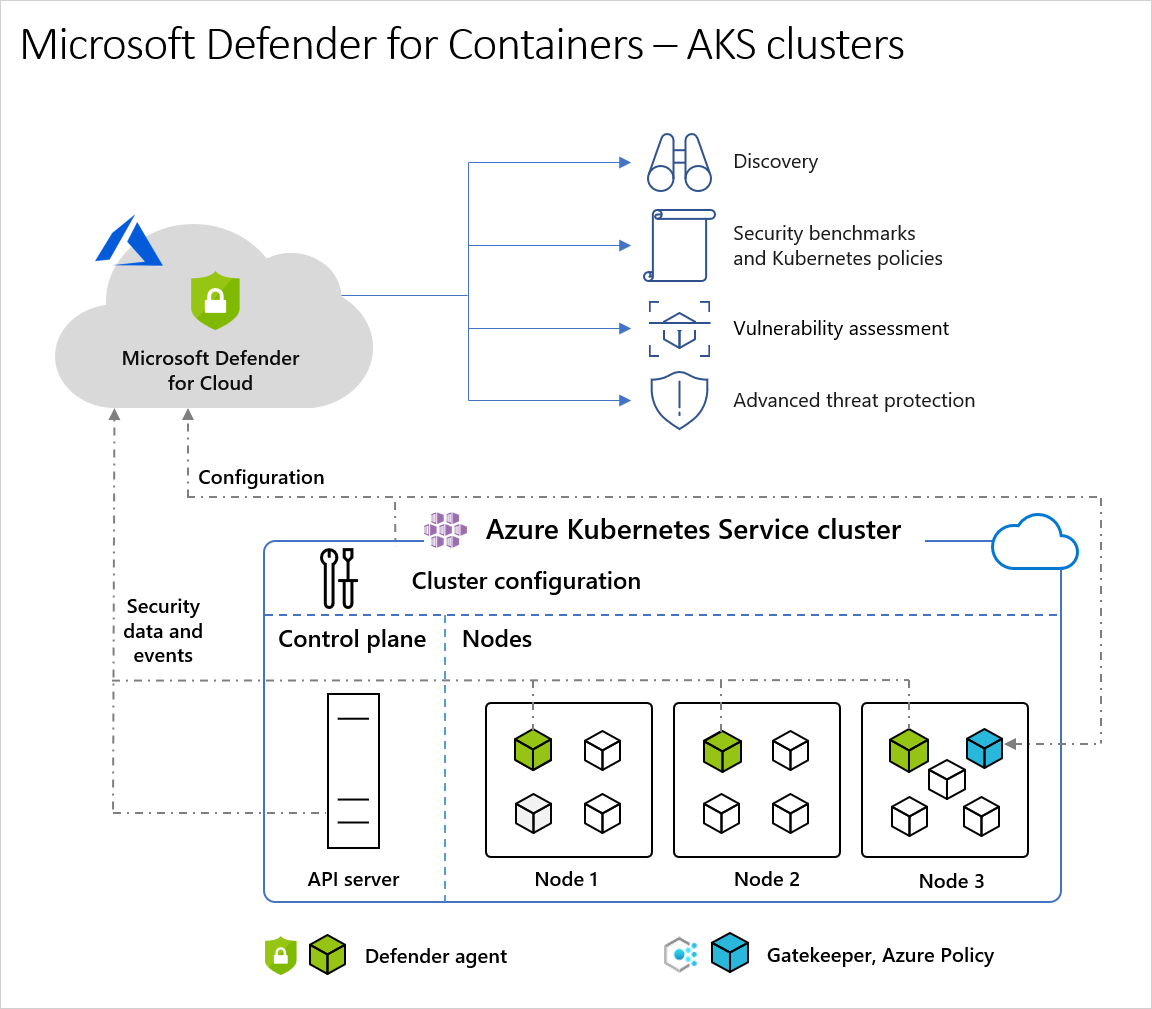
Architecture diagram of Defender for Cloud and AKS clusters
When Defender for Cloud protects a cluster hosted in Azure Kubernetes Service, it collects audit log data agentlessly and automatically through Azure infrastructure with no extra cost or configuration considerations. To get the full protection offered by Microsoft Defender for Containers, you need these components:
- Defender sensor: A lightweight DaemonSet deployed on AKS nodes that collects runtime telemetry (Kubernetes events, process, and network data) by using eBPF technology. It sends the telemetry securely to Defender for Cloud for runtime threat protection. The sensor registers with a Log Analytics workspace and acts as a data pipeline. However, the audit log data isn't stored in the Log Analytics workspace. The Defender sensor is deployed as an AKS Security profile, natively integrated in AKS Resource Provider (RP).
Note
When you configure the Defender sensor on an AKS cluster, it triggers a reconciliation process. This process happens as part of the Defender for Containers plan and is expected behavior.
Azure Policy for Kubernetes: A pod that extends the open-source Gatekeeper v3 and registers as a web hook to Kubernetes admission control. With this pod, you can apply at-scale enforcements and safeguards on your clusters in a centralized, consistent manner. The Azure Policy for Kubernetes pod is deployed as an AKS add-on and you only need to install it on one node in the cluster. It provides the option to enforce configuration rules. For more information, see Protect your Kubernetes workloads and Understand Azure Policy for Kubernetes clusters.
ACR integration: Push-triggered and periodic image scanning for Azure Container Registry, providing vulnerability assessment without requiring extra components.
Agentless discovery: Provides visibility into your Kubernetes clusters without requiring any agents, by using Azure native capabilities to discover and assess cluster configurations.
Agentless scanning for machines: Periodic disk snapshots of Kubernetes nodes for an out-of-band, deep analysis of the operating system configuration and file system. This feature doesn't need any installed agents or network connectivity, and it doesn't affect machine performance.
Microsoft XDR integration: Seamlessly integrates with Microsoft's extended detection and response platform for unified security operations and incident response.
Note
These components work together seamlessly. They require no inbound connections to your clusters and use Azure's native security infrastructure. All components use outbound-only connectivity (no inbound access required).
Defender sensor component details
| Pod name | Namespace | Kind | Short description | Capabilities | Resource limits | Egress required |
|---|---|---|---|---|---|---|
| microsoft-defender-collector-ds-* | kube-system | DaemonSet | Collects runtime telemetry (Kubernetes events, process, and network data) from nodes by using eBPF technology and sends it securely to Defender for Cloud. | SYS_ADMIN, SYS_RESOURCE, SYS_PTRACE |
memory: 296Mi cpu: 360m |
No |
| microsoft-defender-collector-misc-* | kube-system | Deployment | Collects cluster-level inventory and security events that aren't bound to specific nodes. | N/A | memory: 64Mi Cpu: 60m |
No |
| microsoft-defender-publisher-ds-* | kube-system | DaemonSet | Publishes collected telemetry to Microsoft Defender for Containers backend service for processing and analysis. | N/A | memory: 200Mi Cpu: 60m |
Https 443 Learn more about the outbound access prerequisites |
* You can't configure resource limits. Learn more about Kubernetes resources limits.
How does agentless discovery for Kubernetes in Azure work?
The discovery process uses snapshots taken at intervals:
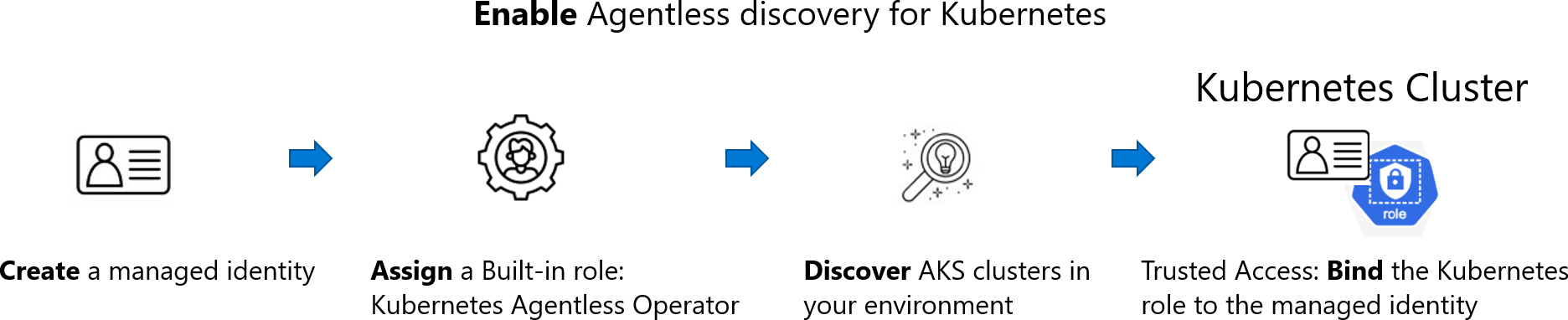
When you enable the agentless discovery for Kubernetes extension, the following process occurs:
Create:
- If you enable the extension from Defender CSPM, Defender for Cloud creates an identity in your environment called
CloudPosture/securityOperator/DefenderCSPMSecurityOperator. - If you enable the extension from Defender for Containers, Defender for Cloud creates an identity in your environment called
CloudPosture/securityOperator/DefenderForContainersSecurityOperator.
- If you enable the extension from Defender CSPM, Defender for Cloud creates an identity in your environment called
Assign: Defender for Cloud assigns a built-in role called Kubernetes Agentless Operator to that identity on subscription scope. The role contains the following permissions:
- AKS read (Microsoft.ContainerService/managedClusters/read)
- AKS Trusted Access with the following permissions:
- Microsoft.ContainerService/managedClusters/trustedAccessRoleBindings/write
- Microsoft.ContainerService/managedClusters/trustedAccessRoleBindings/read
- Microsoft.ContainerService/managedClusters/trustedAccessRoleBindings/delete
Learn more about AKS Trusted Access.
Discover: Using the system assigned identity, Defender for Cloud discovers the AKS clusters in your environment by making API calls to the API server of AKS.
Bind: After discovering an AKS cluster, Defender for Cloud performs an AKS bind operation by creating a
ClusterRoleBindingbetween the created identity and the KubernetesClusterRoleaks:trustedaccessrole:defender-containers:microsoft-defender-operator. TheClusterRoleis visible through the API and gives Defender for Cloud data plane read permission inside the cluster.
Note
The copied snapshot stays in the same region as the cluster.
Next steps
In this overview, you learned about the architecture of container security in Microsoft Defender for Cloud. To enable the plan, see Defender for Containers deployment overview.