Note
Access to this page requires authorization. You can try signing in or changing directories.
Access to this page requires authorization. You can try changing directories.
You can use a custom model with GitHub Copilot modernization in Visual Studio Code when you work in a network-restricted environment. Install the extension and AppCAT manually, and then configure Visual Studio Code to use a model endpoint that your environment can reach.
You don't need to sign in to GitHub Copilot for this workflow.
Warning
Your source code and assessment context are sent to the model endpoint that you configure. A custom model doesn't guarantee full network isolation, and some modernization capabilities still require network access. You're responsible for the security and compliance posture of the model provider.
Prerequisites
- Visual Studio Code.
- A computer with network access that you can use to download the extension and AppCAT packages.
- A way to transfer the downloaded packages to the network-restricted computer.
- A custom model endpoint that the network-restricted computer can reach.
- The endpoint URL, model or deployment name, and an API key if the endpoint requires authentication.
Install the extension from a VSIX
Download the extension package on a connected computer, and then install it on the network-restricted computer.
On the connected computer, open the Extensions view in Visual Studio Code.
Find the GitHub Copilot app modernization extension.
Open the extension's context menu, and then select Download VSIX.
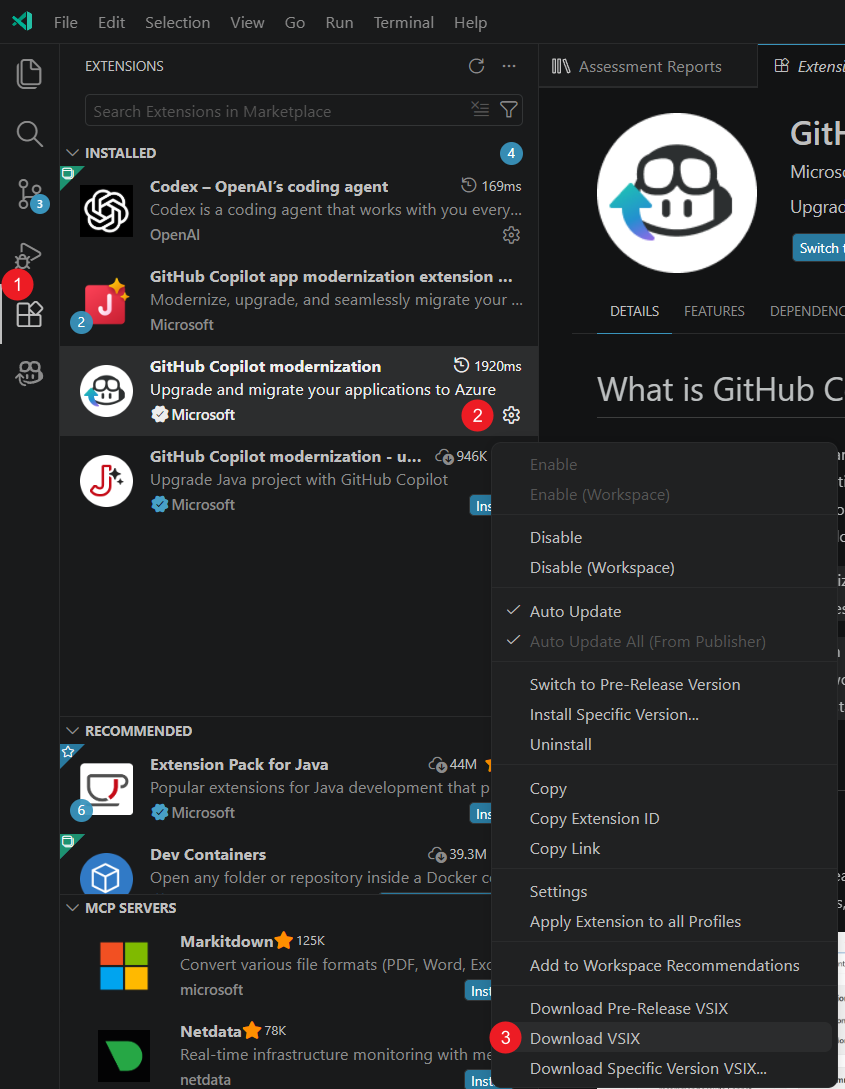
Transfer the VSIX file to the network-restricted computer.
On the network-restricted computer, open the Extensions view.
Select Views and More Actions (...), and then select Install from VSIX....
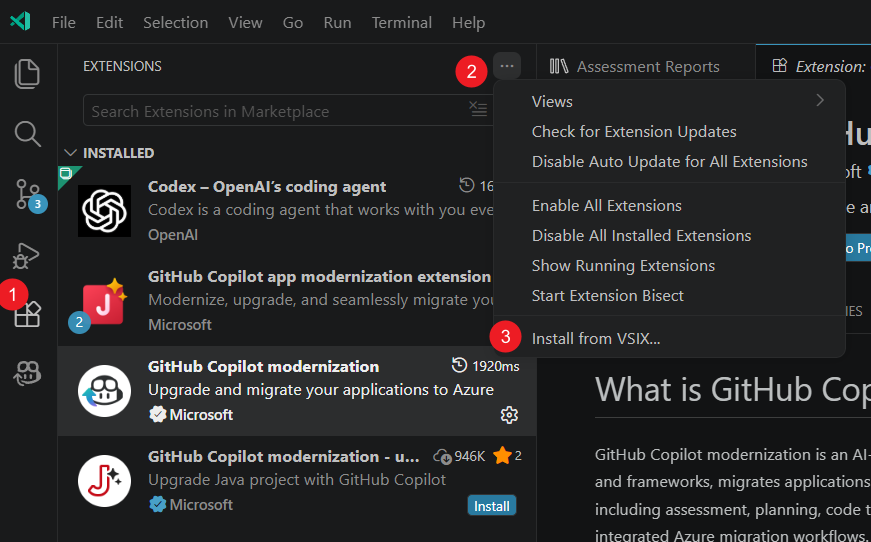
Select the transferred VSIX file.
Install AppCAT manually
The extension can't download AppCAT automatically without access to the public network. Install AppCAT before you run an assessment.
On the connected computer, go to Install AppCAT, and download the application package.
Transfer the package to the network-restricted computer.
Extract the package to
~/.appcat.Verify that the AppCAT executable is in one of the following locations:
- Windows:
~/.appcat/appcat.exe - Linux or macOS:
~/.appcat/appcat
- Windows:
Add
~/.appcatto the systemPATH.Restart Visual Studio Code.
Note
If the installed AppCAT version doesn't match the version that the extension expects, the extension attempts to download another version. Without network access, the download fails and the assessment might appear to run indefinitely. Install the latest AppCAT package manually to resolve the problem.
Add a custom language model
Press Ctrl+Shift+P to open the Command Palette.
Run Chat: Manage Language Models.
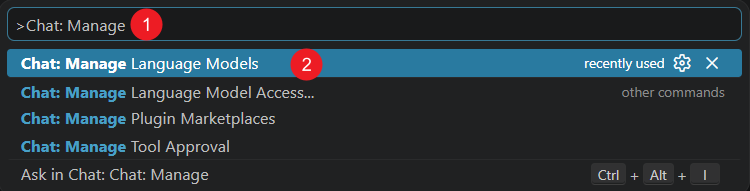
In the Language Models dialog, select Add Models....
Select the provider that matches your endpoint. For example, select Azure, OpenAI, OpenAI Compatible, or Custom Endpoint.
Enter the connection details that the provider requires, including the model name, API key, and endpoint.
Verify that the model appears under Language Models.
Select and test the custom model
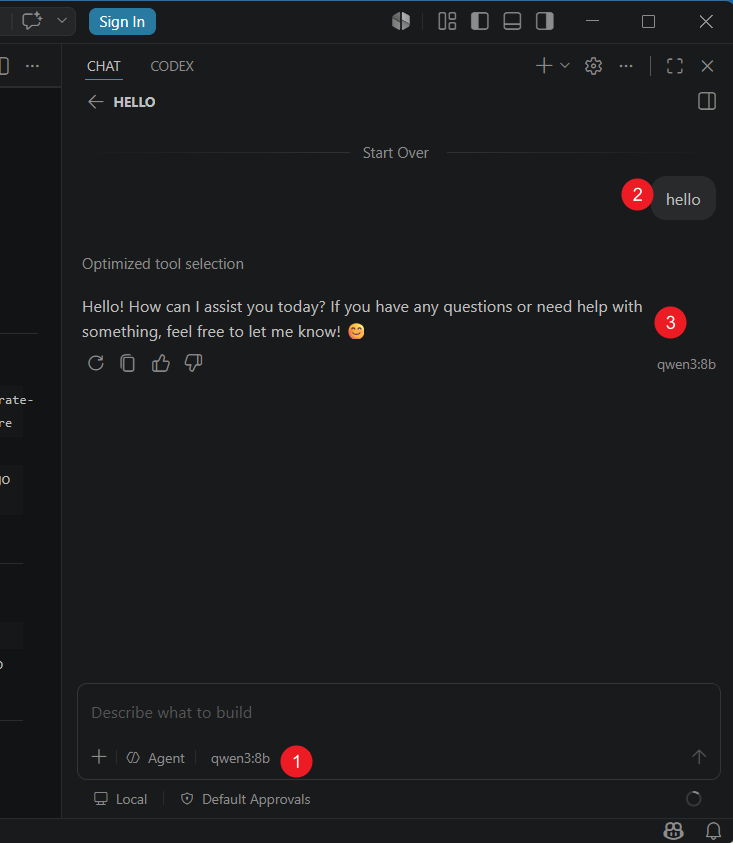
Open Chat in Visual Studio Code.
Select the custom model from the Pick Model list.
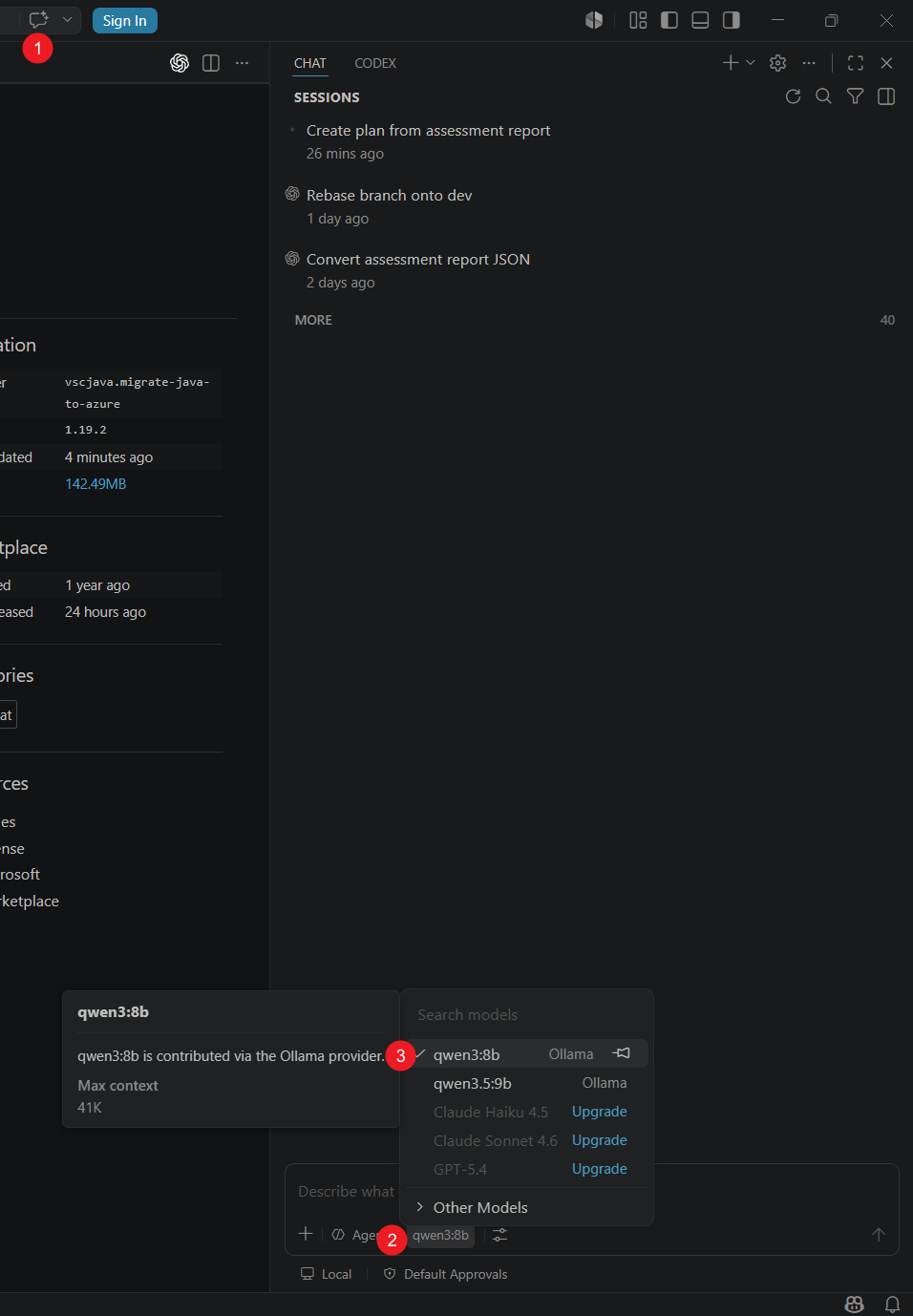
Send a test message, and verify that the model responds.
Configure the utility models
GitHub Copilot modernization uses the Visual Studio Code utility model settings for built-in utility flows.
Open Settings.
Search for
chat.utility.Set Chat: Utility Model to the custom model.
Set Chat: Utility Small Model to the custom model.


Run an assessment and create a plan
- Open GitHub Copilot Modernization.
- Select Start Assessment or Open Assessment Dashboard.
- Run the assessment, and then open the assessment report.
- Select the modernization findings that you want to address.
- Select Create Plan.
The extension sends the selected assessment findings to Chat and invokes the modernization agent, tools, and skills with the configured model.
Limitations and known issues
- The Security assessment domain requires network access and isn't available in a network-restricted environment.
- Scan & Resolve Security Issues requires network access.
- AppCAT version mismatches can trigger an automatic download that fails without public network access.
- Results depend on the capabilities of the custom model. A model that doesn't support the required tools or context might not complete the workflow.
- Configuring a custom model doesn't provide full network isolation. Use network controls to enforce your organization's egress requirements.